For the lead of a small catering crew, on one job at a time
Catering event checklist: one shared board for a small crew's job
We make Instaboard, an online board. This page is for the person who leads a small catering crew and wants one place everyone can open on a phone for one job: who holds what, what to confirm a week out, what to ask the venue, and what happens at load-in, service and clearing. It is the caterer's side of the job. The board is filled in for an invented crew, Hollis & Pine Catering, where Halima leads Wendell, Dario and Lorcan through a boxed lunch for a design studio. It holds no menu, no prices and no guests, and it gives no advice on food safety or amounts. Those belong with your health department, your own procedures and software built for them, and we say which below.
Opens in your browser. Anyone can view; a free sign-in lets you edit.
Updated
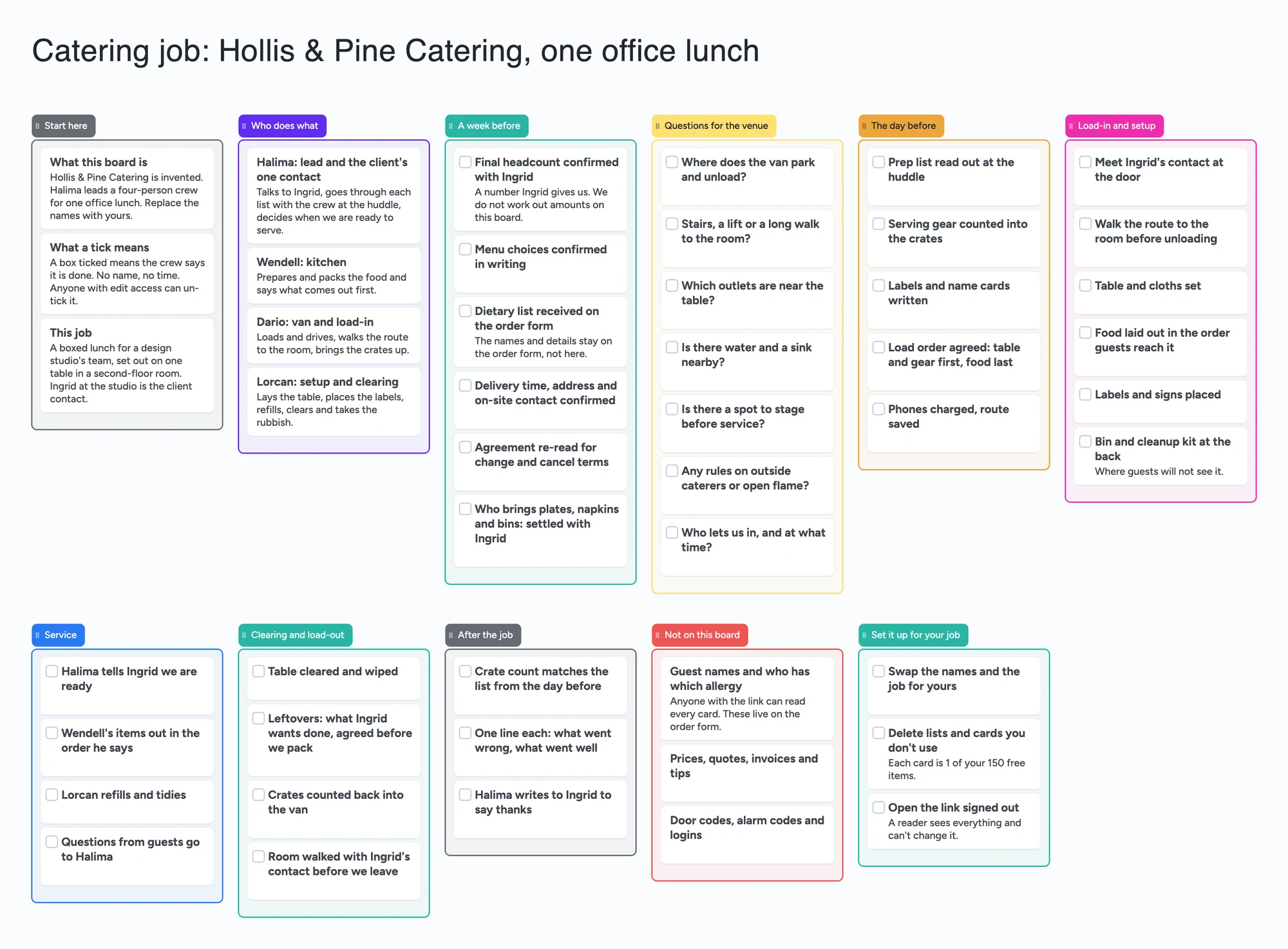
One list per stage of a job, and nothing about the guests
- It is: the crew's plan for one catered job, in the order the job happens: who does what, the week before, questions for the venue, the day before, load-in, service, clearing and what to note afterwards. The crew is invented and every name is a first name.
- It is not: not a quote, not a menu or costing tool, and not a food-safety record. It holds no guest names or allergies, no prices, no portion amounts or temperatures, and no door codes. Nothing on it alerts anyone that a stage is starting.
- A tick means: the crew's own note that something is done. A tick shows no name and no time, and anyone with edit access can un-tick it.
- On the plan you have: the example is 60 of your 150 free items (48 cards, 11 lists and 1 title text box, our count). Arrows and pen strokes don't count. A copy takes 1 of your 5 boards. Writing needs a free sign-in; a reader can open the link signed out and can't change anything.
Four people, one table: who holds what on a small job
The example job is a boxed lunch for a design studio's team, set out on one table in a second-floor room. Ingrid at the studio is the client contact. The crew of four has one lead and three jobs, each on its own card in the Who does what list:
- Halima, lead and the client's one contact. Talks to Ingrid, goes through each list with the crew at the huddle and decides when the crew is ready to serve.
- Wendell, kitchen. Prepares and packs the food and says what comes out first.
- Dario, van and load-in. Loads and drives, walks the route to the room and brings the crates up.
- Lorcan, setup and clearing. Lays the table, places the labels, refills, clears and takes the rubbish.
ezCater, a marketplace for ordering workplace catering, tells the person ordering to "Assign a single point person who can handle questions or issues" on the day. Its checklist is written for the host who orders the food, not for the crew that cooks and delivers it, but the idea carries over: on the board it is Halima's card, so guests and the client's contact always go to the same person. The page shows the date Dec 16, 2025 and a byline, and it promotes ezCater's own ordering.
How much notice caterers say they want
The board starts a week out. One r/Chefit thread shows how much notice some people in kitchens say they want. In r/Chefit (posted 2023-08-12 UTC; Reddit shows 45 comments, and the copy we read held 29 of them), the poster, who cooks at a restaurant, says they were told three hours ahead that a catering for 50 was needed, and an hour or so before service that it was now 100, and asks how normal that is. The answers differ and each is one commenter's own view:
- u/PmMeAnnaKendrick: "we require 7 days."
- u/FriskyBrisket12: "48 hours for smaller events" and "Up to a week for larger ones".
- u/PocketOppossum: "I always had at least 3 days notice for events."
- u/Fit-Abbreviations695: "I set a rule that we get final numbers and dietary requirements 7 days in advance."
Among the four we quote, the numbers run from 48 hours to a week. Some replies describe much shorter jobs: u/aPataPeladaGringa writes "I've has as short as 4 hours notice before event", u/error785 says that at an old job anything under 48 hours "got a rush priority fee", and u/fbp will do "under 72 hours" with a limited menu. The board does not choose a number for you. It puts the confirmations a crew wants to have before the job into the A week before list, and your own rule goes on top.
The calls to make a week out
ezCater's one-week step is headed "Finalize details with your caterer" and lists four things to confirm: final headcount, menu selections, food allergies and dietary restrictions, and delivery time, location and on-site contact. A further step says to double-check the contract for "Cancellation or change policies", and another to settle who supplies plates, napkins, utensils and trash bags. mrtakeoutbags, which sells catering packaging, says to "Set a firm date for the final guaranteed count (often about two weeks out) and put it in writing." Its page shows October 7, 2026.
The A week before list has a card for each of those. Two are worded on purpose. The headcount card says the number is one Ingrid gives the crew, because the board adds nothing up. The dietary card says the names and details stay on the order form: anyone with the link can read every card, and a guest's allergy is not for a link. Both vendor pages also give amounts per guest, and mrtakeoutbags adds a 5 to 10% buffer; none of that is on the board.
Questions only the venue can answer
mrtakeoutbags has a list of questions to ask a venue before signing. The board's Questions for the venue list has seven cards in our own shorter words, with tick boxes so the crew can see which are still open. The answers are typed into the card or into a note beside it. Read November 25, 2026:
| The vendor page asks | The board's card |
|---|---|
| "How many power outlets are available near the prep and buffet areas, and on how many separate circuits?" | "Which outlets are near the table?" (no card about circuits) |
| "Is there running water and a sink for handwashing and cleanup?" | "Is there water and a sink nearby?" |
| "Is there a dedicated prep space, and is there refrigeration you can use?" | "Is there a spot to stage before service?" (no card about refrigeration) |
| "What are the load-in and load-out times, and where do vehicles park and unload?" | Two cards: "Where does the van park and unload?" and "Who lets us in, and at what time?" |
| "Is there an elevator, stairs or a long walk between the loading area and the room?" | "Stairs, a lift or a long walk to the room?" |
| "Does the venue have exclusive vendor agreements or rules on outside caterers, open flames (chafing fuel) or alcohol?" | "Any rules on outside caterers or open flame?" (no card about alcohol) |
| "Who handles trash removal, and is recycling or composting available on site?" | No venue card; the crew's own "Bin and cleanup kit at the back" sits under Load-in and setup |
From mrtakeoutbags' catering checklist, read November 25, 2026. The page is a vendor's blog and sells catering packaging.
That page also lists permits and insurance, and holding temperatures for food. The board has none of that. Check the rules where the job is.
On the day: from the van door to the last crate
Map D, which sells event floor-plan and lead-retrieval software, publishes a day-of checklist for event organizers rather than caterers. Two lines in its opening list are the shape of this board: "Group tasks by time block, not by department, so the list reads in the order the day happens" and "Write tasks as checks someone can confirm". On the board the lists are stages (The day before, Load-in and setup, Service, Clearing and load-out), and each card is worded as something you can look at and tick, such as "Table and cloths set".
ezCater's day-of list has "Confirm delivery with your caterer", "Plan food stations in advance", "Prepare for setup" and several cleanup steps, again from the host's side. Map D's load-out block includes "Walk the space with the venue contact at the end, note any damage and take photos". The board has the walk as a card, "Room walked with Ingrid's contact before we leave". The photos go on a phone, not the board: the free plan allows 3 images per board, and the example has none.
Map D also says to keep the checklist short and print it, because "Wi-Fi and phone batteries fail on event days". If your job is in a kitchen basement with a weak signal, print or screenshot the day's lists the day before.
Three things this board leaves to other places
New boards start as "Anyone who joins can view" and invite-only boards are a Pro feature. The Not on this board list names three things on purpose:
- Guest names and who has which allergy. They live on the order form. A name on a card is readable by anyone who has the link.
- Prices, quotes, invoices and tips. The board adds nothing up.
- Door codes, alarm codes and logins. Put them in a password manager.
Two of the pages we read (mrtakeoutbags and ezCater) include amounts per guest, and mrtakeoutbags also has holding temperatures and permits. We did not copy any of it and none of it is advice from us. Nothing here is legal advice.
Where catering software does the job better
Each row is that vendor's own page, read November 25, 2026. We are not affiliated with any of them, and plans and prices can change. The three were picked from a web search for small catering software, so this is a sample, not a market survey.
| Option | What its own page says | Better than this board for | Where this board differs |
|---|---|---|---|
| CaterKit (meal prep page) | "Free is 2 new events a month"; menus price themselves per portion, with a branded quote the client accepts on a phone and "the prep and pack lists for cook day" | Pricing a menu per portion and sending a quote | Here: no prices and no quote; the crew's lists are typed cards |
| FoodCore (pricing page; a UK product) | Essentials £25 a month or £250 a year paid annually, Core £65 a month; a 7-day free trial with no card; the product page (not pricing) says "including every feature" and lists recipe costing, allergen management, Natasha's Law labels, shopping lists and order tracking | Costing recipes, allergen labels and shopping lists | Here: no recipes, labels or costs |
| Univents (catering software page) | A Free plan with "4 quotes per month" and paid plans "from 299 €/month"; its page says "Change the number in one place – quote, quantities, production list and invoice follow automatically" | Quotes, invoices and production lists built from booked events | Here: no bookings, quotes or invoices |
Swipe the table sideways to see every column.
From each page, read November 25, 2026. CaterKit, FoodCore and Univents sell the software they describe.
Where these win
If you cook for many clients and need recipes costed, quotes sent and allergen labels printed, a catering program does that and this board does not. Use this board when four people want one shared page that says who holds what at each stage of one job, and anyone can fix it from a phone.
A second job and a third: the 150 count
Our arithmetic, with every item counted across all your boards:
- One copy is 60 items. Two copies are 120. Three copies are 180, which passes 150 if nothing else is on your account.
- Each copy is also 1 of your 5 boards.
- A copy keeps its ticks. Un-tick the boxes first, or start each job from a copy you kept clean.
- A longer job, such as a second service the same evening, is another list of cards: each card and list is 1 more item.
Set it up for your own job, and what the free plan limits
- Open the board and swap the names. Replace Hollis & Pine's crew with yours and the office lunch with your job.
- Type your venue's answers into the venue cards. Keep them short; each card is 1 of your 150 items.
- Take private details off. Read every card as a stranger would. No guest details, no codes, no prices.
- Delete what you don't use. A job with no venue questions can lose that list.
- Share it. In Share, set "Anyone who joins can edit" for the crew only; each person signs in once, free. Open the link signed out to check a reader sees everything.
- Items. Each card, list and text box is 1 of your 150 free items, across all your boards. The example is 60. Arrows and pen strokes don't count. Pro removes the item limit ($5 a month billed yearly, $59.99 a year, or $7.99 monthly).
- Photos. 3 images per board. The example has none.
- Not private by default. Anyone with the link can read every card. Invite-only boards are a Pro feature.
- No reminders or due-date alerts. Nothing tells the crew a stage is starting.
- No record of who ticked or when. Anyone with edit access can un-tick any box.
- Writing needs a free sign-in. A reader can open the link signed out and can't change anything.
Start from the ready board
It opens in your browser in a few seconds, with nothing to install. Sign in for free when you want to save it and share it.
Questions
Is there a catering event checklist a small crew can share?
Yes. Open the board, replace Hollis & Pine Catering's names and the office lunch with yours, and share the link with the crew. It holds who does what, a week-out list, venue questions, the day before, load-in, service, clearing and an after-the-job list.
Can I put guests' names and allergies on the board?
No. Anyone with the link can read every card, and a guest did not agree to be on a link. Keep names and dietary details on the order form and put only the card that says where that form is.
Does the board remind the crew or record who did what?
No. Nothing alerts anyone that a stage is starting, a tick shows no name and no time, and anyone with edit access can un-tick it. It is the crew's own note that something is done.
Does the board work out portions or hold food temperatures?
No. It holds no amounts, no temperatures, no permits and no allergen rules. Use your health department's rules, your own procedures and software built for costing.
How many jobs fit on the free plan?
The example is 60 items, so two copies are 120 and a third passes the 150 free items (our arithmetic). Each copy also takes 1 of your 5 boards. Arrows are free, and Pro removes the item limit.
Should the client see the board?
Only if you send them the link, and then they read every card. The board is written for the crew, so keep off it anything you would not say in front of the client, and put the client contact's first name and nothing more.
Sources
- mrtakeoutbags: Catering Event Checklist: Planning to Day-Of Template (read November 25, 2026; page shows October 7, 2026; a vendor's blog)
- ezCater: Your one-stop catering checklist for any meeting or event (read November 25, 2026; page shows Dec 16, 2025; a marketplace's blog)
- Map D: Day-of Event Checklist: Tasks by Time Block, Roles and Emergency Kit (read November 25, 2026; an event software vendor's guide; no date printed, footer shows Copyright 2026)
- r/Chefit: How much time in advance do you get for caterings? (2023-08-12 UTC; read November 25, 2026; Reddit shows 45 comments, the copy we read held 29; replies are single accounts)
- CaterKit: Meal prep for caterers (read November 25, 2026)
- FoodCore: Pricing (read November 25, 2026)
- FoodCore: Catering management software for small UK catering businesses (read November 25, 2026)
- Univents: Catering software (read November 25, 2026)
Related
A market vendor checklist template: one shared board for your stall, your car and your helper
A market vendor checklist for a craft or art stall on one shared board: before, pack the car, at the stall, after. A printable is enough alone; this suits a helper.
A shift handoff template for a small shop: one shared board instead of a group chat
A shift handoff template for a small cafe, shop or bar: done today, still to do, low stock, notes and tomorrow on one shared board, with a first name on every card. Free to copy. Not a clinical record.