For a teacher team that meets weekly and wants the meeting to end with owners
PLC meeting agenda template: one shared board for roles, commitments, evidence and next steps
We make Instaboard, an online board. This is a PLC meeting agenda for a four-teacher team that shares one link, filled in for an invented team, Lena's grade 7 math team, where Lena, Omar, Priya and Jun meet on Thursdays for 45 minutes. It has no reminders or due-date alerts, no reports and no gradebook link, a tick records no name and no time, and it can't fix a meeting that someone else runs. If your school gives you an agenda, use it. What the board gives you is the meeting itself in one place: who has which role, what each person said they would do last time, the one question for today, the evidence the team brought as class totals, the response the team chose and who owns each next step.
Opens in your browser. Anyone can view; a free sign-in lets you edit.
Updated
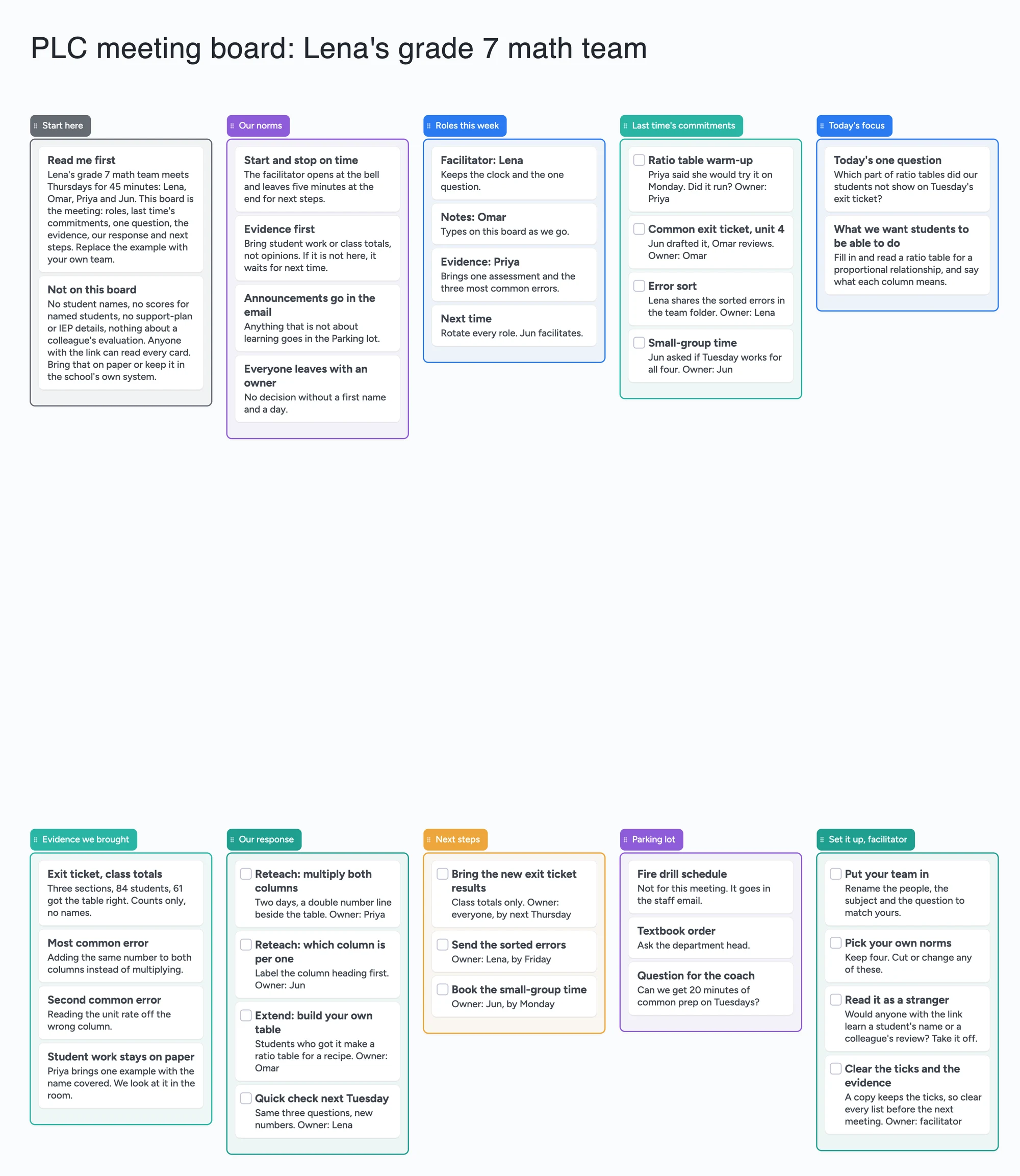
Read this first: what this board does, and what it leaves off on purpose
- What the board is: the meeting in one view: norms, roles for this week, last time's commitments with owners, one focus question, evidence as class totals, the team's response, next steps and a parking lot for everything that isn't about learning.
- What it isn't: no reminders or due-date alerts, no reports for an administrator, no gradebook or assessment link. Student names, scores for named students, support-plan details and anything about a colleague's evaluation stay off it. A tick records no name and no time.
- Ticks: tick items together, and everyone with edit access sees it live. Anyone with edit access can un-tick anything, so a tick is a note to the team, not proof.
- Free plan: the example is 45 of your 150 free items (34 cards, 10 lists and 1 title text box, our count). Arrows and pen strokes don't count. Writing needs a free sign-in, and a reader can open the link signed out. Pro removes the item limit.
Lena's team board, list by list
Lena's team teaches grade 7 math and meets Thursdays. The meeting follows one question from Tuesday's exit ticket. Everything in the example is invented, with first names only and class totals instead of student work.
- Start here (2 cards). How the board is used, and a "Not on this board" card that keeps student names, scores for named students, support-plan details and colleague evaluations off it.
- Our norms (4 cards). Start and stop on time, evidence first, announcements go in the email, and everyone leaves with an owner.
- Roles this week (4 cards). Facilitator, notes, evidence, and a card that rotates every role next time.
- Last time's commitments (4 cards, tick boxes). What each person said they would try, with a first name on each, ticked or left open at the start of the meeting.
- Today's focus (2 cards). One question and what students should be able to do: fill in and read a ratio table and say what each column means.
- Evidence we brought (4 cards). Class totals from one exit ticket across three sections, the two most common errors, and a card saying student work stays on paper with the name covered.
- Our response (4 cards, tick boxes). Two reteach plans, one extension, and a quick check the next Tuesday, each with an owner.
- Next steps (3 cards, tick boxes). What to bring next time, what to send and what to book, each with a name and a day.
- Parking lot (3 cards). Items that aren't about learning: a drill schedule, a textbook order and a question for the coach.
- Set it up (4 cards, tick boxes). Put your team in, pick your own norms, read it as a stranger, and clear the ticks before the next meeting.
There are no arrows on this board. The order of the lists, left to right, is the order of the meeting.
The four questions, and where they sit on the board
Three vendor pages read November 24, 2026 describe a PLC around four questions. Otus and Edthena credit them to DuFour; Solution Tree lists four critical questions without naming him. The wording differs a little from page to page, so the board paraphrases them: what students should be able to do, how the team will know, how it responds when some students haven't, and how it extends learning for those who have. "PLC at Work" is Solution Tree's registered mark, so it is named here only as a source. We are not affiliated with Solution Tree, Otus or Edthena.
- What should students be able to do? The Today's focus list: one question and one sentence of what students should be able to do.
- How will we know? The Evidence we brought list: class totals and the two most common errors.
- How do we respond when some haven't learned it? Two reteach cards on Our response, each with an owner.
- How do we extend learning for those who have? One extension card on Our response, with an owner.
- What carries over? Last time's commitments opens the next meeting, and Next steps names what to bring.
This mapping is ours. Otus makes a similar one with times on it, in the next section.
What teachers say about PLC meetings
Three Reddit threads in r/Teachers, read November 24, 2026 with the replies. Each reply is one account's view, and none of them asks for a shared board.
- "How to do PLCs" (u/Burritos92, 2022-06-23). The poster's school wants more PLC time and the poster asks what worked. u/_Swagner_ suggests rotating roles such as leader, writer, timekeeper, minutes and data, so the team feels like a team. u/nevermentionthisirl says to assign roles and norms and to have an agenda and a purpose. u/Over-Marionberry-686 says PLCs work when they are teacher driven and become another chore when the district mandates them. u/chukotka_v_aliaske describes a three-week cycle in an elementary school: look at assessments, choose a focus and plan an intervention, then carry it out and bring work back.
- "Tired of PLCs and Wanting Out" (u/Short_Concentrate365, 2025-09-13). A grade 4 teacher says teammates arrived without student data and used the time to complain, while the poster kept the tracking sheets admin asked for. u/BlairMountainGunClub says PLC meetings are busywork for admin and that their team makes up agendas to keep admin off its back while the real work happens outside the meeting. A board doesn't make a teammate prepare, and the page doesn't say it does.
- "PLC meetings" (u/Cheap_Parsnip_461, 2026-01-16). Several commenters say they got nothing from their PLC. u/MadViking-66 says PLCs help when teachers are allowed to collaborate to the degree they want, and are a waste when administration micromanages and expects a report of what happens in every PLC. u/Ineedmonnneeyyyy says they were beneficial at a school where they were done as intended and pointless at the next. u/OccasionTiny7464 describes a good PLC as bringing in scores from a recent assessment and comparing what worked.
The board borrows two ideas, each from a different commenter: rotating roles (u/_Swagner_), and a standing agenda and a purpose (u/nevermentionthisirl). Whether teachers drive the PLC, which u/Over-Marionberry-686 says is what makes it work, depends on your school, and a board can't give you that. The commenters who say their PLC is run by admin describe a problem the board can't fix.
What PLC guides cover that this board leaves off
Three vendor pages, read November 24, 2026. Each point is the vendor's own view.
- Otus (a blog post; page data dated 2026-11-06; Otus sells a data platform) gives a 45-minute agenda: check-in and roles 3 minutes, last time's commitments 5, today's focus question 2, dig into the data 15, decide the response 12, next steps 5 and reflection 3. The times add to 45 (our arithmetic). It tells teams to rotate the facilitator and the notes, to give every decision an owner and a date, and to agree on what evidence to bring next time. It also describes meetings by type: planning, data, assessment design, MTSS check-in and reflection.
- Edthena (a blog post; the page says "Updated 5 months ago", page data 2026-06-26; Edthena sells an AI coaching platform) argues that the problem is rarely the schedule and almost always a focus problem: what the team chooses to work on. It credits the four questions to DuFour (2007) and cites a 2014 Boston Consulting Group survey for the Gates Foundation of more than 1,300 teachers and school leaders, in which 29 percent of teachers said they were satisfied with the professional development they received (a figure about professional development in general, not about PLCs).
- Solution Tree ("Why PLC at Work"; no date read; a training vendor) lists the four critical questions and sells workshops and services to schools and districts.
- What the board leaves to other places: a clock on each item, data pulled from a school's own systems, training, any measure of whether a team is improving, and the student information a team needs when it sorts students for reteaching.
- What the board adds: the whole meeting is visible to everyone on the link at once, each commitment and next step carries a first name, and one list holds what isn't about learning so it stays out of the way.
How to set it up for your own team
- Open the board and replace the example. Swap Lena's team, subject and question for yours. Delete lists you don't need; each card is 1 of your 150 items.
- Pick your own norms. Keep four, and change any of Lena's.
- Rotate the roles. Put the next facilitator's name on the Next time card.
- Write one question. One focus question per meeting. If it doesn't fit in a sentence, split it.
- Bring class totals, not student work. Counts and common errors go on the board. Student work stays on paper with the name covered, or in your school's own system.
- Take private details off. Read every card as if a stranger had the link.
- Share it. In Share, new boards start as "Anyone who joins can view". Set it to "Anyone who joins can edit" for the team; each teacher signs in once, free. Open the link signed out to check a reader sees everything.
- Clear the ticks and the evidence before the next meeting. There is no clear-all button and a copy keeps its ticks, so un-tick each list first.
What this board doesn't do, and where other options do it better
Read on November 24, 2026 from each page.
| Option | What its own page says (November 24, 2026) | Better for | Not what you get |
|---|---|---|---|
| Otus PLC agenda (vendor) | A 45-minute agenda template with times, rotating facilitator and notes, and meeting types; the Otus platform "connects to the tools and data a school already uses" | Teams that want results and student information ready before the meeting | A shared list with no data link |
| Edthena PLC focus post (vendor) | The problem is rarely the schedule and almost always the focus; four questions credited to DuFour (2007) | Choosing what a team should work on | A meeting layout |
| Solution Tree workshops (vendor) | Lists the four critical questions and offers workshops and services for schools and districts | Whole-school or district training | A free layout to copy |
| A printed agenda and a notebook | One commenter's team makes up agendas for admin and does the real work outside the meeting | Meetings that need no device | Editing from anywhere, one link |
| Your school's own documents | Not read; schools differ | Anything that holds student names or scores | A board with nobody's name on it |
Swipe the table sideways to see every column.
From each page, read November 24, 2026. Not affiliated with any of them. Student information and anything that evaluates a colleague belong in your school's own system.
Where these win
If your school hands you an agenda, use it. If your team needs results pulled from a school system before you meet, a data platform does that and a board can't. If the meeting is run by an administrator, this board won't change who decides. Use it for the meeting itself: roles, last time's commitments, one question, the evidence totals, the response and who owns each next step, on a link everyone can open.
Limits of the free plan for a team board
- Items. Each card, list and text box is 1 of your 150 free items, across all your boards. The example is 34 cards, 10 lists and 1 title text box, 45 in all. Arrows and pen strokes don't count.
- Copies add up. Our arithmetic: a board per team is another 45 items, 90 for two, 135 for three, and a fourth passes 150 (180). Pro removes the item limit ($5 a month billed yearly, $59.99 a year, or $7.99 monthly). Keep one board and clear it each week if you stay on the free plan.
- Boards. The free plan includes 5 boards, and a copy takes 1 of them.
- Photos. 3 images per board. The example has none, and a photo of student work can identify a student, so don't put one on it.
- Not private by default. New boards start with "Anyone who joins can view". Anyone with the link can read every card. Invite-only boards are a Pro feature.
- No reminders or due-date alerts. The board doesn't tell the team when to meet or what is due.
- No record of who ticked. Anyone with edit access can un-tick any box and nothing records who did, so a tick isn't a sign-off.
- Writing needs a free sign-in. A teacher who joins to tick boxes signs in once; a reader can open the link signed out and can't change anything.
Start from the ready board
It opens in your browser in a few seconds, with nothing to install. Sign in for free when you want to save it and share it.
Questions
Is there a PLC meeting agenda template I can share by link?
Yes. Open the board, replace Lena's team, subject and question with yours and share the link with your team. It holds norms, roles, last time's commitments, one focus question, evidence as class totals, the response and next steps, and nothing about reminders or reports.
Can I put student names or scores on it?
No. Anyone with the link can read every card, so student names, scores for named students, support-plan details and anything about a colleague's evaluation stay in your school's own system. The example uses class totals and common errors only.
Does it work if an administrator runs our PLC?
It can hold the agenda you are given, but it can't change who decides what the meeting covers. Two teachers in the threads we read say a PLC works when teachers drive it (u/Over-Marionberry-686) or collaborate as much as they want (u/MadViking-66), and is a waste when the district mandates it or administration micromanages.
Can I tell who ticked a box?
No. A tick records no name and no time, and anyone with edit access can un-tick it. Treat a tick as a note to the team.
Does it send reminders before the meeting?
No. It has no reminders or due-date alerts. Use your school's calendar for the time and use the board for what happens in the meeting.
How many cards fit on the free plan?
Each card, list and text box is one of the 150 items across all your boards. The example is 45, so a fourth copy passes 150 (our arithmetic). Arrows are free, and Pro removes the item limit.
Sources
- Otus: PLC Meeting Agendas: Structure That Works (read November 24, 2026; page data dated 2026-11-06; vendor)
- Edthena: What Your PLCs Should Actually Be Working On (read November 24, 2026; "Updated 5 months ago", page data 2026-06-26; vendor)
- Solution Tree: Why PLC at Work (read November 24, 2026; no date read; vendor; PLC at Work is its registered mark)
- r/Teachers: How to do PLCs (2022-06-23; read November 24, 2026; replies are single accounts)
- r/Teachers: Tired of PLCs and Wanting Out (2025-09-13; read November 24, 2026; replies are single accounts)
- r/Teachers: PLC meetings (2026-01-16; read November 24, 2026; replies are single accounts)
Related
A backward design unit plan template on one board
A backward design unit plan template on one shared board: results, evidence, then the weekly learning plan. No standards library or grades; Common Planner and Docs do more.
A decision log template on one shared board: open, decided, revisit, reversed
A decision log template on one shared board for two to five people: open questions, decided with the why, revisit on a date, reversed. When a spreadsheet or Notion is the better home.
Whiteboard for Google Classroom: share one board with your class
Post one shared Instaboard board in Google Classroom or on a Google Sites page as a link. Set it so the class can write; students 13+ sign in free. No grading.