For a lead cook or kitchen manager who writes tomorrow's prep list at close
Kitchen prep list by station: one shared board, par typed by hand, and a 911 list for what ran out
We make Instaboard, an online board. This is a kitchen prep list, filled in for an invented 36-seat restaurant, Juniper Kitchen, where the lead cook, Dani, writes tomorrow's prep at close and the opener, Kofi, works down it. Each station has its own list with a card per item: the par, what is on hand, what to make and a first name. Par minus on hand is worked out by you and typed in; the board adds and subtracts nothing. It is not a food-safety record: there are no temperatures, cooling or use-by logs, allergen charts, waste or food cost numbers, and your local health department's rules come first. If a printed prep sheet or a spreadsheet that does the subtraction suits your kitchen, either does more than a board can.
Opens in your browser. Anyone can view; a free sign-in lets you edit.
Updated
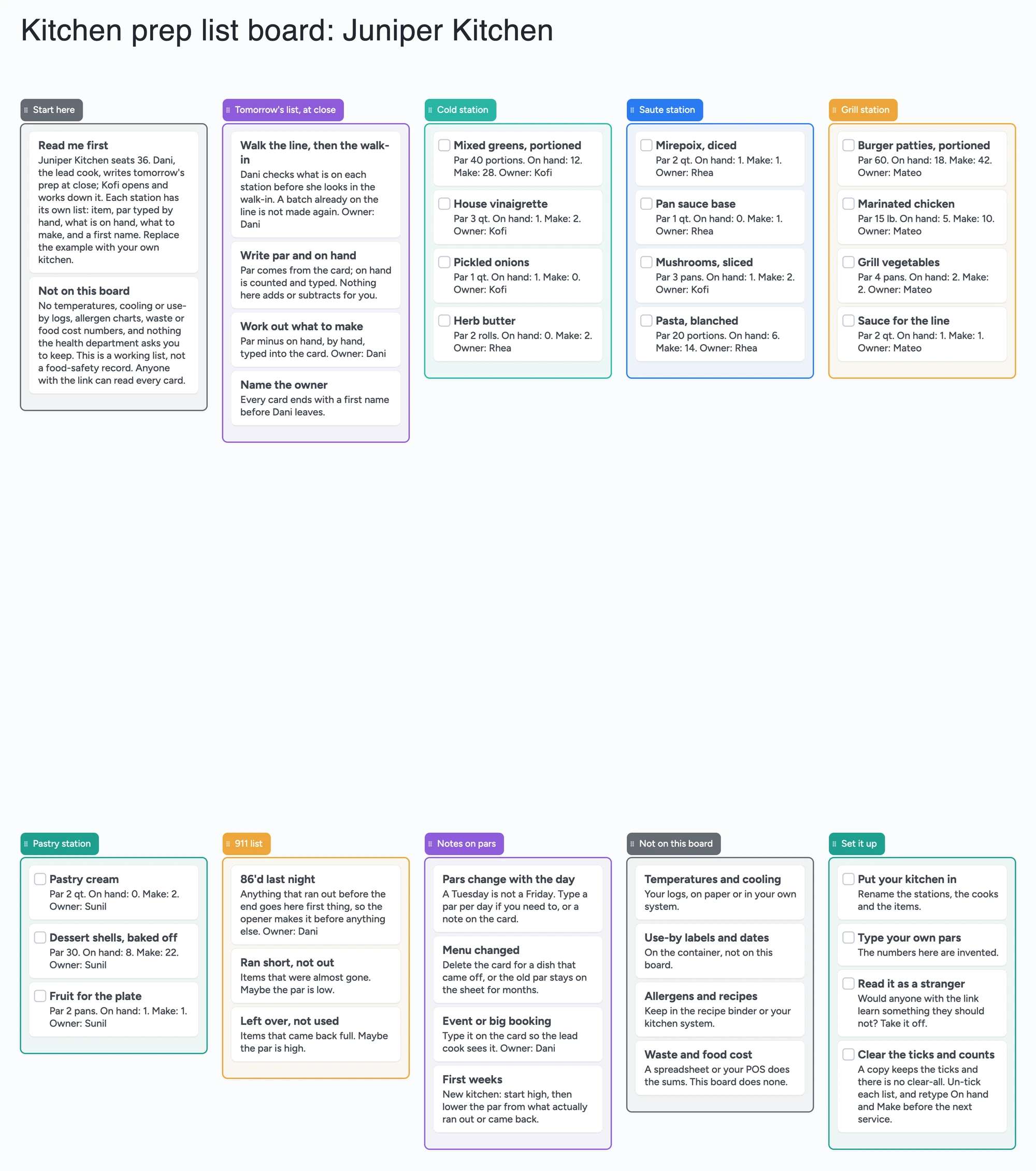
Read this first: what the board does, and what it leaves off on purpose
- What the board is: tomorrow's prep list, by station: a card per prep item with the par, what is on hand, what to make and an owner, all typed by hand, plus a 911 list for what ran out and notes on pars.
- What it isn't: not a food-safety record and not a spreadsheet. No temperatures, cooling, use-by or allergen records, no waste or food cost, and no sums. A tick records no name and no time.
- Ticks: tick a card when it is made, and everyone with edit access sees it live. Anyone with edit access can un-tick anything, so a tick is a note, not proof.
- Free plan: the example is 47 of your 150 free items (36 cards, 10 lists and 1 title text box, our count). Arrows and pen strokes don't count. Writing needs a free sign-in; a reader can open the link signed out.
Juniper Kitchen's board, list by list
Everything in the example is invented: a 36-seat restaurant, four stations, first names only, and pars that are made up.
- Start here (2 cards). How the board is used, and a card saying it is a working list, not a food-safety record.
- Tomorrow's list, at close (4 cards). The order Dani works in: walk the line before the walk-in, write par and on hand, work out what to make, name the owner.
- Cold, Saute, Grill and Pastry stations (4, 4, 4 and 3 cards, tick boxes). One card per prep item, with the par, on hand and make quantities typed in and a first name at the end.
- 911 list (3 cards). What was 86'd last night, what ran short and what came back full.
- Notes on pars (4 cards). Pars change with the day, a menu change, an event, and the first weeks of a new kitchen.
- Not on this board (4 cards) and Set it up (4 cards, tick boxes).
There are no arrows. Read left to right and then down: the close-of-day list first, then the four stations, then the notes.
What a prep sheet holds, from the kitchen guides we read
Read November 24, 2026. Each point is the page's own view.
- WebstaurantStore (a restaurant supplier; its article shows "Last updated on Jul 27, 2021") says a prep list is a production sheet or par sheet, and describes a par level as the amount of an item you need on hand for a specific day and shift. Its example sheet has columns for the item, the par, what is on hand, what is prepped and the total. It says to subtract what is left over from the par, and that a new restaurant takes three to four weeks to find the right pars.
- Restaurant Codex (a restaurant resources site; its page data shows September 14, 2026) says the lead cook builds tomorrow's list tonight, the opener works down it station by station, and the sheet is one per station, built at close and worked at open. It says par minus on hand equals what to prep, and that pars are set station by station.
- Metafoodx (a food-operations software vendor; its page shows November 2, and its page data shows an edit on November 17) says a prep list at minimum names the station, item, quantity needed, on hand, amount to prep, owner and the time it must be ready.
- FusionPrep (a vendor) offers 3-day and 7-day prep list templates as Excel files and as Google Sheets copies.
The board borrows the station-by-station shape and the "build it at close, work it at open" order. It leaves the arithmetic, the time column and the labels to the other tools.
What kitchen people say about prep lists
Three threads, read November 24, 2026 with their replies. Each reply is one account's view; none asks for a shared board.
- "Best Way to Post and Track a Daily Prep List?" (u/beeflife, r/restaurantowners, 2025-03-08). u/alien_mermaid uses a whiteboard that anyone can add to and wipe. u/whatwhatwhathwat prints a laminated daily list that the previous night's kitchen head checks off with a marker. u/SaltywithaTwist uses a clipboard with four columns: par, what we have, how much to make and who should make it. u/Firm_Complex718 says to keep a 911 list of items 86'd the night before. u/Rare-Ant-3091 hangs clipboards on nails on the wall; the sous and chef print the sheets, made in Google Sheets. u/NoelyDeezNutz has the prep person fill in what is on hand and the lead check it before approving, and says the kitchen uploads a photo of the list at the end of the shift.
- "writing a prep list for a new restaurant." (u/No_Visit7543, r/KitchenConfidential, 2026-06-15). u/veryvery23 says to go over on everything at first and note what moves each night. u/RainMakerJMR says to take a running average of three days of sales as the par. u/PickledAnts suggests a chart with items down the side and seven day columns across the top. u/ExtensionActivity460 says a waste and 86 log is a nightmare at volume; u/Dav_Sionnach replies that with 15 prep items it takes 15 seconds to note a run-out, and u/Oxensheepling calls a waste log essential.
- "Best way to calculate pars for main prep list, when roughly starting from scratch?" (u/Chef_de_MechE, r/Chefit, 2023-05-21). u/chephin recommends line checks before service so the prep is on the station. u/themetalcef87 suggests the product sales mix from the last 60 or 90 days.
The board borrows four ideas, each from a different commenter: the four columns par, have, make and who (u/SaltywithaTwist), a 911 list (u/Firm_Complex718), line checks before service (u/chephin) and seven day columns to see a pattern (u/PickledAnts). The order "walk the line, then the walk-in" is the board's own; Restaurant Codex says only to walk the line and the walk-in. The commenters who prefer a whiteboard or a laminated sheet are right for a small kitchen, and the board doesn't answer them.
What stays off the board, and why
- Temperatures, cooling and use-by dates. Those are food-safety records. Keep them the way your local health department asks, on paper or in a system built for it. WebstaurantStore's steps say to put a label with the date, time and cook's name on each prepped item; that stays on the food, not on this board.
- Allergens and recipes. Keep them in your recipe binder or kitchen system, where a cook can find them in an emergency.
- Waste and food cost. The board doesn't count anything. A spreadsheet or your point-of-sale reports do.
- Guests' names and special orders. None belong on a link board.
Anyone with the link can read every card. If a card would embarrass you on a stranger's phone, take it off.
How to set it up for your kitchen
- Open the board and replace the example. Swap the stations, the cooks and the items for yours. Each card is 1 of your 150 items.
- Type your own pars. The numbers in the example are made up. Use your sales to set them, and expect to change them.
- Write tomorrow's list at close. Walk the line, then the walk-in. Type on hand, work out what to make by hand and type it in.
- Name an owner on every card. A first name, typed at the end.
- Tick when it is made. The opener ticks as each item is done. Nothing records who ticked or when.
- Share it. In Share, new boards start as "Anyone who joins can view". Set it to "Anyone who joins can edit" for the cooks who write on it; each signs in once, free. Open the link signed out to check what a reader sees.
- Clear it before the next service. There is no clear-all button and a copy keeps its ticks, so un-tick each list and retype On hand and Make.
Where something else does it better
| Option | What its own page or thread says (November 24, 2026) | Better for | Not what you get |
|---|---|---|---|
| WebstaurantStore prep list guide and PDF template | A supplier's article (last updated Jul 27, 2021) with a printable sheet and steps for subtracting on-hand from par | A printed sheet on a clipboard | A list more than one person can edit from a phone |
| Restaurant Codex prep list and par sheet | One sheet per station, built at close and worked at open, with PDF and Excel downloads | A sheet that works out par minus on hand | A board where cards move |
| FusionPrep templates (vendor) | 3-day and 7-day templates as Excel and Google Sheets copies | Several days on one sheet | A live list for the cooks |
| Metafoodx prep list (software vendor) | A free Excel that works out the amount to prep; its software is built around measured usage | Setting quantities from real usage | A board with no software to buy |
| A whiteboard or laminated sheet | Several commenters use one; one says their kitchen prefers less digital because it can be a pain to pull up all the time | A small kitchen where everyone stands at the same wall | A list you can read at home |
Swipe the table sideways to see every column.
From each page or thread, read November 24, 2026. Not affiliated with any of them.
Where these win
If one cook writes the list and everyone works from a printed sheet, a clipboard is simpler than a board. If you want the subtraction done for you, a spreadsheet does it. Use this board when the lead and the openers want the same list on their phones: who owns each prep item, what ran out last night and what the pars are.
Limits of the free plan for a prep list board
- Items. Each card, list and text box is 1 of your 150 free items, across all your boards. The example is 36 cards, 10 lists and 1 title text box, 47 in all. Our arithmetic: if your kitchen has 60 prep items instead of the example's 15, the board is 92 items, and a second copy passes 150. Pro removes the item limit ($5 a month billed yearly, $59.99 a year, or $7.99 monthly).
- Boards. The free plan includes 5 boards, and a copy takes 1 of them.
- Photos. 3 images per board. The example has none.
- Not private by default. New boards start with "Anyone who joins can view". Anyone with the link can read every card. Invite-only boards are a Pro feature.
- No reminders, no alerts, no history. The board doesn't tell anyone what to prep or when, and doesn't keep yesterday's list.
- No sums. Par, on hand and make are text. Nothing adds up or checks them.
- No record of who ticked. Anyone with edit access can un-tick any box and nothing records who did.
- Writing needs a free sign-in. A reader can open the link signed out and can't change anything.
Start from the ready board
It opens in your browser in a few seconds, with nothing to install. Sign in for free when you want to save it and share it.
Questions
Is there a kitchen prep list template I can share by link?
Yes. Open the board, replace the example's stations, cooks and items with your own and share the link. It holds a list per station with par, on hand, make and an owner on each card, a 911 list and notes on pars.
Does it work out what to prep?
No. Par, on hand and make are typed by hand. A spreadsheet that subtracts for you does more than a board can.
Can I keep temperature or food-safety logs on it?
No. The board is a working list, not a food-safety record. Keep temperatures, cooling and use-by records the way your local health department asks.
How do I reset it for the next day?
There is no clear-all button, and a copy keeps its ticks. Un-tick each station list and retype On hand and Make before the next service.
Can I tell who ticked a card?
No. A tick records no name and no time, and anyone with edit access can un-tick it. Treat a tick as a note to the team.
How many cards fit on the free plan?
Each card, list and text box is one of the 150 items across all your boards. The example is 47, and a kitchen with 60 prep items comes to 92 (our arithmetic). Arrows are free, and Pro removes the item limit.
Sources
- WebstaurantStore: Kitchen Prep Lists for Restaurants (read November 24, 2026; a supplier's article, last updated Jul 27, 2021)
- Restaurant Codex: Prep List and Par Sheet (read November 24, 2026; page data shows 2026-09-14)
- Metafoodx: Free Kitchen Prep List Template and How to Use It (read November 24, 2026; page shows Nov 2, page data shows an edit on 2026-11-17; a food-operations software vendor)
- FusionPrep: Download Free Restaurant Prep List Templates (read November 24, 2026; no date printed; a vendor)
- r/restaurantowners: Best Way to Post and Track a Daily Prep List? (2025-03-08; read November 24, 2026; replies are single accounts)
- r/KitchenConfidential: writing a prep list for a new restaurant. (2026-06-15; read November 24, 2026; replies are single accounts)
- r/Chefit: Best way to calculate pars for main prep list, when roughly starting from scratch? (2023-05-21; read November 24, 2026; replies are single accounts)
Related
A cafe opening and closing checklist on one shared board
A cafe opening and closing checklist on one shared board: opening, side work, closing, shift notes, weekly jobs. No reminders; Connecteam and Homebase do those.
A shift handoff template for a small shop: one shared board instead of a group chat
A shift handoff template for a small cafe, shop or bar: done today, still to do, low stock, notes and tomorrow on one shared board, with a first name on every card. Free to copy. Not a clinical record.