For online tutors on free Zoom
The Zoom 40-minute limit: what it means for a one-hour lesson
If you tutor on a free Zoom account, a lesson with a student ends after 40 minutes, partway through the hour you promised. Here is what Zoom's own page says about the limit, and the real options for a full lesson: a paid Zoom licence, a free Google Meet or Teams call, or the call built into an Instaboard board. A ready board with a timed one-hour lesson plan is below.
Updated
The short answer
- The rule: according to Zoom's support page, meetings hosted by a Basic (free) licence end after 40 minutes when there is one host and at least one participant. Paid licences end after 30 hours.
- For a full hour you have four honest options: pay for a Zoom licence, use a free Google Meet or Microsoft Teams call, call on the Instaboard board (60 minutes free), or keep whichever call you like and open the board by link.
- Our free call is only 20 minutes longer than Zoom's. For lessons of 90 minutes or more, Meet or Teams Free 1:1 runs longer for free than we do. Plan the lesson to fit whichever limit you choose.
What Zoom's page says about the limit
Zoom explains its time limits in one support article (updated October 29, 2025; read November 2, 2026). The parts that matter for a tutor:
- Meetings scheduled and hosted by Basic (free) licences, on free and paid accounts, end after 40 minutes when there is 1 host and 1 or more participants.
- Meetings hosted by paid licences can run up to 30 hours.
- A Basic user who has a licence on a paid account (Pro, Business or Enterprise) keeps the free duration. The limit follows the host's licence, not the account.
- Zoom says the limits apply on any device.
This is not new. In May 2022 a Zoom partner posted in Zoom Community that from May 2, 2022, the limit for 1:1 meetings hosted by Basic users on free accounts was 40 minutes, the same as for group meetings. In that thread, users report being cut off with no warning, and one says a 1:1 lesson they were giving ended mid-session. Those are one-user reports from 2022; Zoom's current page above is the source for today's rule.
Check your own account
Plans and limits change. If you are unsure which licence you host with, look at your account's plan page in Zoom before a lesson, and read Zoom's time-limit article for the current wording.
Your options for a one-hour lesson
| Option | Free call length | What to know |
|---|---|---|
| Zoom, paid licence | Up to 30 hours | You pay Zoom. Everyone keeps the call and the whiteboard they already know. See [Zoom Whiteboard alternatives](/compare/zoom-whiteboard-alternatives) for what Zoom's free whiteboard allows. |
| Google Meet, free personal account | 1:1: up to 24 hours. 3 or more people: 60 minutes | From a Google Meet Help thread (Product Expert answer, September 23, 2026). Pair it with a board: [whiteboard for Google Meet](/whiteboard-for-google-meet). |
| Microsoft Teams Free | 1:1 calls between Teams users: up to 30 hours. Group calls and meetings: 60 minutes | From Microsoft's Teams Free page. People can join a meeting link without a Teams account, and free meetings run up to 60 minutes. |
| Call on the Instaboard board | 60 minutes per call, with a warning 10 minutes before the end. Pro has no limit | One link for the call and the board. Everyone on the call signs in once, free. No recording. |
| Keep your call, open the board by link | Whatever your call allows | Use Meet or Teams for the call and paste the board link in the chat. This is the right pick for long 1:1 lessons. |
Swipe the table sideways to see every column.
Zoom, Teams and Meet limits are from the vendors' own pages, or the Google Product Expert thread for Meet, checked November 2, 2026. Limits can change; check them before you rely on one.
Which to pick depends on how long your lessons are. For a 60-minute lesson, a call on the board or Meet or Teams Free all cover the hour, and the board call is one link instead of two. For 90 minutes or a back-to-back double lesson, Meet or Teams Free 1:1 runs longer for free than our call does, so keep that call and open the board next to it.
Plan the lesson to fit the limit
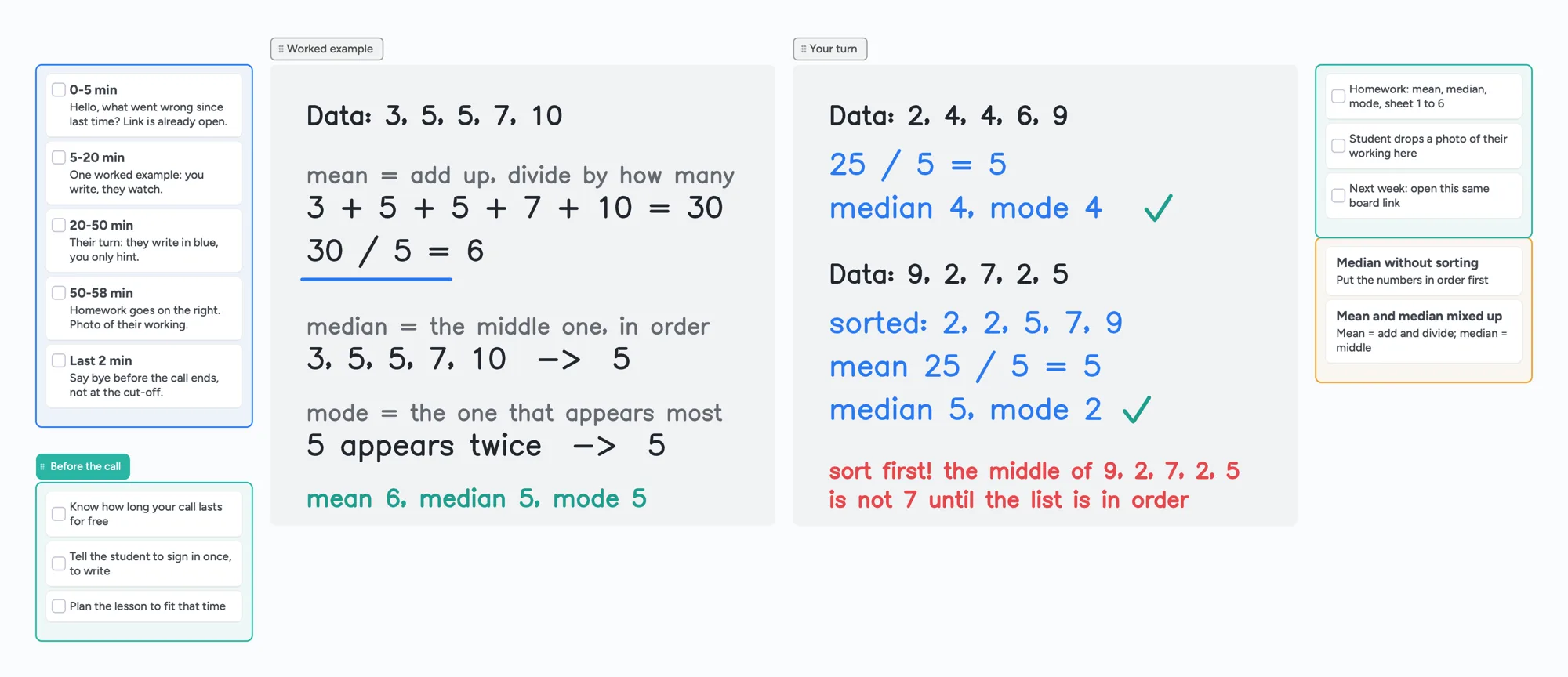
Whatever you choose, a timed plan stops you being cut off mid-sentence. The board above uses a plan that finishes before the hour is out:
- 0-5 minutes: hello, and what went wrong since last time. The board link is already open.
- 5-20 minutes: one worked example. You write, they watch.
- 20-50 minutes: their turn. They write in blue; you only hint.
- 50-58 minutes: homework goes on the right, and a photo of their working.
- Last 2 minutes: say goodbye before the call ends, not at the cut-off.
On a 40-minute limit, shorten each block the same way: worked example by minute 10, their turn until minute 35, wrap up before 38. More on running a first lesson is in how to teach math online, and a checklist for the rest of your setup is in online tutoring setup.
What to know before you use Instaboard for the call
- Our free call is 60 minutes, with a warning 10 minutes before the end. That is 20 minutes more than free Zoom, and far less than free Meet 1:1 or Teams 1:1. Pro calls have no limit ($5 a month billed yearly, $59.99 a year).
- Everyone on the call signs in once, free, with Google, Apple or email. Anyone with the link can view a board without an account.
- No recording of the lesson, no class mode, no scheduling or billing.
- Free covers 5 boards. Pen strokes don't count toward the 150-item limit, and each imported PDF becomes its own board.
- Equation cards only, no LaTeX editor, and the eraser removes whole strokes.
If you want Zoom's features, such as recording, keep Zoom and pay for the licence. This page doesn't claim the board call is better than a paid call for every lesson.
Start from the ready board
It opens in your browser in a few seconds, with nothing to install. Sign in for free when you want to save it and share it.
Questions
How long can a free Zoom meeting with a student last?
According to Zoom's support page, meetings hosted by a Basic (free) licence end after 40 minutes when there is one host and at least one participant. Paid licences can run up to 30 hours. Check Zoom's page for the current wording.
Did Zoom change the limit for one-to-one meetings?
In May 2022 a Zoom partner posted in Zoom Community that, from May 2, 2022, the limit for 1:1 meetings hosted by Basic users on free accounts was 40 minutes. Zoom's current article gives one limit for a host and one or more participants.
What free option runs longest for a 1:1 lesson?
From the vendors' pages as read on November 2, 2026: free Google Meet personal calls for two people can run up to 24 hours (Google Product Expert answer), and free Teams 1:1 calls between Teams users up to 30 hours (Microsoft's Teams Free page). Both are longer than a free Zoom or Instaboard call.
Can I use Instaboard for the call instead of Zoom?
Yes. A board has a video call built in: free for 60 minutes per call, with a warning 10 minutes before the end, and no limit on Pro. Everyone on the call signs in once, free. There is no recording.
Can I keep Meet or Teams and still use the board?
Yes. Start the call in Meet or Teams and paste the board link in the chat. Your student views without an account and signs in once for free to write.
Does the board work for a lesson longer than 60 minutes?
The board itself has no time limit. Free calls on the board end at 60 minutes, so for a longer lesson either keep a longer call in Meet or Teams and use the board beside it, or use Pro, where calls have no limit.
Sources
- Zoom: Understanding time limits for Zoom Meetings (updated Oct 29, 2025; read Nov 2, 2026)
- Zoom Community: 40-minute limit on meeting with two participants (May 2, 2022)
- r/Zoom: How long will a Zoom meeting with 2 people last with the free version (Mar 2026)
- Google Meet Help: free call time limits (Product Expert answer, Sep 23, 2026)
- Microsoft Teams Free: calls and meetings
Related
A Zoom Whiteboard alternative where your student writes too
Zoom's free whiteboard gives you 3 editable boards, sharing is built around Zoom accounts, and free calls stop at 40 minutes. What tutors use instead, where Zoom is still better, and a ready lesson board.
Use your iPad as a whiteboard on Zoom (and let your student write too)
How to use an iPad and Apple Pencil as a whiteboard in a Zoom lesson: screen mirroring, Zoom Whiteboard, or a shared board your student writes on too. Or skip Zoom and call right on the board. Step by step, with the echo fix.
A whiteboard for Google Meet, now that Jamboard is gone
Google Meet lost its Jamboard whiteboard, and the add-ons often don't work on personal accounts. How to run a lesson with a shared whiteboard next to Meet, or skip Meet and call right on the board. With a ready lesson board.
How to teach math online: your first lesson, step by step
How to tutor math online as a beginner: what you need, how to run a first lesson on a board your student writes on too, with Zoom, Google Meet or no video app at all, and what to do without a whiteboard.
Online tutoring setup: what you need before your first lesson
What you need to start tutoring online: sound, light, camera, internet, a way to write, and a board your student writes on too. A plain checklist with a five-minute test call and a ready board to open.
An online whiteboard for tutoring that works the way you teach
A free whiteboard for online tutoring: paste the worksheet, write with a pen, and your student answers on the same board. Call on it or beside Zoom.
A Lessonspace alternative for tutors who don't want to pay by the hour
Lessonspace has no free plan, only a trial: $9 a month covers 10 hours, then $1.95 an hour. What 10, 20 and 30 hours cost, what Lessonspace does better, and a free board where your student writes too.