For the director and the grant writer sharing one pipeline
A grant tracker board for two: funders by stage, reusable pieces, reports due
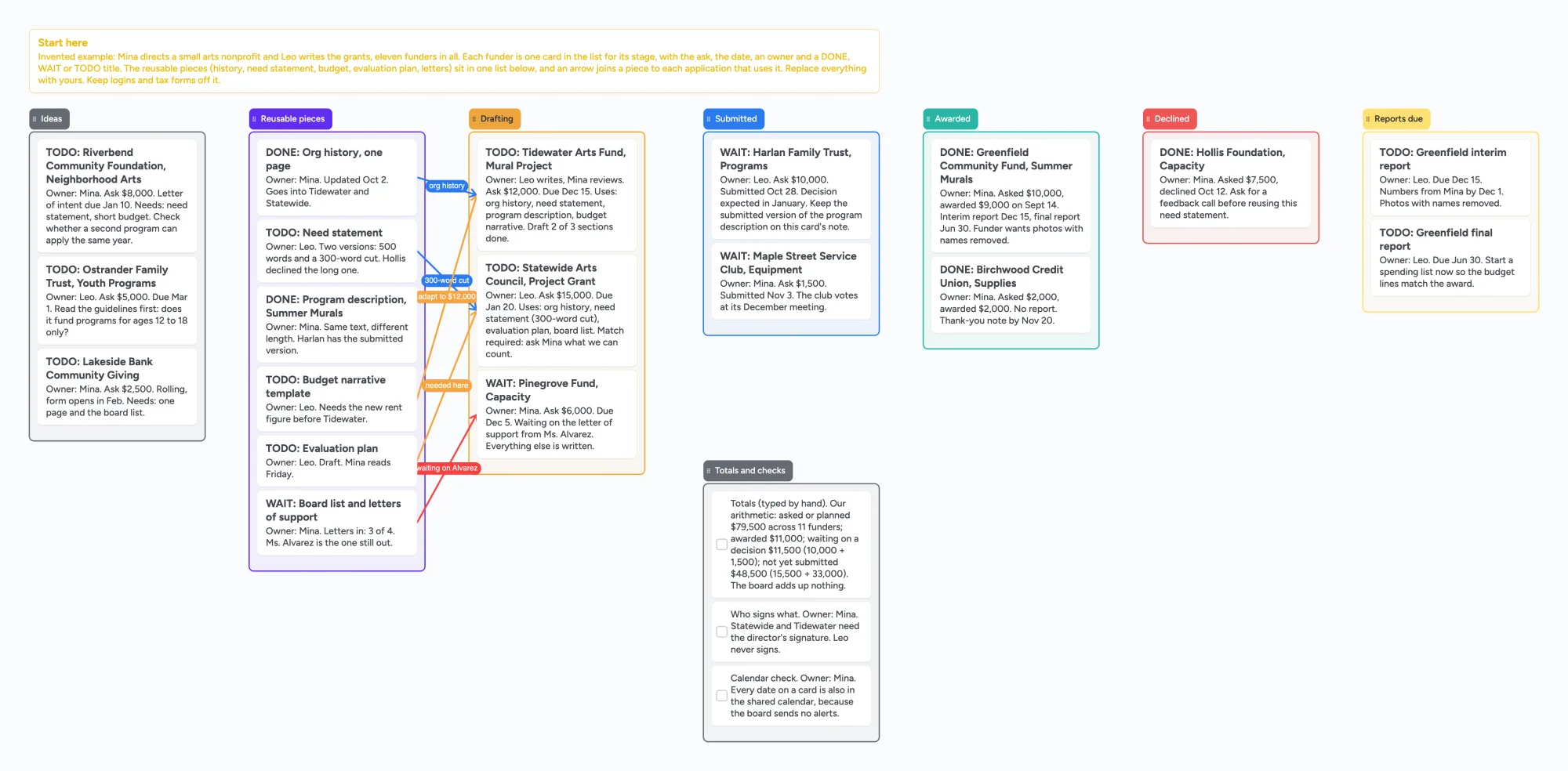
This is for a small nonprofit, an artist or a research group where one person finds and decides on funders and another writes the applications, or where a co-writer or reviewer reads along. It has a list for each stage (ideas, drafting, submitted, awarded, declined, reports due), with a card per funder that names the ask, the date and an owner. A separate list holds the pieces you reuse, such as the organization history, the need statement, the budget narrative and the letters of support, and an arrow joins each piece to the applications that use it. It is a planning board, not grant software. It doesn't search for funders, send deadline reminders, add up your asks or write your reports; Instrumentl, a spreadsheet and Airtable do those jobs, and the next section says where each is better. Use the board for the part around them: who owns each application, which piece is still missing, and which report is due next.
Updated
The short answer
- What it is: one board with a list per stage and a card per funder. Each card says "Owner:" and a first name, carries the ask, the date and what it needs, and starts with DONE, WAIT or TODO. A list of reusable pieces sits beside the stages, and a short list of totals and checks sits below.
- What it isn't: no funder search, no deadline alerts, no report writing, no sums, no sorting by date. The board adds up nothing, so the example's totals are typed by hand.
- Arrows: an arrow can join a card in one list to a card in another, takes a caption and its own colour, and stays attached when a card is reordered. The example joins the organization history to the application that uses it and a missing letter of support to the application waiting on it.
- Free plan: the example is 31 of your 150 free items (23 cards and 8 lists, our count). Arrows and pen strokes don't count. Pro is $5/mo billed yearly.
What this board doesn't do, and where Instrumentl, spreadsheets and Airtable are better
Read on November 11, 2026 from each page named. Instrumentl's pricing page lists Discover at $299 a month paid upfront annually ($349 paid monthly) for up to 3 users, with funder matching, deadline tracking and a first grants pipeline; Pre-Award at $499 ($579 monthly) for up to 5 users, adding collaboration on proposals; and Full Lifecycle at $999 ($1,159 monthly) for up to 15 users, adding post-award spend tracking and accounting connections. Each plan has a 14-day free trial, and the page lists "37k+ active RFPs & 450k+ funder profiles". Its blog post on spreadsheets versus software says digital grant tracking spreadsheets do not have automatic reminders, and that Instrumentl sends automated reminders of upcoming deadlines and changes in requirements. Those are Instrumentl's own claims. If you need to find funders you don't know yet, get reminders or run reports after an award, that is a different tool from this board, and this board has no funder database.
Smartsheet's grant tracking templates page (June 26, 2024) describes a six-stage pipeline (prospects, active, submitted, awarded, funded, closed) with dashboard figures, a calendar template and a budget tracker. Airtable's nonprofit grant tracker template has Grant Applications, Foundations, Foundation Contacts and Programs tables, a Kanban pipeline with five statuses (In progress, Next steps needed, Pending, Funded, Denied), calendar views of deadlines, and automations that notify team members when a status changes. Notion's marketplace lists Toby Egbuna's Grant Application Tracker at 0 USD, with one rating so far. A spreadsheet or Airtable base is the better tool for adding up asks and awards, sorting by date and linking a funder to its contacts; this board does none of that.
Where these tools win
To find funders and get deadline reminders, use Instrumentl or a funder database. To total asks and awards, sort by date and keep contacts in related tables, use a spreadsheet or Airtable. Use this board first, or next to them, when two people need one picture of which application each of you owns, which reusable piece is still missing and which report is due.
How to run a grant pipeline on the board
- One card per funder. Put the ask, the date, what the application needs and an owner on it. The example has eleven invented funders spread across the stage lists; the funders and amounts are invented.
- Name an owner on every card. Write "Owner:" and a first name on the first line. In the example one person writes and the other reviews, and the card says so.
- Start each title with DONE, WAIT or TODO. Change the word as things move. Nothing sorts by it, so you scan for it by eye.
- Move a card to the next stage list when its status changes. Ideas, Drafting, Submitted, Awarded or Declined. A declined card keeps a note such as asking the funder for a feedback call before reusing a need statement.
- Keep one card per reusable piece. The example has the organization history, the need statement in two lengths, the program description, the budget narrative, the evaluation plan and the letters of support. Each says who owns it and what is left.
- Join a piece to every application that uses it. The example draws an arrow captioned "org history" from that card to the application using it, one captioned "300-word cut" for the shorter need statement, and a red one captioned "waiting on Alvarez" from the missing letter to the application that is blocked.
- Give reports their own list. An award creates a report due later, so put each interim and final report on a card with its date and an owner, and note what the funder wants in it.
- Keep the calendar too. Because the board sends no alerts, the last card says every date on a card also goes into a shared calendar.
The thread advice people give each other is mixed, which is why the board is meant to sit beside another tool and not replace it. On r/Professors (August 6, 2024), u/Rogue_Penguin suggests Notion and u/MamieF suggests the free tier of Trello. On r/nonprofit (September 15, 2019), u/KovirPage suggests Excel and Google Calendar and u/Jagitzes suggests tracking by funder with the reporting and renewal deadlines, plus adding every deadline to the main calendar with a reminder a month ahead. On r/nonprofit (February 6, 2026), u/progressiveacolyte says this is a database job and not a spreadsheet job and suggests Airtable, while u/internet11786 says their organization has had about 400 versions of a grant tracker, because each new hire makes their own. Each is one person's view.
This board vs Instrumentl vs a spreadsheet vs Airtable
| Tool | What we read (Nov 11, 2026) | Good at | Not what you get |
|---|---|---|---|
| Instaboard board | Free: 5 boards, 150 items. Pro $5/mo billed yearly | Who owns which application, which piece is missing, arrows from a piece to its applications, a reader on one link | Funder search, reminders, sums, sorting |
| Instrumentl | Discover $299/mo paid upfront annually, up to 3 users; Pre-Award $499, up to 5 users; Full Lifecycle $999, up to 15 users; 14 days free | Its own claims: funder matching, deadline tracking and reminders, proposal collaboration, spend tracking on Full Lifecycle | A free plan, or a free-form board |
| Spreadsheet | Instrumentl's post says digital grant tracking spreadsheets have no automatic reminders; Notion lists Toby Egbuna's Grant Application Tracker at 0 USD | Sums, sorting by date, one row per funder | Arrows from a piece to its applications |
| Smartsheet templates | Six-stage pipeline, dashboard, calendar and budget tracker templates | Dashboards and a budget view | A free-form board of cards and arrows |
| Airtable grant tracker | Four linked tables, a five-status Kanban, calendar views, automations on status change | Linking funders, contacts and programs; notifications | A board you can arrange freely |
Swipe the table sideways to see every column.
From each tool's own pages, read November 11, 2026. We name no tool as the best; they do different jobs.
Limits of the free plan for grants
- Items. Each card and each list is 1 of your 150 free items, across all your boards. The example has 11 funder cards, 12 other cards and 8 lists, 31 in all (our count). A board for 40 funders over several years, with the same other cards and lists, is about 60 (our arithmetic); two of those make 120 and a third passes 150. Arrows and pen strokes don't count.
- Boards. The free plan includes 5 boards. Making your own copy of the example uses 1 of them; a card that opens its own board uses another, so the example keeps everything on one board.
- Photos. 3 images per board. The example has none. On the web a link card's preview picture no longer counts toward the 3, but the iPhone, iPad and Android apps still count it until their next update.
- No reminders, no due-date alerts, no sorting by date. The board doesn't tell anyone a deadline is close. Keep dates in a shared calendar too. Card colour is the border and text only.
- No sums. The example's totals are typed by hand: $79,500 asked or planned across 11 funders, $11,000 awarded, $11,500 waiting on a decision (10,000 + 1,500) and $48,500 not yet submitted (15,500 + 33,000), our arithmetic. Change a card and the totals card doesn't change.
- No funder database and no submitting. It doesn't connect to any funder or portal, and logins and tax forms shouldn't go on it.
- No PDF of the whole board. Use Copy as image to share a picture of the layout. Save as image works on Chrome on the web.
- Writing needs a free sign-in. A co-writer who joins by link or code can add cards and arrows, and the board counts as one of their 5.
Start from the ready board
It opens in your browser in a few seconds, with nothing to install. Sign in for free when you want to save it and share it.
Questions
Is there a free grant tracker I can share with a co-writer?
Yes. Open the board, replace the example nonprofit and funders with yours and set Share to "Anyone with the link can edit" so the co-writer can add cards. It is a board of cards, lists and arrows, not a sortable spreadsheet or a funder database.
Can the board remind me when a grant deadline is close?
No. The board has no reminders or alerts. Put each date in a shared calendar as well, or use a tool that sends reminders, such as Instrumentl, which lists them among its features.
Can it add up what we have asked for and been awarded?
No. The totals card in the example is typed by hand. For sums, use a spreadsheet or Airtable.
Is it safe to put funder names on a shared board?
Anyone with the link can read it, so leave out bank details, tax forms, logins and anything shared in confidence. Share the link only with people you trust.
How many cards fit on the free plan?
Each card and each list is one item of the 150 across all your boards. The example is 31. That is our arithmetic. Arrows are free.
Sources
- Instrumentl: pricing (read November 11, 2026)
- Instrumentl: Tracking Your Grants, Should You Use Spreadsheets or Software? (read November 11, 2026)
- Smartsheet: grant tracking templates (June 26, 2024; read November 11, 2026)
- Airtable: nonprofit grant tracker template (read November 11, 2026)
- Notion Marketplace: Grant Application Tracker by Toby Egbuna (read November 11, 2026)
- r/Professors: tracking grant applications (August 6, 2024; read November 11, 2026)
- r/nonprofit: grant tracking (September 15, 2019; read November 11, 2026)
- r/nonprofit: grant tracker (February 6, 2026; read November 11, 2026)
Related
A grad school application board: programs, recommenders, documents and funding in one place
Plan grad school applications on one shared board: reach, target and safer programs, a card per program for deadline, fee, letters and funding, plus recommenders and documents. Free ready board.
Plan a thesis on one board you can share with your advisor
An editable thesis planning board: a list per chapter, literature clusters, advisor feedback and the core argument on one shared board you send to your advisor.
An office holiday party planning board: who owns what, in one place
Plan the office holiday party with a small committee on one shared board: budget, venue, food, gift swap rules and the evening. Free ready board, and where SignUpGenius does more.