For a team of three to eight about to start a job of a few weeks
A project kickoff checklist on one shared board
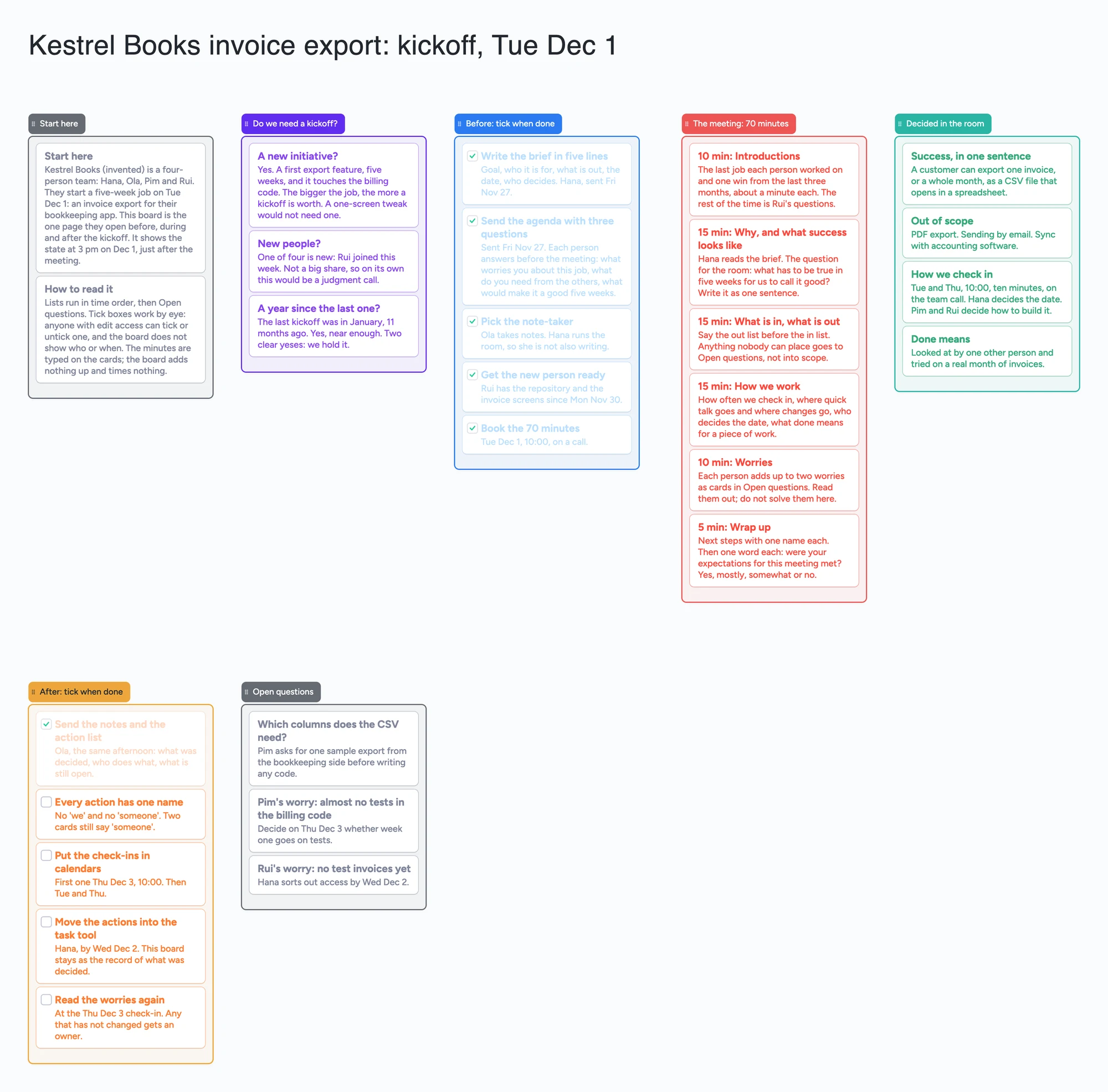
We make Instaboard, an online board. This page gives you a project kickoff checklist already laid out on it, filled in for an invented four-person team: Kestrel Books is starting a five-week job on Tuesday, December 1, an invoice export for its bookkeeping app, and Hana, Ola, Pim and Rui have one board for the days before, the meeting and the days after. Seven lists: a short test for whether a kickoff is worth holding, a tick list of what to do before, the 70-minute agenda, what was decided in the room, a tick list of what to do after, and a list of open questions. Open it, swap in your own job and send the link to your team. It is a checklist you tick by eye, not a meeting tool: it does not send the invite, take the minutes or remind anyone. Below we say what four guides recommend, where they disagree, and when a calendar invite, a document or a template in a task tool is the better choice.
Opens in your browser. Anyone can view; a free sign-in lets you edit.
Updated
Read this first: what the board does and doesn't do
- What it is: one shared page with the kickoff laid out in time order, so the team can see what must be done before, what the meeting covers and what is still open after. The example holds 28 cards in 7 lists and uses 36 of your 150 free items.
- What it is not: no invite, no recording or minutes, no reminders or due-date alerts, no sign-off, and no record of who ticked a box or when. The minutes on the cards are typed text.
- What it leaves to you: the meeting itself. Someone still has to run the room and someone else has to take the notes; the board holds the result.
- Keep off it: client names, contract terms, anything private. A link board is not private. The example uses first names for the four teammates only.
- When to use something else: a calendar invite for the time and the people, a document for the brief and the minutes, or a task tool for the actions. A section below says when each wins.
When a calendar invite, a document or a task tool is the better choice
Start with what a kickoff needs that a shared board of cards does not do.
- You need people in the room at a time. That is a calendar invite. The board has no invite, no time and no reminder; the 10:00 on the card is text.
- You need a written brief or minutes. Atlassian says background shouldn't be an information broadcast in the meeting and should go in a shared document beforehand; project-management.com says to record the meeting and write minutes. A long document belongs in a document. The board holds five lines and the result.
- You need the actions to be tracked. The after list says who does what, but nothing on the board sends a reminder or shows who ticked. project-management.com's example agenda puts the actions in a task tool (its notes column says to add deadlines to Asana). A task tool does that; this board is the record of what was decided.
- You need a signature or an approval. A board has no sign-off.
- Someone's private details would go in it. Client names, rates and contract terms don't belong on a link board.
If the team is three to eight people, you want the same page open on the call, and the question is mostly who is doing what and what we decided, a board does that part well.
First question: is this job worth a kickoff?
Mike Cohn of Mountain Goat Software (a training company; his page prints Last updated December 17th, 2024) says a kickoff is worth holding when a team starts a major new initiative, when a significant number of people are new, and at least once a year, and that the three factors should be weighed together. He says a team adding a print button to four screens probably wouldn't, and that a ninth person joining a team of eight doesn't need one while a team going from 20 to 40 would. The board starts with a list that applies those three questions to Kestrel Books:
| Question | Kestrel Books' answer | Result |
|---|---|---|
| A major new initiative? | A first export feature, five weeks, touching the billing code | Yes |
| A significant number of new people? | One of four joined this week | A judgment call on its own |
| A year since the last kickoff? | January, 11 months ago | Near enough: yes |
Swipe the table sideways to see every column.
The questions are Cohn's; the answers are the example's own and invented. Cohn gives no numbers for what counts as significant, and neither does the board. Eleven months is short of Cohn's year; counting it is Kestrel's call, not his.
Two yeses out of three, so Kestrel holds it. The list exists so a team can say why in two lines instead of arguing about it in a chat.
Kestrel's board, list by list
The example is invented. Each list answers one question, in the order the team needs it.
| List | The question it answers | In the Kestrel board |
|---|---|---|
| Do we need a kickoff? (purple) | Is this worth 70 minutes of four people? | Three cards, one per question, with the answer written down |
| Before: tick when done (blue) | What must be ready so the meeting is not used for reading? | Five tick boxes, all ticked: brief, agenda with three questions, note-taker, new person ready, 70 minutes booked |
| The meeting: 70 minutes (red) | What do we cover, and for how long? | Six cards with minutes: 10, 15, 15, 15, 10, 5 |
| Decided in the room (green) | What did we agree, in words someone can check later? | Success in one sentence, what is out of scope, how we check in, what done means |
| After: tick when done (orange) | What turns the meeting into work? | Five tick boxes, one ticked: notes and action list sent; the other four wait |
| Open questions (grey) | What is unsettled and who has it? | Three cards: one question for the bookkeeping side and two worries |
Swipe the table sideways to see every column.
The board's own wording. The seventh list, Start here, has two cards: what the board is and how to read it. Tick boxes are ticked by eye; anyone with edit access can tick or untick one and the board does not show who or when.
The 70 minutes next to what the four pages suggest
We read four pages in full on November 24, 2026. They agree on the shape and differ on length. Our arithmetic from what each prints:
| Page | How long it says | What it covers |
|---|---|---|
| Mountain Goat Software, Mike Cohn (agile kickoff) | Most teams can finish in 2 to 4 hours, definitely no more than a full day | Introductions, scope and deliverables, core and desired capabilities, a collaboration and communication plan, risks, wrap up |
| Figma (example agenda) | 5 + 5 + 15 + 15 + 10 + 10 + 15 = 75 minutes | Introductions, icebreakers, project purpose, project plan review, scope, roles and responsibilities, next steps and Q&A |
| project-management.com (example agenda) | Items from 1 PM to a last item at 1:55 PM; no end time printed | Introductions, overview and background, timeline and milestones, tools and methodologies, discussion and Q&A, next steps |
| Atlassian | No length printed | Introductions, background, why, scope, action plan, who is doing what, how you will work together, what success looks like |
| Kestrel Books (this board) | 10 + 15 + 15 + 15 + 10 + 5 = 70 minutes | Introductions, why and what success looks like, what is in and out, how we work, worries, wrap up |
Swipe the table sideways to see every column.
From each page as read November 24, 2026. The Figma example is Figma's own made-up agenda; Cohn's range is for an agile team's kickoff and is his estimate. Kestrel's times are invented. Instaboard isn't affiliated with any of these companies.
Kestrel's agenda has no separate question-and-answer slot. Figma suggests at least five to 10 minutes for questions, and project-management.com lists discussion and Q&A as an agenda item; Atlassian says to check whether any questions are left. If a new person needs time to ask, add a block or shorten one.
Where the pages disagree, and what the board does
- Roles. Figma suggests a RACI matrix (who is responsible, accountable, consulted, informed). Cohn argues for each person stating the capabilities they have and the ones they want to build, instead of a project manager outlining each person's responsibilities, which he calls less agile. Kestrel's board has no matrix. It puts one name on every action, and Hana, who sets the dates, is named on the how-we-check-in card.
- Who comes. Atlassian says kickoffs should actively involve the team and anyone who is a stakeholder or whose work is affected. Cohn says he generally doesn't find stakeholders' full participation warranted and would invite a couple of key ones, or let some join part of the meeting. Kestrel is four people with no outside stakeholders, so the question doesn't come up; a bigger team has to choose.
- Icebreakers. Figma and Atlassian both suggest one. Cohn doesn't mention an icebreaker; he suggests a three-part introduction (the work you did on your last project, a personal win and a professional win), 30 to 60 seconds each. Kestrel's introduction card is a shorter version of that: the last job and one win.
- Risks. Cohn suggests a list of the top ten risks and revisiting it at planning; Atlassian covers risk and issue management and project-management.com lists a risk management plan. Kestrel puts two worries per person on cards in Open questions and says them out loud without solving them. A longer method for that exists on the pre-mortem page, and the working-agreement and handover boards cover how the team talks and what a new person receives; this board doesn't repeat them.
After the meeting: the part that gets dropped
Atlassian says to send everyone a summary of the meeting and a list of action items to keep the momentum going; project-management.com says to write minutes and that the project manager can then use the checklist and minutes to catalog tasks and owners and find gaps that need follow-up. Kestrel's after list is that, in five boxes. One is ticked at 3 pm, the same afternoon:
- Send the notes and action list. Ola, who took notes. Ticked.
- Every action has one name. Two cards still say someone. That is the check: the box stays empty until both have a name.
- Put the check-ins in calendars. Thursday Dec 3 at 10:00, then Tuesdays and Thursdays. The board doesn't remind anyone; the calendar does.
- Move the actions into the task tool. Hana, by Wednesday Dec 2. The board stays as the record of what was decided.
- Read the worries again. At the Thursday check-in, and any worry that hasn't changed gets an owner.
Four boxes stay unticked on purpose: the example is the state just after the meeting, so a reader can see what unfinished looks like.
How many kickoffs fit in 150 items?
Each card and each list is 1 of your 150 free items, across all your boards. The title text box counts too. Arrows, sections and pen strokes don't. Our arithmetic from Kestrel's lists:
- As built: 7 lists + 28 cards + the title = 36. Of those cards, 2 are Start here, 3 are the test, 5 are Before, 6 are the agenda, 4 are decisions, 5 are After and 3 are open questions.
- Room left: 150 - 36 = 114 items.
- Four jobs as copies: 4 x 36 = 144. A fifth would be 180, over the limit.
- One job that keeps going: add the check-in notes as cards and 114 more fit before you reach the limit.
- Boards: a copy takes 1 of your 5 free boards.
Pro removes the item limit: $5 a month billed yearly ($59.99 a year), or $7.99 monthly. A kickoff for one job doesn't need it.
What a board can't do for a kickoff
- Run the agenda clock. The minutes on the cards are text; nothing on the lists counts them down or sounds an alarm.
- Send the invite or remind anyone. No invites, no reminders or due-date alerts. Tuesday Dec 1 and 10:00 are text.
- Record or transcribe the meeting. Minutes are typed by hand.
- Show who ticked a box. Anyone with edit access can tick or untick any box; the board does not show who or when.
- Tell anyone anything. Typing a name on a card sends no message to that person. Tell people yourself.
- Offline. Changes made offline are kept and sync when you're back online.
Where other tools do this better
Read November 24, 2026. Not listed means not on the page we read; it doesn't mean the tool lacks it. No ranking: they suit different teams.
| Option | What its page says | Better than a board at | Where a board fits |
|---|---|---|---|
| Confluence kickoff template | Atlassian's guide links its Confluence project kickoff template as a way to document the kickoff. Confluence plan limits are not listed on that page (as of November 24, 2026) | Keeping a long brief, minutes and decisions in a shared document | A short, shared checklist everyone ticks on the call |
| FigJam kickoff template | Figma's guide says its FigJam template maps the agenda, assigns roles and tracks deliverables in one place. FigJam plan limits are not listed on that page (as of November 24, 2026) | Sticky-note exercises and a roles matrix | A plain list of lists with no workshop tools |
| ClickUp kickoff template | project-management.com calls ClickUp's kickoff meeting template great for beginners and customizable. We did not read ClickUp's own page | Turning the actions into tracked tasks | The record of what was decided before the tasks exist |
| A calendar invite and a document | Nothing to read; the guides above all assume both | Time, people, reminders, signed-off minutes | A one-page view of before, the meeting and after |
Swipe the table sideways to see every column.
From each page as read November 24, 2026. Vendor content. Instaboard isn't affiliated with any of these.
Set up your own, in order
- Open the board and replace Kestrel's cards as you go, so it is never half Kestrel.
- Answer the three questions first. Write your own answers on the purple cards. If the answer is no, you may not need the meeting.
- Fill the Before list with your own five. Add the date and the person next to each box.
- Rewrite the agenda minutes for your team. Keep the total in the list title so it matches the cards.
- Run the meeting from the board on the call, with one person writing in Decided in the room and another taking notes elsewhere.
- Put an owner on every After card before you end the call.
- Share it. Set the share setting so anyone who joins can edit ("Anyone who joins can edit"); new boards start view-only, and each person signs in to write.
Limits of the free plan for this board
- Items. Each card and each list is 1 of 150 free items across your account; the example is 36. Arrows, sections and pen strokes don't count.
- Boards. 5 on the free plan. "Make a copy" takes 1 of them.
- Pictures. 3 per board. The example has none.
- Writing needs a free sign-in. Anyone who joins can view the board; to change it they sign in, and the board then counts as 1 of their 5.
- Private lists. A link board is not the place for client details; invite-only boards are a Pro feature.
Start from the ready board
It opens in your browser in a few seconds, with nothing to install. Sign in for free when you want to save it and share it.
Questions
What is a project kickoff meeting?
The first time the people on a project meet to agree why it exists, what is in and out, who does what and how they will work. Atlassian describes it as the first meeting with the project team and, where there is one, the client; Figma describes it as the first time everyone involved comes together to align on goals, tasks and responsibilities before work begins.
Does a small team need a kickoff?
Sometimes. Mike Cohn says to hold one for a major new initiative, when a significant number of people are new, and at least once a year, and not for a tiny change. The board's first list turns those into three questions with your own answers.
How long should a kickoff be?
The pages differ. Cohn says most teams can get through his agile agenda in 2 to 4 hours and definitely no more than a full day; Figma's example agenda adds up to 75 minutes by our arithmetic; Atlassian prints no length. The example board uses 70 minutes for four people and a five-week job.
Who should come?
Everyone on the team, and the product owner and Scrum Master if you have them, according to Cohn; Atlassian also says to involve stakeholders and anyone whose work is affected, while Cohn would invite only a few of them or have others join a part. Part-time team members are a judgment call.
What should happen after the meeting?
Send a summary and the action list, put one name on every action, set the check-ins and move the actions to wherever the team tracks tasks. Atlassian and project-management.com both say to send notes or minutes. The board's After list has these as five tick boxes; it does not remind anyone to do them.
How much of the free plan does it use?
The example is 7 lists, 28 cards and the title, 36 of your 150 free items, and a copy takes 1 of your 5 free boards. Four jobs as copies are 144 items. That is our arithmetic, and your other boards share the 150. Pro removes the item limit.
Sources
- Mountain Goat Software: Advice on Conducting Agile Project Kickoff Meetings, Mike Cohn (page prints Last updated December 17th, 2024; page data first published October 9, 2018; read in full November 24, 2026; training vendor)
- Atlassian: How to Nail Your Project Kickoff Meeting (no date printed; page data published November 14, 2025, modified November 16, 2026; read in full November 24, 2026; vendor content)
- project-management.com: Project Kickoff Meeting Checklist, Sam Ingalls (page prints Sep 24, 2024; read in full November 24, 2026; ad-supported, says vendors may pay it for traffic)
- Figma: 5 steps to run impressive project kickoff meetings (no page date printed; its example agenda is dated September 13, 2023 but is a made-up example; read in full November 24, 2026; vendor content)