For tutors on iPad
A FigJam alternative for tutors who teach on an iPad
FigJam is a good whiteboard, and many tutors moved to it when Jamboard closed. But on an iPad it now lives inside the Figma app, the free plan stops at 3 files, letting a student edit without an account needs a paid plan, and Figma's free Education plan has criteria that independent tutors may not meet. Here is what Figma's own pages say, where FigJam is the better tool, and when a board built for one-to-one lessons fits you better.
Updated
The short answer
- Figma retired the FigJam iPad app on January 8, 2026. On an iPad FigJam now runs in the Figma app or on the web, and Figma's help says the Figma app has full feature parity. Pages can't be created, renamed or deleted on iPad, only on desktop.
- Free FigJam is unlimited collaborators in 3 editable files. Open sessions, where anyone can edit for 24 hours without an account, are only on paid plans, and Figma says that includes accounts with Education status.
- Figma's free Education plan is for a current student or educator in a classroom, applying with a school email. Figma's bootcamp criteria list "Independent tutoring: 1:1 or small group tutoring that is not part of a formalized program" under potential disqualifications. Check Figma's page for your own case.
- Instaboard Free gives you 5 boards, a laser pointer, an iPad app with a pressure-sensitive Pencil and a video call on the board. Your student signs in free to write. It has far fewer templates than FigJam, and no recording or class tools.
What a lesson on the board looks like
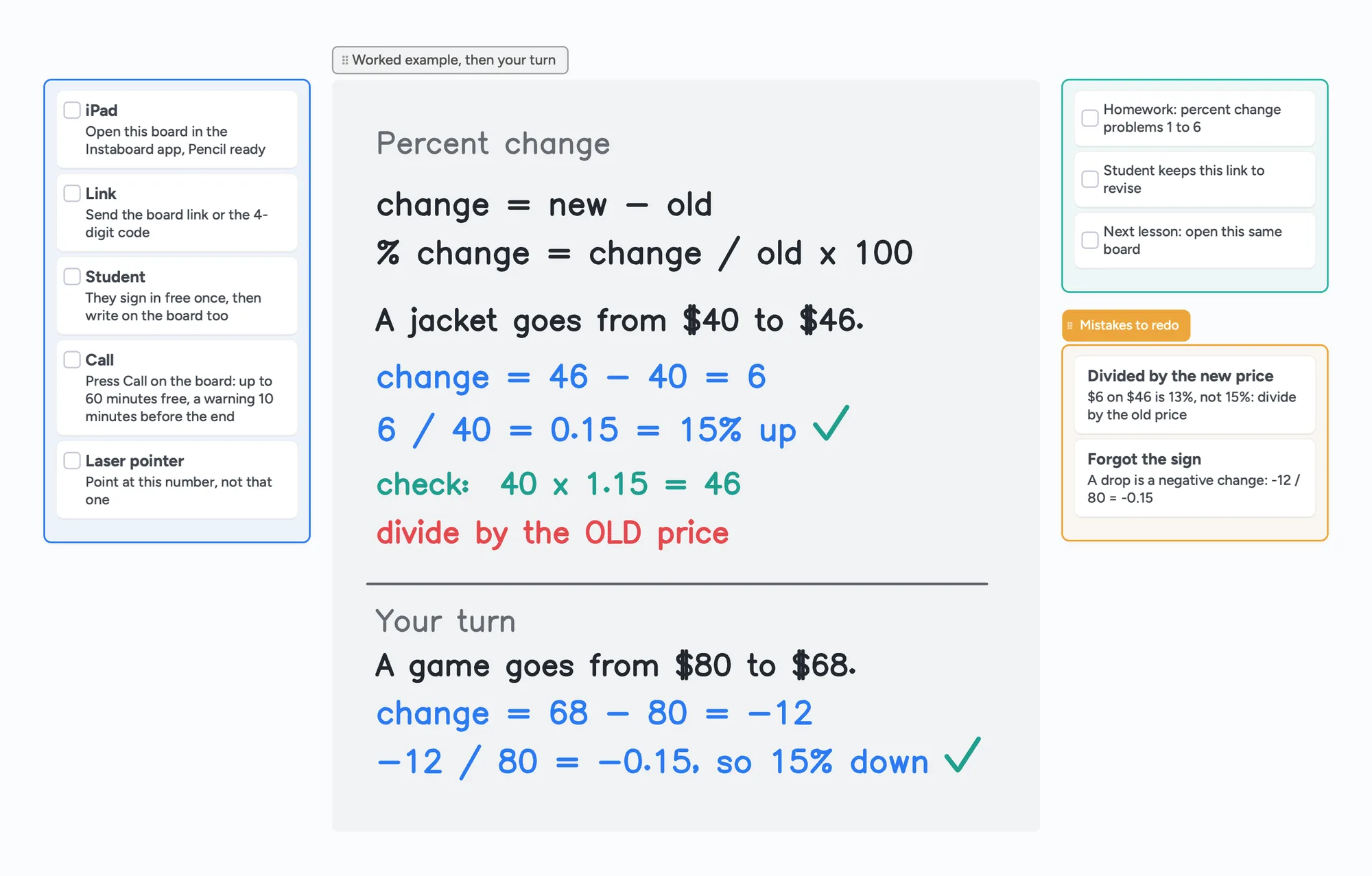
The call sits on top of the board: you write and point with the laser, your student writes their answer on the same page in their own colour, and you both see it live.
What changed for FigJam on iPad
Figma's Help Center page "FigJam for iPad" (read November 5, 2026) says: "We will be retiring our FigJam for iPad app on January 8, 2026. After that, FigJam will be exclusively available in the Figma app or on the web." It adds that your work stays in your Figma account and that "the Figma app is at full feature parity". The old FigJam App Store link now returns "The page you're looking for can't be found".
- Where it opens now: the Figma app on iPad, signed in to your Figma account. Figma's mobile guide says you can "view and edit FigJam boards on the go within the Figma iPad app", and that Figma Design files and Slides decks can't be edited in the mobile app.
- Apple Pencil: it draws with the marker and highlighter, and a "Pencil always draws" setting keeps the Pencil as the pen while your finger moves around.
- One limit on iPad: per the help page, "pages cannot be created, renamed, or deleted on iPad, only from the file on a desktop".
- Gestures: two-finger tap undoes, three-finger tap redoes (Figma's help page).
Figma's pages don't all agree
Figma's marketing page for the FigJam whiteboard still says "the free FigJam iPad app". Its Help Center says the app retired on January 8, 2026. We follow the Help Center, which is the more specific page, and we only cover iPad: we haven't checked editing FigJam on a phone.
Free FigJam, paid FigJam and open sessions
- Free (Starter): Figma's pricing FAQ says "you can create a team with 3 files for free and collaborate with unlimited users". Its plan-downgrade help lists "3 files per each for FigJam and Figma Slides" on Starter. Your personal drafts can be shared with unlimited viewers.
- Paid: FigJam is included in every seat. A Collab seat (full access to FigJam, Slides, Buzz and Specs, view and comment on Design files) is $3 a month billed annually or $5 billed monthly. A Full seat is $16 a month billed annually or $20 billed monthly. These are the Professional plan prices on figma.com/pricing with each billing toggle read in a browser on November 5, 2026.
- Open sessions: Figma's help says an open session gives "anyone can edit access to a FigJam file for unlimited 24 hour periods" and visitors can join "without needing to create a Figma account". It also says "Open sessions are only available on paid plans. This includes accounts with Education status", the file must be in a team space rather than drafts, and visitors in an open session can't use comments or audio conversations.
- Audio conversations: Figma's plan table lists them on Professional and above, not on Starter.
So for a tutor on the free plan, the student has to sign in to a Figma account to edit, and the open-session shortcut for students without accounts is a paid feature. We haven't confirmed from Figma's pages which seat type can start an open session, so check that before you buy a Collab seat for it.
Figma Education and independent tutors
Figma's Education pages (read November 5, 2026) say the free plan is for a current student or educator in a classroom, applying with a school email address, and give examples such as high schools, universities, trade schools, "select online courses, bootcamps, or workshops" with structured, teacher-led instruction, and coding academies. Not counted: "self-directed education", startups or edtech companies, and non-profits.
On its bootcamp and online-course criteria, Figma lists these among the "Potential disqualifications": "Independent tutoring: 1:1 or small group tutoring that is not part of a formalized program." Those criteria are written for bootcamps and online courses that apply on behalf of their students, so how Figma would treat one tutor applying alone is our inference, not something Figma's pages state. If you tutor privately, ask Figma before you rely on Education.
FigJam and Instaboard side by side, for tutoring
| FigJam | Instaboard | |
|---|---|---|
| Free plan | Starter: unlimited collaborators in 3 editable files | 5 boards, 150 items across your account (pen strokes, arrows and sections don't count), 3 images and 1 file per board |
| Paid price | Collab seat $3 a month billed annually ($5 monthly); Full seat $16 annually ($20 monthly) | Pro $5 a month billed yearly ($59.99), or $7.99 monthly; the people you invite join free |
| Student without an account | Open session: anyone can edit for 24 hours, no account; paid plans only; no comments or audio for visitors | Anyone with the link can view; writing needs a free sign-in with Google, Apple or email |
| iPad | Figma app (the FigJam iPad app retired January 8, 2026); Apple Pencil draws; pages can't be created on iPad | iPad app with a pressure-sensitive Apple Pencil; stylus mode lets the Pencil draw while a finger scrolls |
| Pointing at something | Spotlight and follow; tutors asked for a laser pointer in a forum thread (last post December 2025) | Laser pointer, plus follow someone's view |
| Video call | Audio conversations on paid plans | Video call on the board: 60 minutes per call, a warning 10 minutes before the end; everyone on the call signs in free; no recording; Pro has no limit |
| Templates | Hundreds of free templates, including education ones | Ready boards you open from our pages; nothing like FigJam's library |
| Schools | Free Education plan for verified classes; Google Workspace licences for schools | No school plan or admin tools |
Swipe the table sideways to see every column.
FigJam facts from Figma's pricing, pricing FAQ, Help Center and Education pages, all read November 5, 2026 (the pricing page with each billing toggle checked in a browser). Instaboard facts from our own app. Check Figma's pages for your plan.
Where FigJam is the better choice
- Free collaborators. Unlimited collaborators in 3 editable files, with no board count to manage inside those files.
- Templates. Hundreds of free templates, with a weekly-updated education library from Figma's education team.
- Engagement tools. Stamps, emotes, voting, a shared timer and comments, all listed in Figma's plan and iPad pages.
- Diagramming. Shapes and connectors for flows, plus tables and sections.
- Free Education, if you qualify. Verified students and educators get Figma's Professional features free, and Figma says Education accounts can start open sessions.
- Schools. Admins can deploy Figma licences through the Google Admin Console, and schools get a classroom add-on for Google Classroom.
- No-account guests, if you pay. On a paid plan a student can join an open session without an account for 24 hours at a time.
If your students already have Figma accounts, or your school licenses Figma, stay on FigJam. Nothing here says it can't teach well: one tutor writes in a Figma forum thread that it is "a great app for tutoring and teaching" (one person's view).
When Instaboard fits a tutor better
- You teach on an iPad. Instaboard's iPad app has a pressure-sensitive Apple Pencil, and stylus mode lets the Pencil draw while a finger scrolls.
- You point at things while you talk. A laser pointer marks "this number, not that one" without leaving ink behind. In the Figma forum, tutors asked for exactly that in 2024 and 2025, and Figma staff pointed to spotlight instead (last post December 2025). We didn't check whether FigJam has added one since.
- You want the call on the board. Press Call on the board: 60 minutes per call free, a warning 10 minutes before the end, everyone on the call signs in free, no recording, and Pro has no limit. Or keep Zoom or Meet open and use the board next to it.
- You want one flat price. Free costs nothing and Pro is $5 a month billed yearly however many students you have, and they join free.
- You send worksheets. Add a page as a picture (3 per free board) or paste a screenshot, and you and your student both write beside it.
The ready board above is a percent-change lesson: a before-the-lesson checklist, the worked example in ink, the student's turn in blue, homework and the mistakes to redo. For a full walkthrough see our tutoring whiteboard guide, and for running a call alongside Zoom see iPad whiteboard for Zoom.
What tutors wrote about FigJam (one person's view each)
- Open sessions and students (Figma forum, May 2024, follow-up December 2024): a tutor who teaches online and homeschool AP courses wrote that, three times, a student could no longer edit a board even in an open session, while the same link worked for him in a private window. Figma's community support asked him to open a support case, and in December 2024 he wrote that support "couldn't replicate the issue". His workarounds were an incognito window or logging out of Figma completely, which he guessed was an unverified education account overriding the open session. The thread has no fix posted, it is two years old, and it is one tutor's report.
- Laser pointer (Figma forum, March 2024 to December 2025): several tutors wrote that a laser pointer is essential for tutoring, including one who uses an iPad to write out math problems. A Figma community support reply suggested spotlight.
- Undo on iPad (Figma forum, October 2026): one tutor and his student found the undo and redo buttons missing in the Figma iPad app. Figma staff confirmed a fix, and he wrote on October 14 that the October 13 update had restored the buttons. It is fixed for him; we mention it because it shows a tutor depending on the iPad app.
Trying it next to FigJam
- Keep your FigJam files and try the board with one student.
- Open the ready board on your iPad and copy its link. A 4-digit join code and a QR code also work.
- Send the link to your student. They open it in a browser and sign in once, free, to write.
- Teach one lesson on it. Write in ink, point with the laser and have your student answer in their own colour.
What doesn't come over
Instaboard can't open FigJam files or any other tool's boards. An exported picture can be pasted in (3 images per board on Free), so a long-running FigJam file is best rebuilt as cards and fresh pages.
What Instaboard doesn't do
- Students sign in to write. Anyone with the link can view, but writing needs a free account with Google, Apple or email. There is no 24-hour guest editing.
- Free calls end at 60 minutes. Pro has no limit, or keep using Zoom or Google Meet next to the board.
- No lesson recording, class mode, scheduling or voting, and a much smaller template set than FigJam.
- No import from FigJam or other apps. Pictures (3 per free board) and one file per board.
- 3 images and 1 file per board on Free.
- The eraser removes whole strokes. Undo is the quickest way to fix the last thing you wrote.
- Changes made offline are kept and sync when you're back online, but it isn't an offline-first app.
Start from the ready board
It opens in your browser in a few seconds, with nothing to install. Sign in for free when you want to save it and share it.
Questions
Is there still a FigJam iPad app?
No. Figma's Help Center says the FigJam for iPad app retired on January 8, 2026, and that FigJam is now exclusively available in the Figma app or on the web. The Figma app on iPad can view and edit FigJam boards.
Is FigJam free for tutors?
FigJam's free plan is unlimited collaborators in 3 editable files. Figma's free Education plan is for a current student or educator in a classroom applying with a school email, and Figma's bootcamp criteria list independent 1:1 or small-group tutoring that is not part of a formalized program as a potential disqualification. Check with Figma before relying on it.
Can my student edit a FigJam board without an account?
In an open session, yes: visitors can edit for 24 hours without a Figma account. Figma says open sessions are only available on paid plans, including accounts with Education status. On a free plan the student signs in to a Figma account.
How much does FigJam cost?
On Figma's pricing page the Professional plan's Collab seat is $3 a month billed annually or $5 billed monthly, and the Full seat is $16 billed annually or $20 billed monthly (checked November 5, 2026). FigJam is included in every seat.
Does Instaboard have a laser pointer?
Yes. The laser pointer marks a spot for your student without leaving ink on the board, and your student can follow your view.
Do my students have to pay for Instaboard?
No. Students join your boards free. To write on a board they sign in once with Google, Apple or email; without signing in they can only view.
Does Instaboard have a built-in call?
Yes, a video call on the board: 60 minutes per call, with a warning 10 minutes before the end; everyone on the call signs in free; there is no recording; and Pro has no limit. You can also keep your own Zoom or Google Meet call open and use the board next to it.
Is Instaboard free?
Yes. The free plan includes 5 boards, 150 cards and items across your account (pen strokes, arrows and sections don't count), 3 images and 1 file per board, unlimited collaborators and video calls up to an hour. Pro is $5 a month billed yearly ($59.99 a year), or $7.99 monthly, and the people you invite join free.
Sources
- Figma Help Center: FigJam for iPad (read November 5, 2026)
- Figma Help Center: Guide to the Figma mobile app (November 5, 2026)
- Figma pricing, with the billing toggle read in a browser (November 5, 2026)
- Figma pricing FAQ (November 5, 2026)
- Figma Help Center: Upgrade or downgrade your plan, Starter file limits (November 5, 2026)
- Figma Help Center: Invite visitors to an open session (November 5, 2026)
- Figma for Education (November 5, 2026)
- Figma Help Center: Figma for Education, verify education status (November 5, 2026)
- Figma Forum: Clients losing edit access and open session lock the client out (May 2024, read November 5, 2026)
- Figma Forum: Laser pointer (March 2024 to December 2025)
- Figma Forum: Undo and redo buttons gone on figma app on ipad (October 2026)
Related
Jamboard alternatives for teachers, and how to get your old Jams back
Free Jamboard alternatives for teachers: share one board with your class by link, plus how to find your old Jams as PDFs in Google Drive (type:Jam).
Use your iPad as a whiteboard on Zoom (and let your student write too)
Use an iPad as a Zoom whiteboard: mirror it, use Zoom Whiteboard, share a board your student writes on, or skip Zoom. Echo, lag and AirPlay fixes.
An online whiteboard for tutoring that works the way you teach
A free whiteboard for online tutoring: paste the worksheet, write with a pen, and your student answers on the same board. Call on it or beside Zoom.
A free Miro alternative for personal use, tutors and families
Miro Free keeps only 3 boards editable. Instaboard has 5 editable boards, video calls, Apple Pencil and sync when you're back online. Where Miro still wins.