For the applicant juggling ten programs and three letter writers
A grad school application board: programs, recommenders, documents and funding in one place
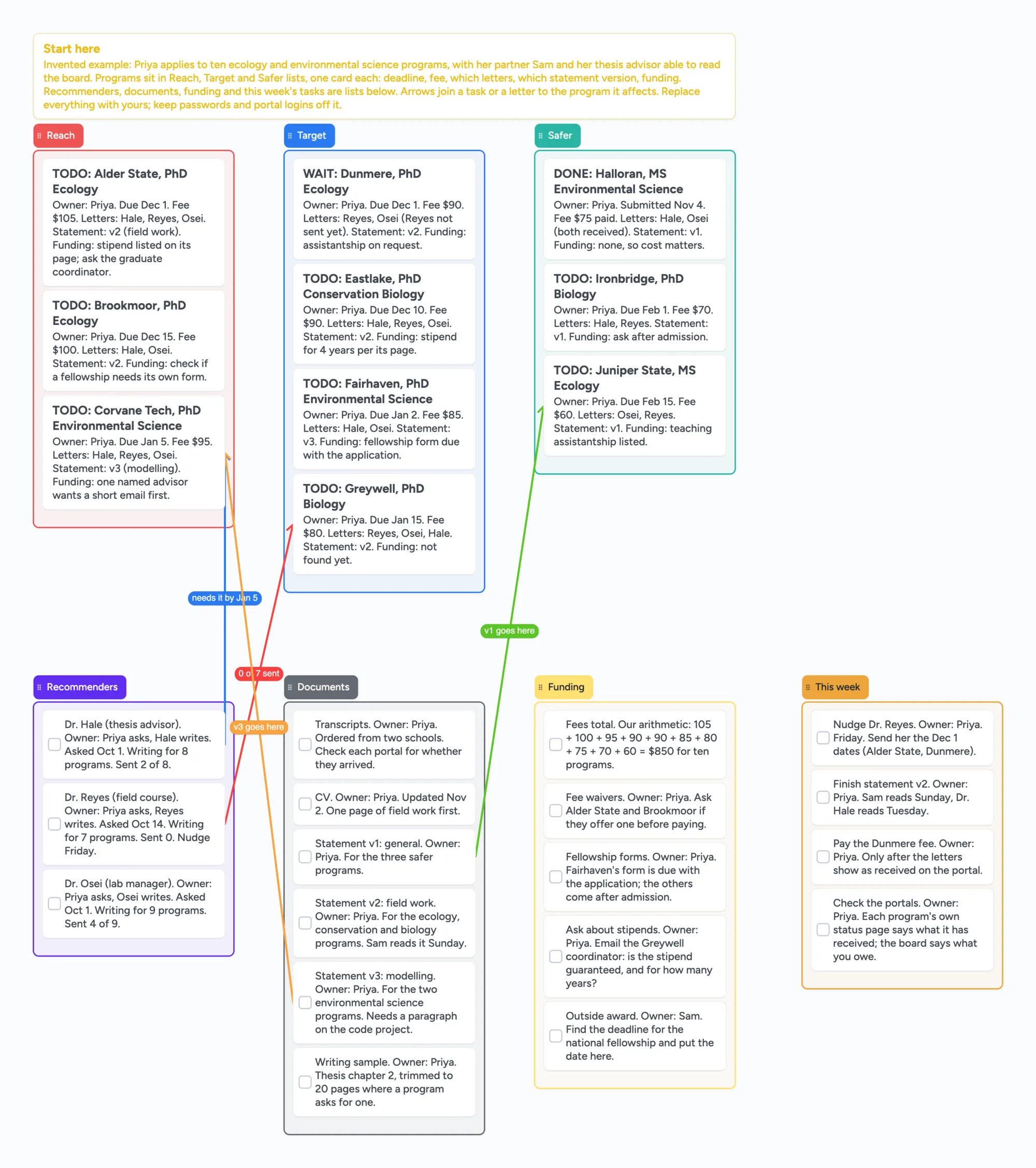
This is for an adult applying to a handful of master's or PhD programs, with a partner, an advisor or a mentor who reads along. It has a list each for reach, target and safer programs, with a card per program that names the deadline, fee, which letters, which statement version and what funding to ask about. Beside them sit lists for recommenders, documents, funding and this week's tasks, and arrows join a letter or a document to the program it affects. It is a planning board, not an application service. It doesn't submit anything, remind anyone of a deadline, store logins or read your statement; each program's portal and a spreadsheet do their own jobs, and the next section says where they are better. Use the board for the part around them: what you still owe, who is writing what, and which program is waiting on which person.
Updated
The short answer
- What it is: one board with a list each for reach, target and safer programs, and lists for recommenders, documents, funding and this week. Each program card says "Owner:" and a first name and carries the deadline, fee, letters, statement version and funding question. DONE, WAIT or TODO starts the title.
- What it isn't: no application portal, no deadline alerts, no statement feedback, no odds of getting in. Keep portal logins in a password manager, never on a board that anyone with the link can read.
- Arrows: an arrow can join a card in one list to a card in another, takes a caption and its own colour, and stays attached when a card is reordered. The example joins a recommender who hasn't sent a letter to the program that is waiting for it.
- Free plan: the example is 36 of your 150 free items (29 cards and 7 lists, our count). Arrows and pen strokes don't count. Pro is $5/mo billed yearly.
What this board doesn't do, and where portals and spreadsheets are better
Read on November 11, 2026 from each page named. Penn State's Graduate School page "After Applying" says its status page lets you check whether your references have been received, whether official transcripts and test scores have been received, upload extra materials and see deadlines for official transcripts. That page, on each program's own side, is the record of what a school has actually received; nothing on this board connects to it, so check each portal and then change the card here.
The University of St. Thomas career office offers a downloadable Excel tracker for graduate applications. Its page lists columns for school and deadlines, application fees and payment status, GRE or subject test information, transcripts and prerequisites, letters of recommendation (number needed, sent, notes), statement of purpose or writing sample progress, resume updates, funding resources and an optional portal login column. It says faculty advisors can see where a student stands, and it works for any field. Notion's template marketplace lists two grad school application trackers, "Graduate School Applications Tracker" and "Grad school application tracker", both priced at 0 USD in their page data. A spreadsheet is the better tool for sorting by deadline and adding up fees; this board does neither.
Where these tools win
To see what a school has received, use that program's portal. To sort every program by date and total the fees, use a spreadsheet such as the St. Thomas Excel tracker, or a Notion template. Use this board first, or next to them, when you, a letter writer and someone who reads your plan need one picture of what each program is waiting on and who owns it.
How to run an application cycle on the board
- Start with one card per program. Put the deadline, fee, which letters, which statement version and the funding question on it. The example sorts ten programs into reach, target and safer lists; the programs are invented, and the sorting is yours.
- Name an owner on every card. Write "Owner:" and a first name on the first line. Most cards are yours; a partner can own the outside-award search and an advisor can own a read of the statement.
- Start each title with DONE, WAIT or TODO. Change the word as things move. Nothing sorts by it, so you scan for it by eye.
- Give each recommender a card. Write who asked, when, how many programs they write for and how many are sent. The example's cards show 2 of 8, 0 of 7 and 4 of 9 sent; the numbers are invented.
- Keep one card per statement version. The example has a general one, a field-work one and a modelling one, and each says which programs it goes to. The board doesn't write or review them; it only says which version goes where.
- Join a blocker to what it blocks. The example draws an arrow captioned "0 of 7 sent" from a letter writer who hasn't sent anything to the program waiting on it, and one captioned "v3 goes here" from a statement version to its program.
- Hold a weekly pass. One list is this week's tasks. The last card says to check each portal's own status page and change the board to match.
Applying to medical, dental or vet school?
The same lists work for any cycle with several schools and several letters: a card per school, a list of letter writers and a list of documents. For osteopathic medicine, AACOM publishes its own Med School Application Organizer, a Google Sheets spreadsheet. Its page says each tab has a sample row to get you started, that the link makes a personal copy in your Google Drive after you sign in and choose "Make a copy", and that school-specific details come from its Choose DO Explorer database. That is a better start for an osteopathic cycle than a blank board, because the tabs are already set up and Choose DO Explorer has the school details to fill them. This board has no school database either, so you type every detail into a card yourself.
This board vs a program portal vs a spreadsheet
| Tool | What we read (Nov 11, 2026) | Good at | Not what you get |
|---|---|---|---|
| Instaboard board | Free: 5 boards, 150 items. Pro $5/mo billed yearly | Who owns what, which program waits on which letter, a reader on one link | Submitting, deadline alerts, sorting, sums |
| Program portal (Penn State) | Status page: references, transcripts and test scores received; transcript deadlines | What that school has actually received | Any other school's status |
| St. Thomas Excel tracker | Downloadable Excel; columns for deadlines, fees, tests, letters, statement progress, funding | A row per program with the columns already set | Arrows, or a shared link |
| Notion templates | Two grad school application trackers, both listed at 0 USD | A ready template to copy into Notion | A free-form board of cards and arrows |
| AACOM Med School Application Organizer | Google Sheets copy with a sample row per tab; school details from Choose DO Explorer | An osteopathic medicine cycle, with the tabs already set up | Anything beyond that cycle |
Swipe the table sideways to see every column.
From each tool's own pages, read November 11, 2026. We name no tool as the best; they do different jobs.
Limits of the free plan for applications
- Items. Each card and each list is 1 of your 150 free items, across all your boards. The example is 29 cards and 7 lists, 36 in all (our count). The same layout for twenty programs is about 46 items (our arithmetic). Arrows and pen strokes don't count.
- Boards. The free plan includes 5 boards. Making your own copy of the example uses 1 of them; a card that opens its own board uses another, so the example keeps everything on one board.
- Photos. 3 images per board. The example has none. On the web a link card's preview picture no longer counts toward the 3, but the iPhone, iPad and Android apps still count it until their next update.
- No reminders, no due-date alerts, no sorting by date. The board doesn't tell anyone a deadline is close. Keep dates in your calendar too. Card colour is the border and text only.
- No submitting and no portal logins. It doesn't connect to any school, and passwords should never go on it.
- No statement or admissions advice. It doesn't read your statement or estimate odds. The reach, target and safer lists are your own sorting.
- Writing needs a free sign-in. An advisor or partner who joins by link or code can add cards and arrows, and the board counts as one of their 5.
Start from the ready board
It opens in your browser in a few seconds, with nothing to install. Sign in for free when you want to save it and share it.
Questions
Is there a free grad school application tracker template?
Yes. Open the board, replace the example applicant and programs with yours and set Share to "Anyone with the link can edit" if someone else needs to write on it. It is a board of cards, lists and arrows, not a sortable spreadsheet.
Can I submit applications from the board?
No. It doesn't connect to any school. Apply in each program's portal and mark the card DONE here.
Is it safe to put my program list on a shared board?
Anyone with the link can read it, so leave out passwords, scores and transcripts. Share the link only with people you trust.
Will it remind me before a deadline?
No. The board has no reminders or alerts. Put each date in your calendar as well.
How many cards fit on the free plan?
Each card and each list is one item of the 150 across all your boards. The example is 36. That is our arithmetic. Arrows are free.
Sources
- Penn State Graduate School: After Applying (read November 11, 2026)
- University of St. Thomas Career Development: Graduate School Application Tracker (read November 11, 2026)
- Notion Marketplace: Graduate School Applications Tracker (read November 11, 2026)
- Notion Marketplace: Grad school application tracker (read November 11, 2026)
- AACOM: Med School Application Organizer (read November 11, 2026)
Related
A college application board: schools, essays, recommenders and deadlines in one place
Plan college applications on one shared board: reach, match and safe schools, essays, recommenders, deadlines and aid forms, with a parent or counselor able to read it. Free ready board.
Plan a thesis on one board you can share with your advisor
An editable thesis planning board: a list per chapter, literature clusters, advisor feedback and the core argument on one shared board you send to your advisor.
An office holiday party planning board: who owns what, in one place
Plan the office holiday party with a small committee on one shared board: budget, venue, food, gift swap rules and the evening. Free ready board, and where SignUpGenius does more.