For small teams who outgrew monday.com's free plan
A free monday.com alternative for a small team, and where monday.com is better
monday.com's support pages say the Free plan has "a limit of two seats" and "3 boards for the entire account", and that paid plans "start at a minimum of 3 seats" (support.monday.com, read November 20, 2026). Instaboard Free has 5 boards and no cap on collaborators, but only 150 items across your account and no columns, automations or dashboards. If your team lives in status columns, formulas and automations, stay on monday.com. If three people mostly need one shared board of cards by status, here is how the two compare.
Opens in your browser. Anyone can view; a free sign-in lets you edit.
Updated
The short answer
- monday.com Free: 2 seats, 3 boards for the whole account, 200 items, 500 MB, no guests or viewers, no automations or integrations (monday.com support, "Understanding the Free Plan", read November 20, 2026). The pricing page lists Free as "Up to 2 seats".
- monday.com paid: plans start at 3 seats and then go up in multiples of 5 (support, "Plans and pricing"). At the 10-seat view the pricing page lists Basic at $9 per seat a month, Standard $12 and Pro $19, billed annually.
- Instaboard Free: 5 boards and 150 items across your account. Each card and each list is 1 of the 150; pen strokes, sections and arrows don't count. The example board is 45 of the 150 (our arithmetic). Anyone with the link can read; writing takes a free sign-in. Pro is $5 a month billed yearly ($59.99 a year), or $7.99 monthly.
- monday.com is better at columns, formulas, automations, timeline and calendar views, dashboards and integrations. Instaboard has none of these.
When monday.com is the better choice
- You track data, not just cards. monday.com boards have columns (the pricing page lists 8 column types on Free; the Free Plan support article says the Formula, Time Tracking, Progress Tracking and Files columns are not on it). Instaboard cards hold a title and text, with no columns, sorting or formulas.
- You want automations. The Free plan has none. Standard lists 3 workflows and 250 automation actions a month; Pro lists 20 workflows and 25,000 (pricing page, read November 20, 2026). Instaboard has no automations or integrations.
- You plan on a calendar. Timeline, Gantt and Calendar views are on Standard in monday.com's pricing page. Instaboard has a Calendar view for cards, but no Gantt and no dependencies.
- You need more than 150 items. monday.com Free starts at 200 items, and its support page says you earn 100 more for each person you refer. Instaboard Free stops at 150 across your account.
- You report to other people. monday.com has dashboards on Free, each showing 1 board (support page). Instaboard has none.
If that is how your team works, stay with monday.com.
What monday.com's own pages say about the Free plan
- Support, "Understanding the Free Plan" (read November 20, 2026): "The Free Plan has a limit of two seats on the account." "You can't invite guests or viewers on this plan." "The Free plan has a limit of 3 boards for the entire account." "You are limited to 200 items" across all boards, plus 100 items for each person you refer. 500 MB of storage. "No automations or integrations".
- The same article says you reach the Free plan by starting a trial first: when it ends you can choose to move to the free plan, and you must have no more members than the free plan allows.
- Support, "Plans and pricing for monday.com" (read November 20, 2026): "Our pricing plans start at a minimum of 3 seats, and then ascend in multiples of 5." A team of 4 picks the 5-seat option and a team of 6 the 10-seat option.
- Pricing page (monday.com/pricing, read November 20, 2026, at the 10-seat view, billed annually): Free "Up to 2 seats" with "Up to 3 boards" and "Up to 3 Docs". Basic $9 per seat a month with unlimited items and unlimited free viewers. Standard $12 per seat adds guest access and automations. Pro $19 per seat.
- Support, "Pricing for guests" (read November 20, 2026; the article shows "Last modified on July 10, 2026"): guests are not included on Basic; on Standard "every 4 guests count as 1 billed seat", so up to 3 guests are free.
Ten people on Basic, billed annually, is $90 a month, so $1,080 a year (our arithmetic: 10 x $9 x 12, at the 10-seat view; the page prices other seat counts separately, which we did not read). One person is still billed for 3 seats. Pro on Instaboard is $59.99 a year, and the people you invite join free.
What people on r/mondaydotcom say
Each is one person's account.
- u/[deleted], March 22, 2024: after the trial they hit "the Free plan boards limit" because Doc pages count as boards, and found no individual plan: "The minimum is 3 seats."
- u/davsch76, August 14, 2024: "I am a solo operation and they require a 3-seat minimum."
- u/GKGator, January 4, 2026: "I am shocked to see a 3 person minimum subscription." Another reply in the thread: "I pay for 3 seats, even if I am the only user." A third: "Just pay for 3 users."
None of them is a plan change. The limits are the same ones monday.com's pages print today.
monday.com Free and Instaboard Free side by side
monday.com rows are from its own pages, read on November 20, 2026. Plans change, so check the page before you commit.
| monday.com Free | Instaboard Free | |
|---|---|---|
| People | 2 seats; no guests or viewers | No cap on collaborators; anyone with the link can read, and they sign in free to write |
| Boards | 3 for the whole account (Docs count, per one Reddit report) | 5 boards |
| Items | 200, plus 100 per referral | 150 across your account (cards and lists count; pen strokes, arrows and sections don't); 3 images and 1 file per board |
| Status | Not read for Free | One list per status; drag a card between lists |
| Columns, formulas, dashboards | 8 column types; formula, time tracking, progress and files columns not on Free; dashboards from 1 board each | None: a card has a title and text |
| Automations, integrations | None on Free | None |
| Video call on the board | Not listed on its pricing page (as of November 20, 2026) | Free calls up to 60 minutes with a warning 10 minutes before the end; calls need a free sign-in; no recording |
| Paid, as listed | Minimum 3 seats, then multiples of 5; Basic $9 per seat a month at the 10-seat view, billed annually | Pro $5 a month billed yearly ($59.99 a year), or $7.99 monthly; the people you invite join free |
| Import | Not read | No monday.com import; PDF import opens a PDF as pages you can write on |
Swipe the table sideways to see every column.
monday.com sources: support.monday.com Understanding the Free Plan, Plans and pricing for monday.com, and monday.com/pricing, all read November 20, 2026.
When Instaboard fits better
- Three or more people, no budget yet. Free monday.com holds 2 seats; on Instaboard nobody needs a paid seat to read or write.
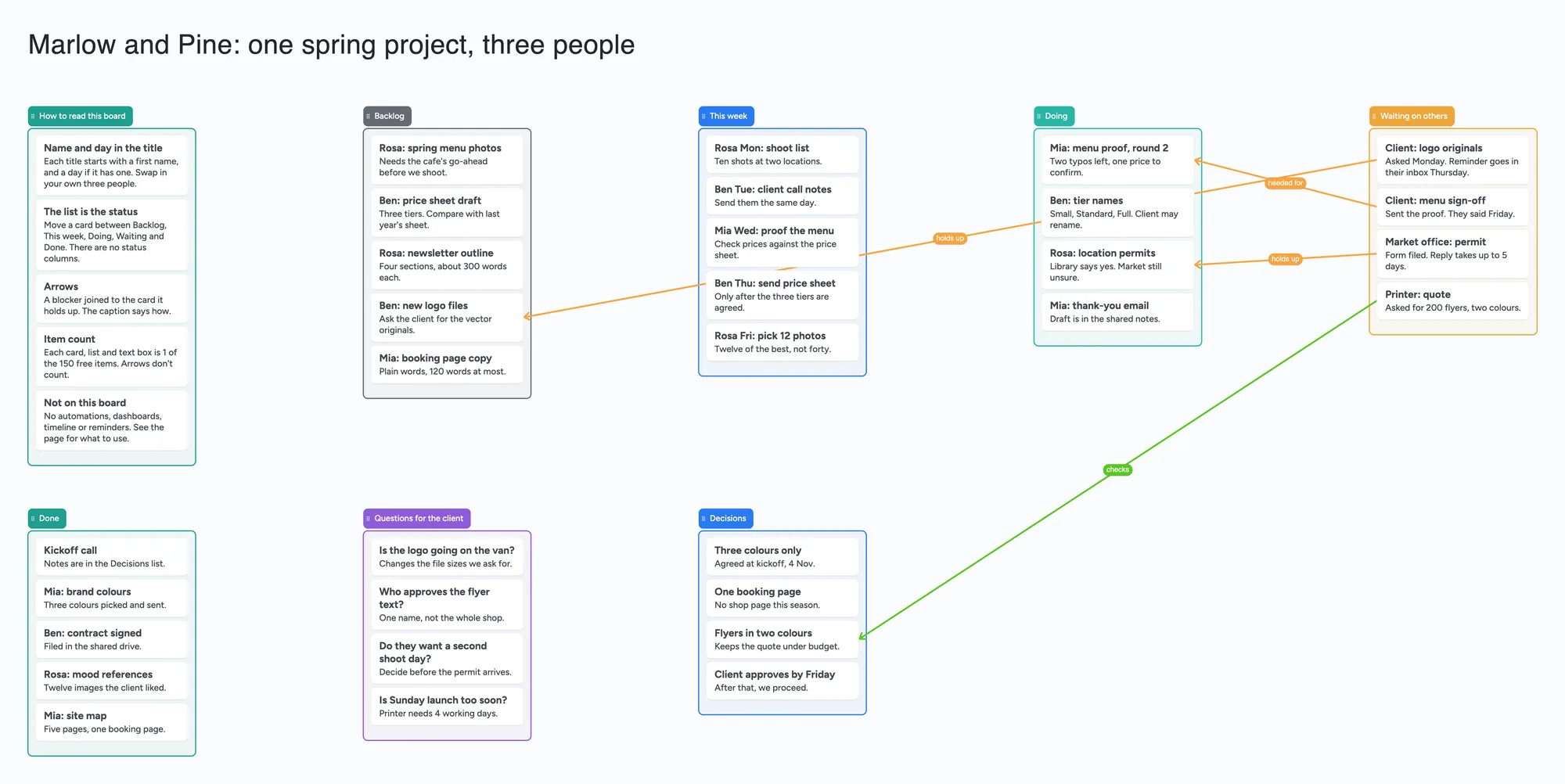
- You mostly move cards by status. Backlog, This week, Doing, Waiting, Done: one list each, and the board is one screen you can pan across.
- Clients or helpers need to see it. On Free monday.com you can't invite guests or viewers. On Instaboard they open the link; to write they sign in free.
- You want to talk while you work. Start a call on the board; everyone signs in free to join.
- You sketch as well as list. The pen is pressure-sensitive, and pen strokes don't count toward the 150 items.
monday.com alternatives in 2026: which one for which need
We make Instaboard, so it is in this table. There's no ranking: each row says what it is for and where it beats us. Facts were read on each tool's own pages on the dates in the note.
| Tool | Free plan and price | Where it is better than Instaboard | Where Instaboard fits better |
|---|---|---|---|
| Trello | Free: up to 10 collaborators per Workspace. Standard $5 per user a month billed annually | A Calendar view (on Premium, per Trello's pricing page as read for the Trello compare page) and Power-Ups | More than 10 people on one free board, a pen and a call on the board |
| Asana | Personal free plan: 2 users. Starter from $10.99 per user a month billed annually (2-seat minimum) | Due dates, alerts and dependencies, which Instaboard lacks | Free for a third person, and no seat minimum on Pro |
| Notion | Free for one person; added people join as owners and hit the 1,000-block cap | Databases with views, wikis and docs in one place | A board you can see all at once, and a call on it |
| Instaboard (us) | Free: 5 boards, 150 items across your account, 3 images and 1 file per board. Pro $5 a month billed yearly | - | Opens in any browser and in the iPhone, iPad and Android apps; anyone can view by link, writing takes a free sign-in; free calls up to 60 minutes |
Swipe the table sideways to see every column.
From the Trello, Asana and Notion compare pages on this site, each read on its own dates there. See [Trello alternatives](/compare/trello-alternatives), [Asana alternatives](/compare/asana-alternatives) and [Notion alternatives](/compare/notion-alternatives).
What this project board can't do
- 150 items on the free plan, across your account. The example board is 8 lists and 36 cards plus a title text box, 45 items. Three boards like it are 135, and a fourth passes 150 (our arithmetic). Pro removes the limit.
- No columns, due dates, reminders, automations or dashboards. The person and the day are words at the start of a card's title.
- No timeline or Gantt view. Waiting cards say who and when in their text.
- No monday.com import. To bring work over, retype the cards you need, or export a board view as a PDF and use Import PDF here: it opens as pages you can write on, and the items stay part of the picture.
- 5 boards and 3 images per board. The example board has no images.
- Writing needs a free sign-in. Someone who isn't signed in can read the board but can't change it. If you are under 18, check with a parent or your school before you sign up to any tool.
How to run a small project on the board
- Open the ready board and read the How to read this board list.
- Share it. In the Share menu, choose "Anyone who joins can edit"; new boards start as "Anyone who joins can view". Send the link, or the 4-digit join code.
- Everyone signs in free (Google, Apple or email). What they add shows up on your board within a few seconds.
- Start each card with a first name, and a day if it has one: "Ben Thu: send price sheet".
- Move cards between status lists as the work moves, and put what you are waiting on in Waiting on others.
- Draw an arrow from a blocker to the card it holds up, and type how in the caption. Arrows don't count toward the 150.
- Keep the board as the record. The board counts as 1 of each person's 5 free boards, and the cards they add count toward their own 150.
Selected cards or lists can be copied as an image with "Copy as image" and pasted into a doc or chat.
Start from the ready board
It opens in your browser in a few seconds, with nothing to install. Sign in for free when you want to save it and share it.
Questions
Is monday.com free?
Yes, with limits. monday.com's support page says the Free plan has a limit of two seats, 3 boards for the whole account, 200 items and no guests, viewers, automations or integrations (read November 20, 2026).
Does monday.com have a free plan for individuals?
There is a Free plan for up to 2 seats. For paid plans, monday.com's support page says plans start at a minimum of 3 seats, so a single person pays for 3 seats. Several people on r/mondaydotcom describe that minimum as the reason they left.
How many boards can I have on monday.com Free?
Three, for the whole account. One user reported in 2024 that Docs count as boards, although the pricing page lists "Up to 3 Docs" separately, so check how your account counts them.
Is there a free alternative to monday.com?
Yes. Instaboard Free keeps 5 boards, with 150 items across your account and no cap on collaborators. Trello Free allows up to 10 collaborators per Workspace. None of the three has monday.com's columns and automations on a free plan, so for data-heavy work monday.com can still be the better choice.
Can I invite a client or a guest on monday.com Free?
No. Support says you can't invite guests or viewers on the Free plan. Guests are included on Standard, where every 4 guests count as 1 billed seat. On Instaboard anyone with the link can read; writing takes a free sign-in.
Can someone edit an Instaboard board without an account?
No. Anyone with the link can read it, but writing needs a free sign-in with Google, Apple or email. There is no workspace to join, and the board counts as 1 of their 5 free boards.
Can I import a monday.com board into Instaboard?
Not as editable items. Export a board view as a PDF and use Import PDF in Instaboard: it opens as pages you can write and draw on, but the items stay part of the picture.
Is Instaboard free?
Yes. The free plan includes 5 boards, 150 cards and items across your account (pen strokes, arrows and sections don't count), 3 images and 1 file per board, unlimited collaborators and video calls up to an hour. Pro is $5 a month billed yearly ($59.99 a year), or $7.99 monthly, and the people you invite join free.
Sources
- monday.com Support: Understanding the Free Plan (2 seats, 3 boards, 200 items, no guests or viewers, 500 MB; read Nov 20, 2026)
- monday.com Support: Plans and pricing for monday.com (minimum 3 seats, then multiples of 5; read Nov 20, 2026)
- monday.com Support: Pricing for guests (guests not on Basic; every 4 guests count as 1 billed seat on Standard; page last modified July 10, 2026; read Nov 20, 2026)
- monday.com pricing (Free up to 2 seats and 3 boards; Basic $9, Standard $12, Pro $19 per seat a month at the 10-seat view, billed annually; read Nov 20, 2026)
- r/mondaydotcom: Small Rant: Free Plan is VERY limited, Mar 22, 2024 (one user's account)
- r/mondaydotcom: Monday.com Pricing, Aug 14, 2024 (replies are single users' accounts)
- r/mondaydotcom: Any Suggestions? Subscription Has A Minimum of Users, Jan 4, 2026 (single users' accounts)
Related
A Trello alternative for families, classes and groups bigger than 10
Trello's free plan stops at 10 collaborators per Workspace, and boards go view-only past it. An honest comparison, plus a free alternative with unlimited collaborators, drawing and calls.
Asana's free plan is now 2 users. Here's what small groups can do.
Asana cut its free plan to 2 users, and older free teams lost their 10 seats on October 15, 2026. What changed, who should pay, and a free alternative for families, clubs and student groups.
A Notion alternative for planning with other people
Notion is unlimited for one person, but a free workspace with 2 or more members gets 1,000 blocks in total. An honest comparison and a visual, shared alternative with drawing and calls.
A free Milanote alternative for student projects, and where Milanote is better
Milanote's free plan stops at 100 notes, images or links. What Instaboard's free plan gives a student project, where Milanote is better, and a ready project board.