For filmmakers planning a short with a partner
A short film pre-production board: who owns what, on one screen
This is for two or three people getting a short film ready to shoot: a list for the script, cast, crew, gear, permits, locations, shoot days and budget notes, and an owner's name on every card. It is a planning board, not production software. It doesn't break down a script, build a strip schedule, make call sheets or add up a budget for you. StudioBinder, Studiovity, Yamdu and Celtx do those, and the next section says where. Use the board for the part before and around them: who is doing what, what is still open, and which permit a location is waiting on, in a place a director and a producer can both open from one link.
Updated
The short answer
- What it is: one board with a list for each job (script, cast, crew, gear, permits, locations, shoot days, budget notes, open questions) and a card for each thing to do. Every card says "Owner:" and a first name, and DONE, WAIT or TODO starts the title.
- What it isn't: no script breakdown, no strip schedule or day-out-of-days, no call sheets and no budget maths. The budget list is cards you add up yourself. StudioBinder, Studiovity, Yamdu and Celtx are the tools for those jobs.
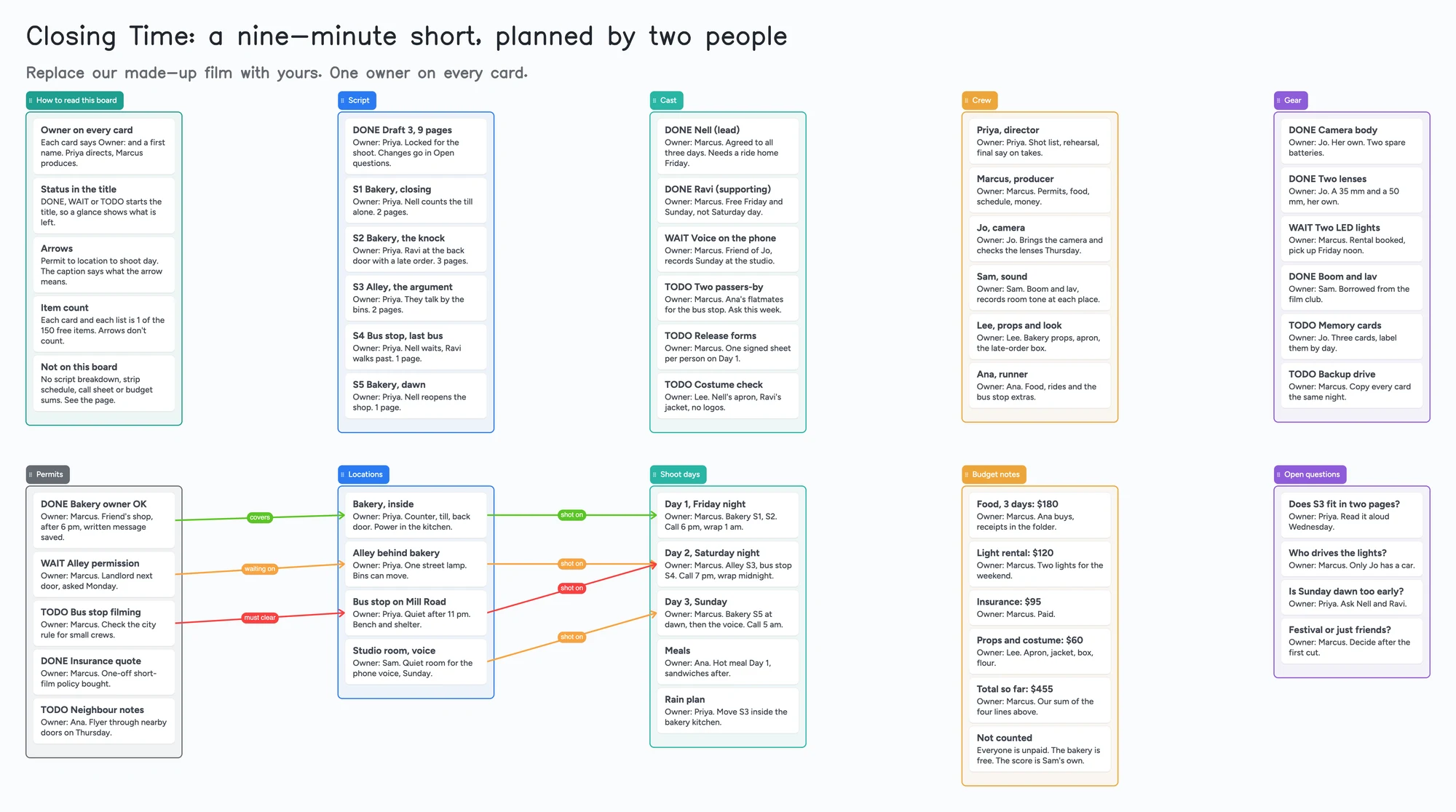
- Arrows: an arrow can join a card in one list to a card in another, takes a caption and its own colour, and stays attached when a card is reordered or a list moves. The example runs permit to location to shoot day, so you can see that the alley permission is what Saturday is waiting on.
- Free plan: the example is 63 of your 150 free items (53 cards and 10 lists, our count). Arrows, sections and pen strokes don't count. A feature film, or a second short on the same account, passes 150 (Pro is $5/mo billed yearly).
What this board doesn't do, and where StudioBinder, Studiovity, Yamdu and Celtx are better
Read on November 11, 2026 from each tool's own pages. StudioBinder's pricing page says its Free plan is "free forever" and covers "all of pre-production from scripting to call sheets", and lists script breakdowns, stripboards, call sheets, shot lists, storyboards, production calendars and task boards among its paid-plan features. Its own guide to script breakdowns describes the job: tag every cast member, prop, costume, vehicle and stunt in a scene, because the breakdown feeds the shooting schedule and the budget.
Studiovity's home page lists AI script breakdown, scheduling, call sheets, shot lists, storyboards, cast and crew management and day-out-of-days reports. Its pricing page lists a monthly plan for short-term productions with 2 team members at $20 a month, and a Black Friday sale banner was running when we read it, so check the price on the day. Yamdu's home page describes script import, breakdowns, a stripboard built by dragging scenes, day-out-of-days reports, call sheets and budgeting, and does not show a price. Celtx's pricing page lists breakdown, cast and crew, schedule, budget and call sheets as "Production Planning Tools", shown on its Team card and as an optional add-on in its feature table.
Where these tools win
If you need a script breakdown that feeds a schedule, a day-out-of-days report, call sheets sent and tracked, or a budget that adds itself up, use StudioBinder, Studiovity, Yamdu or Celtx. Use this board first, or next to them, when a small crew needs one place that shows who owns each open item and what each location is waiting on.
How to plan a short film on the board
A thread of about twenty replies in r/filmmaking (February 2025) lists the order one filmmaker follows: script, boards, shot list, budget, location scouting, schedule, casting, crew, contracts. It is one person's list, not a rule. The board doesn't force that order. It gives every one of those a list.
- Start with the script list. One card per scene with its page count, as in the example (nine pages in all). Put the draft number in the first card so nobody shoots from an old one.
- Name an owner on every card. Write "Owner:" and a first name on the first line. A card with no owner is the first thing to fix. Two people can still talk about a card; one of them has to be responsible for it.
- Start each title with DONE, WAIT or TODO. Change the word when the status changes. Nothing sorts by it, so you scan for it by eye: that is the trade for a board that takes a minute to learn.
- List permits and locations separately, then join them. Draw an arrow from each permit card to the location it covers and caption it ("covers", "waiting on", "must clear"). Colour the arrows that block you red. Then draw an arrow from each location to the shoot day it is used on.
- Keep shoot days short. The example has three, each with a call time, the scenes, and an owner. A rain plan and a meals card sit in the same list.
- Put money on the board as plain cards. One line per cost with the amount, and a total card you update by hand. The example's four costs add to $455 (our arithmetic). It is a note, not a budget tool.
- Share it. In the share menu set Share to "Anyone with the link can edit" (new boards start view-only). A producer or director signs in free and writes live, and you each see the other's changes within seconds. The 4-digit join code expires after 2 hours of inactivity.
When the director and the producer work from different places
The usual shape of a small short is two people who decide and a few who help. One thinks about the film, one about the weekend. The board is the place they meet without a meeting: the director reads the permits list and the producer reads the script list, and an open question goes in the last list instead of a message that scrolls away. Free calls on the board run up to 60 minutes per call, with a warning 10 minutes before the end. Calls need a free sign-in for everyone, aren't recorded, and Pro has no limit.
If you are still writing the film together, see outlining a story with a co-writer and outlining with index cards. If you came from Milanote's free limit, see the Milanote comparison for writers and filmmakers.
This board vs StudioBinder vs Studiovity vs Yamdu vs Celtx vs Storyflow
| Tool | What we read (Nov 11, 2026) | Good at | Not what you get |
|---|---|---|---|
| Instaboard board | Free: 5 boards, 150 items. Pro $5/mo billed yearly | Who owns what, what a location is waiting on, a partner on the same link after a free sign-in | Script breakdown, schedule, call sheets, budget sums |
| StudioBinder | Free plan listed as "free forever"; paid plans add breakdowns, stripboards, call sheets, shot lists. Prices not quoted | A script breakdown that feeds the schedule; call sheets; shot lists | A loose board where you move things as you like |
| Studiovity | Monthly plan: 2 team members, $20/mo (a Black Friday banner was running; check the day's price) | AI script breakdown, scheduling, call sheets, budget, day-out-of-days | A free-form board |
| Yamdu | Price not shown on its home page | Stripboard, day-out-of-days, call sheets, budgeting; its page names film, TV, commercial and documentary productions | A quick sketch for two people |
| Celtx | Production Planning Tools on the Team card, optional add-on in its table; prices not read | Writing and production planning in one place | A board you open without a plan |
| Storyflow | "Paid-only during early access"; Free plan "launches before the end of 2026"; anyone invited by a paid member joins free | References and stills on a canvas, AI assistant | Free for the person who starts the board, today |
Swipe the table sideways to see every column.
From each tool's own pages, read November 11, 2026. Where a page showed a sale banner or no figure, we say so instead of quoting a settled price.
Limits of the free plan for a film
- Items. Each card and each list is 1 of your 150 free items, across all your boards. The example is 53 cards and 10 lists, 63 in all. Arrows, sections and pen strokes don't count.
- A feature, or a second short, passes 150. Our arithmetic: the example is 63 for a nine-minute short, so a second film on the same account leaves about 87 items. A feature with a hundred scenes won't fit on the free plan; Pro is $5 a month billed yearly.
- Boards. The free plan includes 5 boards. A card that opens its own board uses one of them, so the example keeps everything on one board.
- Photos. 3 images per board. The example has none. Use link cards for location photos or lookbooks; on the web a link card's preview picture no longer counts toward the 3, but the iPhone, iPad and Android apps still count it until their next update.
- No reminders, no due-date alerts, no sorting by status. The board doesn't tell anyone that a permit is late. Card colour is the border and text only.
- No PDF of the whole board. You can copy a selection as an image to paste into a message.
- Writing needs a free sign-in. A partner who joins by link or code can add cards and arrows, and the board counts as one of their 5.
Start from the ready board
It opens in your browser in a few seconds, with nothing to install. Sign in for free when you want to save it and share it.
Questions
Is there a free short film pre-production template?
Yes. Open the board, replace the example film with yours and turn on "Anyone with the link can edit" if your producer or director needs to write on it. It is a board of cards, lists and arrows, not a breakdown or schedule template; for those, StudioBinder lists a free plan.
Can it make a call sheet or a shooting schedule?
No. It has no script breakdown, strip schedule, day-out-of-days or call sheet. Use StudioBinder, Studiovity, Yamdu or Celtx for those, and use the board for who owns what.
Can my producer and director both work on it?
A person who opens the link and signs in free can write on it live; you each see the other's changes within seconds. The board counts as one of their 5 free boards, and the cards they add count toward their own 150 items.
How many cards fit on the free plan?
Each card and each list is one item of the 150 across all your boards. The example short is 63. That is our arithmetic. Arrows are free.
Does it work for a documentary or a music video?
The lists work for any small shoot, but the example and the wording are a scripted short. Swap the script list for your interview or shot list.
Sources
- StudioBinder: pricing (read November 11, 2026)
- StudioBinder: Breaking Down a Script (read November 11, 2026)
- Studiovity: home and pricing (read November 11, 2026)
- Yamdu: home (read November 11, 2026)
- Celtx: pricing (read November 11, 2026)
- Storyflow: pricing (read November 11, 2026)
- r/filmmaking: pre-production thread (February 2025, replies are single accounts)
Related
Outline a novel or screenplay with index cards, on a board you can share
Outline a novel or screenplay on digital index cards: one list per act, 40 short cards, subplot arrows, a co-writer on the same board. Free to start; TV pilot too.
Outline a story with a co-writer, on one board you both edit
Outline a story with a co-writer on one shared board: ideas lists for each of you, an agreed outline, a decide-by list. A filled example to copy. Not a drafting tool.
A free Milanote alternative for student projects, and where Milanote is better
Milanote's free plan stops at 100 notes, images or links. What Instaboard's free plan gives a student project, where Milanote is better, and a ready project board.