For online tutors
A Bitpaper alternative for tutors, now that free is join-only
Since April 21, 2025, a free Bitpaper account can only join papers someone else made. Creating papers takes the $15-a-month plan, and if it lapses, every paper you made turns read-only. If you teach a few students a week, that's $180 a year for a whiteboard. Here is what Bitpaper still does best, what the cheaper options give up, and how to move your lessons without losing them.
Updated
The short answer
- Bitpaper Free can join papers and calls but can't create papers. The Individual plan is $15 a month, with a 30-day free trial.
- When a Bitpaper plan ends, your papers stay viewable but become read-only. Export the ones you still need as PDFs while you can edit them.
- Instaboard Free gives you 5 boards, a pen that doesn't count toward any item limit and video calls up to an hour. Pro is $5 a month billed yearly, and your students join free.
What changed at Bitpaper
On April 21, 2025, Bitpaper replaced its Basic, Advanced, Pro and Power plans and its paper and call credits with one tutor plan: $15 a month for unlimited papers and calls. Bitpaper says it had "never run for profit" and needed a sustainable model. Student accounts stayed free, but free accounts can no longer create papers, and papers they had already made became read-only.
- Free: join papers and calls that someone else created. No new papers.
- Individual: $15 a month, billed monthly. Unlimited papers, video calls and storage. New users get a 30-day free trial.
- Company: $50 a month plus $1 per paper and $0.20 per call hour, for agencies with several tutors.
- If you cancel: at the end of the billing cycle your account reverts to Free. Your papers stay online and viewable but read-only, and you can't create new ones until you subscribe again.
Using the trial? Plan for day 31
Lessons you build during the 30-day trial follow the same rule: if you don't subscribe, they become read-only. Decide before the trial ends whether to subscribe or export what you made.
Bitpaper, Ziteboard and Instaboard side by side
| Bitpaper | Ziteboard | Instaboard | |
|---|---|---|---|
| Free plan | Join papers and calls only | 3 boards you own, 3 pen colors | 5 boards; pen strokes don't count toward the 150-item limit |
| Paid price | $15 a month ($180 a year) | Pro about $9 a month | Pro $5 a month billed yearly ($59.99), or $7.99 monthly |
| Old boards if you stop paying | Viewable, but read-only | Free keeps 3 boards you own | Nothing locks; Free just can't create a sixth board or add past 150 items |
| Student needs an account to write | Student accounts are free | Yes, sign-up and log-in (no-login guests are a paid add-on) | Yes, a free sign-in; anyone can view without one |
| Video call built in | Yes, unlimited on the paid plan | On Pro | Yes: up to 1 hour on Free, no limit on Pro |
| PDF worksheets | Yes | Free imports the first page only | Yes, each page becomes a page you write on |
| Pen | Freehand pen and tablet support | Shape recognition; highlighter on Pro | Pressure pen, highlighter, hold to straighten, stylus side-button erase, laser pointer |
| Apps | Browser on any device | Browser on any device | Browser, plus iPad, iPhone and Android apps |
Swipe the table sideways to see every column.
Bitpaper and Ziteboard facts from their pricing pages, FAQs and feature pages, checked October 27, 2026. Ziteboard sells Pro through PayPal; check its pricing page for your currency.
Where Bitpaper is still the better choice
- Unlimited everything for one flat price. If you teach many students and run long calls every day, $15 covers it all with no limits to watch.
- Classroom controls. Bitpaper lets you lock changes, mute participants and turn on Class Mode so students see only your cursor.
- Agencies. The Company plan has API access and white-labelling, and some tutoring agencies already run their lessons in Bitpaper.
- Chat next to the board. Bitpaper has video, audio, text chat and screen sharing in one place.
- Your existing papers. If you have years of papers there, subscribing keeps them editable. Nothing moves over as an editable board.
If that sounds like your week, stay with Bitpaper.
When Instaboard fits better
- You teach a handful of students. One board per student, kept between lessons. Free covers 5 boards, and drawing never counts toward the item limit.
- You write on an iPad. Instaboard has an iPad app with pressure-sensitive Apple Pencil, and stylus mode keeps your palm from leaving marks.
- You want lessons that stay yours. Nothing turns read-only if you stop paying Pro; on Free you just can't create a sixth board or add past 150 items.
- You teach math. Equation cards, a Desmos calculator, a grid background and a countdown timer for timed practice sit on the same board.
- You want the call on the board. Start a video call right on the board, share your screen, and have your student follow your view.
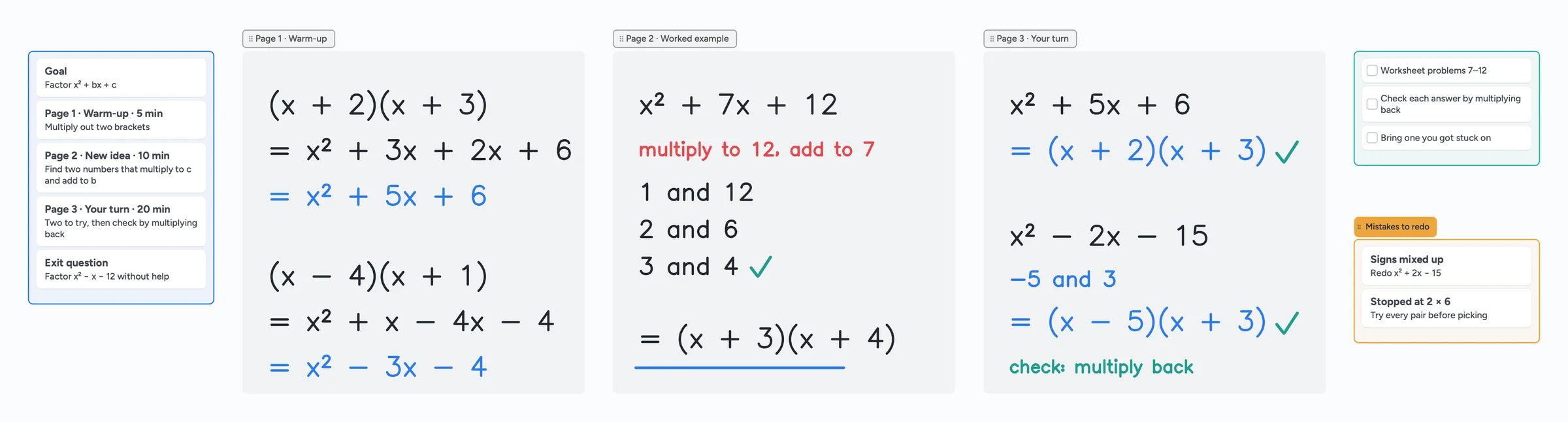
The ready board above lays a lesson out the way a Bitpaper paper does, as pages: sections for the warm-up, the worked example and your student's turn, with the plan, homework and mistakes to redo next to them. For a full walkthrough of a lesson, see our tutoring whiteboard guide.
Moving your lessons from Bitpaper
- Export the papers you still need as PDFs. Bitpaper has PDF export. Do it while your plan or trial is active and the papers are still editable.
- Combine them per student. Merge one student's PDFs into a single file (Preview on a Mac does this), so each student becomes one board.
- Import the PDF into Instaboard. It opens as a board with your pages, and you and your student can write on every page.
- Share the board. Send the link, a QR code or a 4-digit join code. Your student signs in once, for free, and writes on the same board.
What doesn't come over
An exported PDF is a picture of each page. Your old handwriting, text and images can't be edited or moved individually; you write on top of them. Each imported PDF also becomes one of your 5 free boards.
Ziteboard's free plan, briefly
Ziteboard is another browser whiteboard many tutors try after Bitpaper. Its free plan lets you own 3 boards and use 3 basic colors, imports images in low resolution and only the first page of a PDF, and has no audio or video chat. Free boards are public: anyone with the link can open them. To collaborate, both tutor and student register and log in; letting students join without an account is a paid add-on on top of Pro.
What Instaboard doesn't do
- Students sign in to write. Anyone with the link can view, but writing needs a free account with Google, Apple or email.
- No Bitpaper import. Only the PDF comes over, as pages you write on.
- No lesson recording, scheduling or payments.
- The eraser removes whole strokes. Undo is the quickest way to fix the last thing you wrote.
- Free calls end at 60 minutes. Pro has no limit, or keep using Zoom or Google Meet next to the board.
Start from the ready board
It opens in your browser in a few seconds, with nothing to install. Sign in for free when you want to save it and share it.
Questions
Is Bitpaper still free?
Only for joining. A free account can join papers and calls that a paying tutor created, but can't create papers. New users can try the $15-a-month Individual plan free for 30 days.
What happens to my Bitpaper papers if I don't subscribe?
They stay online and viewable, but become read-only at the end of your billing cycle, and you can't create new papers. Subscribing again makes them editable.
Can I move my Bitpaper papers to Instaboard?
As PDFs. Export the papers from Bitpaper, then import each PDF into Instaboard, where it opens as pages you can write on. The old content comes over as a picture, not as editable strokes.
Do my students have to pay?
No. Students join your boards free. To write on a board they sign in once with Google, Apple or email; without signing in they can only view.
Does it work with an iPad and Apple Pencil?
Yes. Instaboard has an iPad app with a pressure-sensitive pen. Many tutors join the call on a laptop and write on the iPad, and the board syncs live between them.
Is Instaboard free?
Yes. The free plan includes 5 boards, 150 cards and items across your account (pen strokes, arrows and sections don't count), 3 images and 1 file per board, unlimited collaborators and video calls up to an hour. Pro is $5 a month billed yearly ($59.99 a year), or $7.99 monthly, and the people you invite join free.
Sources
Related
An online whiteboard for tutoring that works the way you teach
A free online whiteboard for tutoring: pressure-sensitive pen, PDF worksheets, Desmos, equations and a video call on the board. Includes a ready lesson board, setup tips and honest price comparisons.
A Miro alternative for personal use, tutors and families
Miro's free plan keeps only 3 boards editable, and in September 2026 it briefly blocked a fourth board entirely. Where Miro is still the better tool, and a free alternative with more boards, calls on the board and Apple Pencil.
Microsoft Whiteboard alternatives: what to use now that the apps are gone
The standalone Microsoft Whiteboard apps stopped on October 16, 2026. What changed, how to save your boards, and free alternatives for pen users, tutors and teachers, with real free-plan limits.