For novelists, screenwriters and game masters
Character relationship map: a filled template two people can edit
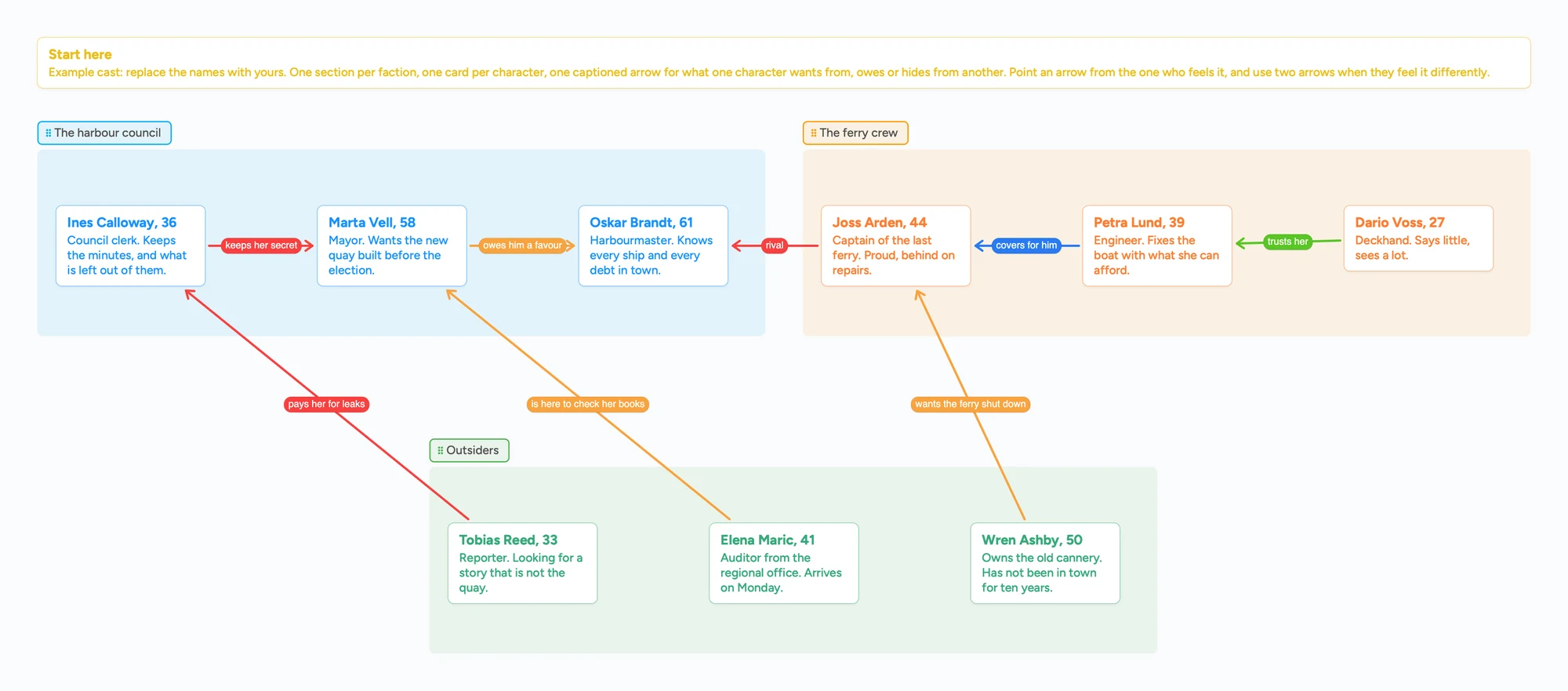
Most character relationship chart makers start blank and work for one person. This page gives you a filled map to copy: a cast of nine in three factions, a card for each character, and arrows with a caption for what one character wants from, owes or hides from another. Open it, swap in your own cast, and send the link to a co-writer, an editor or the players at your table. If you want a free maker with line styles and auto-tidy, Friendify is better at that, and the sections below say where.
Updated
The short answer
- One section per faction, one card per character. Put a line on each card: who they are and what they want.
- Draw an arrow between two characters and type what one wants from the other, like "owes him a favour" or "keeps her secret". When the two feel differently, draw two arrows.
- A co-writer can edit it with you. Set Share to "Anyone with the link can edit" and send the link. They sign in free to write, and the arrows and captions they draw show up for you within seconds.
- Free plan limits, up front: 5 boards, 150 items across all your boards, 3 pictures per board. Every character card is one item.
- Where Friendify is better: it's free with no sign-up, has 14 relationship types with their own line styles, and arranges the chart for you. This board has none of that.
What this map is for, and what it isn't
The map is a board of cards. A faction is a coloured section, a character is a card, and a relationship is an arrow with a caption. You move things by hand. That makes it a good fit for two jobs: a cast you want to keep in front of you while you write, and a cast that more than one person needs to see and change, such as a co-writer's, an editor's or a game master's players'.
It is not a chart maker. It doesn't pick line styles for you, doesn't arrange the chart, doesn't draw family trees in rows, and doesn't keep character sheets. For a fast single-player chart, see Friendify below. For a manuscript with its characters attached, see Campfire.
How to set it up
- Open the ready board above. Replace the example names and one-line descriptions with your cast. Rename the sections to your factions, houses, crews or families.
- Set Share to "Anyone with the link can edit". Without it a co-writer can look but not write.
- Send the link. Whoever opens it can read the whole board without an account. To add or move anything they sign in free with Google, Apple or email.
- Add a card for each character. Put the age or role in the title and the want in one line of text.
- Connect two cards with an arrow and write the caption. Say what the first wants from the second, not just "rivals": "wants her seat on the council" says what happens next. Click the arrow to type the caption and pick a colour from nine. An arrow can join cards in two different sections, and it stays attached when you move a section.
- Look for the empty spaces. Two important characters with no arrow between them are a scene you haven't written.
Keep the yellow "Start here" card until you've replaced the example cast, then delete it.
The free-plan limits, before you build
Instaboard's free plan allows 5 boards and 150 items per account, with 3 pictures and 1 file per board. Each card and each list is one item; arrows, sections and pen strokes don't count. The ready board has 10 cards, so it fits with room for a large cast. Pro is $5 a month billed yearly ($59.99), or $7.99 monthly.
A board someone opens from your link takes one of their own 5 free board slots. A card can open into its own board, but that board counts toward the creator's 5, so keep the whole cast on one board rather than one board per character.
Portraits: three pictures per board on the free plan
The free plan allows 3 pictures per board, so the ready board has none: each character is a text card. A link card that shows a picture preview counts as one of the 3. If you want a portrait on every character of a big cast, keep the images in another tool and put a one-line description in the card, or use Pro, which has no picture limit.
When your cast grows into a world
Cast maps tend to grow. First it's nine characters, then thirty, then the places they live, the factions' histories and a calendar. At that point you are keeping a story bible, and this board is the wrong tool for the pages of notes behind it.
Our own arithmetic: a world of 40 characters, 30 locations and 20 factions is about 90 cards before you write a word of lore under any of them. The free plan stops at 150 items, so a full bible passes it. And a board has no database, no links between pages, no search across everything, no map pins and no timeline.
- Kanka is built for exactly this. Its pricing page (read November 7, 2026) lists the free plan as unlimited entries and unlimited campaigns, and its features page lists characters, locations, calendars, timelines and maps.
- World Anvil has family trees and diplomacy webs on its Master plan, $7 a month or $54 a year (pricing page, read November 7, 2026), and its free plan is limited to 2 worlds.
- LegendKeeper is a wiki with full-text search, maps with pins, timelines and real-time collaboration (features page, read November 7, 2026). Creating your own project needs a subscription, $7.50 a month billed annually, after a 14-day trial; guests can join free (pricing page, same date).
- Obsidian is free for personal use with no sign-up, and keeps your notes on your own device (pricing page, read November 7, 2026). Its Sync add-on is $4 per user per month billed annually and lets people share a vault.
A common split is the wiki tool for the notes and an Instaboard board for the picture: who is tied to whom this week. For a cast of people in a tabletop campaign, with a place per list, see the DnD NPC tracker board. For an outline wall of scenes rather than people, see digital corkboard.
When something else is the better choice
- You want a free chart maker with line styles and auto-tidy. Friendify's page (read in full November 7, 2026) lists no sign-up, 14 relationship types with their own colours and lines (solid, dotted, dashed and double), four starting templates, a Tidy up button, and PNG or SVG export. It saves the map in your browser and as a file; the page doesn't describe editing it together.
- You want the characters attached to your manuscript. Campfire's pricing page (read November 7, 2026) lists a free plan with 10 characters and 2 relationship webs, and says every account can invite as many collaborators as it wants to view, comment on or edit. Its paid plan is $12 a month at the price shown.
- You want a family tree. This board has no family-tree layout: you draw the lines and place every parent and child yourself. StoryLegend's family tree builder page (read in full November 7, 2026) says its auto-layout arranges characters by generation, and lists a guest mode with one tree, a free account with up to 2 trees, and a Pro plan with unlimited trees. World Anvil's family trees page (read in full November 7, 2026) says its Family Tree maker generates relationships from the connections you add. Family Echo's page (read November 7, 2026) is a free family tree maker you can start without signing in; it is built for real families, not stories.
- You want to keep notes on your own device. Obsidian is free and local (above).
- You want a map of relationships that other people can read but not edit. Kumu's pricing page (read November 7, 2026) offers free public projects, visible to everyone and indexed by search engines, and private projects from $9 a month per project.
What the board doesn't do
- No ready-made relationship types or line styles. You write the caption yourself and pick one of nine colours.
- No auto-arrange. You place the cards by hand.
- No character sheets, search or timeline.
- No family-tree layout. Generations are only as neat as you drag them.
- Writing needs a free sign-in. Viewing doesn't.
- 3 pictures per board, 5 boards and 150 items on the free plan.
Start from the ready board
It opens in your browser in a few seconds, with nothing to install. Sign in for free when you want to save it and share it.
Questions
Is there a free character relationship map template?
Yes. The ready board on this page is free to open and copy; you sign in free with Google, Apple or email to edit it. The free plan has 5 boards, 150 items and 3 pictures per board. Friendify is a free maker that needs no sign-up.
Can a co-writer edit the map with me?
Yes. Choose "Anyone with the link can edit" in Share and send the link. They sign in free to write, and they can draw their own arrows and captions. Without signing in they can read the whole board but not change it.
How many characters fit on the free plan?
The free plan allows 150 items across all your boards, and each character card is one item. A cast of 30 leaves plenty of room; a whole story bible does not.
Does it arrange the characters automatically?
No. You place the cards by hand. If you want a chart that tidies itself, Friendify has a Tidy up button.
Can I add portraits?
Up to 3 pictures per board on the free plan, and a link card with a picture preview counts as one of them. Pro has no picture limit.
Can I draw a character family tree on it?
You can, by hand: a card per person and arrows between parents and children. There is no family-tree layout, so a large dynasty gets messy. StoryLegend and World Anvil build family trees for fiction and arrange the generations for you.
Is this a story bible or worldbuilding tool?
No. It's a map of who is tied to whom. For wikis, maps and timelines see Kanka, World Anvil, LegendKeeper or Obsidian above.
Is Instaboard free?
Yes. The free plan includes 5 boards, 150 cards and items across your account (pen strokes, arrows and sections don't count), 3 images and 1 file per board, unlimited collaborators and video calls up to an hour. Pro is $5 a month billed yearly ($59.99 a year), or $7.99 monthly, and the people you invite join free.
Sources
- Friendify: Character relationship map (read in full Nov 7, 2026)
- Campfire: pricing and account plans (read Nov 7, 2026)
- Obsidian: pricing (read in full Nov 7, 2026)
- Kumu: pricing (read Nov 7, 2026)
- Kanka: plans and pricing (read Nov 7, 2026)
- Kanka: features (read Nov 7, 2026)
- World Anvil: Guild membership pricing (read Nov 7, 2026)
- LegendKeeper: pricing (read Nov 7, 2026)
- LegendKeeper: features (read Nov 7, 2026)
- StoryLegend: Family tree builder (read in full Nov 7, 2026)
- World Anvil: Fictional family tree maker (read in full Nov 7, 2026)
- Family Echo (read Nov 7, 2026)
Related
Outline a novel or screenplay with index cards, on a board you can share
Outline a novel or screenplay on digital index cards: one list per act, 40 short cards, subplot arrows, a co-writer on the same board. Free to start; TV pilot too.
A mystery novel outline board for suspects, clues and red herrings
Outline a mystery novel on one board: a list per suspect, clues, red herrings and reveal order. A free ready board, and where Plottr and Sheets do more.
A digital corkboard for your scene cards, free to start
A digital corkboard for outlining a novel with scene cards: colour by point of view, drafted ticks, subplot arrows. Honest comparison with Cork, Corkulous, Plottr, Scrivener and Milanote.
A free infinite canvas app for your notes, on Windows, Android, Chromebook and iPad
Free infinite canvas apps for class notes on Windows, Chromebook, Android and iPad: where each one runs, what its free plan really gives, and a ready notes board to open.