For two adults who want one bucket list they both add to
A bucket list for two on one board: wishes alone first, both say yes, one name on the first step
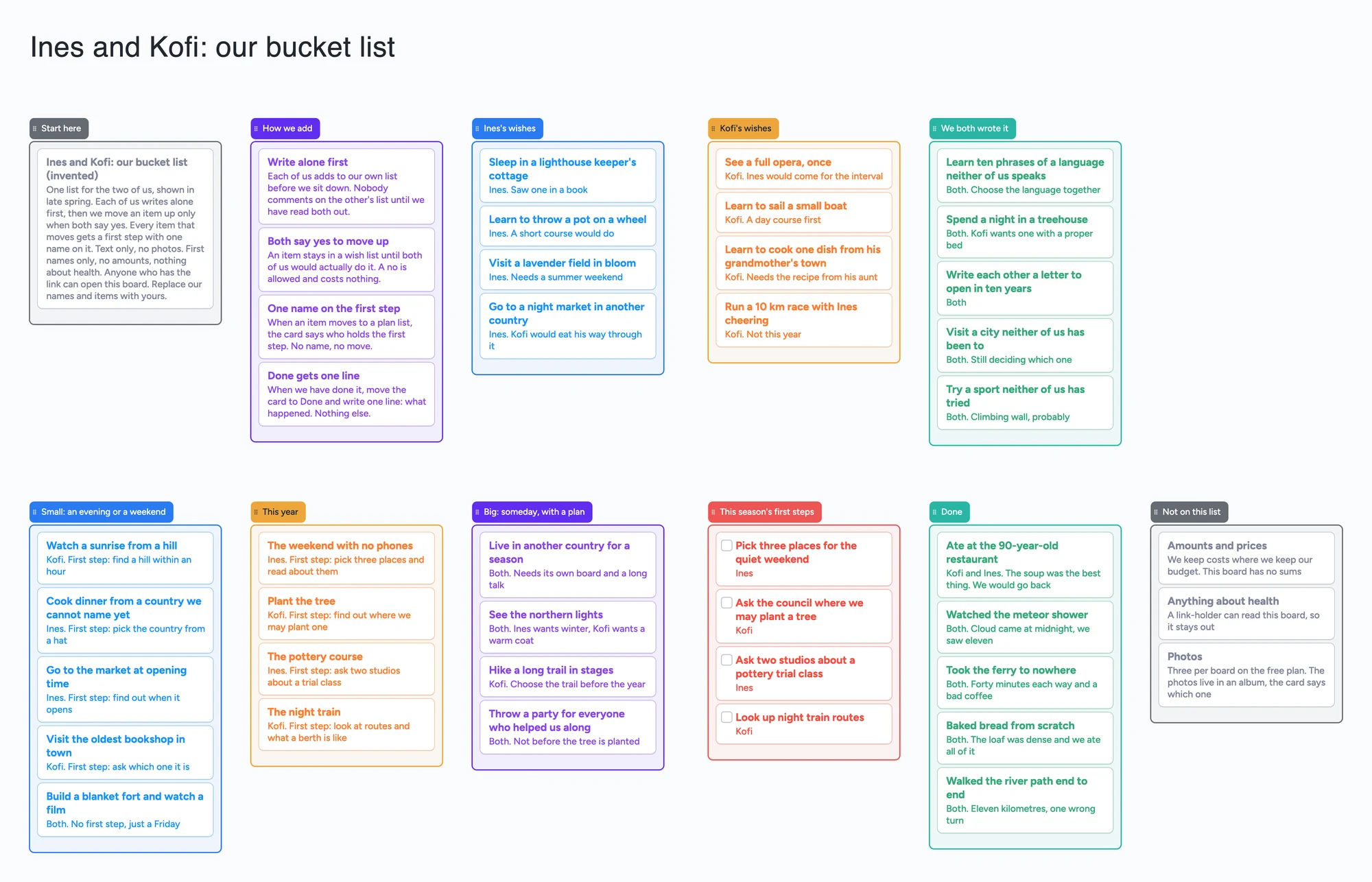
We make Instaboard, an online board. This page is for two adults, a couple or close friends, who want one bucket list they both add to and both see. The board is filled in for an invented couple, Ines and Kofi, in late spring: a wish list each, a list of items they both wrote, three sizes of plan (an evening, this year, someday), first steps with tick boxes, a Done list with one line per item and a short list of what stays off. It is text only and moved by hand. It sends no reminders, holds no photo scrapbook and adds up nothing, and the notes below say where a printable, a Notion template or a shared notes app does more.
Opens in your browser. Anyone can view; a free sign-in lets you edit.
Updated
Read this first: what this board does and doesn't do
- It holds what you type. A wish, the name on a first step and one line when it is done are cards; the size of a plan is the list it sits in. The board sends no reminders or due-date alerts and keeps no streak. A card can carry a due date and the app has a calendar view, but nothing nudges anyone.
- Text only. The example has no pictures. On the free plan a board holds 3 pictures, so a photo scrapbook or a vision board does not fit; keep photos in an album and let the card say which one.
- Two adults, nothing private. Anyone who has the link can open the board. The example has no amounts, no account details and nothing about health. We don't suggest putting children on it.
- Writing needs a free sign-in. New boards start as "Anyone who joins can view"; to let the second person add and move cards, switch Share to "Anyone who joins can edit". Each person signs in free, and the board counts as 1 of their 5 free boards.
- Free plan limits: 5 boards, 150 items across your account and 3 pictures per board. The example is 55 items, and a copy takes 1 of your 5 boards. Pro removes the item limit and costs $5 a month billed yearly ($59.99 a year), or $7.99 monthly.
Why a list for two needs a rule for saying no
Two idea lists, read November 25, 2026 in a browser. Utah State University Extension's "40 Fun and Connecting Bucket List Items for Couples" prints "By Lily W. | January 23, 2025" and groups 40 items under adventure and travel, romantic experiences, fun and playful activities, personal growth and giving back, unique and memorable experiences, and everyday joys. Bucket List Journey's "115 Couple's Bucket List Ideas (That Aren't Boring)" is a longer list written by an author who says she has been with her husband for 30 years, and it carries affiliate links; the page shows no date for the article itself, only dates on reader comments. Both hand you things to put on a list. Neither gives a way to keep a list the two of you have agreed on. Bucket List Journey does include a "spontaneous yes night" of agreeing to try each other's harmless suggestions, but as one more item to do, not a rule for the list.
That is the part the example board adds, and it is our own rule, not one from either page: each person writes alone first, an item leaves a wish list only when both would actually do it, and a no is allowed and costs nothing. In the example, Ines's lighthouse cottage and Kofi's opera night are each still in their own lists, and Kofi's 10 km race sits in his with the note "Not this year".
Ines and Kofi's board in late spring, list by list, and what stays off it
| List | What goes in it | In Ines and Kofi's board |
|---|---|---|
| Start here (grey) | What the board is and that the link is not private | One card |
| How we add (purple) | The four rules the two agreed | 4 cards: write alone first, both say yes, one name on the first step, done gets one line |
| Ines's wishes and Kofi's wishes (blue, orange) | Items that only one of them has said yes to | 4 cards each |
| We both wrote it (green) | Items that appear on both lists | 5 cards |
| Small, This year, Big (blue, orange, purple) | Items both said yes to, by size | 5, 4 and 4 cards |
| This season's first steps (red, tick boxes) | The next step for items in play, each with one name | 4 cards with tick boxes |
| Done (green) | What happened, in one line each | 5 cards |
| Not on this list (grey) | What stays off | 3 cards: amounts, health, photos |
Swipe the table sideways to see every column.
Counted from the board: 11 lists, 43 cards and one title text box (55 items). A tick box records no name or time, and anyone who can edit can untick it.
What stays off the board. The example's last list holds the first three of these as cards; the last two are our advice and have no card:
- Amounts and prices. The board adds nothing up. Keep what things cost where you keep your budget.
- Health. Anyone who has the link can read the board. The example has no medical goals.
- Photos. 3 per board on the free plan. Keep them in an album and let the card say which one.
- Children. It is a board for two adults. We don't suggest putting children on it or writing about them by name.
- Your relationship. The cards say what each person will do next, not what is wrong between you. A board will not settle a disagreement about what goes on the list.
Start your own in five steps
- Open the board and make your copy. "Make a copy" takes 1 of your 5 free boards. Replace Ines, Kofi and the items with yours, and clear the Done list and the ticks.
- Each person fills their own wish list alone. Do it before you sit down together. Nobody comments on the other's list until both have been read out.
- Move an item up only when you both say yes. It goes to the list for its size. Anything that gets one yes stays where it is.
- Put one name on the first step. The card says who holds it, and the step goes in the tick-box list.
- Share the link. To let the other person write, switch Share to "Anyone who joins can edit"; they sign in free and the board counts as 1 of their 5.
Limits of the free plan for this board
- Items. Each card and each list is 1 of 150 free items across your account; the example is 55. If you add about 20 cards a year and delete nothing, the board is 75 after one year and passes 150 in year five (155), our arithmetic. Your other boards share the same 150.
- Boards. 5 on the free plan. A copy takes 1, and so does a board you open from someone's link.
- Pictures. 3 per board. The example has none.
- Writing needs a sign-in. Anyone who has the link can read the board; to change it they sign in free.
- Ticks. A tick records no name or time, anyone with edit access can untick it, and a copy keeps its ticks.
- No reminders or due-date alerts. A card can carry a due date and there is a calendar view, but the app does not nudge anyone.
Three sizes, so a big dream does not sit next to a Friday
The example sorts approved items into three lists by how much they ask of you. This is our choice for a household of two, not something either list above says.
- Small: an evening or a weekend (5 cards). Watching a sunrise from a hill, going to the market at opening time or building a blanket fort. A small item can have no first step at all; the fort card says "just a Friday".
- This year (4 cards). For example the pottery course and planting the tree. Each has a named first step, and the next step for each is a tick-box card in the red list.
- Big: someday, with a plan (4 cards). Living in another country for a season or a long trail hike. The card for the move says it needs its own board and a long talk, because one card cannot hold it.
Nothing moves a card between the lists on its own. Nothing flags a card that has sat in This year since spring. The check is a quick look together when you add the next wish.
One line when it is done
The Done list in the example holds five cards, each with one line: the soup at the 90-year-old restaurant, eleven meteors before the cloud came at midnight, the forty-minute ferry and its bad coffee, a dense loaf of bread, the river path with one wrong turn. The rule on the board is one line and nothing else, so a finished item is a record of what happened and not a review to write.
Done cards still count as items. A finished card is a card until you delete it, so finishing things does not free up room on the free plan.
What people say about keeping a shared list with a partner
Two r/productivity threads, read November 25, 2026 (the comment counts below are what we read in an archived copy of each thread). Each reply is one person's view, credited per account. Neither thread asks for a bucket list board by name.
- "Do you use shared docs/lists with your partner? How do you keep it from turning into chaos?" (u/Shaunak_k, posted 2025-07-23; 37 shown, 40 comments read in an archived copy). The poster says he and his girlfriend share all their planning in Google Docs and that it gets messy fast, and that Notes has no structure and no reminders. u/NotGonnaLie59 suggested Trello and a split: "one place/list/board to jot down everything, and another place to move the top idea to when you've agreed it's more important to focus on", with the example of one place for travel ideas and another for the next trip. u/Hilaryspimple wrote that they use AnyList for a shared grocery list, a bucket list and a camping packing list, and pay about $15 a year for the pro version. u/Particular_Name_3618 wrote to divvy up responsibilities so one person owns each thing, to decide who does a to-do as soon as it comes up, and to put each piece of information only in its organized place.
- "App for todo list with wife?" (u/Sarman11, posted 2022-10-02; 51 shown, 55 comments read in an archived copy). About to-dos, not bucket lists. u/SawSamantics wrote that they use Google Keep notes and that when one of them checks something off it is still visible at the bottom.
What we took from them is only the shape: a place for ideas and a second place for what you have agreed to do, and one person responsible for each thing. The example board has those two places and the one-name rule.
Where a template file, a Notion template and a notes app do more
Read November 25, 2026. Each line is what the page says, not something we tried, and there is no ranking. Our read of Google's suggestions for "bucket list template" the same day shows strings for free pdf, Google Docs, Excel, Word, Notion, Google Sheets and Canva, so some of the people searching this want a file.
| Option | What the page says | Better than a board at | Where a board fits |
|---|---|---|---|
| A template file (PDF, Doc, Sheet, Canva) | We did not open a file; the suggested search strings name these formats | Printing, or a layout you already use | Two people who want to move items between lists on screens |
| A Notion template | "Couple's Bucket List & Memory Journal" by Rosy Ruby is a template with a Couple Bucket List database (properties include Category, Difficulty, Priority, Status, Budget, Due Date, Location, Notes, Photos), a Memory Log and an Anniversary Tracker. The page shows 4.9 from 15 ratings and "Last updated 10 months ago" | Properties, filters, a budget field and photos on each item | A plain set of lists with nothing to set up |
| A shared notes or list app | u/SawSamantics uses Google Keep; u/Hilaryspimple uses AnyList with a bucket list in it. We did not read either app's page | A phone-first list that is quick to add to | Seeing the plan sizes side by side on one canvas |
| An idea article | The Utah State and Bucket List Journey lists above give items, not a way to share them | Giving you things to wish for | Keeping the ones you both chose |
| A shared calendar with alarms | Not read; the board has no alarms | A nudge on the day | Use both: the list here, the date there |
Swipe the table sideways to see every column.
Start from the ready board
It opens in your browser in a few seconds, with nothing to install. Sign in for free when you want to save it and share it.
Questions
Does the board tell us when to do something on the list?
No. It has no reminders, alarms, due-date alerts or notifications. A card can carry a due date and the app has a calendar view, but nothing nudges anyone, so a shared calendar with alarms is the better tool for that.
Does the other person need an account to add items?
To write on the board, yes: they open the link, sign in free, and you switch Share to "Anyone who joins can edit". The board then counts as 1 of their 5 free boards. Someone who only wants to read can open the link without signing in.
Can we put photos on it?
Only 3 per board on the free plan, so a photo scrapbook does not fit. The example is text only; a card can say which album a photo is in.
What if one of us doesn't want an item on the list?
In the example that item stays in its owner's wish list. The rule is that an item moves up only when both would do it, and a no costs nothing. That rule is ours, not one from a page we read.
How many items fit on the free plan?
150 items across your account, where each card and each list is one item. This board is 55, and finished cards still count until you delete them. If you add about 20 cards a year, it passes 150 in year five. That is our arithmetic, and your other boards share the same 150.
Can friends or a family use it, not just a couple?
Yes for adults who each sign in free. The example is two people, and every first step has one name. A larger group would need more list columns and a rule for who says yes, which the example does not show.
Sources
- Utah State University Extension: 40 Fun and Connecting Bucket List Items for Couples (byline "By Lily W. | January 23, 2025"; read in a browser November 25, 2026)
- Bucket List Journey: 115 Couple's Bucket List Ideas (That Aren't Boring) (no article date shown; affiliate links; read in a browser November 25, 2026)
- r/productivity: "Do you use shared docs/lists with your partner?" by u/Shaunak_k (posted 2025-07-23; read November 25, 2026)
- r/productivity: "App for todo list with wife?" by u/Sarman11 (posted 2022-10-02; read November 25, 2026)
- Notion Marketplace: Couple's Bucket List & Memory Journal (4.9 from 15 ratings, "Last updated 10 months ago" in a browser; template body not read; November 25, 2026)