For a founder pair or small team that keeps relitigating the same choices
A decision log template on one shared board: open, decided, revisit, reversed
We make Instaboard, a free online board. This page gives you a decision log already laid out on it, filled in for an invented two-person candle shop, Birch & Wick: Open questions, Decided (each card says why, what was dropped and who), Revisit on a date, and Reversed. Open it, swap Nora and Eli for you and send the link to the people who make the calls. It is a log you read by eye, not a database: no sorting, no filters, no reminders, nothing that nudges you on the revisit date. If you want those, a spreadsheet does the job better, and below we say when.
Opens in your browser. Anyone can view; a free sign-in lets you edit.
Updated
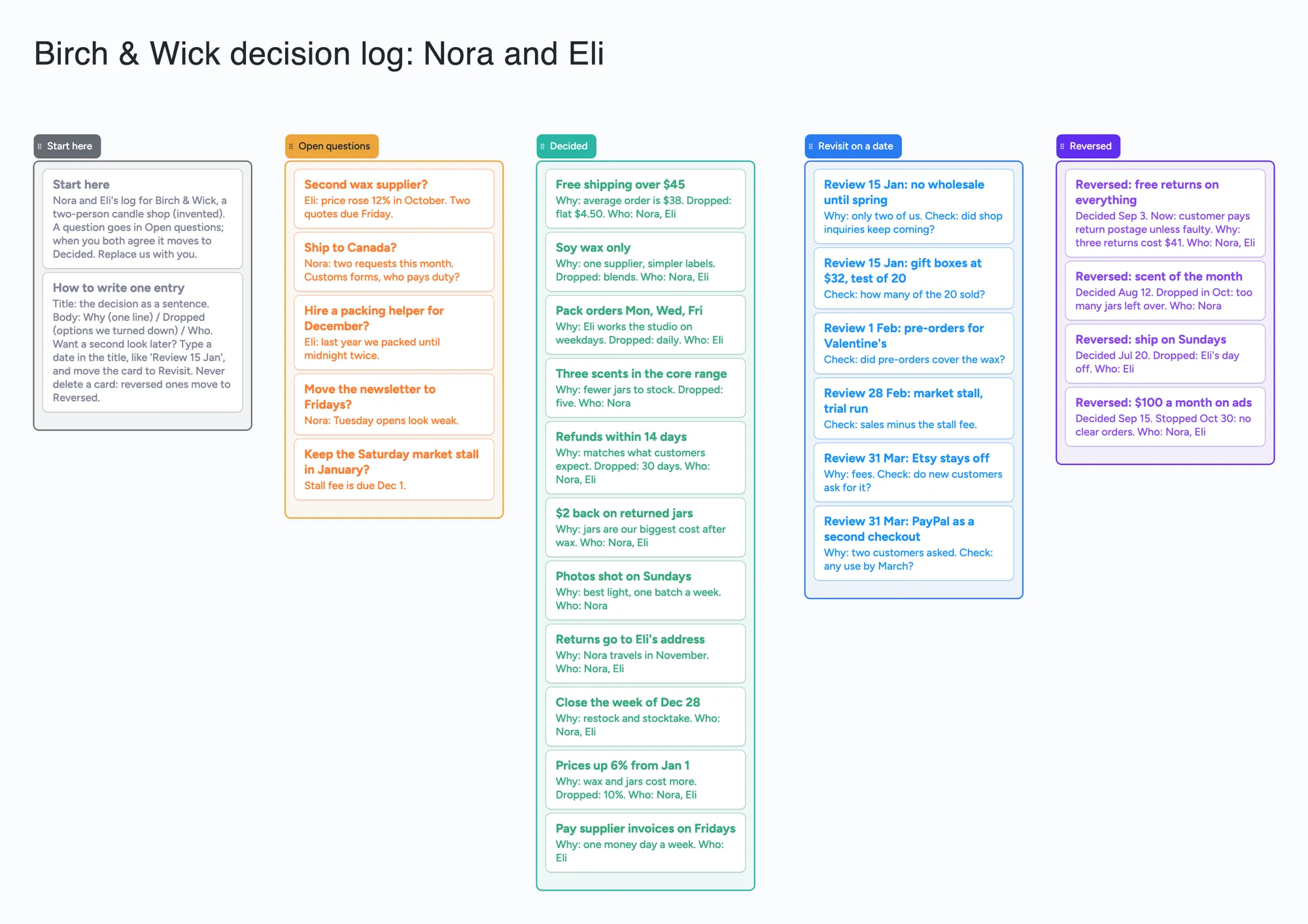
Read this first: what the board does and doesn't do
- What it is: one screen where a small team can see what is still open, what was decided and why, what to look at again, and what was reversed. Birch & Wick's log uses 34 of your 150 free items.
- What it is not: no sorting, no filters, no due dates or reminders, no search across boards and no per-card edit history. A card is a short entry you move; nothing tells you a review date has arrived.
- Where it gets tight: a card is added for every decision, so this is the one planning board where 150 items is a real ceiling. A year at 60 decisions is 68 items (arithmetic below).
- Why a board at all: everyone you share it with sees the same log and can add or move a card live. Anyone who joins can view it; to change it they sign in free.
- Pro: $5 a month billed yearly ($59.99 a year), or $7.99 monthly. The free plan keeps 5 boards, 150 items and 3 pictures per board.
What one entry should hold
A decision log earns its keep when someone asks, months later, "why did we do that?" So an entry needs less than a meeting note and more than a title. On the board each decision is one card with the decision as the title and three short lines under it:
- Title: the decision as a sentence. "Free shipping over $45", not "Shipping".
- Why: one line. "Average order is $38."
- Dropped: the options you turned down, so nobody reopens them by accident.
- Who: the first names of the people who agreed.
Michael Nygard's 2011 post on architecture decision records makes the same case for keeping the reasons beside the decision: without the rationale a newcomer can only "blindly accept" or "blindly change" a past choice (post dated November 15, 2011, read November 21, 2026). The Why and Dropped lines are our small-team version of that.
Birch & Wick's log, list by list
The example is invented. Nora and Eli run a two-person candle shop and keep one log. Here is what each list holds and how a card moves.
| List | What goes in it | In Birch & Wick's log |
|---|---|---|
| Open questions (orange) | A choice nobody has made yet, with who raised it and what is blocking it | "Second wax supplier?" Eli: the price rose 12% in October, two quotes due Friday |
| Decided (green) | The decision, why, what was dropped, who agreed | "Free shipping over $45" Why: average order is $38. Dropped: flat $4.50. Who: Nora, Eli |
| Revisit on a date (blue) | A decision that is a test. The review date is typed at the start of the title, and the card says what to check | "Review 15 Jan: gift boxes at $32, test of 20" Check: how many of the 20 sold? |
| Reversed (purple) | A decision that was overturned. The old card stays, with when it was decided and what replaced it | "Reversed: free returns on everything" Decided Sep 3. Now: customer pays return postage unless faulty |
Swipe the table sideways to see every column.
The board's own wording. Dates are text typed into a title; the board has no date field and sends no alerts.
Nygard's post keeps a reversed decision rather than deleting it: "If a decision is reversed, we will keep the old one around, but mark it as superseded" (read November 21, 2026). The Reversed list does that job. The reason it matters here: the log is the record of what was true at the time.
One decision, start to finish
- Open. Eli notices wax costs have risen and adds a card to Open questions: "Second wax supplier?" with the price change and what is due.
- Decide. The two quotes come in on Friday. They talk it through and agree to stay with one supplier. Eli moves the card to Decided and rewrites it as a sentence: "Soy wax only", Why: one supplier, simpler labels. Dropped: blends. Who: Nora, Eli.
- Test it, if it is a test. "Gift boxes at $32, test of 20" is not final, so the card goes in Revisit with "Review 15 Jan:" at the start of the title and a Check line: how many of the 20 sold?
- Revisit. On or after 15 January someone looks at the Revisit list. The date is typed text, so the habit of looking is yours: pair it with the Friday session where you pay suppliers, or put it in your calendar app.
- Reverse, without deleting. If the call changes, the card moves to Reversed. Nora writes "Reversed:" first, the date of the old decision, what applies now and why. A new decision that replaces it is a new card in Decided.
Everyone with edit access can change any card, so agree a rule between you: for example, only the person named in Who rewrites a card, and a reversal is always written as a new line, never by overwriting the old one. That is a team agreement, not something the board enforces.
Does a year of decisions fit in 150 items?
Each card and each list is 1 of your 150 free items, across all your boards. The title text box counts too. Arrows, sections and pen strokes don't. Our arithmetic from Birch & Wick's lists:
- As built: 5 lists + 28 cards + the title = 34.
- A year at 60 decisions (about five a month): 60 decision cards + 2 start cards + 5 lists + the title = 68.
- Room left: 150 minus 8 fixed items (2 start cards, 5 lists, the title) leaves 142 decision cards, about two and a third years at 60 a year, or about 28 weeks at five a week. A decision that replaces an earlier one adds a card, because the old one stays in Reversed.
- Other boards share the 150. If you keep other boards on the same account, they use the same pool.
So a pair deciding a few things a month can keep a log here for a long while on Free. A team deciding every day will hit the limit within the year: that is when a yearly archive board or one of the tools below makes sense. A practical middle path is to start a new board each year and keep the old one as the archive (a second board takes 1 of your 5, and its cards still count toward the 150).
When a spreadsheet is simply better
Say it plainly: for a log that grows past a few dozen entries, or one you need to sort and count, a spreadsheet is the better home. Google Sheets' help says you can sort data alphabetically or numerically and use filters to hide data you don't want to find (Docs Editors Help, "Sort & filter your data", read November 21, 2026; the page shows no date). A board has neither.
- You want it ordered by date or filtered by who decided. A board shows lists, not a sortable table.
- You want a count: how many decisions this quarter, how many reversed. A board has no totals.
- You expect hundreds of entries. On the free plan the board stops at 150 items.
- Someone will look things up later. A sheet or a document store gives you ordered rows to scan; this page claims no search on the board.
- People already live in a spreadsheet. Use it. A board adds nothing if nobody opens it.
Where a board is good enough: two to five people who want to see the log on one screen, argue about it live, and move a card from open to decided while they talk.
What a board can't do for a decision log
- Remind you. No reminders, no due dates, no alerts. A "Review 15 Jan" title is text; nothing fires on 15 January.
- Sort or filter. No ordering by date or person, no filtered views, no totals.
- Search across boards or years. Entries are cards; this page claims no search across boards.
- Show who changed what. We make no claim of an edit history. Type the names of the deciders in each card.
- Force approval. No roles, no sign-off step. Anyone with edit access can move any card.
- Link entries to each other. A reversal is a line of text on a card, not a connection you can follow.
- Offline. Changes made offline are kept and sync when you're back online.
Where other tools do this better
Read November 21, 2026. Prices change, so check the page before you buy. No ranking: they suit different teams.
| Tool | What its page says | Better than a board at | Where a board fits |
|---|---|---|---|
| Google Sheets or Excel | Sheets' help covers sorting by column and filters that hide rows | Sorting, filtering, counting, a date column, many entries | A shared picture of what's open vs decided, no columns to set up |
| Notion databases | The Decision Tracker For Teams template is listed at $29 and says it has timeline, by-owner and by-impact views and a status flow of Draft, Active, Implemented, Review. A separate Simple Decision Tracker template is listed as free. The pricing page lists databases on Free and $10 per member a month for Plus | Multiple views, an owner field, one searchable place for pages | A single screen; no setup; the person you share with needs only the link |
| Confluence | The Decisions blueprint creates a decision page, and the first use in a space creates an index page that acts as the Decision Log and lists all decisions in that space (Confluence Data Center 8.3 documentation). Pricing page: Free for up to 10 users; Standard listed at $5.78 per user a month | A page per decision with stakeholders, a space-wide index, a place in a larger wiki | No wiki to set up for a founder pair or a small group |
| Decision records in files | Nygard's 2011 post: short text files in the project repository, numbered in sequence, with a reversed decision marked as superseded | Teams that live in a code repository and want decisions versioned beside the code | Non-code decisions, and people who don't use Git |
Swipe the table sideways to see every column.
From each vendor's own pages, read November 21, 2026. The Notion template pages and the Confluence documentation page show no date we could read; the Confluence pricing page has a billing toggle and the text we read doesn't say which setting was shown. Instaboard isn't affiliated with any of these.
Why people keep a log at all
The clearest ask we found is a project manager's. On r/projectmanagement (thread dated January 10, 2025, read in full November 21, 2026), u/AnotherEpicFail described management changing its mind from one meeting to the next, setting off rework. Replies, each one person's view:
- u/More_Law6245: log every decision so you know what, when and who approved it, so documents can be updated.
- u/BraveDistrict4051: keep decisions in one log; pulling it up when someone changes their mind "won't necessarily keep them from changing their minds", but you can point to the record. They also suggest letting people watch you type the decision and put their name by it.
- u/Former-Astronaut-841: captures "DECISION:" in notes during the call, then records who was on the call, the date, a description and the reason in a Google Sheet or Smartsheet.
- u/Mooseandagoose: keeps a decision log as part of a Confluence page tree, filled from meeting minutes.
- u/bstrauss3: sends short numbered record-of-decision emails and keeps them in an easily searched public folder.
Of those five answers, three name a Google Sheet or Smartsheet, a Confluence page tree or a shared folder; the other two say to keep one log of decisions and name no tool. The board suits a smaller job, a pair or small team that wants the log on one screen, and not the project manager running a large programme.
Set up your own, in order
- Open the board and replace Nora and Eli. Delete their cards as you go so the log is never half theirs.
- Move in what is already settled. One card per decision, as a sentence, with Why, Dropped and Who. Start with the last three months, not the whole history.
- Put open questions in Open questions. Add the name of the person who raised each one.
- Tag the tests. Anything you will want to check again gets "Review <date>:" at the start of the title and a Check line, then goes in Revisit.
- Share it. Set the share setting so anyone who joins can edit ("Anyone who joins can edit"); new boards start view-only, and each person signs in free to write.
- Pick one review habit. For example, ten minutes at the start of your weekly meeting: Open questions, then the Revisit list.
Limits of the free plan for this board
- Items. Each card and each list is 1 of 150 free items across your account; the example is 34. Arrows, sections and pen strokes don't count.
- Boards. 5 on the free plan. "Make a copy" takes 1 of them.
- Pictures. 3 per board. The example has none; put screenshots in a linked document instead.
- Writing needs a free sign-in. Anyone with the link can read the board; to change it they sign in free, and the board then counts as 1 of their 5.
- Private decisions. A link board is not the place for salary, health or legal matters; invite-only boards are a Pro feature.
Start from the ready board
It opens in your browser in a few seconds, with nothing to install. Sign in for free when you want to save it and share it.
Questions
Is there a free decision log template?
Yes, several: spreadsheet templates, a free Notion decision tracker, Confluence's decision template. The ready board here is a decision log on a shared board with Open questions, Decided, Revisit on a date and Reversed, free within 5 boards and 150 items. The board is something you read and move cards on; it doesn't sort, filter or send reminders.
What should a decision log entry include?
The decision as a sentence, why it was made, what was dropped, and who agreed. The architecture-records world (adr.github.io) also records the trade-offs and consequences of a choice. On this board that is a card title plus Why, Dropped and Who lines.
Decision log in Excel or Google Sheets vs a board?
A sheet wins whenever you need to sort, filter or count entries, or expect hundreds of them. A board wins when two to five people want to see open, decided and reversed on one screen and move cards while they talk. Many teams use a sheet for the long record and a board for the live conversation.
How do I record a reversed decision?
Keep the old card, move it to a list called Reversed, start the title with "Reversed:", and write the date of the old decision, what applies now and why. A decision that replaces it is a new card in Decided. This follows the idea in Michael Nygard's 2011 post of keeping a reversed decision and marking it superseded.
Can the board remind us to revisit a decision?
No. Instaboard has no reminders or due dates. Type the review date at the start of the card title, such as "Review 15 Jan", and put the check in your calendar app or your weekly meeting.
How many decisions fit on the free plan?
Each card and each list is 1 item of the 150 across your account. The example is 5 lists, 28 cards and the title, 34 items. A year at 60 decisions is 68 items, and the free plan holds about 142 decision cards beside the 8 fixed items. That is our arithmetic, and your other boards share the 150.
Sources
- r/projectmanagement: "Documenting Decisions" (u/AnotherEpicFail, posted 2025-01-10; replies by u/More_Law6245 2025-01-11, u/BraveDistrict4051, u/Former-Astronaut-841, u/Mooseandagoose, u/bstrauss3, 2025-01-10; read November 21, 2026)
- Michael Nygard: Documenting Architecture Decisions (November 15, 2011; numbered records, superseded decisions; read November 21, 2026)
- Google Docs Editors Help: Sort & filter your data (read November 21, 2026; page shows no date)
- Notion Marketplace: The Decision Tracker For Teams (listed $29; read November 21, 2026; page shows no date)
- Notion Marketplace: The Simple Decision Tracker (listed free; read November 21, 2026; page shows no date)
- Notion: pricing (Free and Plus; read November 21, 2026)
- Atlassian: Decisions Blueprint, Confluence Data Center 8.3 documentation (read November 21, 2026; no date seen in the text we read)
- Atlassian: Confluence pricing (Free for 10 users, Standard $5.78 per user a month; read November 21, 2026)
- Architectural Decision Records: adr.github.io (ADR as a collection that forms a project's decision log; read November 21, 2026; the page lists dated items but no page date)
Related
A GTD template on one shared board: inbox, next actions, projects and a Friday review
A Getting Things Done style template on one shared board: inbox, next actions by context, projects, waiting for, someday and a Friday review. What a board can't do, and the apps that can.
A shift handoff template for a small shop: one shared board instead of a group chat
A shift handoff template for a small cafe, shop or bar: done today, still to do, low stock, notes and tomorrow on one shared board, with a first name on every card. Free to copy. Not a clinical record.
An online course outline on one shared board: outcomes, then a list per module
An online course outline on one shared board: outcomes first, then a list per module with its lessons, activity, quiz and resource. Open it, swap in your course and share the link.