For the course creator who plans with a co-instructor or an expert
An online course outline on one shared board: outcomes, then a list per module
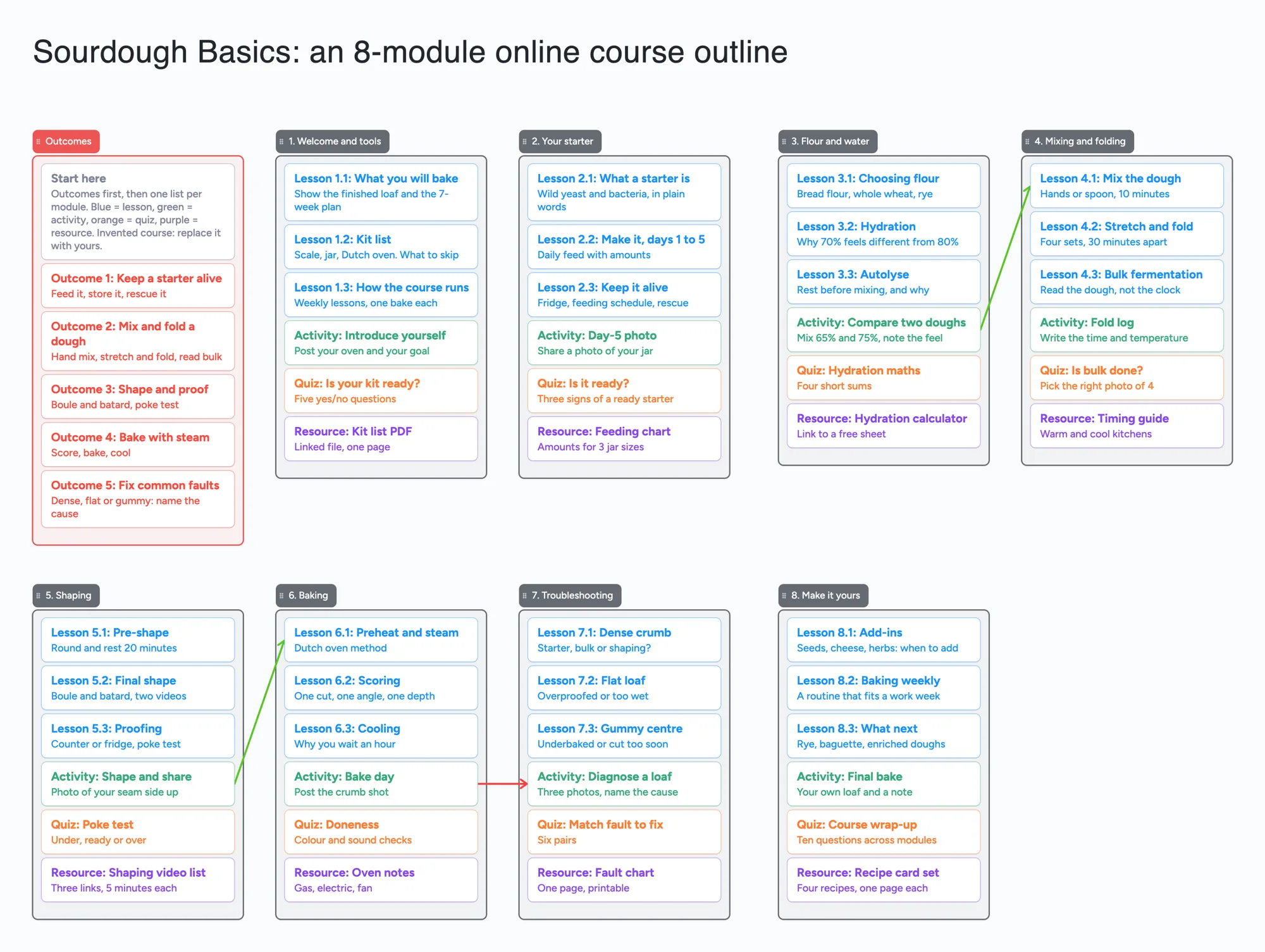
We make Instaboard, a free online board. This page gives you an online course outline already laid out on it: the outcomes in one list, then one list per module with its lessons, an activity, a quiz and a resource. The course is invented, an eight-module sourdough course. Open it, replace it with yours and send one link to the person you plan with. It plans the course only. It hosts no lessons, runs no quizzes, sets no dates and exports nothing to a course platform, and the tools named below do those jobs better.
Opens in your browser. Anyone can view; a free sign-in lets you edit.
Updated
The short answer
- Outcomes first, then one list per module. Write what a learner can do at the end, then give each module a list: its lessons, one activity, one quiz and one resource, each a card. The whole course is on one screen, so you and your co-instructor can see gaps and move cards.
- What it is not: no lesson hosting, no quiz engine, no learner accounts, no due dates or schedule, no export to a course platform and no reminders. Cards hold the plan, not the lessons.
- Count the items before you copy it. The example is 9 lists, 54 cards and the title text box: 64 of your 150 free items. A 12-module course in the same shape is 92; the free plan holds about 20 modules (our arithmetic).
- Pro lifts the limit: $5 a month billed yearly ($59.99 a year), or $7.99 monthly. The free plan keeps 5 boards, 150 items and 3 pictures per board.
- Anyone with the link can read it; writing takes a free sign-in. New boards start view-only. Set "Anyone who joins can edit" so your co-instructor or expert can add a card.
How to fill in a course outline board
- Write the outcomes first. The example has five, one card each, in the red list. Udemy's course-creation guide says to start from the objectives and plan back from them (backward design), and the board follows that order.
- Make one list per module. Name it with a number. The example has eight: welcome, starter, flour and water, mixing, shaping, baking, troubleshooting and make it yours.
- Give every module the same six cards. Three lessons, an activity, a quiz and a resource. The same shape in every list makes a gap easy to see: a module with no activity looks short next to the others.
- Say in each card what it holds. Title on the first line, one line of detail under it, such as "Four sets, 30 minutes apart". The detail is for your co-instructor, not the learner.
- Move cards, not documents. If module 4 needs another lesson, drag a card in. If two modules overlap, drag one across. Arrows mark a dependency, such as an activity that feeds the next module.
- Share it. In the share menu set "Anyone who joins can edit" (new boards start view-only). Each person signs in free to write live. Give each person their own cards so two people never type in the same one.
- Build the real course elsewhere. When the outline is agreed, record and host the lessons in your course tool. The board stays the map.
People who plan courses with experts describe the same need. In an r/instructionaldesign thread (December 2024), u/dmoose28 asked for a "simple, kanban-like planning template" that subject matter experts can use; u/BouvierBrown2727 replied that they used Miro's kanban template with each tile as a training segment, shared with instructional designers, a project manager and the experts; u/Tim_Slade named Trello and then Notion. Those are three accounts, not a measurement.
Course outline tools, side by side
Each row is from the tool's own pages, read on November 21, 2026. Features and prices change, so check the page before you choose.
| Tool | What its page says | Where it beats a shared board | Where a shared board fits |
|---|---|---|---|
| Instaboard board | Free: 5 boards, 150 items. Pro $5 a month billed yearly ($59.99 a year), or $7.99 monthly | Nothing in this table on hosting, quizzes or schedules | The planning step: outcomes and modules as cards two people move, one link, after a free sign-in |
| OpenLearning course design template | Its blog describes a Google Drive template that maps learning outcomes to module sets, modules and pages, with a sample course outline | A document made for outcomes-to-modules mapping, with room for long text | A board you can see whole and drag, instead of a document you scroll |
| Udemy outline guide and template | Its course-creation page teaches backward design (objectives first) and links an outline template as a Google Sheet | Guidance built for Udemy courses, and a sheet for sorting and columns | Cards for the shape before it becomes rows |
| LearnWorlds course outline templates | A page of 18 course outline templates; an outline there is title, description, objectives, activities, supporting material, milestones and schedule | Milestones and a schedule, and the platform that hosts the course | Planning the modules with a co-instructor before you pick a platform |
| Notion Course Launch Planner | A free marketplace template by ZikoTemplates | Pages, databases and views inside Notion | No Notion workspace to learn: a link opens in a browser |
| Trello | Free: up to 10 collaborators and 10 boards per Workspace, with assignee and due dates; Timeline and Calendar views are on Premium at $10 | Due dates, assignees and a card for each task | A course map that doesn't need dates |
| Miro | Free: 3 editable boards, with a Kanban format; Starter is $8 per member a month billed yearly | A big canvas, templates and workshop tools for a team | A free board with no seat price for the expert you invite |
Swipe the table sideways to see every column.
From each tool's own pages, read November 21, 2026. OpenLearning's and Notion's pages show no date; LearnWorlds' page shows none in the text we read.
Which tool for which job
No ranking: these are different jobs.
- Writing the outcomes and long lesson notes: a document, such as the OpenLearning or Udemy templates. A card holds a line, not a lesson script.
- Sorting, counting and a column for every field: a spreadsheet, such as Udemy's Google Sheet template.
- Dates, owners and a launch checklist: Trello or the Notion launch planner. This board has no due dates and no reminders.
- A big team canvas with templates: Miro.
- Hosting the course, quizzes and learners: a course platform such as LearnWorlds or Udemy.
- A shared map of modules that you and an expert can both move: this board. The expert signs in free to edit. It does not host, quiz or schedule.
How many modules fit
On this board the outcomes list and the title text box are 2 items, and the outcomes list holds 6 cards (the start card and five outcomes):
- 8 modules (the example): 1 + 8 lists = 9 lists, 6 + 48 = 54 cards, plus the title: 64 of your 150 free items.
- 12 modules: 13 lists, 6 + 72 = 78 cards, plus the title: 92.
- 20 modules: 21 lists, 6 + 120 = 126 cards, plus the title: 148, the most that fit with six cards per module on a board with nothing else on the account.
- Fewer cards per module leave room: three lessons and a quiz is 4 cards and 5 items per module.
Arrows, sections and pen strokes are free. This is our arithmetic; Pro removes the item limit.
When another tool is the better choice
- You want to host the lessons. Use a course platform. The board hosts nothing.
- You want quizzes that learners take. The board has quiz cards, not a quiz engine.
- You want dates, a launch schedule or reminders. Use Trello or a Notion planner.
- You want to write the lessons in full. Use a document. A card is short.
- You want to import the outline into a platform. The board exports nothing to a course tool. Copy as image is the only export.
- Your course has more than about 20 modules. See the limits below.
Limits of the free plan for a course outline board
- Items. Each card and each list is 1 of your 150 free items, across all your boards. The example is 54 cards, 9 lists and the title text box, 64 in all. Arrows, sections and pen strokes don't count.
- Boards. The free plan includes 5 boards. Keep one course on one board.
- Photos. 3 images per board. The example has none, so a course with a picture per lesson needs Pro or links.
- No dates, reminders, hosting or quizzes. Nothing nudges anyone when a module is due.
- Writing needs a free sign-in. A co-instructor who joins by link or code can add cards and arrows, and the board counts as one of their 5 boards. Someone who is not signed in can open the link and read everything, but can't change anything.
- Offline. Changes made offline are kept and sync when you are back online.
Start from the ready board
It opens in your browser in a few seconds, with nothing to install. Sign in for free when you want to save it and share it.
Questions
Is there a free online course outline template?
Yes, several. The ready board here has an outcomes list and a list per module with lessons, an activity, a quiz and a resource. It is free within 5 boards and 150 items, and you open it and replace the example with your course. OpenLearning, Udemy and LearnWorlds each publish outline templates too, as documents or sheets. The board is something you move cards on, not a document.
How do I outline an online course?
Start from what a learner can do at the end, then split the course into modules and give each module its lessons, an activity and a check. Udemy's guide calls this backward design. On the board that is one outcomes list and one list per module, with the same kinds of card in each so gaps show.
How do I plan a course with a subject matter expert?
Share one view you both edit. Set "Anyone who joins can edit" and send the link; the expert signs in free to write. Give each of you your own cards, and keep questions for the expert in one list. The board holds no comments thread or reminders, so agree where the chat happens.
What should an online course outline include?
LearnWorlds lists title, description, objectives, activities, supporting material, milestones and schedule. The board covers objectives, modules, activities and resources; the description, milestones and schedule go in a document or a planner.
Can I plan a course on a kanban-style board?
Yes. People in an r/instructionaldesign thread describe using a kanban-style board such as Miro's or Trello for this. A list per module and a card per lesson works the same way here. There are no due dates or limits on work in progress.
How many items does a course outline board use on the free plan?
Each card and each list is one item of the 150 across all your boards. The eight-module example is 9 lists, 54 cards and the title text box, 64 items. Twelve modules is 92, and about 20 modules is the most that fit. That is our arithmetic. Arrows and sections are free.
Sources
- r/instructionaldesign: simple kanban-like planning template for SMEs (December 2024; replies are single accounts; read November 21, 2026)
- OpenLearning: course outline blog (Google Drive course design template; read November 21, 2026; page shows no date)
- Udemy Teach: outline your course (backward design, outline template as a Google Sheet; read November 21, 2026)
- LearnWorlds: online course outline templates (18 templates; read November 21, 2026; no date in the text we read)
- Notion: Course Launch Planner template (free; read November 21, 2026; page shows no date)
- Trello: pricing (Free limits, Premium views; read November 21, 2026)
- Miro: pricing (Free 3 editable boards, Starter price; read November 21, 2026)
Related
Your first tutoring session: what to ask, what to do and what to send
Five questions before day one, a 45-minute agenda, a working assessment and a three-sentence parent note, filled in for one student on a shared board.
Whiteboard for Google Classroom: share one board with your class
Post one shared Instaboard board in Google Classroom or on a Google Sites page as a link. Set it so the class can write; students 13+ sign in free. No grading.
Online tutoring setup: what you need before your first lesson
What you need to start tutoring online: sound, light, camera, internet, a way to write, and a board your student writes on too. A plain checklist with a five-minute test call and a ready board to open.
Plan a thesis on one board you can share with your advisor
An editable thesis planning board: a list per chapter, literature clusters, advisor feedback and the core argument on one shared board you send to your advisor.