For couples comparing venue and vendor quotes
A wedding vendor comparison board you and your family can all see
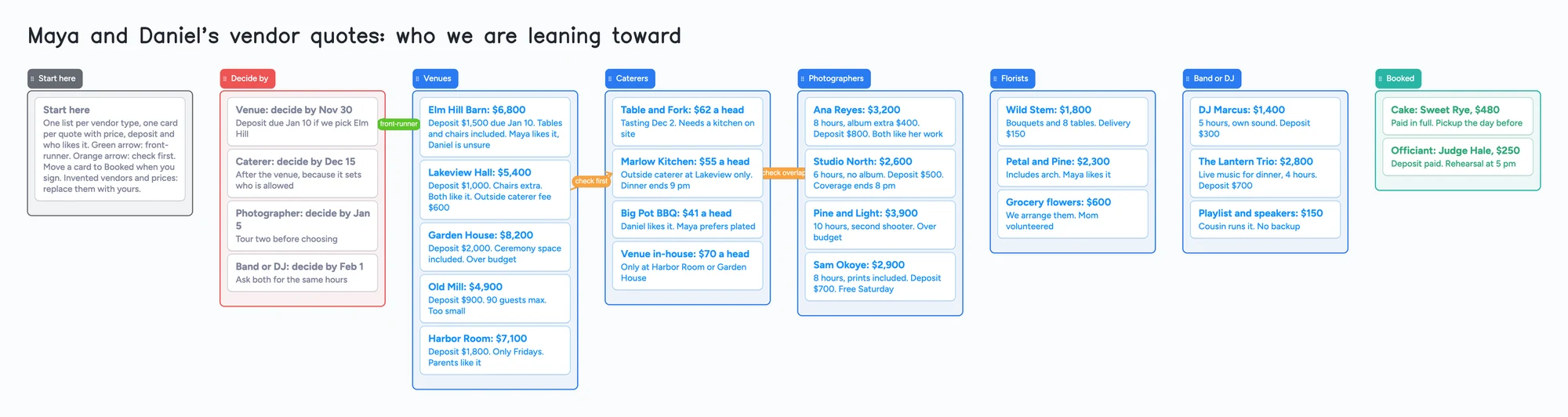
Every venue and vendor prices differently, which is why couples end up with a spreadsheet of twelve columns nobody else opens. This page shows a board for the deciding part: one list per vendor type, one card per quote with the price, the deposit and who likes it, a Decide by list and a Booked list, and an arrow for the front-runner. You, your partner and the parents can all open it by link. It is not a spreadsheet. It adds up nothing, sorts nothing and has no formulas, so a sheet is better for the arithmetic (see below). The example is an invented couple, Maya and Daniel, with five venues, four caterers, four photographers and a few others.
Updated
The short answer
- What it is: a list per vendor type and a card per quote, with the price, the deposit and who likes it written on the card. A Decide by list holds the dates; a card moves to Booked when you sign.
- What it isn't: no formulas, no totals, no sorting by price and no payment reminders. Prices on the cards are text you type. Selected cards and lists can be copied as an image.
- The example board uses 34 of your 150 free items: 26 cards and 8 lists (our arithmetic). Each card and each list counts; pen strokes, sections and arrows don't.
- A real wedding is bigger. The Knot's 2025 Real Weddings Study, quoted in its vendor manager article, says the average couple hires 14 pros. Fourteen vendor types with three quotes each is 42 cards and 14 lists, 56 items, or 58 with a Start here card and list, before anything else on your account (our arithmetic).
- Your partner or parent needs a free sign-in to write. They can open the link and read the board without one.
What this board can't do for vendor quotes
- No sums and no sorting. A card can't add a deposit to a delivery fee or put the cheapest quote first. A spreadsheet does both, so if the decision is mostly arithmetic, use one.
- No columns. Every vendor prices differently and a card is free text, which suits that, but you can't line up "Deposit" across five cards the way a table does. Write the same fields in the same order on every card.
- No reminders. A date on a card, such as "decide by Nov 30", is text. Nothing nudges you when it is close.
- No contracts, payments or messaging. The board doesn't hold contract files as a vendor tool does, doesn't track what you've paid and doesn't contact vendors.
- Card colour is a border and text colour only. The list keeps its own colour. Don't expect a cheap-to-expensive colour scale.
- Photos and links. The free plan allows 3 images per board, so a venue photo per card won't fit. A link card with a picture preview doesn't use up one of the 3 photos on the web; the iPhone and Android apps still count it until their next update. Links without a preview never counted.
- 150 items on the free plan, across your account. Each card and each list is 1 of the 150. Pro is $5 a month billed yearly ($59.99 a year) and removes the item limit.
- 5 boards on the free plan. Keep one board for all your vendors rather than one per vendor. The example board has no images.
How to compare vendors on one board
Couples on r/weddingplanning describe the same problem. One poster (August 2024) was compiling venue pricing in a Google Sheet and asked how to fit venues with peak and off-peak ranges and several package tiers into uniform columns. A reply suggested deciding first on a target season and a package tier, so that only the prices that apply go in the sheet. Another reply kept venues in columns with cost breakdowns in rows and used the same layout on other tabs for florists and photographers. An earlier poster (May 2019) found vendor options overwhelming, and a reply said to compare like with like: hours worked, whether the price includes tax and service fees, what is included. Those are single accounts, not a pattern we measured. The advice they share is to write down the same things for every quote.
- One list per vendor type. On the example board that is Venues, Caterers, Photographers, Florists and Band or DJ. Add the types you need.
- One card per quote, with the same fields in the same order. The example writes the price in the title, then the deposit, what is included, what is extra and who likes it. Writing "Chairs extra" or "Coverage ends 8 pm" is what makes two cards comparable.
- Put the dates in a Decide by list. The venue usually comes first because it limits the caterer, so the example lists it first and says so on the card.
- Mark the front-runner with an arrow. An arrow joins a card in one list to a card in another, with a caption and its own colour. The example's green arrow joins the front-runner venue to its decide-by date, and orange arrows flag "check first" and "check overlap" between a venue and a caterer and between a caterer and a photographer.
- Let each person say what they like. Everyone writes on the card, such as "Maya likes it, Daniel is unsure", so the disagreement is visible before the tour.
- Move the signed quote to Booked. Drag the card across. When a list is empty of options, you are done with that vendor type.
Set up the board with your partner or your parents
- In the share menu, set "Anyone with the link can edit". New boards start view-only.
- Send the link, or the 4-digit join code. The code expires after 2 hours of inactivity, so send the link to anyone you'll need later.
- Each person signs in free (Google, Apple or email) to write. Someone who isn't signed in can open the link and read everything, but can't change anything. Once they're signed in, what they add shows up on your board within a few seconds, and you see theirs the same way.
- The board counts as one of their 5 free boards, and cards they add count toward their own 150. If they're already at 5 boards, they can still open the link and write; the board just isn't added to their boards.
- If two of you type in the same card at once, the two edits merge letter by letter with no lock. Give each person their own cards, or take turns, and write the "who likes it" line as one line per person.
Free calls on the board run up to 60 minutes per call, with a warning 10 minutes before the end; everyone signs in free, calls aren't recorded, and Pro has no limit. So the two of you, or you and a parent, can go through the Decide by list on a call. Once you've picked a venue, the guest list board and the seating chart board are the same idea for who is invited and where they sit.
Where else couples keep vendors
Each row is from the tool's own pages, read on November 11, 2026. Features change, so check the page before you choose.
| Tool | What its page says | Where it beats a shared board | Where a shared board fits |
|---|---|---|---|
| Instaboard | Free: 5 boards, 150 items; Pro $5 a month billed yearly | Nothing in this table: no sums, sorting, reminders or messaging | One board everyone edits by link; free text, so any pricing structure fits |
| The Knot Vendor Manager | Its article says it keeps contracts, emails and payment schedules together, and lets you compare quotes and message vendors | Contracts and messages in one place, next to its marketplace | Works with vendors found on The Knot; a quote from anyone else is typed in |
| WeddingWire Vendor Manager | Its page says to save favorites, compare vendors with pricing and reviews, add notes, message vendors, and email, print or export your vendor list | Reviews and pricing for vendors listed on WeddingWire; messaging | Vendors found elsewhere; a card per quote with your own fields |
| Zola budget tool | Zola's page says it breaks costs down by category, supports contract upload and payment reminders, and recommends vendors by budget and location | Budget by category, contracts, payment reminders | Comparing three photographers' quotes before any of them is a payment |
Swipe the table sideways to see every column.
Sources are listed at the bottom of the page, all read on November 11, 2026. A spreadsheet isn't in the table because it isn't one product; see the next section.
When another tool is the better choice
- The decision is arithmetic. Spreadsheets add a venue fee, a bar minimum and a service charge for your guest count, and sort five venues by total. This board doesn't. The r/weddingplanning replies above are mostly spreadsheet advice for a reason.
- You want to find vendors, not compare ones you have. The Knot, WeddingWire and Zola list vendors with reviews and let you message them.
- You track what you've paid. Zola's page lists payment reminders; this board has none.
- You want contracts filed next to each vendor. The Knot's article says its vendor manager keeps contracts. A card here holds a short file or a link, not a contract workflow.
- You hired a planner. A planner usually brings their own system. Ask them before you start a second one.
Start from the ready board
It opens in your browser in a few seconds, with nothing to install. Sign in for free when you want to save it and share it.
Questions
Can my partner and my parents edit the vendor board at the same time?
Yes. Set "Anyone with the link can edit" and send the link. Each person signs in free to write, and what they add shows up for the others within a few seconds. Avoid typing in the same card at once: the edits merge with no lock.
Does the board add up quotes or sort by price?
No. Prices on cards are text. A spreadsheet adds and sorts; use one for the arithmetic and this board for the discussion and the decision dates.
How do I compare vendors that price differently?
Write the same fields in the same order on every card: price, deposit, what is included, what is extra, who likes it. That is what makes two cards comparable. Free text suits quotes with peak and off-peak or tiered packages.
Can I put venue photos on the cards?
Only 3 images fit on a free board. A link card with a picture preview doesn't use one of the 3 on the web, and the iPhone and Android apps still count it until their next update. Put the link on the card and keep photos on the venue's page.
How many vendors fit on the free plan?
The free plan holds 150 items across your account, and each card and each list counts. The example board is 34 items. Fourteen vendor types with three quotes each is 56 items, or 58 with a Start here card and list (our arithmetic). Pro removes the item limit.
Do The Knot, WeddingWire or Zola have a free vendor tool?
Each has a vendor or budget tool on its own pages: The Knot Vendor Manager, WeddingWire Vendor Manager and Zola's budget tool. Check each page for what its free plan includes.
Sources
- r/weddingplanning: how to organize venue prices in a spreadsheet (Aug 2024, replies are single accounts)
- r/weddingplanning: how to compare vendors, venues and photographers (May 2019, replies are single accounts)
- The Knot: What's a Wedding Vendor Manager? (updated Jul 9, 2025; contracts, emails, payment schedules, compare quotes, 14 pros from the 2025 Real Weddings Study; read Nov 11, 2026)
- WeddingWire: Wedding Vendor Manager (save favorites, compare pricing and reviews, notes, messaging, export vendor list; read Nov 11, 2026)
- Zola: the best free wedding planning websites (budget tool, contract upload, payment reminders, vendor marketplace; read Nov 11, 2026)
Related
A wedding guest list board for your names and both sets of parents' names
Wedding guest list tracker on one shared board: your list and each parent's, A/B tiers, headcount vs venue. A Google Sheets template alternative.
A wedding seating chart you and your family can all edit
Plan wedding seating on one shared board: a list per table, a card per household, arrows for keep apart and seat together. A filled example to copy. Not a floor-plan tool.
A wedding planning board you and your partner can actually share
A free, ready-made wedding planning board: the basics, a month-by-month checklist, vendors with deposits and balances, and a day-of timeline. Plan together with your partner in real time.