For two people who share a house and a long list of jobs
A home projects list board: one backlog for two, moved from someday to done
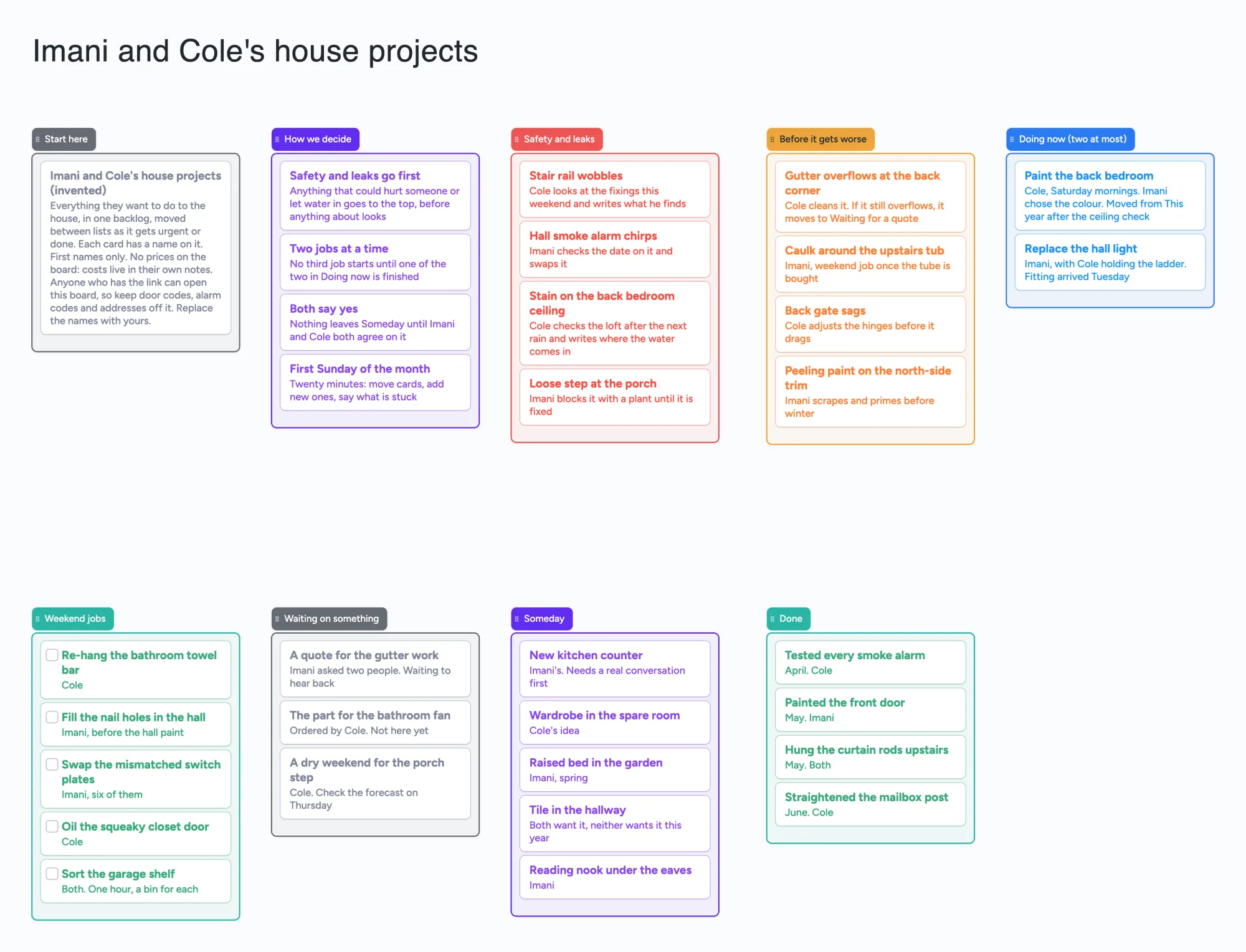
We make Instaboard, an online board. This page is for two people, a couple or housemates, who own or rent a place with more jobs than weekends and who want one list they both write on, instead of a notes app each. The board is filled in for an invented couple, Imani and Cole, in their first house. It holds the rules they decided, jobs sorted by urgency, the two jobs in progress, small weekend jobs with tick boxes, jobs waiting on someone else, a someday list and a done list. It has no prices, no reminders and no scores, and anyone who has the link can open it. It is a backlog, not a list of choices between products: our home renovation page covers comparing paint, floors and furniture, and this one does not.
Opens in your browser. Anyone can view; a free sign-in lets you edit.
Updated
Read this first: what this board does and doesn't do
- It holds a list you type. A job, who has it and one line of what comes next are a card. Nothing scores anything or sends reminders or due-date alerts, and Sort / Filter works one list at a time; urgency is which list a card sits in.
- No prices, no door codes. The board has no costs, quotes or budget. Keep alarm codes, door codes, addresses and your landlord's or tradespeople's phone numbers off it.
- Not a safety guide. The cards say who looks at a wobbling rail or a stain, not what to do about it. For anything that could hurt someone, ask a qualified person.
- A link is not private. Anyone who has the link can open the board. New boards start as "Anyone who joins can view". To let the second person add and move cards, switch Share to "Anyone who joins can edit"; each person signs in free to write, and the board then counts as 1 of their 5 free boards.
- Free plan limits: 5 boards, 150 items across your account and 3 pictures per board. A copy of this board takes 1 of your 5. Pro removes the item limit and costs $5 a month billed yearly ($59.99 a year), or $7.99 monthly.
Why a backlog, and why two people
Four Reddit threads, read November 24, 2026, are about the same problem: a house produces jobs faster than two people finish them. Each reply is one person's view, and we read the comments in each thread, so these are a handful of commenters, not a count of what owners do:
- "How do you keep track of all the small house projects you want to get done?" (r/DIY, u/thegreendog95, posted October 21, 2025). u/tree_beard_8675301 wrote that they once made a master list of everything and it was about 80 items long, "which felt completely impossible", so now they remember a job when they see it. u/dougz3 wrote that they keep a whiteboard on the fridge and cross jobs out. u/dxsquared wrote that they keep three Google Tasks lists: small things, moderate things for a Saturday, and a big project list. u/Snakend wrote that Trello already does this. u/cjlightf wrote "Apps are easy to ignore."
- "How do you prioritize new home projects?" (r/HomeImprovement, posted December 30, 2021). u/mberrong wrote that they keep an annual list on the fridge and move whatever is not done to next year's list. u/comj91 wrote that they sort jobs into three groups: now, soon, and down the road. u/UrFriendJackDaniels wrote that they go through three categories in order, starting with jobs that remove a danger and then jobs that get more expensive or dangerous if left. u/Big_Game_Huntr advised finishing one room at a time.
- "How do you guys stand having so many projects and not enough money to do everything?" (r/homeowners, u/IntelligentF, posted February 1, 2024). u/20-20beachboy wrote "You have to triage problems as they come up." u/sohcgt96 wrote that on getting the house they made a spreadsheet with a column for each room and listed projects in order of priority. u/Own-Artichoke-2026 wrote that they and their wife sit down annually to prioritise and "You will never get them all done". u/TheBimpo wrote that they keep a spiral notebook of punch lists to see how far they have come.
- "How do you keep track of home projects? Todo app? Something else?" (r/homeowners, u/seg492, posted December 12, 2023). A couple using Google Keep asked for something better. Replies named Google Sheets, Excel, Todoist, Notion, Keep, Trello and a note pad. u/LOLokayRENTER wrote that tasks are simple enough that Keep or Trello will do.
None of the comments we read asked for a shared board. The pattern across them is a short list of rules, a few buckets by urgency, and a regular sit-down. The board in this page turns those three things into lists. Where a spreadsheet or a fridge whiteboard already works for you, stay with it.
The rules go on the board first
The second list, How we decide, holds four cards, and they are Imani and Cole's own: safety and leaks go first, two jobs at a time, nothing leaves Someday until both say yes, and twenty minutes on the first Sunday of the month. They echo what commenters wrote (u/UrFriendJackDaniels on danger first, u/mberrong on one list that gets looked at again and again), but they are invented for this example. The board enforces none of them: a third card can still be dragged into Doing now.
Polished Habitat, a home blog (page prints "01/07/2016"; read November 24, 2026), suggests starting with a "BIG DREAM" list of everything you can think of and then asking yourself questions such as which ONE thing you would do if you could do only one this year, and whether anything has to be done regardless. The author sorts jobs by high, medium and low priority. The board's Someday list is that dream list; the rest of the board is what is left after the questions.
Imani and Cole's board, list by list
| List | What goes in it | In Imani and Cole's board |
|---|---|---|
| Start here (grey) | What the board is and isn't; that the link is not private | One card |
| How we decide (purple) | The rules the two agreed | 4 cards: safety first, two at a time, both say yes, first Sunday |
| Safety and leaks (red) | Jobs where something could hurt someone or let water in | 4 cards: stair rail, smoke alarm, ceiling stain, porch step |
| Before it gets worse (orange) | Jobs that cost more or do more damage if left | 4 cards: gutter, bath caulk, gate, trim paint |
| Doing now, two at most (blue) | The jobs being worked on | 2 cards: paint the back bedroom, replace the hall light |
| Weekend jobs (green, tick boxes) | Small jobs that fit in a few hours | 5 cards with tick boxes |
| Waiting on something (grey) | Jobs that need a quote, a part or the weather | 3 cards |
| Someday (purple) | Wants that need both to say yes first | 5 cards |
| Done (green) | What got finished, with the month and who | 4 cards |
Swipe the table sideways to see every column.
The board's own wording. The board sends no reminders or due-date alerts; "first Sunday" is a card, not an alarm.
A month of moving cards
This is how Imani and Cole might use the board. The order is our example, not a rule.
- First Sunday, twenty minutes. They open the board together, move finished cards to Done with the month and a name, and read Safety and leaks first.
- A new job comes up. Cole sees a stain on the ceiling. He adds a card to Safety and leaks that says what he will check and when.
- Doing now has two slots. The back bedroom is being painted and the hall light is being replaced. A third job waits until one of them is done.
- Weekend jobs are ticked as they go. Everyone with edit access sees a tick live. The board doesn't record who ticked it or when, and anyone with edit access can untick it, so the card says whose job it is.
- A job gets stuck. The gutter still overflows, so its card moves to Waiting on something with a line saying whose turn it is.
- Someday only changes with both. A card leaves Someday when both write yes in the card's text.
What is left off on purpose
- Prices and quotes. The poster in the u/seg492 thread asked for an app for "putting together cost estimates, prioritize them" and more. A board has no sums, so costs stay in a spreadsheet or notes, and the board holds only which job is waiting on a quote.
- Contractors and legal matters. No names, numbers or contracts. The cards say who asked and who is waiting.
- Codes and addresses. Door codes, alarm codes and addresses never go on a link board.
- Instructions. The board has no how-to steps. For a job you aren't sure about, ask someone qualified.
Where other tools do this better
Read November 24, 2026. Prices and limits change, so check the page. No ranking: they suit different people. Every row is what the tool's own page or a thread says; nothing is from using it.
| Tool | What its page or thread says | Better than a board at | Where a board fits |
|---|---|---|---|
| A paper list or fridge whiteboard | Reddit: u/dougz3 wrote that they keep a whiteboard with magnets on the fridge and cross jobs out; u/mberrong keeps an annual list on the fridge | Being in front of you every day, with no sign-in | Two people who are in different places, or who want the Done list to stay |
| Todoist | Its pricing page (shows no date) lists a free plan with 5 personal projects, task reminders and comments; task deadlines are listed under Pro, which it shows at $5 a month billed yearly ($60) or $7 monthly | Reminders and scheduling a job for a day | A backlog moved between lists, with no reminders or due-date alerts |
| Google Sheets, Excel or Keep | Reddit: several commenters use one; u/sohcgt96 wrote that they used a spreadsheet with a column per room. Not read | Sums, sorting and a cost column | Cards that are dragged between urgency lists |
| Trello | Reddit: u/Snakend wrote that Trello already does this. Not read | A card-and-list board you may already use | No tool to learn, if you only need one shared list |
Swipe the table sideways to see every column.
Set it up in six steps
- Open the board and make your copy. "Make a copy" takes 1 of your 5 free boards; replace Imani, Cole and the jobs with your own.
- Write your own rules in How we decide. Keep them to four lines; delete the ones you don't want.
- Empty the lists you don't need and put every job you can think of in Someday first, then move the urgent ones up.
- Put a name on every card. A card without a name is a job nobody has.
- Share the link with the other person. To let them write, tick "Anyone who joins can edit" in Share; each signs in free to add or move cards.
- Pick the day. Write a date in the card of the monthly sit-down. The board won't remind you.
Limits of the free plan for this board
- Items. Each card and each list is 1 of 150 free items across your account; the example is 42. Arrows, sections and pen strokes don't count. If Done is never cleared and six cards are added a month, the board reaches 150 in month 18, our arithmetic. A master list of 80 jobs like the one u/tree_beard_8675301 described would be 90 items with the nine lists and the title.
- Boards. 5 on the free plan. "Make a copy" takes 1 of them.
- Pictures. 3 per board. The example has none; photos of the job belong in a shared album.
- Writing needs a sign-in. Anyone who has the link can read the board; to change it they sign in free, and the board then counts as 1 of their 5.
- Reusing it. A copy keeps its ticks, so untick Weekend jobs when you reuse the board.
Start from the ready board
It opens in your browser in a few seconds, with nothing to install. Sign in for free when you want to save it and share it.
Questions
Does the board remind us about jobs?
No. It has no reminders, alarms, due-date alerts or notifications. The monthly sit-down is a card with a date you type. Todoist's pricing page lists task reminders on its free plan if you want one.
Does the other person need an account to edit?
To write on the board, yes: they open the link and sign in free, and you tick "Anyone who joins can edit" in Share. The board then counts as 1 of their 5 free boards. Someone who only wants to read can open the link without signing in.
Can I keep prices and quotes on it?
We'd leave them off. The board has no sums or columns, and anyone who has the link can open it. Keep costs in a spreadsheet and use the board for who has which job and what it is waiting on.
How is this different from a renovation board?
A renovation board compares options for a project, such as paint or floor choices side by side. This one is a backlog of many small and large jobs, moved from someday to done by two people. The example has no pictures and no product choices.
How many cards fit on the free plan?
150 items across your account, where each card and each list is one item. This board is 42. A copy with a Done list that is never cleared and six new cards a month reaches 150 in month 18. That is our arithmetic, and your other boards share the same 150; Pro removes the item limit.
Is this for landlords or tradespeople?
No. It is for two people who share a place and its jobs. It has no tenants, tickets, quotes or contracts, and the example is invented.
Sources
- r/DIY: "How do you keep track of all the small house projects you want to get done?" by u/thegreendog95 (posted 2025-10-21; read November 24, 2026)
- r/HomeImprovement: "How do you prioritize new home projects?" (posted 2021-12-30; read November 24, 2026)
- r/homeowners: "How do you guys stand having so many projects and not enough money to do everything?" by u/IntelligentF (posted 2024-02-01; read November 24, 2026)
- r/homeowners: "How do you keep track of home projects? Todo app? Something else?" by u/seg492 (posted 2023-12-12; read November 24, 2026)
- Polished Habitat: Prioritizing Your Home Project List, Part 2 (page prints "01/07/2016"; read November 24, 2026)
- Todoist: pricing (page shows no date; read November 24, 2026)