For an SAT tutor, or a parent, who sets up one plan for one student
SAT study plan template: one shared board for the week's tasks, a mistake log and a parent check
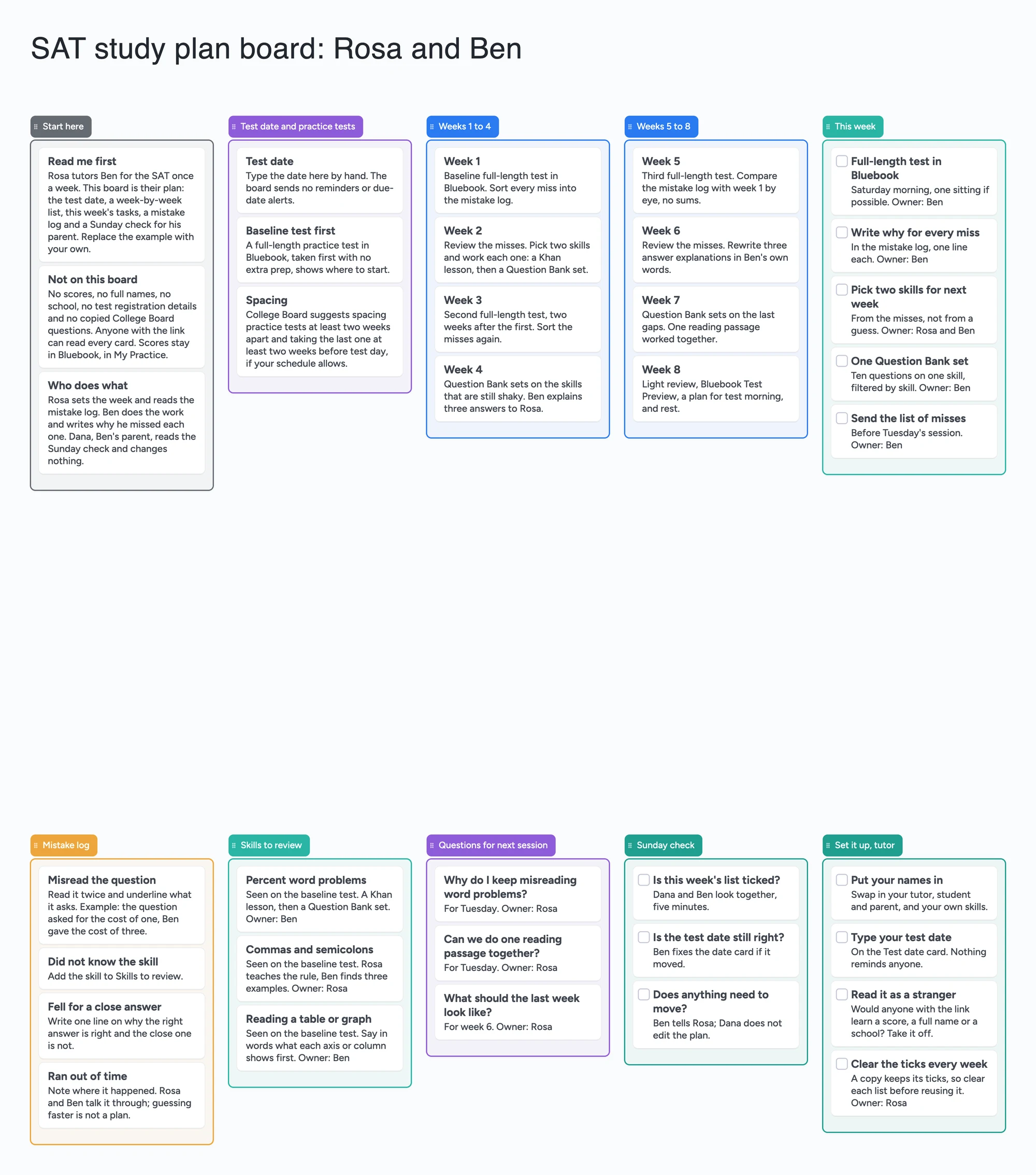
We make Instaboard, an online board. This is an SAT study plan for a tutor and one student who share one link, filled in for an invented pair, Rosa and Ben, with Ben's parent Dana reading a Sunday check. It has no practice questions, no scores and no reminders or due-date alerts, and a tick records no name and no time. Practice tests and scores live in College Board's Bluebook app, and an adaptive planner such as OnePrep's does more than a board can. What the board gives you is the plan around the lessons: a week-by-week list, this week's tasks with an owner on each, a log of why each miss happened, and one place the parent can look. Many SAT students are under 18: if that is your student, check with a parent or your school before signing up, and let the adult set it up.
Opens in your browser. Anyone can view; a free sign-in lets you edit.
Updated
Read this first: what this board does, and what it leaves off on purpose
- What the board is: the plan around the lessons: a test date typed by hand, an eight-week list, this week's tasks with an owner, a mistake log, skills to review, questions for the next session and a Sunday check for a parent.
- What it isn't: no practice questions, no scores, no reminders or due-date alerts. Scores, full names, a school and test registration details stay off it, and so do copied College Board questions. A tick records no name and no time.
- Ticks: tick items together, and everyone with edit access sees it live. Anyone with edit access can un-tick anything, so a tick is a note, not proof of work.
- Free plan: the example is 47 of your 150 free items (36 cards, 10 lists and 1 title text box, our count). Arrows and pen strokes don't count. Writing needs a free sign-in, and a reader can open the link signed out. Pro removes the item limit.
Rosa and Ben's board, list by list
Rosa tutors Ben once a week, and Dana is Ben's parent. Everything in the example is invented, with first names only and no scores.
- Start here (3 cards). How the board is used, a "Not on this board" card, and who does what: Rosa sets the week, Ben does the work, Dana reads the Sunday check and changes nothing.
- Test date and practice tests (3 cards). The test date typed by hand, a baseline full-length test first, and College Board's spacing advice.
- Weeks 1 to 4 and Weeks 5 to 8 (4 cards each). One card per week: a baseline test, review, a second full-length test two weeks after the first, a third, and a light last week with a plan for test morning.
- This week (5 cards, tick boxes). The test, why-for-every-miss, two skills for next week, one Question Bank set and the list of misses sent before the session, each with an owner.
- Mistake log (4 cards). Four kinds of miss: misread the question, did not know the skill, fell for a close answer, ran out of time, each with what to do about it.
- Skills to review (3 cards). Three skills from the baseline test, each with a first name.
- Questions for next session (3 cards). Questions Ben wants to raise on Tuesday.
- Sunday check (3 cards, tick boxes). Five minutes with a parent: is the list ticked, is the date right, does anything need to move.
- Set it up (4 cards, tick boxes). Put your names in, type your date, read it as a stranger and clear the ticks every week.
There are no arrows on this board. The order of the lists, left to right and then down, is the order of the plan.
What College Board's plan page says, and what the board takes from it
College Board's "Build Your SAT Suite Study Plan" page, read November 24, 2026 (no date printed in the text), is the source for the plan's shape. The test is College Board's, and "SAT" is its mark: it is named here as a source only, and we are not affiliated with College Board.
- Start from a baseline. The page calls a Bluebook practice test the best and most accurate way to measure your knowledge of the skills on the test. Week 1 on the board is that test.
- Learn from the misses. Its "Skill Booster" activity says to go back and work out why you missed a question, and to take notes so you can spot patterns. The mistake log and "write why for every miss" are our version of that.
- Space out the tests. It recommends spacing practice tests at least two weeks apart if the schedule allows, and taking a full-length one at least two weeks before test day. Weeks 1, 3 and 5 are the board's spacing.
- Say it in your own words. Its "Create an Explanation" activity suggests rewriting answer explanations in your own words. Week 6 and the "explain three answers" card use it.
- Pick activities that fit the time. The page groups activities by length: quick ones of 15 minutes or less, moderate ones up to an hour, and extended ones over an hour. The board names a Question Bank set and a full-length test but sets no hours, and promises no change in score.
The mapping of those activities to eight weeks is ours, not College Board's.
What students on r/Sat say about study plans
Three r/Sat threads, read November 24, 2026 with the replies. Each reply is one account's view, and none of them asks for a shared board.
- "Summer Study Plan?" (u/Few-Wasabi-1847, 2024-06-03). The poster asks how often to take practice tests. u/lebronjamez21 says not to spend time learning how to study the SAT and to start with a practice test and then work through Khan Academy. u/IvyBloomAcademics, who describes working with students, outlines a ten-week plan and says not to use up College Board's practice tests at once. u/scarred_hamper says they did not need full tests and instead worked many questions in the College Board Question Bank.
- "Those who scored 1500+ on the SAT, what did your Study Plan look like?" (u/Ezoticx16, 2025-10-22). u/lolabug67 says to take full-length tests, which show strong and weak areas, then use hard questions from those areas. u/StarWarsNerd69420 describes one practice test every Friday, reviewing mistakes on Saturday and retaking the same test on Sunday. u/solemnandsincere says the plan that worked depends on where you started.
- "1380 to +1550 in 3 months (study plan" (u/Thick_Outside_7284, 2024-05-23). We use only the question; one commenter in it mentions their own product.
The board borrows three ideas, each from a different commenter: start with a full-length test and work from the weak areas (u/lolabug67), review mistakes in a separate sitting (u/StarWarsNerd69420), and don't use up College Board's practice tests at once (u/IvyBloomAcademics). The commenters who say to skip planning and just do questions are a fair counterweight, and the board doesn't answer them.
What other SAT planners cover that this board leaves off
Read November 24, 2026 from each page. Each point is the page's own view.
- OnePrep's study planner (a vendor) says it turns a test date, target score and current level into a week-by-week plan with daily sessions drawn from its question bank, adapts as you practice, and rebuilds the calendar if the test date changes. It says its bank holds more than 4,000 Digital SAT questions.
- College Board (the test maker) gives the activities and the spacing advice above, and runs Bluebook, where practice tests, scores and "My Practice" live.
- A Notion template (the "Digital SAT Prep" template on the Notion marketplace; the listing shows it as free and rates it 4.3 from 28 ratings; the page's own "last updated" line is broken, and per page data it was created July 24, 2024 and last updated November 22, 2024; the page's body was not readable) is one of several student-made trackers.
- What the board leaves to other places: questions, timing, scores, adaptive plans, reminders and due-date alerts, and any record of how many hours were done.
- What the board adds: a tutor, a student and a parent look at one list; every task carries a first name; and the mistake log is written by the student, in plain sentences, where the tutor reads it before the session.
How to set it up for your student
- Open the board and replace the example. Swap Rosa, Ben and Dana for your own names, and the example skills for the ones the baseline test shows. Each card is 1 of your 150 items.
- Have the adult create the account. Your student can read the link signed out; writing needs a free sign-in, and if your student is under 18, a parent or your school should be involved.
- Type the test date. On the Test date card. Nothing on the board reminds anyone.
- Take the baseline test first. Do it in Bluebook, and keep the score there. Put only the kinds of miss on the board.
- Write the week. Set the tick list on This week, with an owner on each card.
- Let the student write the why. One line per miss in the mistake log, read by the tutor before the session.
- Share it. In Share, new boards start as "Anyone who joins can view". Set it to "Anyone who joins can edit" for the tutor and student; each signs in once, free. Open the link signed out to check a reader sees everything.
- Clear the ticks every week. There is no clear-all button and a copy keeps its ticks, so un-tick each list first.
What this board doesn't do, and where others do it better
Read on November 24, 2026 from each page.
| Option | What its own page says (November 24, 2026) | Better for | Not what you get |
|---|---|---|---|
| College Board plan page and Bluebook | Lists study activities by length and recommends spacing full-length practice tests; practice tests and scores sit in Bluebook | Practice tests, scores and "My Practice" (College Board's) | A shared list with a tutor |
| OnePrep study planner (vendor) | A personalised week-by-week plan from a test date and target score, adapting as you practice, with 4,000+ questions | A student studying alone who wants a daily plan with questions | A plan with a person's name on each task |
| Notion SAT templates | Templates with ratings on the marketplace; the body was not readable | People who already use Notion | A board with no Notion account |
| Khan Academy | Not read (its page blocked our fetch); listed on College Board's plan page as one of its study activities | Skill lessons | A plan |
| A notebook and a text to the tutor | One commenter says to skip the planning and just do questions | Students who need no structure | A parent's view |
Swipe the table sideways to see every column.
From each page, read November 24, 2026. Not affiliated with any of them. "SAT" is a College Board mark.
Where these win
If your student studies alone, an adaptive planner with questions in it does more than a board can. If you only need practice tests and scores, use Bluebook. Use this board when a tutor, a student and a parent need to look at the same list: the week's tasks, the reasons for the misses and what to bring on Tuesday.
Limits of the free plan for a study plan board
SAT is a trademark of College Board, which is not affiliated with and does not endorse this page.
- Items. Each card, list and text box is 1 of your 150 free items, across all your boards. The example is 36 cards, 10 lists and 1 title text box, 47 in all. Arrows and pen strokes don't count.
- Copies add up. Our arithmetic: a board per student is another 47 items, 94 for two, 141 for three, and a fourth passes 150 (188). Pro removes the item limit ($5 a month billed yearly, $59.99 a year, or $7.99 monthly). A tutor with several students may reach the limit on the free plan.
- Boards. The free plan includes 5 boards, and a copy takes 1 of them.
- Photos. 3 images per board. The example has none, and a photo of a score report or a test page would put private information on a link.
- Not private by default. New boards start with "Anyone who joins can view". Anyone with the link can read every card. Invite-only boards are a Pro feature.
- No reminders or due-date alerts. The board doesn't tell anyone when to study or when the test is.
- No record of who ticked. Anyone with edit access can un-tick any box and nothing records who did.
- Writing needs a free sign-in. A student who joins to tick boxes signs in once; a reader can open the link signed out and can't change anything.
Start from the ready board
It opens in your browser in a few seconds, with nothing to install. Sign in for free when you want to save it and share it.
Questions
Is there an SAT study plan template I can share by link?
Yes. Open the board, replace Rosa, Ben and Dana with your own names and share the link. It holds a test date, an eight-week list, this week's tasks, a mistake log, skills to review and a Sunday check, and no questions, scores or reminders.
Does it give me practice questions or scores?
No. Practice tests and scores are in College Board's Bluebook app, and the board holds only the plan around them. The example has no scores on it, and you shouldn't put your student's on it.
Can a student under 18 use it?
Many SAT students are. A parent or your school should be involved in the sign-up, and the adult should set the board up. Anyone with the link can read every card, so keep scores, full names and a school off it.
Will it improve a score?
The page makes no promise about scores or hours. It is a list the tutor, student and parent share; what a student does with it is up to them.
Can I tell who ticked a box?
No. A tick records no name and no time, and anyone with edit access can un-tick it. Treat a tick as a note to the team.
How many cards fit on the free plan?
Each card, list and text box is one of the 150 items across all your boards. The example is 47, so a fourth copy passes 150 (our arithmetic). Arrows are free, and Pro removes the item limit.
Sources
- College Board: Build Your SAT Suite Study Plan (read November 24, 2026; no date printed in the text; the test maker)
- OnePrep: SAT Study Planner (read November 24, 2026; only a © 2026 footer; vendor)
- Notion Marketplace: Digital SAT Prep | Road to a perfect 1600 (read November 24, 2026; listing only; the body was not readable)
- r/Sat: Summer Study Plan? (2024-06-03; read November 24, 2026; replies are single accounts)
- r/Sat: Those who scored 1500+ on the SAT, what did your Study Plan look like? (2025-10-22; read November 24, 2026; replies are single accounts)
- r/Sat: 1380 to +1550 in 3 months (study plan (2024-05-23; read November 24, 2026; question only)
Related
How to tutor SAT math online on a whiteboard: one SAT-style lesson, step by step
How to tutor SAT math online on a shared whiteboard: what the College Board says the Math section tests, one SAT-style lesson worked step by step with the student doing the next one, and why Bluebook is the tool for timed practice. Ready lesson board included.
A math mistake log template: one card per mistake, redone in ink, filled in so you can see how it reads
A math mistake log (error log) for a tutor and student: one card per mistake, the cause named first, redone in ink and moved from to-redo to secure. Filled example board, and when a spreadsheet is the better log.
A tutoring progress report template for parents, filled in so you can see how it reads
A monthly tutoring progress report for a parent: sessions held, one number that moved, a win, what is still hard and next month's plan. A filled example board you can send as one link.