For study groups, tutors and game tables
Does Discord have a whiteboard? Yes, and here is how to open it
Yes. Discord has a Whiteboard activity you can start from the App Launcher in a voice channel, a DM or a group chat. For a casual hangout it is the quickest choice, and we say so below. If your group needs more than sketching (a plan with owners, a stuck list, worked answers that are still there next week), you can open a shared Instaboard board next to the call and paste its link in your channel. Instaboard is not a Discord activity, so Discord keeps the voice and video. Viewers need no account; writing takes a free sign-in.
Opens in your browser. Anyone can view; a free sign-in lets you edit.
Updated
The short answer
- Yes, Discord has one. It is the Whiteboard activity, started from the App Launcher in a voice channel, DM or group chat (steps below).
- Everyone in the session can change everything except other people's text: Discord says anyone in the activity session can draw, delete objects, and move or resize any object.
- Boards expire. Discord keeps a board per channel or group message, and says a board that is not active for 90 days expires.
- For a casual hangout, use Discord's own. It is already open and needs nothing new.
- For a study plan or a lesson, keep Discord for the call and open a shared board next to it. Paste the link in the channel; anyone can view, and writing takes a free sign-in.
How to open the Whiteboard in Discord
- Join a voice channel, or open a DM or group chat.
- Open the App Launcher and pick Whiteboard from the activities list.
- Start it. Everyone with access to that channel or chat can open the same board.
- Draw and add things. The tools Discord lists are drawing, text, sticky notes, shapes, GIFs and stickers, and image upload (png, jpeg, jpg, gif).
Discord's help calls it Jamspace Whiteboard and says it works on the desktop app, in the browser, and on mobile and tablet. Before starting any activity on desktop, Discord says to turn on Hardware Acceleration (User Settings > Advanced).
If starting it fails
On January 6, 2026 u/XenonTheDerg posted on r/discordapp about an error when using the whiteboard. u/Frolick7122 wrote that they got the same error with Wordle and later that it looked fixed, at least for Wordle; another user wrote that it was still not working for them. The thread doesn't say what caused it, and these are individual users' posts, not a Discord statement. Check that Hardware Acceleration is on, then try again later.
What Discord's whiteboard won't do for a study group or a lesson
Discord's own help pages (the Jamspace Whiteboard FAQ, September 26, 2024) set these rules. None of them is a flaw for a hangout; they matter when the board is the work:
- Anyone in the session can change anything. Discord: "anyone in the activity session can draw, delete objects, and move or resize any object". Text can only be edited by the person who wrote it. If one person deletes your worked answer, it's gone for everyone.
- Access follows the channel. Anyone with access to the channel or chat can open the board. Discord's advice for limiting access is to use a private channel or group.
- It expires. A board that is not active for 90 days expires, so it is not a place to keep a semester's notes.
- It is built for about a dozen people. Discord says it is optimized for 12 participants; more can join, but performance may decline.
Discord's Whiteboard or a board next to the call
| Discord Whiteboard | Instaboard board next to Discord | |
|---|---|---|
| Where it lives | Inside Discord, started from the App Launcher | A browser tab or the app, opened from a link pasted in your channel; not inside Discord |
| Who can open it | Anyone with access to the channel or chat | Anyone with the link can view with no account; writing takes a free sign-in |
| Who can change what | Anyone in the session can draw, delete, move or resize any object; text only by its author | Anyone with edit access can change any card. "Owner" on a card is a group agreement |
| What goes on it | Drawing, text, sticky notes, shapes, GIFs, stickers, images | Lists, cards, arrows, pen ink, PDF pages you write on, equation cards |
| How long it stays | Expires after 90 days without activity | Stays at its link; free covers 5 boards |
Swipe the table sideways to see every column.
Discord cells from its Jamspace Whiteboard FAQ (September 26, 2024) and How to Use Apps help article, read November 17, 2026.
Set up a shared board next to your Discord call
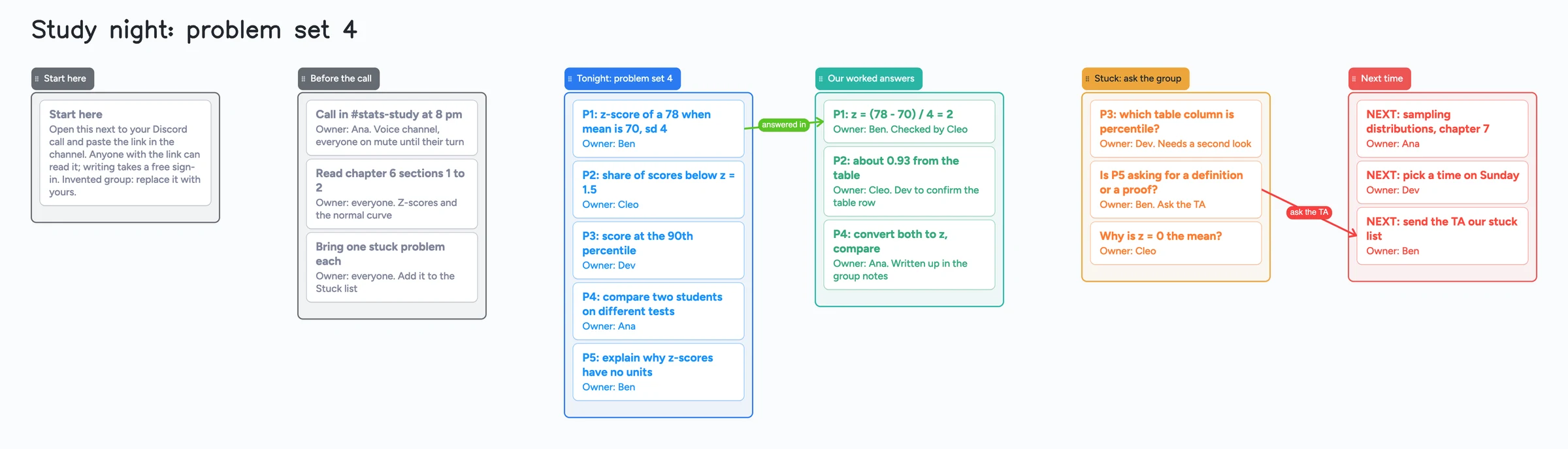
- Open the board above and make it yours. It is an invented study group: replace the names and problems with yours.
- Set sharing to "Anyone with the link can edit" so your group can write. New boards start view-only.
- Start your Discord call as usual and paste the board's link in the channel, or turn on the board's 4-digit join code (joiners with a code can view; a free sign-in lets them write).
- Everyone opens the link in a browser tab, or in the Instaboard app on a phone or tablet. They can view straight away and sign in once (free, with Google, Apple or email) to write.
- Keep the windows side by side. You don't need to share your screen: you all have the board open and see each other's changes live.
- Give every card an owner. Put "Owner: name" on the card, the way the example board does, so two people don't answer the same problem.
A board you open from a link counts as 1 of your 5 free boards. If you are already at 5, it still opens and you can still write; it just won't be added to your boards. If you are under 18, check with a parent or your school before you sign up for a new tool.
Running a game table on Discord? The D&D session planner board follows the same setup with a recap, scenes and a handouts list.
When Discord's own whiteboard is the better choice
- A casual hangout. Sketch a map, doodle with friends, drop a GIF. Nothing to open, nobody to sign in.
- A quick explanation during a call. It is one click from the voice channel.
- Everyone is already in the server, and the board should live with the channel.
- You want Discord's built-in GIF and sticker library on the board. We don't claim an equivalent.
Pick the shared board when the work should outlast the call: a problem set with a name on every problem, worked answers you can check, and a list of what is still stuck.
What Instaboard doesn't do
- It isn't a Discord activity. It doesn't appear in the App Launcher and doesn't open inside Discord. It runs next to it.
- People sign in to write. Anyone with the link can view; writing needs a free sign-in with Google, Apple or email.
- Free covers 5 boards and 150 items (cards and lists count; pen strokes, sections and arrows don't), with 3 pictures and 1 file per board. The example board is 24 items (our arithmetic).
- Free calls on the board end at 60 minutes, with a warning 10 minutes before the end. Everyone signs in free, calls aren't recorded, and Pro has no limit. If you keep Discord for the call, this doesn't apply.
- The eraser removes whole strokes. Undo is the quickest fix for the last thing you wrote.
- No Discord bot or integration. You paste a link; nothing syncs with your server.
If you are a tutor choosing a room for paying students, see our tutoring whiteboard guide and the comparison of Lessonspace and Pencil Spaces. Using Google Meet instead? See whiteboard for Google Meet.
Start from the ready board
It opens in your browser in a few seconds, with nothing to install. Sign in for free when you want to save it and share it.
Questions
Does Discord have a whiteboard?
Yes. Discord has a Whiteboard activity. Start it from the App Launcher in a voice channel, a DM or a group chat. Anyone with access to that channel or chat can open the same board.
How do I share a whiteboard on Discord?
Start the Whiteboard activity and everyone in the channel or chat can open it. To share a separate board instead, open an Instaboard board, set it to "Anyone with the link can edit", and paste the link in your Discord channel.
Why is the Discord whiteboard not working?
On desktop, Discord says to turn on Hardware Acceleration (User Settings > Advanced) before starting any activity. One r/discordapp user posted about an error on January 6, 2026; the thread doesn't say what caused it, and one reply said Wordle gave the same error and later looked fixed. A board you share by link doesn't depend on Discord's activities.
Can everyone on the call edit the Discord whiteboard?
Yes. Discord says anyone in the activity session can draw, delete objects, and move or resize any object. Text can only be edited by its author. To limit who can open it, Discord suggests a private channel or group.
How long does a Discord whiteboard stay?
Discord keeps a board per channel or group message and says a board that is not active for 90 days expires.
Can my study group write on an Instaboard board during a Discord call?
Yes. Paste the board link in the channel. Everyone can view with no account and signs in once, free, to write. Discord keeps carrying the voice and video.
Is Instaboard free?
Yes. The free plan includes 5 boards, 150 cards and items across your account (pen strokes, arrows and sections don't count), 3 images and 1 file per board, unlimited collaborators and video calls up to an hour. Pro is $5 a month billed yearly ($59.99 a year), or $7.99 monthly, and the people you invite join free.
Sources
Related
Does Google Meet have a whiteboard? Not since Jamboard ended
Google Meet has no built-in whiteboard since Jamboard ended. How to open an add-on, what to check if it's missing, and a board your student can write on.
An online whiteboard for tutoring that works the way you teach
A free whiteboard for online tutoring: paste the worksheet, write with a pen, and your student answers on the same board. Call on it or beside Zoom.
DnD session planner online: a filled board for one session, shared with your table
A filled D&D session plan to copy: last session's recap, scenes, secrets with arrows to where players learn them, NPCs, handouts and a next-session list. Free plan limits stated.
Zoom or Google Meet for tutoring: which free call fits a lesson?
Zoom, Google Meet or Microsoft Teams for online tutoring: free call length, recording, annotation, how to tutor on Meet and on Teams, from the vendors' own pages (read November 5 and 6, 2026), plus a ready board to use next to any call.
How to study from lecture slides: your notes beside each slide
Put your lecture slides beside your own-words notes and a 'can't explain yet' card, then study with a group on one board. Free plan: 3 images per board.