For novelists and screenwriters
A digital corkboard for your scene cards, free to start
A wall of index cards is still how many writers see their story. A digital version should let you lay cards out where you want them, colour them, link them and read the whole shape at once. Here is what Instaboard does for that, what it doesn't, and where Cork, Corkulous, Plottr, Scrivener and Milanote fit better. A ready three-act board is below.
Updated
The short answer
- Instaboard works as a corkboard for scene cards. A card has a bold scene name and a short summary. You place cards anywhere, colour them, tick them when drafted, join them with labelled arrows, and open a card into its own board for the scene's notes.
- You arrange it by hand. There is no automatic grid that re-flows when you move a card, no stacking, and no import from or export to Scrivener, Final Draft or Plottr.
- Free plan: 5 boards and 150 items (cards, lists, images). Pen strokes don't count. Anyone can view a board by link; editing needs a free sign-in. A long novel can outgrow 150 cards.
- If you want a cork-style tool just for writing, Cork has unlimited cards on its free plan, and Plottr and Scrivener are built for whole manuscripts.
What a scene-card corkboard looks like on Instaboard
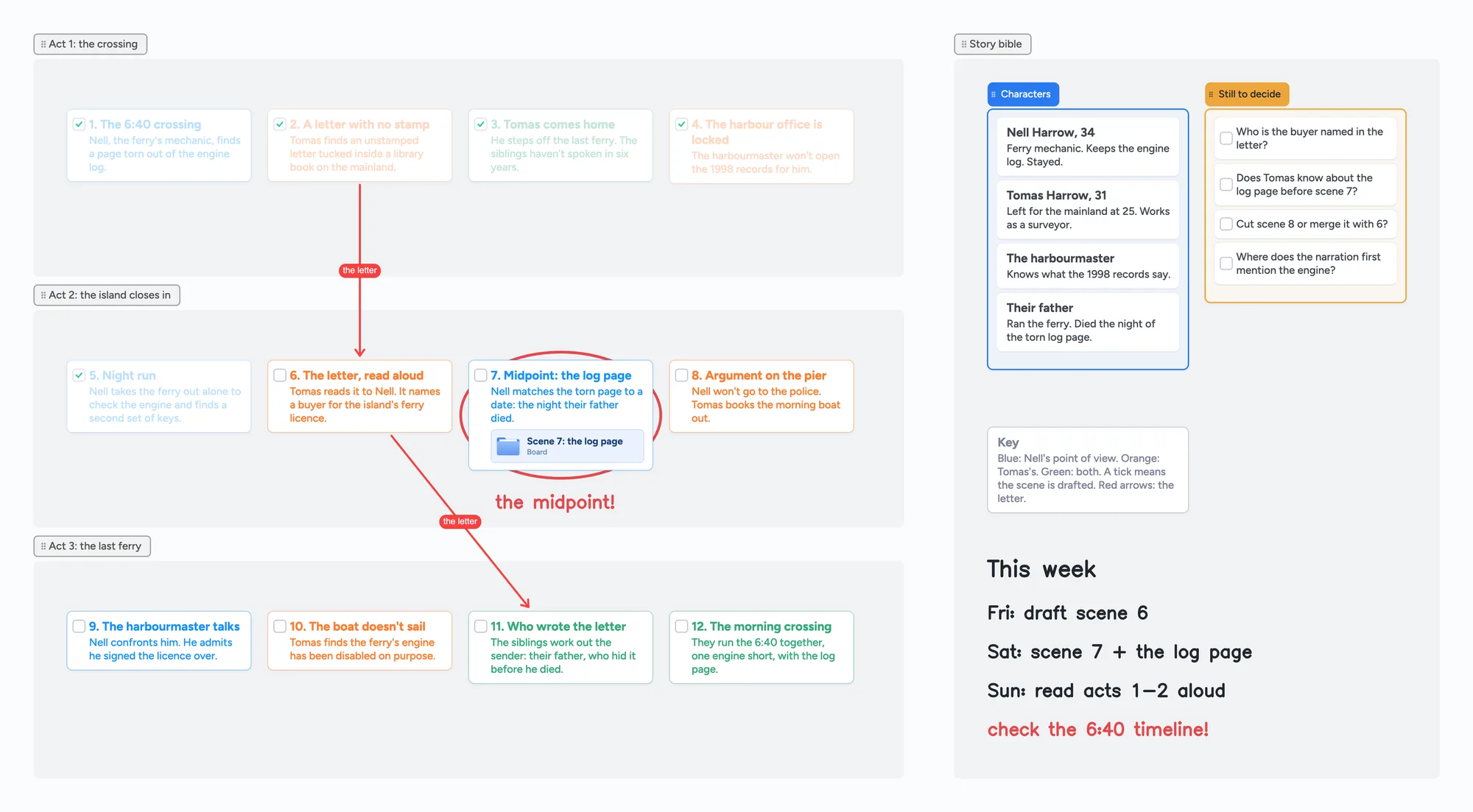
The ready board is a three-act outline for an invented novel, set up the way writers lay index cards out on a wall.
- Scene cards with a bold name and a summary. Each card has a title row and a body, so you can read the scene list at a glance and still keep a sentence of detail.
- Colour by point of view. Blue is one character, orange another, green both. The pattern across the three acts shows who is carrying the story.
- A tick when a scene is drafted. Cards can carry a checkbox, so the board doubles as a progress check.
- Arrows for a subplot. Red labelled arrows follow one thread, the letter in this example, from scene to scene.
- A scene that opens its own board. The midpoint card opens a separate board for that scene's notes, beats or research.
- A story bible next to the wall. Characters on one list, open questions on a checklist, and a handwritten to-do for the week, drawn with a pen or a pen tablet.
You can zoom out to see all twelve scenes at once and zoom in to one card to read it. Move a scene by dragging its card to a new spot, and the arrows follow it.
Digital corkboards and outliners for writers, side by side
Every row is from the maker's own pages, read on November 2, 2026. Prices change, so check the page before you buy.
| Tool | Built for | Free or entry price | What stands out |
|---|---|---|---|
| Instaboard | Any visual organizing, with a pen | Free: 5 boards, 150 items; Pro $5 a month billed yearly | Cards, lists, arrows and ink on one canvas; boards open in any browser and in the iPhone, iPad and Android apps |
| Cork (cork.is) | Writers | Free: 3 active boards, unlimited cards, 25 MB images; paid plans $19 to $59 a year | Stackable cards, wiki-style [[links]] with backlinks, board and kanban views, one-click Markdown export, installable as an app |
| Corkulous | Pinboards on Apple devices | Download from the App Store | Pins notes, photos, videos, PDFs and sketches to infinite boards on macOS and iOS; Apple devices only |
| Plottr | Planning a novel or series | Pro $9.99 a month or $99 a year; Plottr $60 a year (desktop) | Visual book outlining and a series bible; desktop for Windows and Mac, with a browser app and real-time collaboration on Pro |
| Scrivener | Writing the whole manuscript | Free trial, then a paid license | A binder for drafts, notes and research; compiles to Word, PDF, Final Draft and plain text; macOS, Windows and iOS |
| Milanote | Mood boards and creative projects | Free: 100 notes, images or links and 10 file uploads; $9.99 a month billed annually | Unlimited shared boards, even on the free plan |
Swipe the table sideways to see every column.
Plans change often. Sources are listed at the bottom of the page, all read on November 2, 2026.
When another tool is the better choice
- You want a cork wall for writing and nothing else. Cork is made for it: free unlimited cards, stackable cards, [[links]] between cards with backlinks, and a clean Markdown export if you leave. It costs $19 a year to go past 3 boards. Instaboard's free plan counts cards, and a long novel can pass 150.
- You are planning a series with a story bible. Plottr is built for outlining books and series, with a series bible, on Windows and Mac. It costs $9.99 a month or $60 to $99 a year.
- You write the whole book in one place. Scrivener holds the draft, the notes and the research together, and compiles to Word, PDF, Final Draft or plain text. Instaboard holds no manuscript text and has no compile step.
- You live on Apple devices and want a plain pinboard. Corkulous pins notes, photos and PDFs to infinite boards on Mac, iPad and iPhone.
- You collect lots of images for a mood board. Milanote's free plan allows 100 items and 10 uploads, and Instaboard allows 3 images per board.
- You want cards that re-flow into a grid when you move one. Instaboard doesn't do that. You place and move cards by hand.
What to know before you outline a novel here
- No Scrivener, Final Draft or Plottr import or export. You can't bring an outline in from them or send a board to them. Selected cards and lists can be saved as a PNG.
- No automatic grid, stacking or sorting. Cards stay where you put them. Lists keep their cards in order, and you can move cards between lists.
- 150 items on the free plan, across your account. Cards, lists, text boxes, sticky notes, widgets and images count. Pen strokes, sections and arrows don't. The ready board uses 23 (21 cards and 2 lists), so a 60-scene novel plus a story bible fits only with care.
- 5 boards on the free plan. Keep one board per book, and use the card-to-board link sparingly.
- 3 images and 1 file per board. A character photo or a map is fine, a wall of reference images is not.
- No links between cards by name. Arrows join cards, but you can't type a link to another card and see backlinks.
- Editing needs a free sign-in with Google, Apple or email. Viewing a board by link doesn't. If your connection drops, your changes are kept and sync when you're back, but it isn't an offline-first app with local files.
- Pro is $5 a month billed yearly ($59.99 a year) and removes the board, item and image limits.
Writing the scenes themselves
Instaboard holds the outline, not the prose. Keep drafting in your word processor or Scrivener, and use the board to see the shape and tick scenes off.
Start from the ready board
It opens in your browser in a few seconds, with nothing to install. Sign in for free when you want to save it and share it.
Questions
Is there a free digital corkboard for writers?
Yes, several have a free tier. Cork's free plan has 3 active boards with unlimited cards. Instaboard's free plan has 5 boards and 150 items, with pen strokes not counted. Milanote's free plan has 100 notes, images or links. Each tool's limits are in the table above.
Can I use Instaboard as a Scrivener corkboard replacement?
For the outline wall, yes: scene cards with a title and summary, colours, ticks and arrows. It isn't a Scrivener replacement for drafting. It has no manuscript editor, no compile step, and no import or export with Scrivener.
Can I move cards and have the others shift into place?
No. Instaboard has no automatic grid. Cards stay where you drop them, so you line them up yourself.
Does Instaboard work on iPad and Android?
Yes. There are apps for iPhone, iPad and Android, and any modern browser works on Windows, Mac and Chromebook. The same board opens on all of them.
Can I draw on the corkboard?
Yes. Pen, highlighter and a pressure-sensitive pen on a tablet all work, so you can circle a scene or write a note in the margin. The eraser removes whole strokes.
How many scene cards fit on the free plan?
The free plan allows 150 items across your account. Cards, lists, text boxes, images and widgets count; pen strokes, sections and arrows don't. A 40-scene outline with a character list fits. A very long book may not.
Can I share the board with an editor or co-writer?
Yes. Send the link: anyone can view it without an account, and they sign in for free to edit.
Sources
- Cork: home page (features, free plan, install as an app; read Nov 2, 2026)
- Cork: pricing (free 3 active boards, $19 / $39 / $59 a year)
- Corkulous: home page (Apple devices, pinned notes, photos, PDFs, sketches)
- Plottr: pricing (Pro $9.99 a month, $60 and $99 a year)
- Scrivener: overview (compile to Word, PDF, Final Draft, plain text; platforms)
- Milanote: plans and pricing (free 100 items, 10 uploads)
- r/editors: "Index card/ story structure app" (Oct 21, 2024; wants a bold scene name with a smaller description, and auto-arranged grid)
- r/Screenwriting: "What are your favorite outlining tools?" (Sep 10, 2026)
Related
A free infinite canvas app for your notes, on Windows, Android, Chromebook and iPad
Free infinite canvas apps for class notes on Windows, Chromebook, Android and iPad: where each one runs, what its free plan really gives, and a ready notes board to open.
A Freeform alternative that works on Windows, Android and the web
Freeform only runs on Apple devices, and everyone needs an Apple Account even to view a shared board. A free alternative that works on Windows, Android and any browser, with a call on the board.
Make a biology concept map from your own notes
Turn your lecture notes into a biology concept map: concepts on cards, labelled arrows, feedback loops and a recall check. Worked example on the HPA axis, a ready board to copy, and a nursing version.
Build a nursing concept map for your patient
How to build a nursing concept map from your clinical notes, step by step: patient, pathophysiology, assessment data, labs, meds, priority problems, interventions and outcomes. A worked heart failure example you can open and edit.