For instructors, teachers and study groups
A whiteboard for Zoom and Teams breakout rooms: one board, one section per group
You split the class into rooms and want every group to write on a whiteboard, then bring the results back. The hard part is not drawing: it is getting one link into every room, because one Zoom user reported the main chat being wiped in breakouts, and Teams doesn't let people on a free Teams account be assigned to a room. Here is what Zoom's and Microsoft's own pages say, and a way to run the whole activity on one shared board.
Updated
The short answer
- Make one board for the whole activity with one section per group, and tell each group to stay in its own section. Nothing stops a group from editing another group's section.
- Get the link into every room before you split. Zoom says the host can share a screen into all open rooms ("Share to breakout rooms"); Teams lets the organizer post an announcement in each room's chat. Put the link, a QR code or the 4-digit join code on that screen or message.
- Students 13 and older sign in free to write. Anyone with the link can view the board without signing in.
- One board per group is not free for a big class. Separate boards per group count against the free 5-board limit, which is why this page uses one board.
What Zoom and Teams say about whiteboards in breakout rooms
Zoom's breakout room guide (updated September 19, 2025, read November 5, 2026): a meeting can be split into up to 100 rooms. The host or a co-host can assign people automatically or manually, or let participants choose their room. Participants have "the same audio, video, and screen share capabilities as allowed in the main session".
Zoom's page on sharing into breakout rooms (updated December 5, 2024, read November 5, 2026): the host or a co-host can click Share Screen and turn on Share to breakout rooms, and the selected content is shown in all open rooms. They can also broadcast a message to all rooms, if that is enabled in the breakout room settings. The page adds: "Annotation or whiteboarding is saved before the host's shared content is viewed."
Microsoft's Teams breakout room page (no date on the page, read November 5, 2026): the meeting organizer, or a presenter appointed as a breakout rooms manager, creates and opens the rooms. An announcement the organizer sends appears in each room's chat, marked IMPORTANT. Among the features "not currently available in breakout rooms" it lists: "Adding or assigning participants signed into a Microsoft Teams (free) account to a room" and "Copying the Join meeting info". We found no line about Whiteboard in breakout rooms on that page.
What people report (one person's view each)
- Zoom Community, August 22, 2024: a person with the Whiteboard add-on wrote that they could not share the link in the chat because "the main chat is wiped when they go into break outs", and that sending it as a broadcast message meant "they can't click on the link". A Zoom community champion who is a Zoom employee answered on September 19, 2024 with two workarounds: each group makes its own whiteboard, or one whiteboard is shared with everyone by email with one page per group, "max 12 pages", and "there is no embeded tools to do this limitation" (nothing stops groups editing each other's page). Two later users asked the same thing in 2025 and the thread shows no answer.
- Microsoft Q&A, March 18, 2025: a facilitator wrote that a Teams meeting whiteboard they used to reach from breakout rooms had stopped being accessible there "for the last few weeks". It is one user's report on one version of Teams, not a statement from Microsoft.
Run the activity on one board
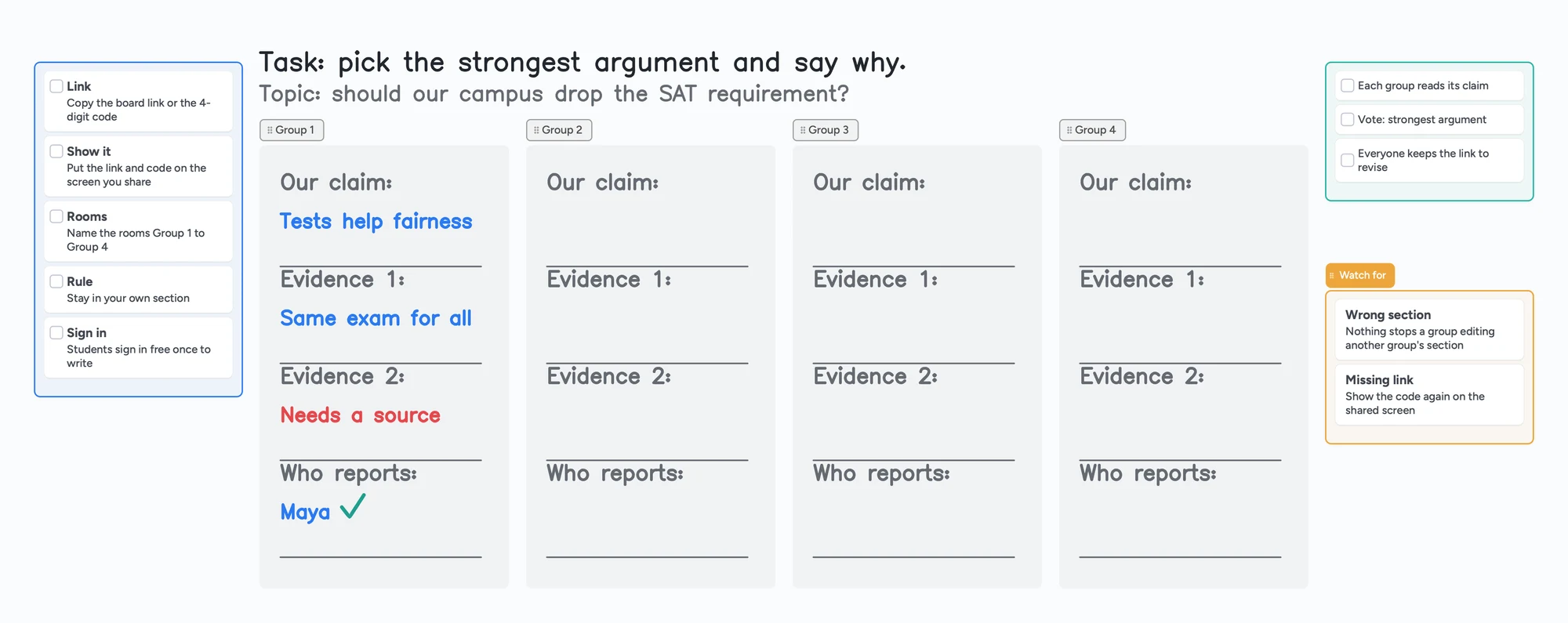
- Open the ready board above (or start a blank one) and change the topic and the task at the top. The board has four group sections; use as many as you have groups.
- Copy the link. In Share, set link access to Anyone with the link can edit first. The 4-digit join code is short enough to read out or put on a slide (it expires after 2 hours of inactivity), and a QR code works for people on a phone.
- Put the link where every room will see it. Make a slide or a message with the link, the code and one rule: "Write only in your own group's section."
- Open the rooms. Each group opens the link in a browser, signs in once, free, with Google, Apple or email, and writes in its own section: the claim, the evidence, and who reports back.
- Close the rooms. Everyone returns to the main room, you read each section aloud, and everyone keeps the link to revise.
Nothing locks a group to its section
Anyone who can write on the board can write anywhere on it. The sections show who owns what, but a group can edit another group's section, so say the rule out loud. If you need strict separation, give each group its own board and check the free 5-board limit below.
Getting the link into every room
| Zoom | Teams | |
|---|---|---|
| Show one thing in all rooms | Host or co-host: Share Screen, then turn on "Share to breakout rooms" (Zoom's page, December 5, 2024) | Not found on Microsoft's page |
| Send text to all rooms | Broadcast a message, if enabled in the breakout room settings | Organizer announcement, shown in each room's chat as IMPORTANT |
| Who can be in the rooms | Participants; the host and co-hosts manage them | Not people signed in with a free Teams account (Microsoft's page, read November 5, 2026) |
| Is a link in that message clickable? | One user said no for a broadcast message (2024). We haven't tested it | We haven't tested it |
Swipe the table sideways to see every column.
Zoom: Zoom Support articles on managing breakout rooms and on sharing and broadcasting to breakout rooms. Teams: Microsoft Support, Manage breakout rooms in Microsoft Teams. All read November 5, 2026.
We haven't tested whether a link in a Zoom broadcast message or a Teams room chat is clickable, so don't rely on it. A screen the host shares, or a slide the groups can read, works whatever the chat does: show the link, the QR code and the join code there, and keep the code up on screen while the rooms are open.
What this costs on the free plan
Free gives you 5 boards and 150 items across your account; pen strokes, sections and arrows don't count toward the 150. The one-board design uses 1 of your 5, and the sections don't use items. Separate boards for each group count against the free 5-board limit, so six groups would not fit. A board a student opens from a link counts as 1 of that student's own 5 free boards.
When Zoom's or Teams' own whiteboard is the better choice
- Everyone is already signed in to the same Zoom or Microsoft accounts, so no second sign-in is needed. Zoom's employee answer above describes sharing a whiteboard by email address with one page per group.
- You want everything inside the meeting and don't want to hand out a second link.
- Your students are under 13. Instaboard is meant for students 13 and older.
- Students must join without signing in. On Instaboard, anyone with the link can view, but writing needs a free sign-in.
What Instaboard doesn't do here
- No class mode. There are no rosters, no automatic groups and no way to send each group its own link from inside Zoom or Teams.
- No lock on sections. See the warning above.
- It is a second tab or window, not part of the Zoom or Teams meeting.
- Writing needs a free sign-in with Google, Apple or email, and Instaboard is meant for students 13 and older.
For one-to-one lessons instead, see how to use an iPad as a whiteboard on Zoom and a whiteboard for Google Meet.
Start from the ready board
It opens in your browser in a few seconds, with nothing to install. Sign in for free when you want to save it and share it.
Questions
Can you use a whiteboard in Zoom breakout rooms?
Zoom's host can share a screen into all open rooms with "Share to breakout rooms". For a whiteboard people write on, a Zoom employee's 2024 answer in the Zoom Community describes sharing one whiteboard with everyone by email and giving each group a page, or letting each group make its own. You can also use a board from another tool, as on this page.
Can you use a whiteboard in Teams breakout rooms?
Microsoft's breakout rooms page we read does not mention Whiteboard. A Microsoft Q&A user reported in March 2025 that a meeting whiteboard was no longer reachable from breakout rooms. A board from another tool that people open from a link works the same way in Teams as anywhere else, as long as the link reaches the rooms.
How do I get the board link to every breakout room?
In Zoom, the host or a co-host can share a screen to all rooms, so put the link, a QR code and the join code on that screen. In Teams, the organizer can send an announcement that shows in each room's chat. We haven't tested whether links in those messages are clickable, so show the link on a screen or slide as well.
Can every group write on the same board at once?
Yes. Everyone who signs in free can write on the board at the same time, so give each group a section. Nothing stops a group from editing another group's section, so tell them to stay in their own.
Do students need an account?
To write, yes: a free sign-in with Google, Apple or email. Anyone with the link can view without signing in. Instaboard is meant for students 13 and older.
Is this free?
Yes, to start. Free gives you 5 boards and 150 items across your account, and pen strokes, sections and arrows don't count toward the items. One board for the whole activity uses 1 of your 5. Separate boards per group count against the free 5-board limit.
Sources
- Zoom Support: Managing meeting breakout rooms (updated September 19, 2025; read November 5, 2026)
- Zoom Support: Share screen and broadcast to breakout rooms (updated December 5, 2024; read November 5, 2026)
- Zoom Community: Sharing whiteboards in breakout rooms (August 22, 2024; read November 5, 2026)
- Microsoft Support: Manage breakout rooms in Microsoft Teams (undated; read November 5, 2026)
- Microsoft Q&A: Accessing Whiteboard from MS Teams Breakout rooms (March 18, 2025; read November 5, 2026)
Related
Whiteboard for Google Classroom: share one board with your class
Post one shared Instaboard board in Google Classroom or on a Google Sites page as a link. Set it so the class can write; students 13+ sign in free. No grading.
Use your iPad as a whiteboard on Zoom (and let your student write too)
Use an iPad as a Zoom whiteboard: mirror it, use Zoom Whiteboard, share a board your student writes on, or skip Zoom. Echo, lag and AirPlay fixes.
Does Google Meet have a whiteboard? Not since Jamboard ended
Google Meet has no built-in whiteboard since Jamboard ended. How to open an add-on, what to check if it's missing, and a board your student can write on.
Microsoft Whiteboard alternatives: what to use now that the apps are gone
The standalone Microsoft Whiteboard apps stopped on October 16, 2026. What changed, how to save your boards, and free alternatives for pen users, tutors and teachers, with real free-plan limits.
A Zoom Whiteboard alternative where your student writes too
Zoom's free whiteboard gives you 3 editable boards, sharing is built around Zoom accounts, and free calls stop at 40 minutes. What tutors use instead, where Zoom is still better, and a ready lesson board.
Jamboard alternatives for teachers, and how to get your old Jams back
Free Jamboard alternatives for teachers: share one board with your class by link, plus how to find your old Jams as PDFs in Google Drive (type:Jam).
An online whiteboard for tutoring that works the way you teach
A free whiteboard for online tutoring: paste the worksheet, write with a pen, and your student answers on the same board. Call on it or beside Zoom.