For a small team choosing between two free whiteboards
Miro vs Mural on the free plan: what differs, and a trial board to pick one
On the free plan both tools keep only the 3 most recently created boards editable, and both show visitors as view-only. The differences are in what else Free includes. On the vendors' own pages, Mural's Free plan lists timer, voting and private mode, and Miro's Free plan lists docs, tables and a larger template library. Which one fits depends on what you run. We make Instaboard, and this page gives you a board for running the trial.
Opens in your browser. Anyone can view; a free sign-in lets you edit.
Updated
The short answer
- Same cap: Miro Free keeps the 3 most recently created boards editable; Mural Free keeps the 3 most recently created murals editable. Older ones stay visible and become view-only on both (Miro pricing and Mural help, read November 24, 2026).
- Same visitor rule: unlimited visitors, view-only, on both. Editing visitors need a paid plan: Starter on Miro, Team+ on Mural.
- Where they differ on Free: Mural lists timer, voting and private mode on every plan. Miro's plans table lists timer and voting from Starter, and video calls from Starter. Miro lists docs, tables, timelines and kanban on Free, plus 7000+ templates; Mural lists 250+.
- Price at 4 people, yearly billing (our arithmetic): Miro Starter $8 x 4 x 12 = $384; Mural Team+ $119.88 x 4 = $479.52.
- Instaboard Free has no editor limit and 5 boards, but only 150 items across your account, a countdown timer and no voting. Pro removes the item limit.
Miro Free and Mural Free side by side
| Miro Free | Mural Free | |
|---|---|---|
| Editable boards | 3 most recently created; older are view-only | 3 most recently created murals; older stay visible and shareable but are view-only |
| Visitors | View only. Editing visitors are on Starter and up | View only. To edit, they must become a member |
| Members | Unlimited team members (Miro Help, Free plan) | Unlimited members |
| Private boards | Not on Free; Starter and up | Open rooms only, so every member sees every mural; private rooms from Team+ |
| Timer and voting | Not on Free; Starter and up | Listed on every plan, with private mode (here a facilitation tool, not a private room), laser pointer and facilitator lock |
| Video calls | Not on Free; Starter and up | Not listed on its pricing page (as of November 24, 2026) |
| Templates | 7000+ Miro and community templates | 250+ templates |
| Docs, tables, timelines, kanban | Listed on Free | Not listed on its pricing page (as of November 24, 2026) |
| Paid price per member | Starter $8 a month billed yearly; Business $20 | Team+ $9.99 a month billed annually ($12 monthly); Business $17.99 |
Swipe the table sideways to see every column.
Facts from miro.com/pricing, Miro's Plans and features help table, mural.co/pricing and Mural's Free plan and billing help articles, read November 24, 2026. A cell that says "not listed" means the page doesn't state it, not that the tool lacks it.
Pick by what you need to do on Friday
- You run a workshop with a timer and dot voting. Mural's pricing page lists those on every plan; Miro's plans table lists them from Starter.
- You write a doc and a table next to the canvas. Miro's pricing page lists docs, tables, timelines, kanban and slides on Free.
- You want the biggest template shelf. Miro lists 7000+ templates, Mural 250+.
- Clients must look but never edit. Either works. Both show free-plan visitors as view-only.
- Clients must edit without joining. Neither free plan does it. Miro Starter and Mural Team+ list editing visitors.
- Client work must stay private. Neither free plan does it: Miro lists private boards from Starter and Mural lists private rooms from Team+.
- You have more than 3 live projects. Both stop you at 3 editable. Count first, then decide whether to tidy or pay.
A trial beats a table. Do the same three tasks in both tools in the same week and write what happened. That is what the board on this page is for.
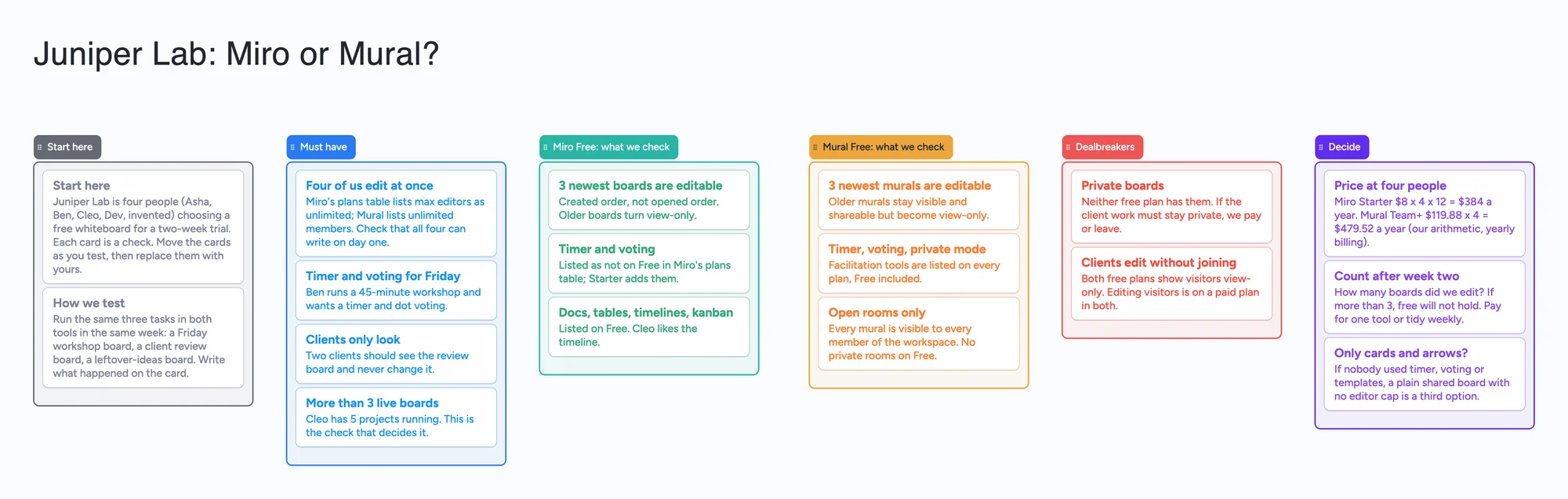
Juniper Lab's two-week trial, list by list
The example is invented. Asha, Ben, Cleo and Dev run a four-person lab and need one free whiteboard. Each card on the board is a check.
| List | What goes in it | In Juniper Lab's board |
|---|---|---|
| Must have (blue) | What the team can't live without | Four editors at once; timer and voting for Ben's Friday workshop; clients view only; more than 3 live boards |
| Miro Free (green) | What to check in Miro | The 3 newest boards stay editable; timer and voting listed as paid; docs, tables, timelines and kanban |
| Mural Free (orange) | What to check in Mural | The 3 newest murals stay editable; timer, voting and private mode; open rooms only |
| Dealbreakers (red) | What ends the trial | No private boards on either; clients can't edit without a paid plan on either |
| Decide (purple) | The call, with the arithmetic | Price at four people; the board count after week two; the plain-board option |
Swipe the table sideways to see every column.
Names and checks are made up. A card is a note about a check; it doesn't connect to Miro or Mural.
The card that usually decides it is "More than 3 live boards". If the lab edits more than 3 at once, free won't hold on either tool.
If you pay: the arithmetic at 1, 4 and 10 people
Our arithmetic at each tool's yearly price. Miro Starter is $8 per member a month billed yearly (miro.com/pricing). Mural Team+ is $9.99 a month billed annually, and Mural's billing FAQ gives $119.88 per member a year. Check both pages before you buy.
- 1 person: Miro Starter $96 a year; Mural Team+ $119.88.
- 4 people (Juniper Lab): Miro Starter $384; Mural Team+ $479.52.
- 10 people: Miro Starter $960; Mural Team+ $1,198.80.
- Business, 4 people: Miro $20 x 4 x 12 = $960; Mural $17.99 x 4 x 12 = $863.52.
Mural's billing FAQ says its price is per membership, so $12 a month covers one person. Miro's pricing page lists unlimited and private boards, visitor editing, timer and voting under Starter, and Mural's lists unlimited editable murals, editing visitors and private rooms under Team+ (both read November 24, 2026).
When each one is simply the better choice
- Mural lists more facilitation tools on Free. Timer, voting, private mode, summon and facilitator lock are all listed on its Free plan.
- Miro lists more formats on Free. Its pricing page lists docs, tables, timelines, kanban and slides on Free, and 250+ integrations.
- Mural is cheaper per seat on Business. Both list unlimited guests there: $17.99 per member a month billed annually on Mural, $20 on Miro (our arithmetic above).
- Miro lists a bigger template shelf, 7000+ against 250+.
- Either wins for an enterprise. Both list SSO and enterprise plans; we don't compare those.
Where Instaboard's free plan sits, and where it stops
| Miro Free | Mural Free | Instaboard Free | |
|---|---|---|---|
| Editable boards | 3 newest | 3 newest | 5 in your own list; a board you open from someone's link counts as 1 of your 5 |
| Who can write | Team members; visitors view only | Members; visitors view only | Anyone who signs in free; viewing needs no account |
| Content limit | No item limit listed on its Free plan help page (as of November 24, 2026) | Not listed on its pricing page (as of November 24, 2026) | 150 items across your account (cards, lists, text boxes and pictures count; pen strokes, arrows and sections don't); 3 pictures and 1 file per board |
| Timer and voting | Starter and up | Every plan | A countdown timer; no voting |
| Calls | Starter and up | Not listed | Free calls up to 60 minutes per call, sign-in needed, no recording |
| Paid price | Starter $8 per member a month, billed yearly | Team+ $9.99 per member a month, billed annually | Pro $5 a month billed yearly ($59.99 a year), or $7.99 monthly; invited people join free |
Swipe the table sideways to see every column.
Miro and Mural facts as in the first table. Instaboard facts are ours.
A free Instaboard account stops too. At 5 boards you can't create a sixth, though a shared link still opens, and one busy board can use up most of the 150 items. Pro removes the item limit. If nobody on your team uses timer, voting or templates, a plain shared board with no editor limit is worth adding to the trial.
Does a trial board fit in 150 items?
- As built: 6 lists + 17 cards + the title text box = 24.
- A trial of 40 checks: 40 cards + 2 start cards + 6 lists + the title = 49.
- Room left: 150 minus the 9 fixed items (2 start cards, 6 lists, the title) leaves 141 check cards on one board, if it is your only board.
If you use Instaboard for real work boards as well, they share the same 150.
What this board can't do
- Connect to either tool. It doesn't read your Miro or Mural account. You type the checks.
- Move a board over. There is no Miro or Mural import. You can import a PDF as pages you write on.
- Score the trial. No voting and no totals. You read it by eye.
- Remind you. No reminders, due dates or alerts.
- Keep it private. A board shared by link isn't private; keep client names off it.
Set up your own trial, in order
- Open the board and replace Juniper Lab. Delete their cards as you go.
- Fill Must have first. Four to six checks, each one something you do weekly.
- Sign up free on both tools and run the same three tasks in the same week.
- Move each check to the Miro or Mural list and write what happened under it.
- Use Dealbreakers for what ends the trial, then fill Decide with your headcount and each page's price.
Start from the ready board
It opens in your browser in a few seconds, with nothing to install. Sign in for free when you want to save it and share it.
Questions
Do Miro and Mural both limit the free plan to 3 boards?
Yes. Miro's pricing page says three most recent boards stay editable on Free. Mural's Free plan help article says only the three most recently created murals are editable at any given time. On both, older boards stay visible and become view-only. Both pages were read November 24, 2026.
Does Mural's free plan include voting and a timer?
Mural's pricing page lists Facilitation Superpowers, including timer, voting and private mode, as included in every plan. Miro's plans table lists timer and voting from Starter up, not on Free.
Can visitors edit on the free plan in Miro or Mural?
No on both. Mural's Free plan help says visitors have view-only access and must become members to edit. Miro's plans table lists visitors with edit or comment access from Starter up, not Free.
Is Miro or Mural cheaper for four people?
At yearly billing, our arithmetic gives Miro Starter $8 x 4 x 12 = $384 a year and Mural Team+ $119.88 x 4 = $479.52 a year. Check each pricing page before buying, since prices change.
Do either of them have private boards on the free plan?
No. Miro lists private boards from Starter. Mural's Free plan help says private rooms are not available on Free, so every mural is visible to all workspace members.
What does Instaboard's free plan give me instead?
Five boards that all stay editable, 150 items across your account and 3 pictures per board. Anyone can view a shared board by link, and writing needs a free sign-in. Pro removes the item limit. Instaboard has a countdown timer and no voting.
Sources
- Miro: pricing (Free: 3 editable boards, 7000+ templates, 250+ integrations; Starter $8 per member a month billed yearly; Business $20; read November 24, 2026)
- Miro Help: Plans and features available (visitors, guests, private boards, video calls, voting and timer by plan; read November 24, 2026)
- Miro Help: Free plan (unlimited team members; 3 most recently created boards; read November 24, 2026)
- Mural: pricing (Free: 3 editable murals, unlimited view-only visitors, open rooms; Team+ $9.99 billed annually, $12 monthly; Business $17.99; Facilitation Superpowers on every plan; read November 24, 2026)
- Mural Help: Introducing the Mural Free plan (last published June 1, 2026; read November 24, 2026)
- Mural Help: FAQ, Billing and plans (Team+ $12 monthly, $119.88 per member annual; last published June 1, 2026; read November 24, 2026)