For friends planning an adult's surprise party
A surprise party planning board for the people in on it
We make Instaboard, an online board. Read this before the board: a link to a board is not private. Anyone who has the link can open it, so the guest of honour must never get it, and nothing on the board hides a card from one person and shows it to another. It is a place for the planners to keep one plan together, filled in for an invented party: Maya and four friends planning a dinner for Jonah's 35th. It sends no reminders, counts no replies and runs no polls. If you want invitations with reply counts, an invitation tool or a group chat does that better, and we name them below. This page is about adult birthdays only.
Opens in your browser. Anyone can view; a free sign-in lets you edit.
Updated
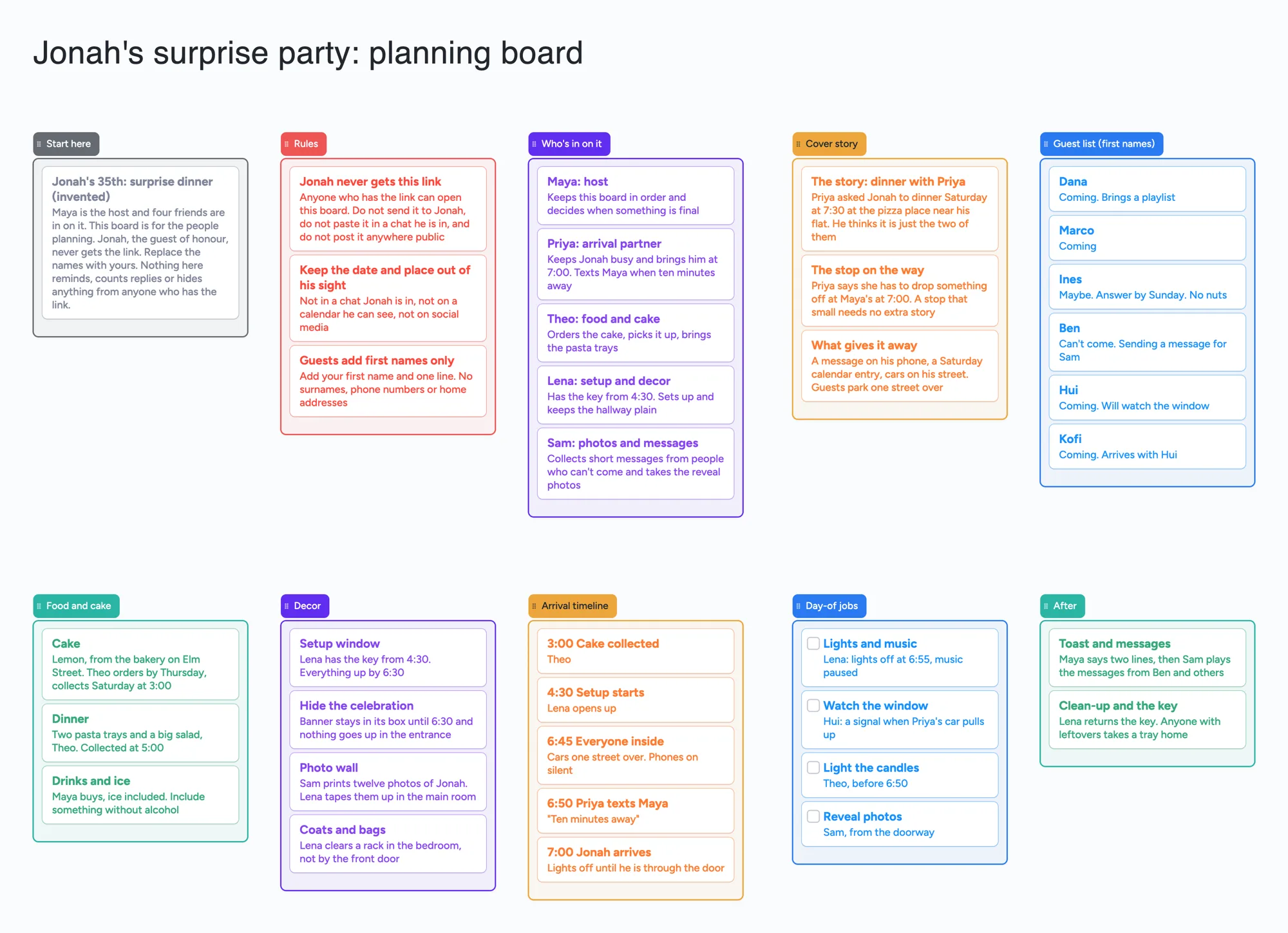
Read this first: what this board does and doesn't do
- A link is not private. Anyone who has the link can open the board. The guest of honour must never get it: don't send it where they read, don't post it, and don't rely on any setting to hide it. New boards start as "Anyone who joins can view".
- Guests add their own cards. A guest opens the link and signs in to add a card. Writing needs a free sign-in, and the board then counts as 1 of that person's 5 free boards.
- No reminders, no reply counts, no polls, no notifications. A card that says "Answer by Sunday" is text someone typed. Nothing counts yes and no for you.
- Free plan limits: 5 boards, 150 items across your account and 3 pictures per board. A copy of this board takes 1 of your 5. Pro is $5 a month billed yearly ($59.99 a year), or $7.99 monthly, and removes the 3-picture limit. This page doesn't claim any plan makes a board secret.
- Ask first. Check the person would enjoy a surprise. One Reddit thread below is about someone who had said no.
When a group chat, an invitation tool or a printed plan is the better pick
If you need to know who is coming, an invitation with a reply deadline does that and a board doesn't. If you need to nudge six people at once, a group chat does that. If one person is doing most of it, a printed list on their fridge is enough. A shared board fits in between: three to six planners who each own a job, want to see the whole plan in one place, and can keep one link away from one person.
The comparison table further down says what each tool's own page says, read November 23, 2026.
The co-planners' job
Three guides we read name roughly the same short list of roles. GetTogether (April 5, 2026) says to choose one coordinator, who "handles guests, food, and the location", and an arrival partner, who "keeps the birthday person company and brings them at the agreed time". wikiHow (last updated June 5, 2025) calls that person a chaperone, who "can distract and redirect the honoree until it's time for the surprise party", and says the chaperone should text the host about ten minutes before arriving. Paperless Post (January 28, 2025) suggests enlisting a close friend as an ally for a pre-event hangout that moves into the main event. Those are the guides' words; the names on our board are our own.
- Maya, the host, keeps the board in order and decides when something is final.
- Priya, the arrival partner, has one job: keep Jonah busy, bring him at 7:00, and text Maya when ten minutes away.
- Theo, food and cake, orders, collects and brings.
- Lena, setup and decor, has the key and the room.
- Sam, photos and messages, collects what people who can't come want to say.
A card for each person with one line says who to ask. It is a list of who does what, typed by you. The board doesn't assign anyone or tell them.
Jonah's board, list by list
The party is invented: a dinner for a friend's 35th at a flat, five planners and six guests so far. All names are first names.
| List | What goes in it | In Jonah's board |
|---|---|---|
| Start here (grey) | What the board is and that Jonah never gets the link | One card |
| Rules (red) | What everyone agrees before adding anything | 3 cards: "Jonah never gets this link", "Keep the date and place out of his sight", "Guests add first names only" |
| Who's in on it (purple) | The planners and each one's job | 5 cards: Maya, Priya, Theo, Lena, Sam |
| Cover story (orange) | What Jonah has been told, and what could give it away | 3 cards: the dinner with Priya, a stop on the way, what gives it away |
| Guest list (blue) | First names, one line each | 6 cards: Dana, Marco, Ines, Ben, Hui, Kofi |
| Food and cake (green) | Who orders, collects and buys | 3 cards: cake, dinner, drinks and ice |
| Decor (purple) | Setup window, what stays hidden, photos, coats | 4 cards |
| Arrival timeline (orange) | The hour from cake collection to 7:00 | 5 cards, one per time |
| Day-of jobs (blue) | Small jobs with a tick box each | 4 cards with tick boxes: lights and music, watch the window, light the candles, reveal photos |
| After (green) | Toast, messages, clean-up | 2 cards |
Swipe the table sideways to see every column.
The board's own wording. Times are typed text. The board has no clock, countdown or reminder.
One party, start to finish
This is how Maya's group might use the board. The weeks are our example, not a rule; GetTogether says the same of its own sample timeline.
- Ask whether Jonah would enjoy it. GetTogether's first checklist item is to confirm that a surprise suits the birthday person.
- Maya makes the board and posts the rules card first. She shares the link only with the planners, in a chat Jonah is not in.
- Each planner writes their own card under "Who's in on it" and signs in free to do it.
- The cover story goes in before anything else. Priya's card says what Jonah has been told and what stays simple. Paperless Post's example has guests "arrive no later than 6:45" for a 7:00 arrival; ours borrows that shape.
- Guests are added as first names. Maya, or the guests themselves once they have the link, add a card per person with one line: coming, maybe, can't come.
- Food and decor jobs get a name and a time. Theo's card says when the cake is collected. Lena's says when the key is hers.
- The arrival timeline is written backwards from 7:00. Cars parked one street over is Paperless Post's tip; the ten-minute text is wikiHow's.
- On the day, the Day-of jobs cards get ticked. Tick items together: everyone with edit access sees a tick live. Nothing records who ticked or when.
- After the reveal, the After list says who says what and who returns the key.
What people planning surprise parties say
Three Reddit threads, read November 23, 2026. Each reply is one person's view. We read the 25 comments the page loaded in each.
- r/partyplanning, "Planning surprise birthday party, 15 adult guests" (u/Ten_Horn_Sign, posted July 18, 2025; 33 comments, 25 loaded). The poster described planning a surprise birthday party for a spouse: confirmed guests, catering, a cake and a cover story that it was a work barbecue. The poster wrote that real attendance was likely 12-20 because "some people flake, some will bring spouses". That is why Jonah's guest list has a "maybe" card. u/oknowwhat00 suggested having her friends send you favourite photos of her to print on a poster board, which is Sam's job and the photo wall on our board. u/casmd21 wrote that everyone should know where the bar and the bathroom are.
- r/partyplanning, "What's the one party planning tip you wish you knew sooner?" (u/Kindly-Panic-64, posted May 30, 2025; 98 comments, 25 loaded). The poster wrote that at a surprise birthday party they threw, they forgot to organise where guests would hang their jackets: "Total chaos at the door." That is the coats card on our Decor list. u/JustGenericName wrote not to delegate ice pickup because the person bringing it "will always be late" (Maya buys the ice on our board). u/movie-girl1156 wrote not to plan around friends who offer help, and to pick up anything borrowed ahead of time. u/HellaShelle suggested setting up the night before and doing a walk-through with someone not involved.
- r/AmIOverreacting, a poster who had said no to a surprise party (u/ohnothrowawayAIO, posted August 7, 2026; 252 comments, 25 loaded). The poster wrote that a girlfriend ignored repeated "no"s and held one anyway with the poster's friends. The top reply, u/AhoyMatteyPDX, wrote "She threw that party for HER, full stop." u/AbsentheMindedProf wrote that their husband hates parties for his birthday, "especially surprise parties". We take no side in the couple's dispute; the point for a planner is to ask first, which is step 1 above.
That is a handful of commenters, not a count of how people plan, and we read only the loaded comments. None of the loaded comments in these three threads asked for a shared board.
Where other tools do this better
Read November 23, 2026. Prices and limits change, so check the page. No ranking: they suit different people. Every row is what the tool's own page says; nothing is from using it.
| Tool | What its page says | Better than a board at | Where a board fits |
|---|---|---|---|
| A group chat or email thread | Paperless Post suggests a group chat or email "where everyone can see who is invited and discuss party details out of earshot". GetTogether says to use a private planning channel that excludes the guest of honour. wikiHow's expert answer says to keep plans "off social media and out of text messages" in case a message appears on someone else's phone | Reaching everyone at once, quick questions, being where people already are | One place to see the whole plan instead of scrolling a thread, with a card per job |
| Paperless Post (invitations) | Its blog (January 28, 2025) mentions an RSVP deadline, a Guest Question, a Guest Survey for allergies, messaging and a Comment Wall. Its pricing page (no date) lists Guest Surveys, Password Protection and Guest Tags under Plus for 200 coins, and says it also has many free designs. Which of the blog's other features need a paid tier is not stated in the pages we read | Invitations with reply deadlines, collecting allergies, one place for guest messages | A plan for the planners rather than an invitation for the guests |
| Evite (invitations) | Its Free vs. Premium page (no date) lists customizable designs, read receipts and a shareable link under Free; read receipts "don't apply to Invitations sent via shareable link". We did not read what its pages say about replies or guest lists | Sending an invitation with a design | A plan for the planners rather than an invitation for the guests |
| GetTogether (event planner) | Its blog post (April 5, 2026) says guests can vote and RSVP free without an account or app, and new events need a paid plan, an eligible 14-day card-required trial, or an Event Pass. The same post says to verify a tool's visibility and sharing settings before putting private information in it | Date voting, place voting and replies in one shared link | A plan of jobs and timing the planners fill in together, without a vote or a reply count |
| A shared document or spreadsheet (Google Docs or Sheets) | Not read for this page; we name it as an option without quoting a plan | Long text and familiar editing | Cards you drag between lists, with each job on its own card |
Swipe the table sideways to see every column.
From each page as read November 23, 2026: Paperless Post blog and pricing page, Evite's Free vs. Premium support page, GetTogether's blog post, wikiHow. Instaboard isn't affiliated with any of these.
Does it fit in 150 items?
Each card and each list is 1 of your 150 free items, across all your boards. The title text box counts too. Arrows, sections and pen strokes don't. Our arithmetic from Jonah's board:
- As built: 10 lists + 36 cards + the title = 47.
- A party of 30 guests, one card each instead of six: 24 more cards = 71.
- With a longer day too, ten more cards on the timeline and day-of jobs: 81.
- Guests who add their own cards count those cards toward their own 150, not yours. A free account that already has 5 boards can still write on a board it joins. That is from our own test of joiners on November 7, 2026.
- Other boards share the 150. A second board on the same account draws from the same pool.
A surprise party board fits on Free. We have no source that says Pro lifts the 150, so we don't claim it.
What a board can't do for this
- Keep a secret. Anyone with the link can read every card, and a signed-out reader sees everything. If the guest of honour gets the link, they see the plan.
- Hide a card from one person. There is no per-card or per-person hiding on this board.
- Count who is coming. There are no replies, no deadline, no totals. A guest card is typed text.
- Remind or notify. No reminders and no alerts when a card changes.
- Run a poll or vote on a date. No polls.
- Send invitations. Share the link in a private chat if you decide to.
- Record who ticked a job, or when. Anyone with edit access can untick a card too.
- Stop a guest editing a card. If anyone who joins can edit, any of them can move or delete any card. Agree who moves what.
Set up your own, in order
- Check the person would like a surprise, before anything else.
- Open the board and delete Jonah's cards as you go. Keep the rules card with its warning about the link.
- Share the link only with the planners, somewhere the guest of honour doesn't read. New boards start view-only; to let planners write, tick "Anyone who joins can edit" in Share, and each person signs in free to write.
- Write the cover story and the arrival time first. Everything else hangs on them.
- Put each job on a card with a name and a time, and give the day-of jobs tick boxes.
- Keep surnames, phone numbers and home addresses off it. First names and one line each.
Limits of the free plan for this board
- Items. Each card and each list is 1 of 150 free items across your account; the example is 47. Arrows, sections and pen strokes don't count.
- Boards. 5 on the free plan. "Make a copy" takes 1 of them.
- Pictures. 3 per board. The example has none; photos of the guest of honour belong in a chat or a shared album, not on a link board.
- Writing needs a sign-in. Anyone with the link can read the board; to change it they sign in free, and the board then counts as 1 of their 5.
- Private details. A link board isn't the place for surnames, phone numbers, home addresses, or the guest of honour's schedule beyond the evening.
Start from the ready board
It opens in your browser in a few seconds, with nothing to install. Sign in for free when you want to save it and share it.
Questions
Can the guest of honour see the board?
Yes, if they get the link. Anyone who has the link can open the board, and nothing hides a card from one person. Keep the link where they don't read.
Do guests need an account to add a card?
To write on the board, yes: they open the link and sign in free. The board then counts as 1 of their 5 free boards. A guest who only wants to read can open the link without signing in.
Can the board count who is coming or remind guests?
No. It has no replies, deadlines, polls, reminders or notifications. An invitation tool lists reply deadlines on its pages, and a group chat reaches everyone at once.
How are the day-of jobs ticked?
Each job is a card with a tick box. Everyone with edit access sees a tick live. Nothing records who ticked it or when, and anyone with edit access can untick it.
How many cards fit on the free plan?
150 items across your account, where each card and each list is one item. This board is 47; a party of 30 guests laid out the same way is 71. That is our arithmetic, and your other boards share the same 150.
Is this for children's parties?
No. This page is about adult birthdays only, and the example is a dinner for a friend's 35th.
Sources
- r/partyplanning: "Planning surprise birthday party, 15 adult guests" by u/Ten_Horn_Sign (posted 2025-07-18; 25 of 33 comments loaded; read November 23, 2026)
- r/partyplanning: "What's the one party planning tip you wish you knew sooner?" by u/Kindly-Panic-64 (posted 2025-05-30; 25 of 98 comments loaded; read November 23, 2026)
- r/AmIOverreacting: surprise party the poster did not want, by u/ohnothrowawayAIO (posted 2026-08-07; 25 of 252 comments loaded; read November 23, 2026)
- Paperless Post blog: 21 tips for planning the perfect surprise birthday party (January 28, 2025; read in full November 23, 2026)
- Paperless Post pricing (Coins and Plus features; page shows no date; read November 23, 2026)
- GetTogether: How to Plan a Surprise Birthday Party, Checklist and Timeline (April 5, 2026; read in full November 23, 2026)
- wikiHow: How to Plan a Surprise Birthday Party (last updated June 5, 2025; expert Q&A by Stefanie Chu-Leong; read November 23, 2026)
- Evite support: Premium vs. Free invitations (page shows no date; read November 23, 2026)
Related
An office holiday party planning board: who owns what, in one place
Plan the office holiday party with a small committee on one shared board: budget, venue, food, gift swap rules and the evening. Free ready board, and where SignUpGenius does more.
Family reunion planning template: one shared board for the committee
A free family reunion planning template to open and edit with your committee: venues, dates by who can attend, headcount by branch, food and lodging.
A class reunion planning template: one shared board for the committee
A class reunion planning template for the committee on one shared board: who owns what, classmates to find, date and venue options, program and tasks by phase.