For writing tutors
How to teach writing online on a whiteboard: a body-paragraph lesson, step by step
A writing lesson is mostly a conversation about a draft. Online, the question is where the draft lives and who is holding the pen. This page walks through one lesson, building a body paragraph, and says plainly what Instaboard is for in a writing session (one paragraph and the talk around it) and what it is not (a place to edit a whole paper).
Updated
The short answer
- Use the board for one paragraph at a time. Split a model paragraph into its jobs, let your student write the missing piece, and talk about why it works.
- It is not a word processor. For a long draft a shared document is the better tool, and a UW-Madison Writing Center instructor suggests one when a draft is on a laptop.
- Students can view with no account but need a free sign-in to write. Free calls run 60 minutes; Pro ($5 a month billed yearly) has no limit.
- Nothing is recorded or checked. There is no spell check, no grammar feedback and no AI on the board; the feedback is you.
What a lesson on the board looks like
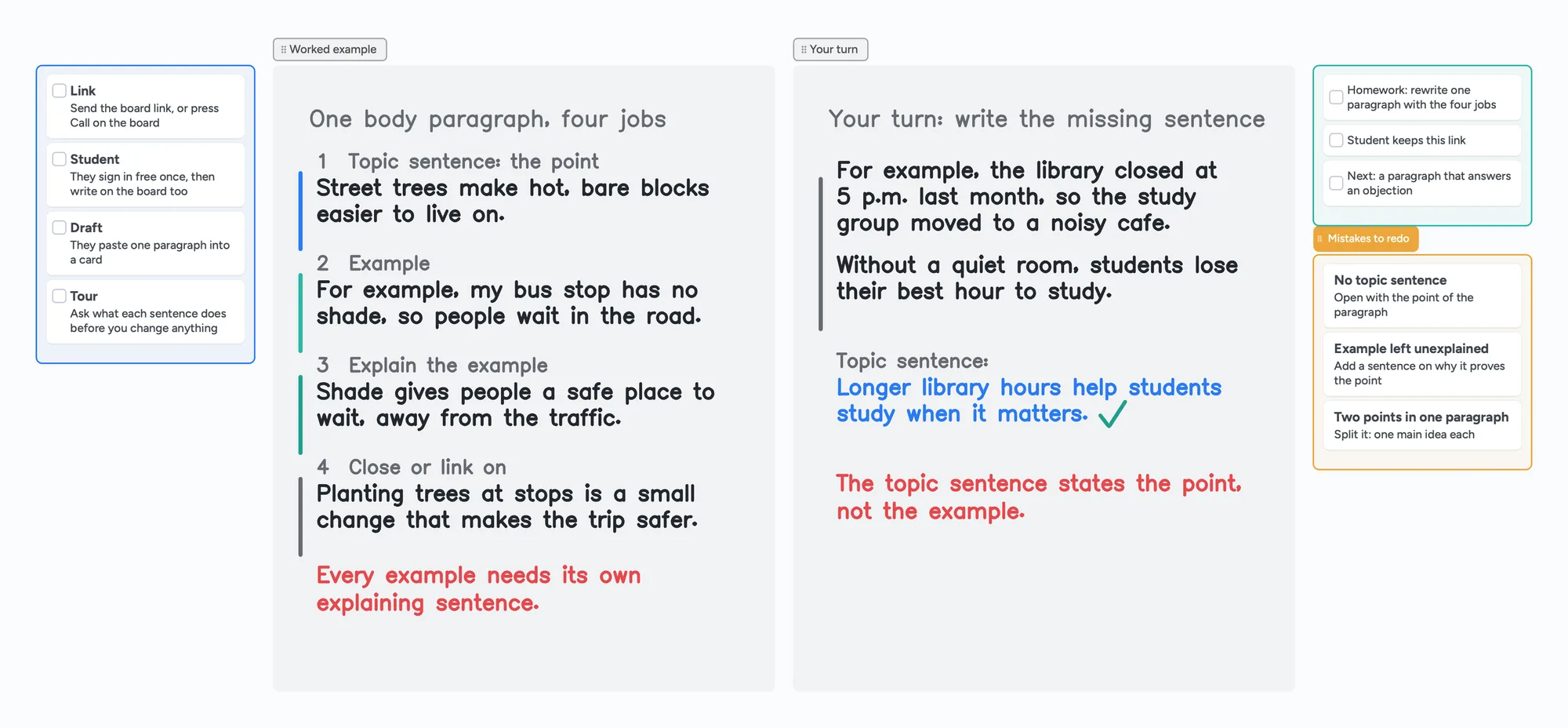
The call sits on top of the board, so you talk and write in the same place. You mark up the model paragraph, your student writes the missing sentence in their own colour, and you tick it.
What a writing tutor does in a session
Writing tutors who ask for advice on r/TutorsHelpingTutors describe students who are far behind and short on motivation. In a June 2024 thread one reply suggests focusing on the mechanics of writing: teach composition and essay structure, even the "hamburger" approach, then give a topic, let the student write, and deconstruct and reconstruct the result, which you can do in every lesson. Another reply says there is no quick fix and the answer is practice. Those habits turn into four jobs for a board:
- Show the structure. A model paragraph split into its jobs, so the student sees the shape before they write.
- Do a tour of the draft. A UW-Madison writing-center instructor suggests starting by asking the student to go through the paper and say what each paragraph does.
- Let the student write the next piece instead of fixing it for them, in their own colour.
- Keep short notes that the student can return to, away from the draft itself.
Setting up your first lesson? See online tutoring setup and how to teach math online, which walks through a first call step by step.
A body-paragraph lesson in five steps
The UNC Writing Center handout on paragraphs builds a paragraph in five steps: a topic sentence that states the controlling idea, an elaboration, an example, an explanation of the example, and a sentence that completes the idea or leads into the next paragraph. It stresses that none of your examples should be left unexplained. The board above follows that order with our own invented sentences:
- Ask for a tour first: before changing anything, ask your student what each sentence of their paragraph is doing.
- Show the model: the topic sentence states the point ("Street trees make hot, bare blocks easier to live on.").
- Add the example and explain it: "my bus stop has no shade, so people wait in the road", then a sentence saying why that matters.
- Close or link on: one sentence that ties the paragraph back to the point.
- Student's turn: give them an example and an explanation with the topic sentence missing, and let them write it. The common slip is writing the example again instead of the point; the red note on the board names it.
| Job | On the board | What to ask the student |
|---|---|---|
| Topic sentence | The point of the paragraph, in blue | What is the one thing this paragraph says? |
| Example | A specific case, in green | Could someone picture this? |
| Explain the example | A sentence on why it proves the point | So what does this show? |
| Close | A sentence that links on | How does this lead to your next paragraph? |
Swipe the table sideways to see every column.
The structure follows the UNC Writing Center handout "Paragraphs" (read November 2, 2026). The sentences on our board are invented for this lesson.
Writing on Instaboard
A writing session on Instaboard is a conversation about one paragraph, with the call on top. Here is what that means in practice:
- Paste or type one paragraph into a card. Paste it from the student's draft, or have them type it on the board.
- Mark it up with the pen. Underline the topic sentence, circle the example, draw an arrow when a sentence belongs elsewhere.
- Let the student write the next sentence on the board in their own colour.
- Import a worksheet or a prompt as a PDF and write on it. Each imported PDF uses one of the 5 free boards.
Not a word processor
Instaboard has no track changes, no comments on a long document, no spell check and no grammar feedback. It is good for one paragraph and the talk around it, not for editing a thirty-page paper.
When a shared document is the better choice
- You are working on a long draft. A UW-Madison Writing Center instructor describes the difficulty of getting a sense of the whole draft on a small screen when you have to scroll through it, and suggests working together in a Google Doc, which is a collaborative space where you can make notes and move things around. Use a shared document for the draft and keep the board for the lesson.
- The student keeps over-polishing. The same post warns that a student with a laptop can sit and edit every sentence, and suggests taking notes on separate paper instead of on the computer. A separate board for notes does the same job.
- You need to track edits or leave line-by-line comments. That belongs in a document or a word processor, not on a board.
- You want a recording of the lesson. Instaboard does not record.
Instaboard fits when you teach structure and want the student to write the next sentence on the same page, with the call, the model and the notes on one link.
Use the lesson board in five steps
- Open the writing board above and make it yours.
- Send your student the link, or press Call on the board so the lesson runs in one place. They sign in free once to write.
- Swap in your own paragraph. Replace the model with a paragraph from your student's draft, split into its jobs.
- Let the student write the missing sentence in their own colour, then talk about why it works.
- Leave the board open as the notes and start the next lesson from it.
A thesis-statement version of the same lesson is on the Pencil Spaces alternative page, and session notes for tutors shows what to record afterwards.
What Instaboard doesn't do for writing
- No word processing. No track changes, no comments, no spell check, no grammar feedback, no AI.
- No handwriting reading. Handwritten notes stay as ink and are not searchable.
- Whole-stroke eraser only. You cannot rub out part of a line; erase the stroke and redraw it.
- No recording of the lesson, no class mode, no scheduling.
- Students sign in to write. Anyone with the link can view; writing needs a free sign-in. Free calls run 60 minutes.
- Free covers 5 boards. Each imported PDF uses one of them. Pen strokes do not count toward the 150-item limit; cards and lists do.
- Free boards are shared by link, so use first names only and keep private details off the board.
Start from the ready board
It opens in your browser in a few seconds, with nothing to install. Sign in for free when you want to save it and share it.
Questions
How do I teach writing on an online whiteboard?
Work on one paragraph at a time. Show a model split into its jobs, ask the student what each sentence does, then let them write the next sentence on the same board.
Should my student write their whole essay on the board?
No. A board suits a paragraph and the talk around it. For a long draft use a shared document, and keep the board for the lesson and notes.
Can I edit my student's paper on Instaboard?
Not as a document. You can paste a paragraph into a card and mark it up with the pen, but there is no track changes, commenting on long text or spell check.
Do I need a tablet to mark up writing?
No. Underlining and circling work with a mouse, and a touchscreen or pen tablet makes it quicker. See [which pen tablet to buy](/pen-tablet-for-online-tutoring).
Can my student write on the board too?
Yes. Students can view without an account and need a free sign-in to write. They write in their own colour on the same page.
Is Instaboard free?
Yes. The free plan includes 5 boards, 150 cards and items across your account (pen strokes, arrows and sections don't count), 3 images and 1 file per board, unlimited collaborators and video calls up to an hour. Pro is $5 a month billed yearly ($59.99 a year), or $7.99 monthly, and the people you invite join free.
Sources
Related
How to teach math online: your first lesson, step by step
How to tutor math online as a beginner: what you need, how to run a first lesson on a board your student writes on too, with Zoom, Google Meet or no video app at all, and what to do without a whiteboard.
Online tutoring setup: what you need before your first lesson
What you need to start tutoring online: sound, light, camera, internet, a way to write, and a board your student writes on too. A plain checklist with a five-minute test call and a ready board to open.
A tutoring session notes template, filled in so you can see how it reads
What to write after each tutoring session: outcome, what went wrong, evidence, next task and a short parent note. A copy-and-use template and a filled board you can send as one link.
An online whiteboard for tutoring that works the way you teach
A free whiteboard for online tutoring: paste the worksheet, write with a pen, and your student answers on the same board. Call on it or beside Zoom.
A pen tablet for online tutoring: what to buy and how to set it up
Which pen tablet to buy for online tutoring (Wacom, XP-Pen, Huion, about $40 to $60), how to set it up with pen pressure in the browser, and a whiteboard your student can write on too.
A Pencil Spaces alternative for tutors who want a flat price
Pencil Spaces moved to per-hour plans on September 1, 2026: $0.40, $1 or $5 an hour plus a monthly minimum. What each costs at 10, 20 and 40 hours, where Pencil Spaces is better, and a flat-price board.