For screenwriters outlining a feature with 15 beats
A screenplay beat sheet on one shared board: 15 beats, scenes under each, with pages
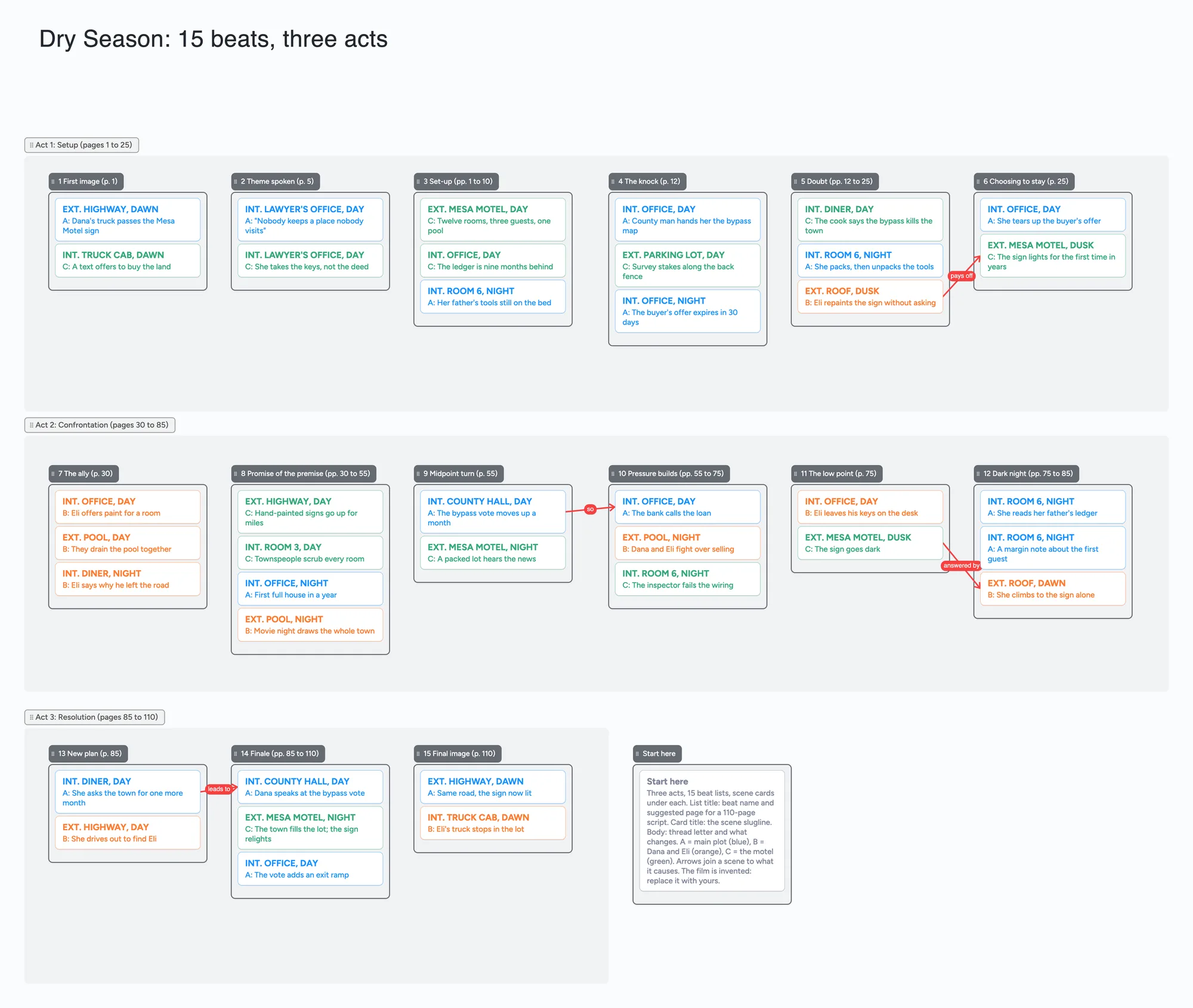
We make Instaboard, a free online board. This page gives you a feature-film beat sheet already laid out on it: three act sections, one list for each of 15 beats with its suggested page for a 110-page script in the title, and scene cards under each beat, each one a slugline and a line on what changes. The film is invented. The 15-beat idea comes from Blake Snyder's Save the Cat method, and the beat names on the board are our own words. Open it, replace the story with yours, and send one link to a co-writer, a script editor or a reader. It is a text board for planning, not a script editor, a stills board or a mood board: nothing on it formats a script, counts pages or imports a screenplay.
Opens in your browser. Anyone can view; a free sign-in lets you edit.
Updated
The short answer
- Acts are sections, beats are lists, scenes are cards. The three act frames group the beats and cost nothing. Each beat is a list you can drag, and its title carries the page where that beat usually sits in a 110-page script. Each scene is a card: the slugline on top, a thread letter and a line on what changes underneath. Move a card to another beat when a scene belongs somewhere else.
- What it doesn't have: no script editor or formatting, no page counts that update, no script import, no export to Final Draft or Fountain, no scene tagging, no pictures beyond 3 per board. The page numbers in the list titles are typed text. For placement by your page count use a beat sheet mapper or screenwriting software (compared below).
- Count the items before you copy it. Each list and each card is one item; the title text box counts too; sections, arrows and pen strokes don't. The example is 15 beat lists, 39 scene cards, a Start here list and its card, and the title box: 57 of your 150 free items (our arithmetic). A script with 100 scene cards would be 15 + 100 + 2 + 1 = 118; 132 scene cards reaches 150.
- Pro lifts the limit: $5 a month billed yearly ($59.99 a year), or $7.99 monthly. The free plan keeps 5 boards, 150 items and 3 pictures per board.
- Anyone with the link can read it; writing takes a free sign-in. New boards start view-only. Set "Anyone with the link can edit" if a co-writer or script editor should add cards.
How this differs from our other outline boards
We have three other outline pages that sit near this one. They hold different shapes, so pick one for a given project rather than keeping two in step.
| Board | Shape | Beat names | Example size |
|---|---|---|---|
| Screenplay beat sheet (this page) | Feature film: 15 beat lists in three acts, each titled with its page in a 110-page script, scenes as cards under the beat | 15 beats in our own words, pages from StudioBinder's list | 57 items |
| [Index-card outline](/index-card-outline-for-novels-and-screenplays) | A run of scene cards in four act lists of ten, so the structure comes from the order of the cards | Copies no beat names | 50 items |
| [Novel beat sheet](/novel-beat-sheet-board) | Novel: the same 15-beat idea with three scene cards (main plot, relationship, setting) under every beat; no page numbers | 15 beats in our own words | 61 items |
| [Chapter-by-chapter outline](/novel-chapter-outline-board) | A list per chapter with three beats each; the beats are what happens in a chapter | Chapter names only | 96 items |
Swipe the table sideways to see every column.
Item counts are the example boards' own, each card and each list counting as one (our arithmetic).
What is different here, then: a script has pages, so each beat list shows its page, and a scene is a slugline, which is how you scan a screenplay outline. If you are not writing a screenplay, the novel page is the better fit.
How to fill in a 15-beat screenplay board
StudioBinder's Save the Cat guide (read November 18, 2026; the page shows no date) lists 15 beats for a 110-page script, from an opening image on page 1 to a final image on page 110, and says the page numbers are suggested: if your script runs longer than 110 pages it points you to a beat sheet calculator to recalibrate. The board uses that list for the page numbers in its titles. Change them freely; they are only text.
- Rename the beats if you like. The 15 lists are named in our own words ("First image", "The knock", "Midpoint turn"). Use Snyder's or StudioBinder's names if you follow their method; the lists are just text.
- Reset the pages for your length. The example is a 110-page feature. Retype the page in each list title for your own page target.
- Fill the two ends first. The first and final image, the midpoint and the low point. A beat with no scene under it is a gap in the story you can see at a glance.
- Add scenes as cards, slugline first. Put the slugline in the card title and what changes in the body. The example prefixes the body with a thread letter (A main plot, B the two leads, C the motel) so a colour scan shows when one thread goes quiet.
- Draw an arrow when one scene causes another. An arrow joins a card in one list to a card in another and stays attached when you reorder cards or move a list. The example has four.
- Share it. In the share menu set "Anyone with the link can edit" (new boards start view-only). A co-writer or script editor signs in free and writes live. If you each own one thread, you never type in the same card; two people typing in one card merge letter by letter.
Screenwriters disagree about fixed beat lists. In a May 2021 r/Screenwriting thread on beat sheets, u/HotspurJr wrote that most professionals "don't use anybody else's beat sheet" and use beat sheets to analyse movies they love. That is one account's view, not a measurement. No Film School's own beat sheet article (read November 18, 2026; the page shows no date) says a lot of people find Save the Cat "a little overrated" and that beats are malleable. The board suits either view: beats are a list you can rename, reorder or delete.
About the name Save the Cat
Save the Cat! is a trademark of its owner. Its terms of use (updated February 24, 2026) say trademarks and trade names displayed are the company's exclusive property or used under license, and that use without written permission is prohibited. This page names the method only as the source of the 15-beat idea. The board's beat names are our own wording, and this page and board are not affiliated with or endorsed by Save the Cat! or Blake Snyder Enterprises, LLC.
Beat sheet and screenwriting tools, side by side
Each row is from the tool's own pages, read on November 18, 2026. Features and prices change, so check the page before you choose.
| Tool | What its page says | Where it beats a shared board | Where a shared board fits |
|---|---|---|---|
| Instaboard board | Free: 5 boards, 150 items. Pro $5 a month billed yearly ($59.99 a year), or $7.99 monthly | Nothing in this table on script pages, formatting or import: the page numbers are typed | Scenes under beats on one screen, arrows between scenes, a co-writer on the same link after a free sign-in |
| Save the Cat Beat Sheet Mapper | Free and interactive: enter a page count and project type and it shows where each of the 15 beats lands | Placing each beat by your own page count | It is a mapper, not a shared plan; your scenes don't sit under the beats |
| StudioBinder | Its Save the Cat guide gives 15 beats with pages for a 110-page script and a template behind an email form; the software lists a free plan ("free forever") and script outlines on its Starter plan | Writing the script and breaking it down in one place; the guide's worked example | A shared outline with no plan to choose; it does not read your script |
| Final Draft | Final Draft 13 is listed at $199.99 (struck from $249.99) for macOS 12 or higher and Windows 11 or higher, and the page says "Not available on Chromebook". Its Beat Board is a pre-writing tool where beats can be grouped, coloured and placed anywhere, not locked to a grid (Final Draft blog, September 5, 2025) | Beats and the script in one app | No purchase and nothing to install; a link a co-writer opens in a browser |
| Arc Studio | Free: 2 scripts, no collaborators, no outlining tools. Essentials $69 a year. Pro $99 a year adds collaborators and outlining tools | Writing and outlining in one app, with Fountain and Final Draft export | A free board you can share before anyone pays |
| WriterDuet | Free: 3 projects. Plus is $9.99 a month with real-time collaboration; free users can co-write on an upgraded user's script | Script formatting, a real-time script editor and an outline view | A plan outside the script, free with a co-writer on a link |
Swipe the table sideways to see every column.
From each tool's own pages, read November 18, 2026 (StudioBinder's price figures were not legible on the pricing page, so none are printed). The Mapper's and StudioBinder's beat positions are not copied onto the board beyond the page numbers in the list titles.
What a beat sheet or screenwriting tool costs over three years
Prices are each tool's own page, read on November 19, 2026, multiplied by three years (our arithmetic). Sale prices change, and a plan that is cheaper for one script may not be for a team.
| Tool | Price on its page | Three years |
|---|---|---|
| Instaboard board | Free: 5 boards, 150 items. Pro $59.99 a year, or $7.99 a month | $0 on Free; $179.97 on Pro yearly (3 x $59.99); $287.64 on Pro monthly (36 x $7.99) |
| Save the Cat Beat Sheet Mapper | Free | $0 |
| Notion beat sheet template (NotoMantra) | Free marketplace template | $0 for the template |
| Scrībō | Free; Pro $4.99 a month or $49.99 a year (its page) | $0 on Free; $149.97 on Pro yearly (3 x $49.99) |
| Arc Studio | Free $0 (2 scripts, PDF export with a watermark); Essentials $69 a year; Pro $99 a year | $0; $207 (3 x $69); $297 (3 x $99) |
| Highland Pro | $4.99 a month billed $59.99 annually; 30-day trial | $179.97 (3 x $59.99) |
| Final Draft 13 | $199.99 (struck from $249.99), one purchase | $199.99 |
| Final Draft Suite | Annual plan listed at $69.99 (struck from $99.99) under a "Black Friday early access sale" banner; monthly $16.99 | $209.97 at the sale price (3 x $69.99), $299.97 at the struck price (3 x $99.99) |
| WriterDuet | Free: 3 projects. Plus $9.99 a month (monthly toggle shown; the yearly price was not read) | $0 on Free; $359.64 on Plus monthly (36 x $9.99) |
| Save the Cat Story Suite | Essentials $89 a year, Premium $119 a year (real-time story collaboration); Pro $179 a year; lifetime $599 | $267 (3 x $89); $357 (3 x $119); $537 (3 x $179); $599 once for lifetime |
Swipe the table sideways to see every column.
Each figure is from the tool's own page, read November 19, 2026; the three-year column is our arithmetic. Sale prices change; check the page before you buy. Final Draft and Highland are installed apps and Arc Studio, WriterDuet and Story Suite are writing tools, so they do more than a planning board.
Where each one runs
From each tool's own pages, read November 19, 2026. Where a page does not state a platform, none is claimed.
| Tool | What its page says it runs on |
|---|---|
| Instaboard board | In a browser, and in the iPhone, iPad and Android apps. Changes made offline are kept and sync when you reconnect; it is not an offline-first app |
| Save the Cat Beat Sheet Mapper | An interactive page on savethecat.com |
| Save the Cat Story Suite | Web-based; use on PC or Mac, iOS phones and tablets, and Android phones and tablets; work done offline syncs once you reconnect |
| Final Draft 13 | macOS 12 or higher and Windows 11 or higher; "Not available on Chromebook" |
| Arc Studio | Free: no desktop app or iPhone and iPad app listed. Essentials and Pro list a desktop app and an iPhone and iPad app |
| Highland Pro | Mac, iPad and iPhone, with iCloud syncing |
| WriterDuet | Free lists writing from computer and mobile; Plus lists a desktop application and offline writing with auto-sync |
| Scrībō | In any browser, its page says |
From each tool's own pages, read November 19, 2026.
Which beat sheet tool for which job
No ranking: these are different jobs.
- Beat positions for your own page count, free: Save the Cat's Beat Sheet Mapper. This board does not compute pages.
- Notes you already keep in Notion: the free NotoMantra beat sheet template, or any document with 15 headings.
- Free cards in a browser, nothing else: Scrībō, which says it is a free index card app (its page also lists export to Fountain). Storyflow also lists a free beat sheet template; Storyflow is a vendor and its page says it is free to start.
- Beats and pages in one file: Final Draft, Arc Studio (outlining tools are on Pro) or Highland Pro.
- The official 15-beat software: the Save the Cat Story Suite, from the people who own the method.
- A shared canvas where a co-writer moves the same cards: this board. A co-writer signs in free to edit. It has no script pages, no script import or export and no link by name.
How many scenes a feature needs, and what fits
Scrībō's guide to outlining a screenplay with index cards (read November 19, 2026) says a feature usually runs somewhere between 40 and 60 scenes. On this board that is, with the 15 beat lists, the Start here list and card and the title text box (18 items before any scene):
- 40 scene cards: 18 + 40 = 58 of your 150 free items.
- 60 scene cards: 18 + 60 = 78.
- The most the free plan holds: 150 - 18 = 132 scene cards, with nothing else on the account.
- Two scripts at 58 items each use 116 of the 150, which runs across all your boards, so a third would pass the limit (3 x 58 = 174).
Arrows, sections and pen strokes are free. This is our arithmetic; Pro removes the item limit.
When another tool is the better choice
- You want each beat placed by your own page count. Use Save the Cat's Beat Sheet Mapper or a beat sheet calculator. The board's pages are typed.
- You want to write and outline in the same file. Final Draft, Arc Studio and WriterDuet keep the outline beside the script. This board holds the plan, not the screenplay.
- You want to tag scenes, build a schedule or break a script down. StudioBinder does breakdowns and schedules from a script. The board has no script import and no tagging.
- You want a stills or mood board. This is a text board with 3 pictures allowed per board; use a tool built for images.
- You distrust fixed beat lists. Use the index-card page and let the structure come from the order of your scenes.
- You are outlining a novel. Use the novel beat sheet board, which has no script pages.
Limits of the free plan for a screenplay beat sheet board
- Items. Each card and each list is 1 of your 150 free items, across all your boards. The example is 39 scene cards, 15 beat lists, a Start here list with its card and the title text box, 57 in all. Arrows, sections and pen strokes don't count.
- Boards. The free plan includes 5 boards. Keep the whole beat sheet on one board.
- Photos. 3 images per board. The example has none, and this is not a stills or mood board.
- No script features. No script formatting, page counter, import, export to a screenwriting format, tagging or reminders.
- Writing needs a free sign-in. A co-writer who joins by link or code can add cards and arrows, and the board counts as one of their 5 boards.
- If you are under 18, check with a parent or your school before you sign up.
Start from the ready board
It opens in your browser in a few seconds, with nothing to install. Sign in for free when you want to save it and share it.
Questions
Is there a free screenplay beat sheet template?
Yes, several. Save the Cat's own Beat Sheet Mapper is free and interactive, and there is a free Notion template. This page has a ready board: open it, replace the example film with yours and turn on "Anyone with the link can edit" if a co-writer should write on it. It is free within 5 boards and 150 items, and it is a board of lists and cards you move, not a formatted worksheet or a script editor. The Mapper and StudioBinder's guide give page positions.
How many beats are in a feature film beat sheet?
The Save the Cat beat sheet has 15, from an opening image on page 1 to a final image on page 110 for a 110-page script, according to StudioBinder's guide. Other methods use a different number, and the lists on the board can be renamed or deleted.
What pages do the beats go on?
The list titles use the page numbers StudioBinder prints for a 110-page script (for example the midpoint at page 55 and the low point at page 75). It calls them suggested pages and points to a beat sheet calculator for longer scripts. Retype them for your own page target.
How do I make a beat sheet for a feature film script online?
Four steps on this board. Make the 15 beats as lists, with the page where each usually sits for your script length in the title. Put one card per scene under the beat it serves, slugline first; a feature usually runs about 40 to 60 scenes, according to Scrībō's guide. Fill the first and final images first, then move cards until the order holds. Share the link so a co-writer can edit after a free sign-in. For page positions from your own page count, use Save the Cat's Beat Sheet Mapper, because the board only holds the page numbers you type.
Is there a Save the Cat beat sheet app for screenwriters?
Yes. The Save the Cat Story Suite is the official software; its page says it is web-based, runs on PC, Mac, iOS and Android, and lists a 15-beat story map from the Essentials plan at $89 a year (read November 19, 2026). Instaboard is not affiliated with it or endorsed by it. This page's board uses its own beat names and is a shared planning board, with no script formatting.
How many scenes fit on the free plan?
Each card and each list is one item of the 150 across all your boards. With 15 beat lists, a Start here list and card and the title text box, 100 scene cards is 118 items and 132 scene cards is exactly 150, with no room for anything else. That is our arithmetic. Arrows and sections are free.
Is this affiliated with Save the Cat?
No. The page and board are not affiliated with or endorsed by Save the Cat! or Blake Snyder Enterprises, LLC. The method is named only as the source of the 15-beat idea, and the beat names on the board are our own.
Sources
- StudioBinder: Save the Cat beat sheet (15 beats with suggested pages for a 110-page script; read November 18, 2026; page shows no date)
- Save the Cat!: Beat Sheet Mapper (free, interactive; page count and project type; read November 18, 2026)
- Save the Cat!: terms of use (trademarks, updated February 24, 2026; read November 18, 2026)
- Final Draft: Beat Board vs Index Cards (September 5, 2025; read November 18, 2026)
- Final Draft: Final Draft 13 product page (price, platforms; read November 18, 2026)
- Arc Studio: pricing (read November 18, 2026)
- WriterDuet: pricing (read November 18, 2026)
- Save the Cat!: Story Suite (plans, platforms; read November 19, 2026)
- Highland: Highland Pro (platforms, price, trial; read November 19, 2026)
- Scrībō: how to outline a screenplay with index cards (40 to 60 scenes; read November 19, 2026)
- Scrībō: home page (free plan, Pro price; read November 19, 2026)
- Notion: Beat Sheet template by NotoMantra (free; read November 19, 2026)
- Storyflow: Beat Sheet Filmmaking template (vendor; read November 19, 2026)
- No Film School: beat sheet (read November 18, 2026; page shows no date)
- r/Screenwriting: beat sheets thread (May 2021; replies are single accounts; read November 18, 2026)
Related
Outline a novel or screenplay with index cards, on a board you can share
Outline a novel or screenplay on digital index cards: one list per act, 40 short cards, subplot arrows, a co-writer on the same board. Free to start; TV pilot too.
A novel beat sheet on one shared board: 15 beats, three acts, scenes under each beat
A 15-beat novel outline to open and edit: 3 act sections, a list per beat, scene cards under each. Free-plan item counts and where other tools are better.
24-chapter novel outline board: acts, chapters and beats on one shared board
A filled 24-chapter novel outline to open and edit: four act sections, a list per chapter, three beat cards each. Item counts for the free plan stated, and where other tools are better.
A documentary outline board: the story you hope to tell, and what you still need to get
Outline a documentary on one shared board: three act lists, interviews, scenes to film and archive, with arrows between them. Free ready board, and where Celtx, StudioBinder and Boords do more.
A shot list on a shared board: one card per shot, one list per scene
A shot list on one shared board: a list per scene, a card per shot with size, lens, owner and status. Free to open, and where StudioBinder does more.