For physics tutors
How to teach physics online on a whiteboard: a series-circuit lesson, step by step
Physics lessons run on diagrams and short calculations: a circuit, a force diagram, then the numbers. Online, the question is where you draw them and whether your student can draw back. This page walks through one lesson, resistors in series, and says plainly what Instaboard does and does not do for physics: diagrams and equations are hand-drawn ink, and there are no simulations.
Updated
The short answer
- Use the board as a shared worked-solution sheet. Draw the diagram, write the formula, work the example line by line, then let your student do the next problem on the same page.
- Diagrams and equations are hand-drawn ink on Instaboard. There is no circuit editor, no simulation and no graph plotter beyond the Desmos widget. Share your screen for a simulation such as PhET.
- Screen share is enough for some tutors. One tutor in a 2025 thread says students can draw on a shared screen but it doesn't add much. A shared board helps most when the student writes the next step.
- Students can view with no account but need a free sign-in to write. Free calls run 60 minutes; Pro ($5 a month billed yearly) has no limit.
What a lesson on the board looks like
The call sits on top of the board, so you talk and write in the same place. You draw the circuit, your student writes the next line in their own colour, and you tick it.
What a physics tutor does on a whiteboard
Physics tutors who write about their setups on r/TutorsHelpingTutors describe a short list. A UK physics tutor in January 2024 asked how to run online lessons; one reply says Zoom's whiteboard plus screen-share annotation works very well, another uses a laptop with a digital pen, and a full-time maths and physics tutor lists two screens, a USB mic, a webcam and a drawing pad, with Zoom for the lesson and Miro for the whiteboard, which they call a poor fit and say they are open to alternatives. Those habits turn into four jobs for the board:
- Draw the diagram. A circuit, a force diagram or a ray sketch, drawn live so the student sees the order.
- Write the working. Formula, substitution, answer with units, one line at a time.
- Let the student take the next problem and write it in their own colour.
- Mark up the real worksheet. Import the student's PDF and write on it instead of retyping the problem.
A tablet or pen tablet makes diagrams much faster to draw than a mouse. A physics and engineering tutor in a February 2025 thread has used a screenless Huion tablet for five years. See which pen tablet to buy, which has a forces-on-a-ramp board, and online tutoring setup.
A series-circuit lesson in five steps
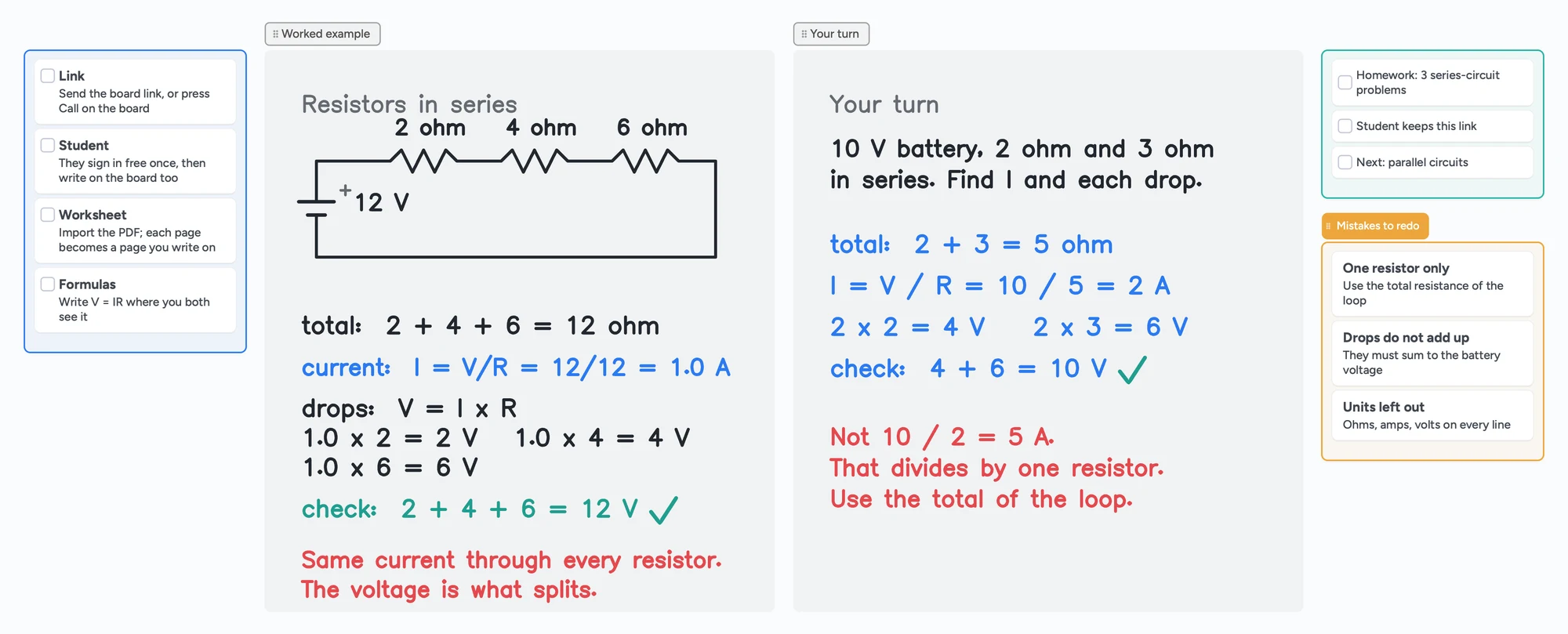
OpenStax College Physics 2e, section 21.1, teaches resistors in series this way: the total resistance is the sum of the individual resistances, the current comes from Ohm's law, and the voltage drops across the resistors add up to the battery voltage. The board above follows that order with our own numbers:
- Draw the circuit: a 12 V battery with 2 ohm, 4 ohm and 6 ohm resistors in one loop.
- Add the resistances: 2 + 4 + 6 = 12 ohm. In series the total is the sum.
- Find the current with Ohm's law: I = V / R = 12 / 12 = 1.0 A. The same current flows through every resistor.
- Find each voltage drop with V = I × R: 1.0 × 2 = 2 V, 1.0 × 4 = 4 V, 1.0 × 6 = 6 V.
- Check: 2 + 4 + 6 = 12 V, the battery voltage. If the drops do not add up, something is wrong.
Then it is the student's turn: a 10 V battery with 2 ohm and 3 ohm in series. The total is 5 ohm, the current is 10 / 5 = 2 A, and the drops are 4 V and 6 V, which add to 10 V. The common trap is dividing the battery voltage by one resistor (10 / 2 = 5 A). The red note on the board names it: use the total resistance of the loop.
| Step | On the board | Why it matters |
|---|---|---|
| Draw | Battery and three resistors in one loop | The picture decides what is in series. |
| Total | 2 + 4 + 6 = 12 ohm | Series resistances add. |
| Current | I = V / R = 12 / 12 = 1.0 A | One current for the whole loop. |
| Drops | V = I × R for each resistor | Where the voltage goes. |
| Check | 2 + 4 + 6 = 12 V | Catches a wrong total or a wrong current. |
Swipe the table sideways to see every column.
The method follows OpenStax College Physics 2e, section 21.1 (read November 2, 2026), which works a 12.0 V series example with its own numbers. The values on our board are our own, checked by hand.
Drawing physics on Instaboard
On Instaboard you draw diagrams and write equations with the pen, like a whiteboard in a room. Here is what that means, so you can decide before the lesson:
- Hand-drawn diagrams. Circuits, force diagrams, ray diagrams and graphs are pen drawings. The circuit on the board above is drawn stroke by stroke.
- Hand-written equations. Formulas, substitutions and units are written, not typed. Equation cards typeset a formula if you want one to stay tidy.
- Graphs. Draw them by hand, or use the Desmos widget, which shows a snapshot on the board and opens the full calculator when you edit it. It needs an internet connection.
- The worksheet. Import the PDF and write on it. Each imported PDF uses one of the 5 free boards.
No simulations, no circuit editor
Instaboard has no circuit builder, no physics simulation and no automatic checking of your diagram. If you want students to experiment, share your screen and use a simulation.
When screen share or a simulation is the better choice
- You just need to annotate a screen. A tutor in an August 2025 thread teaches maths, physics, chemistry and test prep by drawing on a shared screen with a USB drawing pad. They say students can draw too but it doesn't add much; students usually text a picture of their work and they go through it together. If that is how you teach, a shared board adds little.
- You want students to experiment with a circuit. PhET's Circuit Construction Kit: DC simulation lets learners build circuits and use an ammeter and voltmeter, and its page says HTML5 simulations run on iPads, Chromebooks, PC, Mac and Linux. Share your screen and use the board for the working.
- You need to draw to scale or plot a function. A graphing tool is better; the Desmos widget on the board is the nearest option.
- You want a recording of the lesson. Instaboard does not record.
Instaboard fits when you teach by drawing and working problems, you want the student to write the next step, and you want the call, the diagram and the working on one link.
Use the lesson board in five steps
- Open the physics board above and make it yours.
- Send your student the link, or press Call on the board so the lesson runs in one place. They sign in free once to write.
- Swap in your topic. Replace the circuit with the diagram you are teaching and write the formulas you need where you both see them.
- Let the student take the next problem and write it in their own colour.
- Leave the board open as the revision sheet and start the next lesson from it.
The same pattern works for other subjects: how to teach math online and an online whiteboard for math show it with a graph and a worked example.
What Instaboard doesn't do for physics
- No simulations, no circuit editor, no physics engine. Diagrams are hand-drawn ink.
- No typed LaTeX editor. Equation cards typeset formulas; the working on the board above is written by hand.
- No built-in graph plotter. The Desmos widget is the graphing option and needs a connection.
- Whole-stroke eraser only. You cannot rub out part of a line; erase the stroke and redraw it.
- No recording of the lesson, no class mode, no scheduling.
- Students sign in to write. Anyone with the link can view; writing needs a free sign-in. Free calls run 60 minutes.
- Free covers 5 boards. Each imported PDF uses one of them. Pen strokes do not count toward the 150-item limit; cards and lists do.
Start from the ready board
It opens in your browser in a few seconds, with nothing to install. Sign in for free when you want to save it and share it.
Questions
How do I teach physics on an online whiteboard?
Draw the diagram, write the formula, work an example line by line, then let the student take the next problem on the same board. Import the student's worksheet as a PDF so you both write on the real problem.
Can I draw circuits and force diagrams on Instaboard?
Only by hand with the pen. There is no circuit editor or diagram library, and the board does not check your drawing. A tablet or pen tablet makes drawing faster than a mouse.
Do I need a tablet to teach physics online?
No, but diagrams are slow with a mouse. A touchscreen laptop, an iPad or a pen tablet helps. Tutors in the r/TutorsHelpingTutors threads use a touchscreen laptop, a digital pen and a screenless drawing tablet.
Can I run a simulation on the board?
No. Instaboard has no simulations. Share your screen to run one, for example PhET's Circuit Construction Kit: DC, and keep the board for the working.
Can my student write on the board too?
Yes. Students can view without an account and need a free sign-in to write. They write in their own colour on the same page.
Is Instaboard free?
Yes. The free plan includes 5 boards, 150 cards and items across your account (pen strokes, arrows and sections don't count), 3 images and 1 file per board, unlimited collaborators and video calls up to an hour. Pro is $5 a month billed yearly ($59.99 a year), or $7.99 monthly, and the people you invite join free.
Sources
- r/TutorsHelpingTutors: Uk based physics tutor - online platform? (January 15, 2024)
- r/TutorsHelpingTutors: Best drawing tablet for online tutoring? (February 18, 2025)
- r/TutorsHelpingTutors: How do you share your handwritten notes when tutoring remotely? (August 14, 2025)
- OpenStax College Physics 2e, 21.1 Resistors in Series and Parallel
- PhET: Circuit Construction Kit: DC (University of Colorado Boulder)
Related
An online whiteboard for math: write, graph and let your student write too
What a math tutor needs from an online whiteboard: handwriting, typed equations, graphs and worksheets, and which tools have each. Free limits compared, plus a ready slope lesson board.
How to teach math online: your first lesson, step by step
How to tutor math online as a beginner: what you need, how to run a first lesson on a board your student writes on too, with Zoom, Google Meet or no video app at all, and what to do without a whiteboard.
An online whiteboard for tutoring that works the way you teach
A free whiteboard for online tutoring: paste the worksheet, write with a pen, and your student answers on the same board. Call on it or beside Zoom.
A pen tablet for online tutoring: what to buy and how to set it up
Which pen tablet to buy for online tutoring (Wacom, XP-Pen, Huion, about $40 to $60), how to set it up with pen pressure in the browser, and a whiteboard your student can write on too.
Online tutoring setup: what you need before your first lesson
What you need to start tutoring online: sound, light, camera, internet, a way to write, and a board your student writes on too. A plain checklist with a five-minute test call and a ready board to open.
Use your iPad as a whiteboard on Zoom (and let your student write too)
How to use an iPad and Apple Pencil as a whiteboard in a Zoom lesson: screen mirroring, Zoom Whiteboard, or a shared board your student writes on too. Or skip Zoom and call right on the board. Step by step, with the echo fix.