For a cafe or coffee shop owner with a small crew
A cafe opening and closing checklist on one shared board
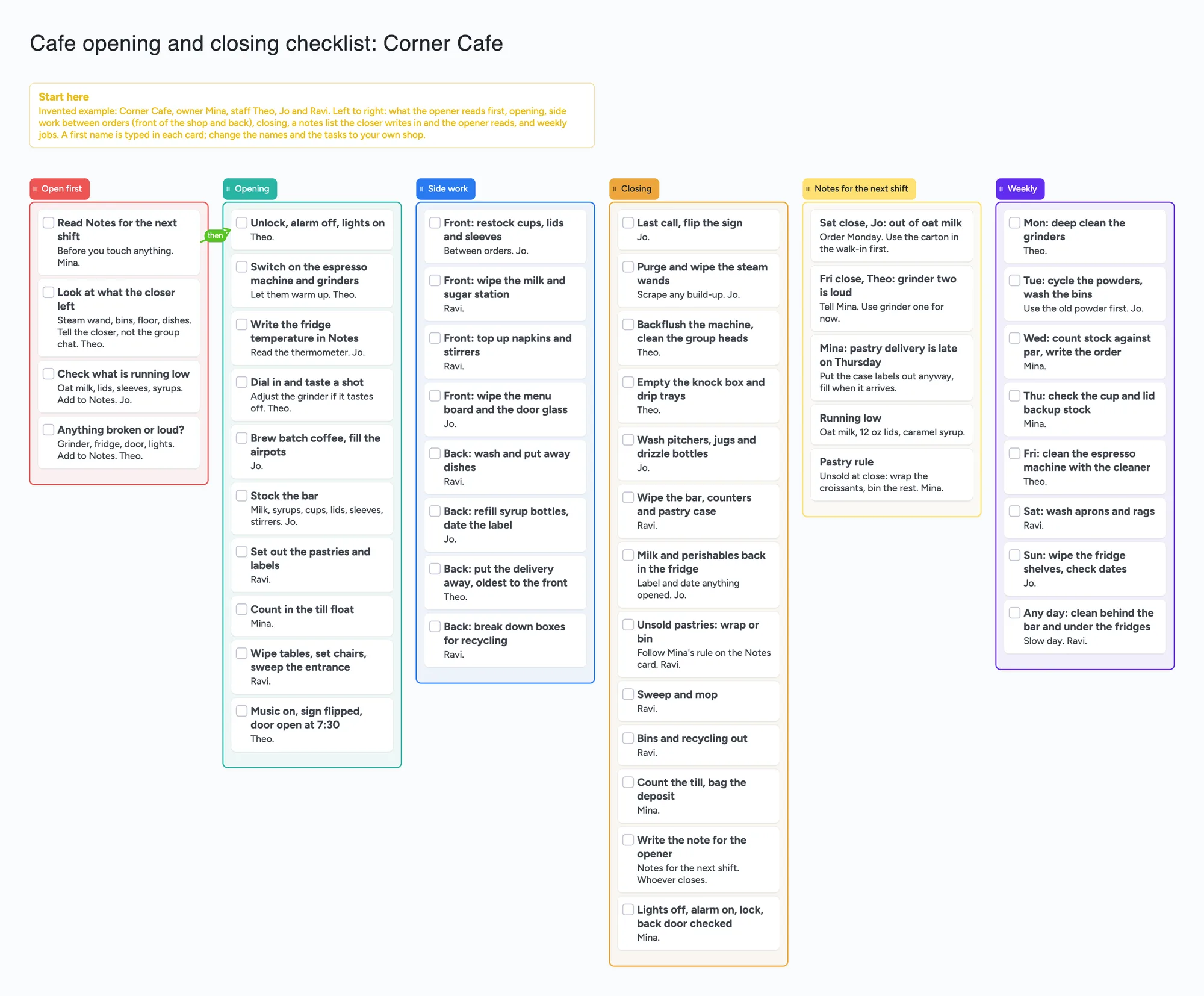
This is for a small cafe where the opener sometimes walks into what the closer left. One board, left to right: what the opener reads first, opening, side work between orders, closing, a notes list the closer writes in and the next opener reads, and weekly jobs. Each task is a card with a tick box and a first name typed in. It is a layout to copy, not a staff app: it sends no reminders or alerts, schedules no one, and we do not claim it records who ticked a task or when.
Opens in your browser. Anyone can view; a free sign-in lets you edit.
Updated
The short answer
- What it is: six lists. Open first (what the opener reads before touching anything), Opening, Side work (jobs between orders, split into front and back in our own grouping), Closing, Notes for the next shift, and Weekly. Every task is a card with a tick box and a first name typed into its text; the Notes list is plain cards.
- What it isn't: no reminders, no alerts, no scheduling, no time clock. We do not claim it records who ticked a task or when: put the name in the card text and use Notes for anything that must be remembered. Connecteam and Homebase are built around assigning and tracking tasks; see below.
- The habit it supports: the closer writes a card in Notes for the next shift and the opener reads it first. Several people in r/barista describe exactly that need (below). It is a habit, not a feature.
- Free plan: the example is 56 of your 150 free items (49 cards, 6 lists and 1 title text box, our count). A shop with two locations is 110 on one board or 112 as two boards (our arithmetic below); three locations don't fit. The one arrow doesn't count.
- To change it: writing on a board needs a free sign-in. In the share menu set Share to "Anyone who joins can edit" (new boards start view-only). Copying the board takes 1 of your 5 free boards.
What cafe staff say about checklists and handoff
Read in full on November 21, 2026; each reply is one person's view, credited per account. In r/barista, a thread about a steam wand left dirty every morning (OP u/star_sage, February 20, 2025), the poster wrote that they told the work group chat and "nothing changed" in about three weeks, and added that the manager planned to put the job on a list that gets "initialed every time we do it". u/daynanfighter, who said they once started a checklist at a bar, called it "more administrative burden" and thought a manager correcting people, with wiping after every use, worked better; at the least, a checklist should confirm the wand was wiped at the end of the day. u/extacie described a closing checklist staff tick and sign off, so "we will know who will be responsible". Instaboard does not claim that sign-off or any record of who ticked; this page only shows the layout.
In "How toxic can barista jobs get?" (OP u/kaiyakaiyabobaiya, February 18, 2024), u/Then-Variation-688 (February 19, 2024) wrote that they would come in to open to a mess because the closers forgot something, and that the owners gave them a shop checklist that was "the first one found on Google and not at all relevant to our shop". That is the reason this board is an example to rewrite, not a standard list.
In "Baristas, what are some day to day issues you run into at work?" (May 19, 2024), u/spytez recommended daily and weekly work sheets broken down by shift, and opening and closing sheets so new people, or openers covering a closing shift, can look things up. The same commenter, about inventory sheets in Google's spreadsheets, said they had to print them because it was the only way to get people to use them. u/YogurtclosetNo4738 wanted each shift to tell the next that the mocha ran out or the floor wasn't mopped. u/TheAnswerIsSauce kept a communication notebook for the next day's crew and made reading it a rule at every clock-in. u/UnholyGr11 said a fixed deep-clean day (Friday for the machine) becomes routine. u/eliseeium said to cycle powders every week. The board's Notes list and Weekly list borrow those two ideas; we don't present any as a standard.
Side work: the small jobs between orders
On the board, side work is the list of small jobs that fill a quiet minute: restocking cups, lids and sleeves, wiping the milk and sugar station, putting a delivery away. We split it into front (the customer side) and back (dishes, syrups, deliveries, boxes) so two people can take one each. That split is our own grouping for a cafe. The cafe threads we read didn't define side work, so this page makes no claim about how restaurants with servers do it. Put a first name on each card and keep the list short enough to finish on a slow shift.
Where Connecteam, Homebase, Sling and Trello are better
Read from each vendor's pricing page on November 21, 2026 (none of the pages shows a date). Connecteam's page says its Small Business Plan is "entirely free for up to 10 users" with all hubs and all features (marked with an asterisk pointing to a feature list) and lists "Unlimited checklists, forms, and tasks" with a time clock and basic scheduling in its operations hub. Homebase's Basic plan is $0 per location per month for 1 location, up to 10 employees, with basic scheduling and time tracking; its Task Manager add-on is $13 a month per location and, in Homebase's words, lets you "build and assign task lists" and "hold your team accountable and track completion". Sling's page says shift scheduling is free for up to 30 users and lists task templates and shift tasks (attach tasks and checklists to a shift); we did not confirm which plan includes them. Sling is now Sling by Toast, per its own banner. Trello's page says Free is for up to 10 collaborators per Workspace with unlimited cards and up to 10 boards per Workspace; advanced checklists, with members and due dates on checklist items, are on Standard at $5 per user a month billed annually ($6 monthly).
If you want a task assigned to a named person, a phone that reminds them, a rota or a time clock, those tools are built for it and a board is not. If your crew won't open a link on their phones, paper wins: one commenter above had to print their sheets to get them used.
Where these tools win
Use Connecteam or Homebase when you need assigned tasks, reminders, scheduling or a time clock, and Sling by Toast if scheduling is the main job. Use Trello Free if you already run a card board for the shop. Use this board when you want a filled-in cafe layout you can copy, edit and send as one link, with a notes list the closer fills in for the opener.
How to set it up for your shop
- Open the board and make it yours. Replace Mina, Theo, Jo and Ravi with your crew and every task with your own: the cafe in the example is invented, so don't treat its tasks as a standard.
- Cut it to what your shop skips. If the steam wand is what gets forgotten, write that card in your own words. Fewer, clearer cards get used.
- Put a first name in each card's text where a job belongs to one person. The board does not claim to record who ticked a task.
- Start the shift in Open first. The opener reads Notes for the next shift, looks at what the closer left, and checks what is running low.
- Finish the closing list with a note. The closer adds a card to Notes for the next shift; the opener deletes it once it is dealt with, so the list stays short.
- Keep weekly jobs on their own list by day (grinders Monday, machine Friday), so a Friday job isn't buried in the daily list.
- Untick when a new shift starts. This page doesn't claim the ticks reset themselves.
- Share it. In the share menu set Share to "Anyone who joins can edit" (new boards start view-only). Each person who writes signs in free; someone who only reads can open the link signed out.
This board vs Connecteam vs Homebase vs Sling vs Trello
| Tool | What we read (Nov 21, 2026) | Good at | Not what you get |
|---|---|---|---|
| Instaboard board | Free: 5 boards, 150 items, 3 images per board. Pro $5 a month billed yearly ($59.99 a year), or $7.99 monthly | A copyable cafe layout, one link for the crew, a notes list for the next shift | Reminders, alerts, scheduling, a time clock, a record of who ticked a task or when (not claimed) |
| Connecteam | Small Business Plan "entirely free for up to 10 users" (asterisk to a feature list); Basic operations lists unlimited checklists, forms and tasks, time clock, basic scheduling | Assigned checklists, time clock, scheduling in one app | A board you lay out freely |
| Homebase | Basic $0 per location per month for 1 location, up to 10 employees; Task Manager add-on $13 a month per location | Scheduling, time tracking; task lists and completion tracking (add-on) | Task lists on the free plan (not listed on its pricing page as of Nov 21) |
| Sling by Toast | Shift scheduling free for up to 30 users; task templates and shift tasks listed (plan not confirmed) | Scheduling and team messaging | A free task checklist (not confirmed on its pricing page as of Nov 21) |
| Trello | Free for up to 10 collaborators per Workspace, unlimited cards, up to 10 boards per Workspace; Standard $5 per user a month billed annually ($6 monthly) adds advanced checklists | Cards, lists, checklists with members and due dates on Standard | A ready cafe layout |
Swipe the table sideways to see every column.
From each vendor's pricing page, read November 21, 2026. Prices and plans change; check the page.
Limits first: what this board does not do
- No reminders and no alerts. The board tells no one that a job is due or was missed.
- No scheduling. It does not make a rota, set shifts or ask who is free.
- No record of who ticked or when. We don't claim the board saves that. Put the name in the card text and use the Notes list.
- Writing needs a free sign-in. A crew member who joins by link or code signs in, and the board counts as one of their 5.
- Items. Each card, list and text box is 1 of your 150 free items across all your boards. The example is 49 cards, 6 lists and 1 title text box: 56. Arrows, sections and pen strokes don't count.
- More than one location. Two locations on one board is 12 lists, 97 cards (43 task cards twice, the 5 notes cards twice, one Start here card) and a title: 110 items. Two separate boards, each with its own Start here card and title, are 56 + 56 = 112. Three locations on one board is 18 lists + 145 cards + 1 title = 164, over 150 (our arithmetic). One location leaves room for 143 cards beside its 6 lists and the title (150 − 6 − 1).
- Boards. The free plan includes 5 boards. Copying the example uses 1.
- Photos. 3 images per board, so no photo of each station. A link card's preview picture no longer counts toward the 3.
- Not food-safety or legal advice. The example tasks are an invented cafe's, not a health-code checklist; check your local rules.
Start from the ready board
It opens in your browser in a few seconds, with nothing to install. Sign in for free when you want to save it and share it.
Questions
Is there a free cafe opening and closing checklist template I can share with staff?
Yes. Open the board, replace the example cafe with your own tasks and names, and turn on "Anyone who joins can edit" so the crew can write on it. Each person who writes signs in free. It is a shared board of cards, not a staff app, so it sends no reminders.
Does it show who ticked a task or when?
This page doesn't claim that. The cards have tick boxes, but we don't say what a tick records. Put a first name in the card text, and use the Notes list for anything that must be remembered. Homebase's Task Manager add-on is described on its own page as letting you track completion.
Can it remind staff to do the closing list?
No. The board has no reminders, alerts or scheduling. Connecteam and Homebase are built for assigned tasks and scheduling, and their free plans have limits you should read on their pages.
What is side work on a cafe checklist?
Here it means the small jobs between orders, like restocking cups and lids or wiping the milk station. We split it into front and back to share it out. That is our own grouping; the cafe threads we read didn't define the term.
How many tasks fit on the free plan?
Each card, list and text box is one of the 150 free items across your boards. The example is 56 items. Two locations is 110 on one board or 112 as two boards; three locations don't fit. That is our arithmetic. Arrows are free.
Is Instaboard free?
Yes. The free plan includes 5 boards, 150 cards and items across your account (pen strokes, arrows and sections don't count), 3 images and 1 file per board, unlimited collaborators and video calls up to an hour. Pro is $5 a month billed yearly ($59.99 a year), or $7.99 monthly, and the people you invite join free.
Sources
- r/barista: a steam wand left dirty each morning (OP u/star_sage, February 20, 2025; replies are single accounts, read November 21, 2026)
- r/barista: How toxic can barista jobs get? (OP u/kaiyakaiyabobaiya, February 18, 2024; reply by u/Then-Variation-688 February 19, 2024; read November 21, 2026)
- r/barista: Baristas, what are some day to day issues you run into at work? (May 19, 2024; replies are single accounts, read November 21, 2026)
- Connecteam pricing (read November 21, 2026; page shows no date)
- Homebase pricing (read November 21, 2026; page shows no date)
- Sling pricing (read November 21, 2026; page shows no date)
- Trello pricing (read November 21, 2026; page shows no date)
Related
A shift handoff template for a small shop: one shared board instead of a group chat
A shift handoff template for a small cafe, shop or bar: done today, still to do, low stock, notes and tomorrow on one shared board, with a first name on every card. Free to copy. Not a clinical record.
A craft fair planning template: one shared board for the organising committee
Plan a craft fair or makers market with a small committee on one shared board: venue, vendor call, confirmed vendors, waitlist, setup, market day and volunteers. Free ready board; Zeffy and Eventbrite do the payments.
A moving board: pack by room, number every box, share one list
Plan a move on one shared board: a list per room with a card for every numbered box, plus moving-day tasks. Free ready board; a moving app or a spreadsheet searches better.