For online tutors
A Pencil Spaces alternative for tutors who want a flat price
On September 1, 2026, Pencil Spaces launched new plans billed per session hour: $0.40 an hour on Pro, $1 on Expert and $5 on Master, each with a monthly minimum of 10 hours. Your bill now follows your hours, and cloud recording, Google Docs and lesson summaries sit on the dearer plans. Here is what the plans cost at 10, 20 and 40 hours a month, where Pencil Spaces is clearly the better tool for tutoring, and when a flat-price board with the call built in fits instead.
Updated
The short answer
- Pencil Spaces' new plans (launched September 1, 2026) are Pro $0.40 an hour, Expert $1 and Master $5, billed only while two or more people are in a Space, with a monthly minimum of 10 hours ($4, $10 or $50). Existing plans stay in place, says Pencil Spaces.
- For one-to-one lessons Pencil Spaces Pro costs $4 a month up to 10 hours, $8 at 20 hours and $16 at 40. That is cheaper than Instaboard Pro ($5 a month billed yearly) below about 12 hours a month, and dearer above it.
- Instaboard Free gives you 5 boards and a video call on the board for up to an hour. Pro is a flat $5 a month billed yearly, and your students join free. It has no recording, class controls or scheduling.
What a lesson on the board looks like
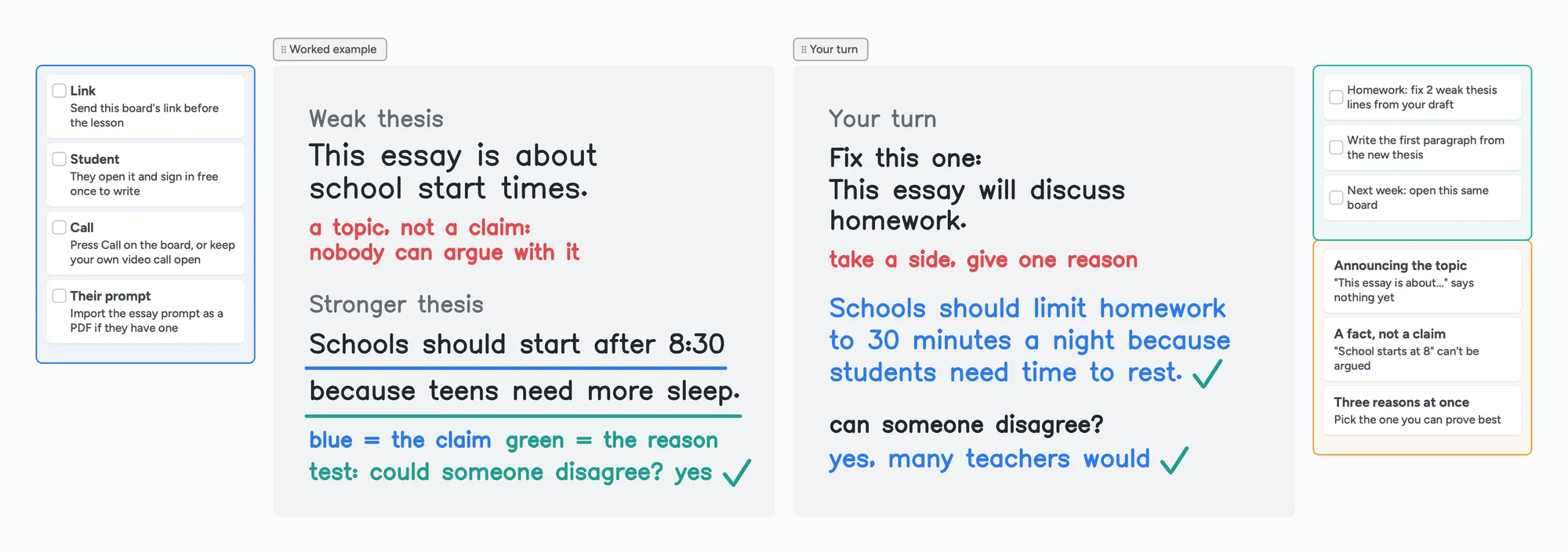
The call sits on top of the board: you write and point with the laser, your student writes their answer on the same page in their own colour, and you both see it live.
What changed at Pencil Spaces on September 1, 2026
Pencil Spaces announced its new plans on August 20, 2026 and launched them on September 1. Its blog post says the older plans charged per participant, which didn't suit one-to-one lessons, especially for a tutor who joins from both an iPad and a laptop and could count as an extra participant. The new plans charge per session hour instead.
- Pro: $0.40 an hour, minimum 10 hours billed at $4 a month. Unlimited Spaces, HD video, audio and screenshare, and 24/7 support are listed as additions to the free Starter plan.
- Expert: $1 an hour, minimum 10 hours billed at $10 a month. Adds cloud recording (90-day storage), 1000+ built-in apps and automated lesson summaries.
- Master: $5 an hour, minimum 10 hours billed at $50 a month. Adds tutor coaching, autograding and AI safeguarding.
- Enterprise: custom pricing for teams running thousands of session hours a month.
- What counts as an hour: time when two to four people are in a Space. The first person in a Space is free, so waiting alone for a student costs nothing. Billing is to the minute, and the flat rate covers up to four people.
Already on a Pencil Spaces plan?
Pencil Spaces says that if you're happy with your current plan you don't need to do anything: your plan stays in place and it keeps honoring what you pay. Some new features, like AI safeguarding, incognito observation and automatic session coaching, are only on the newer plans.
What it costs at 10, 20 and 40 hours a month
These are one-to-one lessons, so only the student counts as a billable person. The monthly minimum is charged at the start of the month and covers your first 10 hours. Anything above that is billed at the end of the month at the hourly rate.
| Lesson hours a month | Pencil Spaces Pro | Pencil Spaces Expert | Instaboard Free | Instaboard Pro |
|---|---|---|---|---|
| 10 hours | $4 | $10 | $0 | $5 |
| 20 hours | $8 | $20 | $0 | $5 |
| 40 hours | $16 | $40 | $0 | $5 |
Swipe the table sideways to see every column.
Pencil Spaces rates and the 10-hour monthly minimum from its pricing page, checked November 2, 2026; the totals are our arithmetic (for example, 20 hours on Pro is the $4 minimum plus 10 more hours at $0.40). Instaboard Pro is $59.99 billed yearly, about $5 a month, or $7.99 billed monthly. Instaboard Free calls end at 60 minutes and Free has 5 boards.
So Pencil Spaces Pro is the cheaper of the two paid options if you teach fewer than about 12 hours a month ($5 buys 12.5 hours at $0.40). Above that the flat $5 wins. Against Instaboard's monthly price of $7.99 the crossover is about 20 hours. The Expert plan, which is the first with cloud recording, is $10 a month at the minimum.
Pencil Spaces and Instaboard side by side
| Pencil Spaces | Instaboard | |
|---|---|---|
| Free plan | Free Starter plan; paid plans have a 14-day trial with no card. The pricing page doesn't list what Starter includes | 5 boards, 150 items across your account (pen strokes don't count), 3 images and 1 file per board, calls up to 1 hour |
| Paid price | $0.40, $1 or $5 per session hour, 10-hour minimum ($4, $10, $50 a month) | Pro $5 a month billed yearly ($59.99), or $7.99 monthly, flat |
| Student without an account | Guests can join public Spaces after the host admits them from the waiting room; private Spaces need an account | Anyone with the link can view; writing needs a free sign-in with Google, Apple or email |
| Video call | Built in; HD video and screenshare on Pro and up | Built in; free up to 1 hour, no limit on Pro |
| Recording | Local recording on Pro and up; cloud recording from Expert | None |
| Equations | LaTeX or freehand equation editor | Equation cards and a Desmos calculator widget; no LaTeX editor |
| Boards | Unlimited Spaces on Pro and up, with unlimited boards in a Space | 5 on Free, then paid |
| Scheduling and classroom controls | Scheduling, breakout rooms, lead and lock, waiting room, observer mode, distraction alerts | None of these |
| Pen | Freehand drawing; works with external writing pads | Pressure pen, highlighter, hold to straighten, laser pointer, stylus mode on iPad; the pen's side button erases |
| Apps | Browser, plus iOS, Android and desktop apps | Browser, plus iPad, iPhone and Android apps |
Swipe the table sideways to see every column.
Pencil Spaces facts from its pricing page, its September 2026 pricing blog post and its help center, checked November 2, 2026. Check the pricing page for your plan.
Where Pencil Spaces is the better choice
- It is built for tutoring. Scheduling, a waiting room, breakout rooms, observer mode, raised hands and lead-and-lock are part of the product. Instaboard has none of them.
- Students can join without an account. On a public Space a guest types a name and waits for you to admit them. On Instaboard your student can view without signing in but needs a free sign-in to write.
- Recording. Local recording comes with Pro and up, and Expert adds cloud recording with 90-day storage and automated lesson summaries. Instaboard doesn't record lessons.
- A real equation editor. Pencil Spaces lists LaTeX and freehand equations. Instaboard has equation cards and a Desmos widget, not a LaTeX editor.
- Lots of boards and tools. Unlimited Spaces and boards on Pro and up, a resource library, and from Expert polls and timers plus Google Docs, Drive and OneDrive import.
- Tutoring-business extras. Integrations with Teachworks and TutorCruncher, an API, safeguarding tools and compliance certifications for agencies and schools.
- Light use is cheap. Under about 12 hours a month, Pro's $4 minimum costs less than Instaboard Pro.
If recording, scheduling or student guest access are why you teach on Pencil Spaces, stay there. Nothing stops you using the board next to your Pencil Spaces call for the material you hand over.
When Instaboard fits better
- You want one price that doesn't follow your hours. Free costs nothing, and Pro is a flat $5 a month billed yearly however many hours you teach.
- You teach a lot of hours. At 40 hours a month Pencil Spaces Pro is $16 and Expert is $40. Instaboard Pro stays at $5.
- Your lesson is material, not just a call. Lists and cards keep the plan, homework and mistakes to redo beside the ink, and one board per student stays open for next week.
- You write on an iPad. Instaboard has an iPad app with a pressure-sensitive Apple Pencil, and stylus mode lets the pencil draw while a finger scrolls.
- You send worksheets as PDFs. Import one and it becomes pages you and your student both write on. Each imported PDF uses one of your 5 free boards.
- You already have a call you like. Keep Zoom or Meet open and use the board next to it, or press Call on the board for up to an hour free.
The ready board above is a writing lesson: a before-the-lesson checklist, a weak and a stronger thesis in ink, the student's turn in blue, homework and the mistakes to redo. For a full walkthrough, see our tutoring whiteboard guide.
Trying it next to Pencil Spaces
- Keep teaching in Pencil Spaces while you try the board on one student.
- Open the ready board and copy its link. A 4-digit join code and a QR code also work.
- Send the link in your Space's chat or by message. Your student opens it in a browser and signs in once, free, to write.
- Teach one lesson on it. Write in ink, point with the laser and have your student answer in their own colour. Compare your bill and your week at the end of the month.
What doesn't come over
Pencil Spaces lists export of a Space as an image or as a .space file on every plan. Instaboard can't open .space files or any other tool's boards. An exported picture can be pasted in (3 images per board on Free), and a PDF becomes pages you write on, so a long-running Space is best rebuilt as cards and fresh pages.
What Instaboard doesn't do
- Students sign in to write. Anyone with the link can view, but writing needs a free account with Google, Apple or email.
- Free calls end at 60 minutes. Pro has no limit, or keep using Zoom or Google Meet next to the board.
- No lesson recording, class mode, scheduling, payments or lesson summaries.
- No import from Pencil Spaces or other boards. Only PDFs come over, as pages you write on, and each one uses one of your 5 free boards.
- 3 images and 1 file per board on Free.
- The eraser removes whole strokes. Undo is the quickest way to fix the last thing you wrote.
- Equation cards, not a LaTeX editor. There is a Desmos calculator widget; Instaboard itself has no built-in graphing.
- Changes made offline are kept and sync when you're back, but it isn't an offline-first app.
Start from the ready board
It opens in your browser in a few seconds, with nothing to install. Sign in for free when you want to save it and share it.
Questions
How much does Pencil Spaces cost in 2026?
Pencil Spaces' new plans, launched September 1, 2026, are billed per session hour: Pro $0.40, Expert $1 and Master $5, each with a 10-hour monthly minimum ($4, $10 and $50 a month). Only time with two or more people in a Space counts, and the first person in a Space is free. Prices are from its pricing page, checked November 2, 2026.
Is Pencil Spaces free?
Pencil Spaces offers a free Starter plan and a 14-day free trial of paid plans with no card required; if you don't convert, you move to Starter. Its pricing page lists Pro's additions to Starter (unlimited Spaces, HD video, audio and screenshare, and 24/7 support) but not a full list of Starter's limits, so check before you rely on it.
Did Pencil Spaces raise prices on existing users?
Not according to its own announcement. The blog post says your existing plan stays in place and Pencil Spaces keeps honoring what you currently pay, and some new features are only on the newer plans. We haven't seen a statement either way about later changes.
Can my student join Pencil Spaces without an account?
On a public Space, yes. The student clicks Continue as Guest, types a name and waits until the host admits them. A private Space needs a Pencil Spaces account, per its help center article from April 2026.
Do my students have to pay for Instaboard?
No. Students join your boards free. To write on a board they sign in once with Google, Apple or email; without signing in they can only view.
Does Instaboard have a built-in call?
Yes, a video call on the board, free up to an hour on Free and unlimited on Pro. You can also keep your own Zoom or Google Meet call open and use the board next to it.
Is Instaboard free?
Yes. The free plan includes 5 boards, 150 cards and items across your account (pen strokes, arrows and sections don't count), 3 images and 1 file per board, unlimited collaborators and video calls up to an hour. Pro is $5 a month billed yearly ($59.99 a year), or $7.99 monthly, and the people you invite join free.
Sources
Related
An online whiteboard for tutoring that works the way you teach
A free whiteboard for online tutoring: paste the worksheet, write with a pen, and your student answers on the same board. Call on it or beside Zoom.
A Zoom Whiteboard alternative where your student writes too
Zoom's free whiteboard gives you 3 editable boards, sharing is built around Zoom accounts, and free calls stop at 40 minutes. What tutors use instead, where Zoom is still better, and a ready lesson board.
A Bitpaper alternative for tutors, now that free is join-only
Bitpaper's free plan can only join papers since April 2025, and a lapsed plan turns your papers read-only. What tutors use instead, where Bitpaper is still better, and how to move your lessons over.
An Explain Everything alternative for live lessons, where your student writes too
Explain Everything Free gives you 3 one-slide projects, 3-minute videos and 15 minutes of collaboration. What the paid plans add, what it does better, and a free board where your student writes live.