Free template
A wedding planning board you and your partner can actually share
Most couples end up with a spreadsheet, five apps and a hundred screenshots. This free board puts the whole plan in one place: the basics you agreed on, a month-by-month checklist, every vendor and the day-of timeline. Share it with your partner and see each other's changes live.
Updated
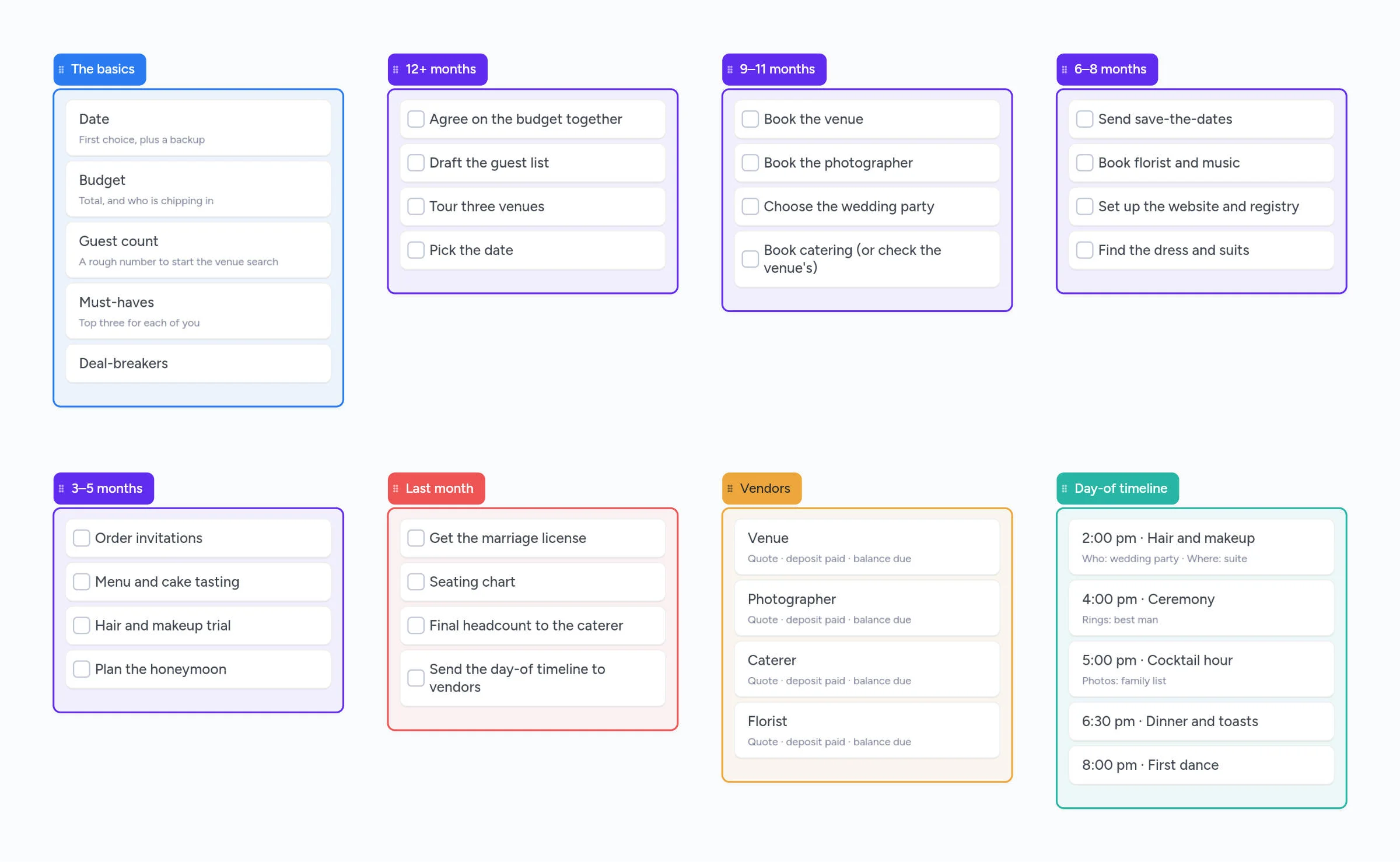
What's on the board
- The basics: date, budget, guest count, must-haves and deal-breakers.
- A checklist from 12+ months out to the last month.
- Vendors with quote, deposit paid and balance due.
- A day-of timeline with who does what.
How to use it
- Fill in the basics together. Date, budget, guest count, three must-haves each and your deal-breakers. Every later choice gets checked against this list.
- Work through the checklist by month. Tick tasks off as you go. Add a due date or assign a task to one of you.
- Give each vendor its own board. Any card can open into a board of its own, so "Venue" can hold the venues you toured, quotes, photos and questions to ask.
- Share it. Send your partner, parents or planner a link or a 4-digit code. Changes show up live on everyone's screen.
- Finish with the day-of timeline. Put who's involved and where on each step, then share it with your vendors.
The wedding checklist, month by month
The board's checklist follows the timeline most planning guides agree on (The Knot, Brides and Zola):
| When | What to do |
|---|---|
| 12+ months | Agree on the budget, draft the guest list, tour venues, pick the date |
| 9–11 months | Book the venue and photographer, choose the wedding party, book catering |
| 6–8 months | Send save-the-dates, book florist and music, set up the website and registry, find the dress and suits |
| 3–5 months | Order invitations, menu and cake tasting, hair and makeup trial, plan the honeymoon |
| Last month | Marriage license, seating chart, final headcount, day-of timeline to vendors |
Why a board instead of a spreadsheet
- You can see the whole plan at once. Lists sit side by side, so nothing hides in tab twelve.
- Photos and links live next to the task. Drop inspiration photos, the venue's PDF or a vendor's link right on the card.
- Planning together is live. No shared login and no "which version is right?"
- Depth when you need it. A card opens into its own board for the big decisions, like the venue or the dress.
What it doesn't do
Instaboard is for planning. It isn't a wedding website, RSVP or registry tool. Keep using Zola, The Knot or Joy for those, and plan everything else on the board.
- Free fits a wedding. The board uses about 40 of the free plan's 150 cards and items, and the free plan includes 5 boards.
- Who paid what. The Expense Tracker on the board records who paid for each cost and who owes whom. It doesn't add up a budget total.
- Helpers need a free sign-in to edit. Anyone with the link can view the board without an account.
If you're on Zola or The Knot
On October 14, 2026, The Knot Worldwide agreed to acquire Zola. Both companies say the two brands will stay separate for couples, and the deal still needs regulatory clearance. Nothing changes in your Zola or Knot account today.
Your planning doesn't have to live inside either one. A board you own keeps your checklist, vendors and timeline in one place, whichever website and registry you use.
Other ways couples plan
| Tool | Cost | Planning together | Best for |
|---|---|---|---|
| Instaboard | Free; Pro $5/mo billed yearly | Live, everyone you share with | A visual plan with checklists, vendors, photos and the day-of timeline |
| Google Sheets template | Free | Live, but clunky on phones | Budgets and guest lists with formulas |
| The Knot app | Free | Partners share one login | Checklist, vendor search, website and registry |
| Zola | Free tools | Invite one partner or helper | Website, RSVPs, registry and seating chart |
| Joy | Free | Multiple editors | Website, RSVPs and registry |
| Trello | Free up to 10 boards per workspace | Up to 10 collaborators | Simple lists; calendar view is paid |
Swipe the table sideways to see every column.
Plans from each tool's official pages, checked October 2026.
Start from the ready board
It opens in your browser in a few seconds, with nothing to install. Sign in for free when you want to save it and share it.
Questions
Is the wedding planning board free?
Yes. Open the board, start editing and keep it on the free plan. It uses about 40 of the free plan's 150 cards and items.
Can my partner and I both edit the board?
Yes. Share the board with a link or a 4-digit code. Anyone can view it, and people who sign in for free can edit. Changes show up live for everyone.
When should I start planning a wedding?
Most planning guides suggest starting about 12 months out. Set the budget first, then the guest count, then the venue and date, because those three shape every later choice.
Does the board track the wedding budget?
You can write amounts on cards, and the Expense Tracker records who paid what and who owes whom. It doesn't add up a budget total, so many couples keep the budget in a spreadsheet and link it from the board.
Does it work on my phone?
Yes. Instaboard has apps for iPhone and Android, and the board also opens in any browser.
Sources
Related
An online whiteboard for tutoring that works the way you teach
A free online whiteboard for tutoring: pressure-sensitive pen, PDF worksheets, Desmos, equations and a video call on the board. Includes a ready lesson board, setup tips and honest price comparisons.
Microsoft Whiteboard alternatives: what to use now that the apps are gone
The standalone Microsoft Whiteboard apps stopped on October 16, 2026. What changed, how to save your boards, and free alternatives for pen users, tutors and teachers, with real free-plan limits.