For new math tutors and teachers
How to teach math online: your first lesson, step by step
Teaching math over video is mostly one problem: you both need to write on the same page. A screen share only goes one way, and a call with no board turns into describing fractions out loud. Here is a plain first lesson you can run this week, three ways to hold the call (the board's own call, Zoom or Google Meet), what to do when you have no whiteboard or tablet yet, and a ready lesson board on triangle area to start from.
Updated
The short answer
- You need three things: a way to talk (video or just audio), a page you both write on, and a way to write that isn't a mouse if you can (a pen tablet or iPad helps, but isn't required to start).
- Use a shared board, not a screen share. A screen share only shows your writing. On a shared board your student writes the next problem themselves, and you see their steps as they go.
- The call can live on the board. Instaboard has a video call built into the board, free for up to 60 minutes. Or keep Zoom or Google Meet for the call and paste the board link in the chat.
- Run one skill per lesson: ask what they're stuck on, show one worked example, let them do the next one, then set homework and keep the same board link for next week.
- No whiteboard yet? You can still teach: type the steps in a text box, or have your student photograph their paper work and drop it on the board for you to mark up.
What a lesson on the board looks like
The call sits on top of the board, so you talk and write in the same place. You write the worked example, then your student writes the next one on the same page in their own colour.
What you need to teach math online
| Need | Minimum to start | Nicer later |
|---|---|---|
| Call | Any video or audio call: the board's own call, Zoom or Google Meet | A headset so your student hears you clearly |
| Shared page | A board you both write on, opened from one link | One board per student, kept between lessons |
| Writing | A mouse or a trackpad, with the steps typed or written big and slowly | A pen tablet or an iPad with Apple Pencil |
| Worksheets | Photo of the homework, dropped on the board | A PDF worksheet imported as pages you both write on |
Swipe the table sideways to see every column.
A mouse makes handwriting slow and messy, which is why many tutors add a pen tablet or an iPad sooner or later. Your student doesn't need either. They can type, use a mouse or trackpad, or photograph their paper work.
Your first lesson, step by step
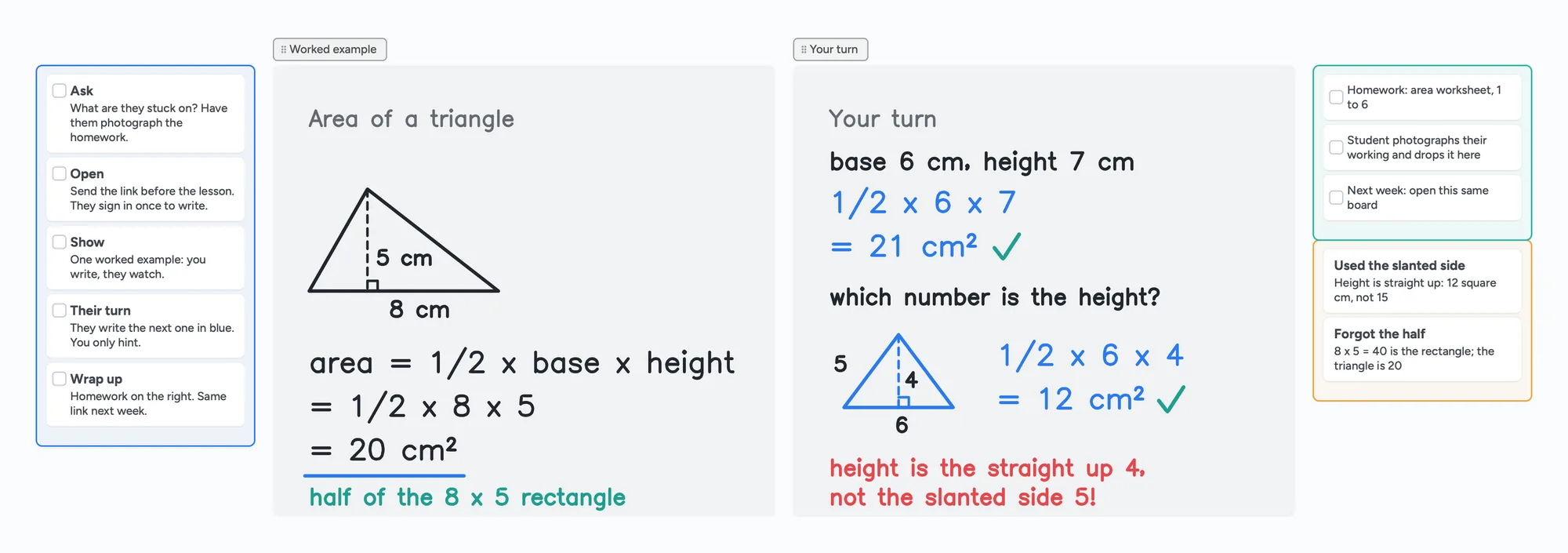
The ready board above follows these steps, with a triangle-area example. Swap the example for your own topic.
- Ask what they're stuck on before the lesson. Ask for a photo of the homework or the page in the textbook. One skill per lesson is plenty: "area of a triangle", not "geometry".
- Send the board link ahead of time. Anyone with the link can view. To write, your student signs in once for free with Google, Apple or email, so tell them before the call, not during it.
- Start the call and open the board together. Use the board's own call, or Zoom or Meet with the link pasted in the chat (setups below).
- Teach one worked example, out loud and in ink. Write each line as you say it. On the example board: area = 1/2 × base × height = 1/2 × 8 × 5 = 20 cm². Keep the reason next to the answer, like "half of the 8 × 5 rectangle".
- Give them the next one and stay quiet. They write on the same page in their own colour. Hint with a question, not the answer: "which number is straight up?" On the board's second problem, the slanted side is 5 and the height is 4, so 1/2 × 6 × 4 = 12 cm², not 15.
- Mark it with a tick or a note, then give a second problem with one twist so you can see whether they understood or just copied.
- Wrap up on the board. Write the homework in the list on the right, ask them to photograph their working and drop it on the board, and say that next week you'll open the same link. Their old work is still there for revision.
Why the student should write
If only you write, you can't tell whether they follow. When they write the next line, you see the exact step where it goes wrong, and you can fix that step instead of repeating the whole example.
Three ways to run the call
| Links to send | Free call length | Best when | |
|---|---|---|---|
| Call on the board | One: the board link | 60 minutes, with a warning 10 minutes before the end | You want the video and the page together, with nothing else to set up |
| Zoom + a board | Two: the Zoom meeting and the board | 40 minutes on a free Zoom account for meetings with 1+ others | Your student or their school already uses Zoom |
| Google Meet + a board | Two: the Meet link and the board | Free personal Meet calls: up to 24 hours for 1:1, 60 minutes for 3+ people | You want long free 1:1 calls, or your student is on Google |
Swipe the table sideways to see every column.
Zoom limit from Zoom's support article on meeting time limits and Meet limits from a Google Meet Help thread answered by a Product Expert on September 23, 2026, checked November 2, 2026; they can change.
- Call on the board: open the lesson board, start a call from it, and send your student the link or the 4-digit join code. Both of you must be signed in to call. Free calls end at 60 minutes; Instaboard Pro has no time limit.
- Zoom: join on your laptop and paste the board link in the chat. Full setup, including echo with two devices, is in Use your iPad as a whiteboard on Zoom. Zoom's own whiteboard is covered in the Zoom Whiteboard alternatives page.
- Google Meet: join on your laptop and paste the board link in the Meet chat. Meet has no built-in whiteboard now that Jamboard is gone; what to use instead.
If you keep Zoom or Meet, join on one device (usually the laptop) and write on the other, because two devices on the same call cause echo.
Teaching math online without a whiteboard
You can start today with nothing but a call. These are weaker than a shared board, but they work for a first lesson:
- Type the steps in a text box or a card on the board, one line per step, and read each line aloud. Typed math is slower to follow than handwriting, so keep problems short, and use a fraction slash like 1/2 or an equation card.
- Screen-share a worksheet and talk through it. Your student sees the problem but can't write on it, so ask them to do the next step on their own paper and show it to the camera, or photograph it.
- Have your student photograph their paper work and drop the photo on the board. You mark it up with ink in another colour and they see it appear.
- Say what you're doing. With no drawing, the explanation carries the lesson: name each step ("I'm finding the height, the straight-up side") before you do it.
When a plain mouse starts to slow you down, add a pen tablet. How to choose and set one up covers what to buy and how to get pen pressure working in the browser.
What to know before you start with Instaboard
- Your student needs a free sign-in to write. Anyone with the link can view the board; writing needs a free account with Google, Apple or email.
- Free covers 5 boards. Pen strokes don't count toward the 150-item limit, and each imported PDF becomes its own board. With several regular students, Pro is $5 a month billed yearly ($59.99 a year).
- Free calls end at 60 minutes, with a warning 10 minutes before. Pro calls have no limit.
- No lesson recording and no class mode that locks or leads students. If you need a recording, use the recording in Zoom or Meet.
- Equation cards only. There is no LaTeX editor. Typed fractions and exponents work, and a Desmos calculator is on the board for graphs. What a math tutor needs from a whiteboard compares the options.
- The eraser removes whole strokes. Undo is the quickest way to fix the last thing you wrote.
If you teach at scale and want scheduling, billing and recordings built in, a tutoring-room product is a better fit. See the Lessonspace alternatives comparison for the cost per hour.
Start from the ready board
It opens in your browser in a few seconds, with nothing to install. Sign in for free when you want to save it and share it.
Questions
How do I start tutoring math online as a beginner?
Pick one skill, send your student a board link ahead of time, and run the call on a page you both write on. Teach one worked example, let them do the next, then set homework on the same board. You don't need special equipment to start, only a call and a shared board.
Can I teach math online without a whiteboard?
Yes. Type the steps on a card, screen-share a worksheet, or have your student photograph their paper work and drop it on a shared board so you can mark it up. A shared board you both write on is better, because you can see each step they take.
How do I teach math online with Zoom?
Join the Zoom meeting on your laptop, open a shared board and paste its link in the Zoom chat so your student can write too. Free Zoom meetings with other people end at 40 minutes, so Instaboard's own call (60 free minutes) is an option if you want the video and the board in one link.
How do I teach math online with Google Meet?
Join Meet on your laptop and paste the board link in the Meet chat. Google Meet has no built-in whiteboard now that Jamboard is gone, so the board sits next to the call. Free personal Meet calls can run up to 24 hours for two people.
Does my student need an account?
To write on an Instaboard board, they sign in once for free with Google, Apple or email. Anyone with the link can view without an account, so ask them to sign in before the first lesson.
Do I need a tablet to tutor math online?
No. A mouse or trackpad works to start, though handwriting is slow. A pen tablet or an iPad with Apple Pencil makes your writing look like writing and is the most common upgrade.
Can I record the lesson?
Not on Instaboard. Use the recording in Zoom or Meet if you need one, or keep the board: the finished page stays on the board link, so your student can review it.
Sources
Related
Use your iPad as a whiteboard on Zoom (and let your student write too)
How to use an iPad and Apple Pencil as a whiteboard in a Zoom lesson: screen mirroring, Zoom Whiteboard, or a shared board your student writes on too. Or skip Zoom and call right on the board. Step by step, with the echo fix.
A whiteboard for Google Meet, now that Jamboard is gone
Google Meet lost its Jamboard whiteboard, and the add-ons often don't work on personal accounts. How to run a lesson with a shared whiteboard next to Meet, or skip Meet and call right on the board. With a ready lesson board.
A pen tablet for online tutoring: what to buy and how to set it up
Which pen tablet to buy for online tutoring (Wacom, XP-Pen, Huion, about $40 to $60), how to set it up with pen pressure in the browser, and a whiteboard your student can write on too.
An online whiteboard for tutoring that works the way you teach
A free whiteboard for online tutoring: paste the worksheet, write with a pen, and your student answers on the same board. Call on it or beside Zoom.
An online whiteboard for math: write, graph and let your student write too
What a math tutor needs from an online whiteboard: handwriting, typed equations, graphs and worksheets, and which tools have each. Free limits compared, plus a ready slope lesson board.
A Zoom Whiteboard alternative where your student writes too
Zoom's free whiteboard gives you 3 editable boards, sharing is built around Zoom accounts, and free calls stop at 40 minutes. What tutors use instead, where Zoom is still better, and a ready lesson board.
A Lessonspace alternative for tutors who don't want to pay by the hour
Lessonspace has no free plan, only a trial: $9 a month covers 10 hours, then $1.95 an hour. What 10, 20 and 30 hours cost, what Lessonspace does better, and a free board where your student writes too.
How to teach physics online on a whiteboard: a series-circuit lesson, step by step
How a physics tutor can teach on an online whiteboard: a series-circuit lesson step by step, hand-drawn diagrams, and when screen share or a simulation is the better tool. Ready lesson board included.
How to teach chemistry online on a whiteboard: a mole-ratio lesson, step by step
How a chemistry tutor can teach on an online whiteboard: a mole-ratio lesson step by step, what to write by hand, and when a structure editor like Molbrett is the better tool. Ready lesson board included.
How to teach writing online on a whiteboard: a body-paragraph lesson, step by step
How a writing tutor can run an online lesson on a shared board: a body-paragraph lesson step by step, the student writing the next sentence, and when a shared document is the better tool. Ready lesson board included.