For the friend who ends up organizing the group trip
A group trip planning template on one shared board: who's going, which dates, which stay, who books what
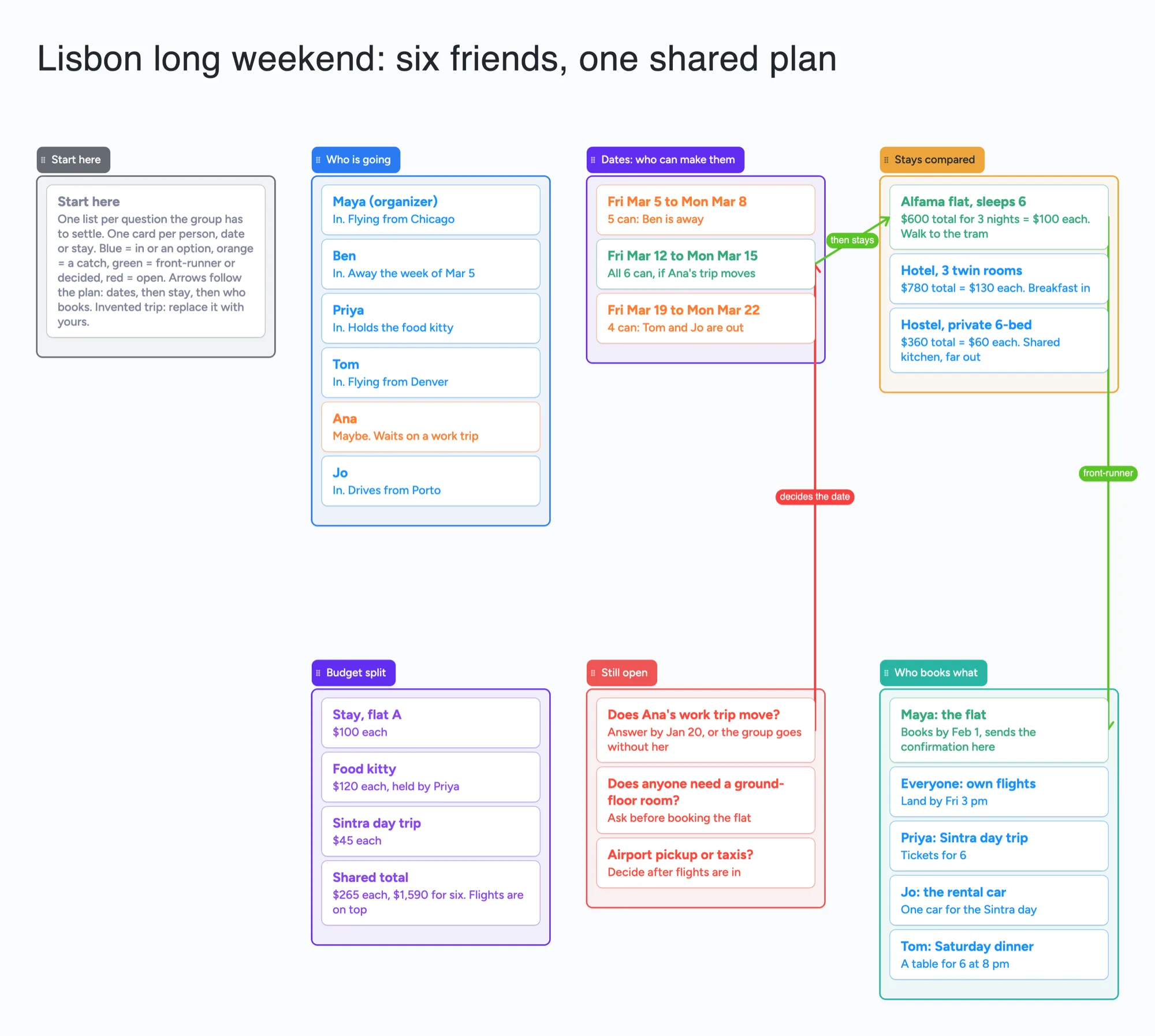
We make Instaboard, a free online board. This page gives you a group trip plan already laid out on it, for the deciding part before anything is booked: who is going, which dates work for whom, the stays side by side, who books what, the budget split and what is still open. The trip is invented, six friends and a long weekend. It is the right shape when a group chat has turned into 200 messages. It is not a day-by-day itinerary, a map, a booking tool or an expense splitter, and Wanderlog does the map and the splitting better. Open it, replace the trip with yours, and send one link.
Opens in your browser. Anyone can view; a free sign-in lets you edit.
Updated
The short answer
- One list per question the group has to settle. Who is going. Which dates work for whom. Which stay. Who books what. What the split comes to. What is still open. Each person, date, stay or task is a card, so the whole plan is visible before anyone pays.
- What it is not: no map, no day-by-day itinerary, no booking, no currency conversion, no expense splitting and no reminders. The prices and the split on the cards are text you type; the example's sums are our arithmetic.
- Count the items before you copy it. The example is 7 lists, 25 cards and the title text box: 33 of your 150 free items. Arrows, sections and pen strokes don't count (our arithmetic).
- Pro lifts the limit: $5 a month billed yearly ($59.99 a year), or $7.99 monthly. The free plan keeps 5 boards, 150 items and 3 pictures per board.
- Anyone with the link can read it; writing takes a free sign-in. New boards start view-only. Set "Anyone with the link can edit" so each friend can add a card.
How this differs from our trip pages
We have other trip pages. This one is the group's decision board before there is an itinerary; they are not.
| Page | What it holds | The question it answers |
|---|---|---|
| Group trip planning board (this page) | People, dates, stays, who books what, the split, open questions | What do we still have to decide together? |
| Trip planning board glossary page | A definition, and a ready cabin weekend board with a list per day | What is a trip planning board? |
| Plan a trip with friends (the /travel page) | Its description: pins on a map and a day-by-day itinerary in real time | Where do we go each day? |
Swipe the table sideways to see every column.
The shapes are those of each page's own text (our reading).
Those pages: what is a trip planning board and plan a trip with friends, the map and day-by-day version. If you are planning a wedding or a trip with a wedding's quotes instead, the wedding vendor comparison board holds quotes the same way a stays list does here.
How to fill in a group trip board
- Make a card for each person and say what they have said. The example writes "In", "Maybe" and what each person is waiting on. The group sees who is still deciding.
- Put the dates before the stays. Each date option is a card with who can make it. The example's middle weekend is the only one where all six can come, so the arrow marks it as the one to plan around.
- Compare stays with the same fields on every card. Total for the stay, price each, and the one catch. The example writes "$600 total for 3 nights = $100 each" so the split is clear without a calculator.
- Give every booking an owner. One card per booking with a name on it. The example has the flat, the Sintra day trip, the rental car and a Saturday table, each with one name.
- Write the split as text, and keep the sums on the card. The example adds up as stay $100 + food $120 + Sintra $45 = $265 each, $1,590 for six (our arithmetic). Flights are on top and stay on each person.
- Keep the open questions in one red list. Anything that blocks a booking goes there, with a date to answer by. An arrow from a question to the date it decides shows what is waiting on it.
- Share it. In the share menu set "Anyone with the link can edit" (new boards start view-only). Each friend signs in free to write live. If two people type in one card at once, the edits merge letter by letter, so give each person their own cards.
People who plan group trips describe how much structure to hold. In an r/TravelHacks thread on group travel planning (July 2022), u/FatSadHappy wrote that a big group needs ground rules, such as who decides what, and kept a Google Sheets tab per person; u/85francy85 wrote that one person should decide and "No democracy". Those are two accounts, not a measurement. The board suits either view: a list can hold a poll of options with one decider, or each person's cards.
Group trip tools, side by side
Each row is from the tool's own pages or a thread, read on November 19, 2026. Features and prices change, so check the page before you choose.
| Tool | What its page says | Where it beats a shared board | Where a shared board fits |
|---|---|---|---|
| Instaboard board | Free: 5 boards, 150 items. Pro $5 a month billed yearly ($59.99 a year), or $7.99 monthly | Nothing in this table on maps, booking or expense splitting | The deciding part: dates, stays and owners on one screen, one link for the group after a free sign-in |
| Wanderlog | Its pricing page lists collaborating with friends in real time, expense tracking and splitting, flight and hotel reservations imported by email, and the itinerary and map in one view. It says Pro unlocks offline access, unlimited attachments, flight deals and export to Google Maps; the Pro price was not checked | A map, a day-by-day itinerary, expense splitting and email import of bookings | Before there is an itinerary: who is in, which dates, which stay |
| Google Sheets | Named by several people in an r/TravelHacks thread (July 2022): a tab per person, a column per reviewer for stay suggestions, a date table | Sums, sorting and a column for every field | A visual board with a card per option, instead of a grid every person must scroll |
| Notion template (Group trip planner) | A free marketplace template, rated 4.05 from 3 ratings | Pages, databases and views inside Notion | No Notion account to learn: a link a friend opens in a browser |
| Canva itinerary planner | Itinerary planner templates; print from $27.00 on the page | Printed or designed planners | A plan that changes as the group decides |
| MonkeyTravel blog template | An article on a group itinerary with anchor and float time, updated August 24, 2026 on the page | A framework for a day's pace | The options and the decisions; the day's pace is yours to add |
Swipe the table sideways to see every column.
From each tool's own pages, read November 19, 2026. Wanderlog's Pro price and plan limits were not checked.
Where each one runs
From each tool's own pages, read November 19, 2026. Where a page does not state a platform, none is claimed.
| Tool | What its page says it runs on |
|---|---|
| Instaboard board | In a browser, and in the iPhone, iPad and Android apps. Changes made offline are kept and sync when you reconnect; it is not an offline-first app |
| Wanderlog | A web app, with a free travel app on the App Store and Google Play per its pages; offline access is listed under Pro |
| Google Sheets | Not checked |
| Notion template | Not checked |
From each tool's own pages, read November 19, 2026.
Which tool for which job
No ranking: these are different jobs.
- A map and a day-by-day itinerary: Wanderlog, whose pricing page says it puts the itinerary and the map in one view.
- Sums and a column for everything: a spreadsheet. Several people in the r/TravelHacks thread use one.
- A reference for a trip you will take alone: a Notion template or a printed planner.
- Splitting costs after the trip: an expense tool. This board holds the plan, not the payments.
- One place for the group to decide before booking: this board. A friend signs in free to edit. It has no map, no booking and no reminders.
How many cards fit
On this board the 7 lists and the title text box are 8 items before any card:
- 25 cards (the example): 8 + 25 = 33 of your 150 free items.
- A group of 12 with 4 stays and 5 dates: 8 + 12 + 4 + 5 + 10 other cards = 39.
- The most the free plan holds: 150 - 8 = 142 cards, with nothing else on the account.
- The example as it is is 33 items, so four trips like it use 132 of the 150 across your boards and a fifth passes the limit (5 x 33 = 165).
Arrows, sections and pen strokes are free. This is our arithmetic; Pro removes the item limit.
When another tool is the better choice
- You want a map and a day-by-day itinerary. Use Wanderlog or a map app. The board has no map.
- You want to split costs with exact sums. Use a spreadsheet or an expense tool. The board holds a number you typed.
- You want to book through the tool. The board books nothing and holds no confirmation files beyond a link.
- You want a poll everyone answers by tapping. The board has cards and arrows, not a poll.
- Your group is over a few dozen people. See the limits below; a large event needs more than a board.
Limits of the free plan for a group trip board
- Items. Each card and each list is 1 of your 150 free items, across all your boards. The example is 25 cards, 7 lists and the title text box, 33 in all. Arrows, sections and pen strokes don't count.
- Boards. The free plan includes 5 boards. Keep the whole trip on one board.
- Photos. 3 images per board. The example has none.
- No reminders, no booking, no map, no sums. Nothing nudges anyone when a date is close.
- Writing needs a free sign-in. A friend who joins by link or code can add cards and arrows, and the board counts as one of their 5 boards. Someone who is not signed in can open the link and read everything, but can't change anything.
- Offline. Changes made offline are kept and sync when you are back online.
Start from the ready board
It opens in your browser in a few seconds, with nothing to install. Sign in for free when you want to save it and share it.
Questions
Is there a free group trip planning template?
Yes, several. The ready board here has lists for who is going, dates by who can make them, stays compared, who books what, the budget split and what is still open. It is free within 5 boards and 150 items, and you open it and replace the example trip with yours. A free Notion template and a spreadsheet are other ways. The board is something you move cards on, not a spreadsheet with sums.
How do I plan a group trip with friends?
Settle the questions in order. Who is really going. Which dates work for whom. Which stay and what each person pays. Who books what. Write each as a list with a card per option, name one person who decides when the group splits, and put what blocks a booking in one open list with a date to answer by. Then book. The example board follows that order.
What is a good group travel planning template?
One that makes the decisions visible before anyone pays: people, dates, stays, owners and the split. A spreadsheet works if everyone opens it; a board works if you want each option as a card. Neither books anything. For a map and a day-by-day itinerary, Wanderlog's pages describe both.
How do I split costs on a group trip?
Write the stay, food and shared tickets as a per-person number on the card, then add them: in the example that is $100 + $120 + $45 = $265 each, our arithmetic. The board adds nothing for you. For settling who owes whom during the trip, use an expense tool.
How do I share a trip plan so everyone can edit?
In the share menu set "Anyone with the link can edit", then send the link. Each friend signs in free (Google, Apple or email) to write; someone who isn't signed in can open the link and read, but can't change anything. Each person adds their own cards so you never type in the same one at once.
How many items does a group trip board use on the free plan?
Each card and each list is one item of the 150 across all your boards. With 7 lists and the title text box, 25 cards is 33 items, and the most a board holds is 142 cards. That is our arithmetic. Arrows and sections are free.
Sources
- r/TravelHacks: group travel planning (July 2022; replies are single accounts; read November 19, 2026)
- r/travel: collaborative trip planning app/website to share links (replies are single accounts; read November 19, 2026)
- Wanderlog: pricing page (collaboration, expense splitting, email import, Pro features; no Pro price shown; read November 19, 2026; page shows no date)
- Notion: Group trip planner template (free; 4.05 from 3 ratings; read November 19, 2026)
- Canva: itinerary planner templates (print from $27.00; read November 19, 2026; page shows no date)
- MonkeyTravel: the group trip itinerary template (updated August 24, 2026 per the page; read November 19, 2026)
Related
A wedding vendor comparison board you and your family can all see
Compare wedding venue and vendor quotes on one shared board: a list per vendor type, a card per quote, decide-by dates. A filled example to copy. Not a spreadsheet.
An office holiday party planning board: who owns what, in one place
Plan the office holiday party with a small committee on one shared board: budget, venue, food, gift swap rules and the evening. Free ready board, and where SignUpGenius does more.
Home renovation planner: a shared board for the decisions
Decide paint, floor and sofa together: a list per decision, a few candidates, who decides and an order-by date. A shared board, not a floor-plan or budget tool.
A wedding planning board you and your partner can actually share
A free, ready-made wedding planning board: the basics, a month-by-month checklist, vendors with deposits and balances, and a day-of timeline. Plan together with your partner in real time.