For online tutors
Zoom or Google Meet for tutoring: which free call fits a lesson?
Most tutors end up on Zoom or Google Meet, and the free versions differ in ways that matter in a lesson: how long the call lasts, whether you can record, and whether anyone can write on the screen. Here is what Zoom's and Google's own pages say (read November 5, 2026), how to tutor on Meet, and a ready board to open next to whichever call you pick.
Updated
The short answer
- For a free one-hour lesson, Meet is the safer pick. Google's page says that without a subscription, on a computer, one-on-one meetings can run up to 24 hours. A meeting hosted on a free Zoom (Basic) licence ends after 40 minutes.
- Zoom is the better pick if you need to write on the student's screen or record on a free account. Zoom lets presenters and viewers annotate shared content, and its page says computer recording is available to free and paid accounts.
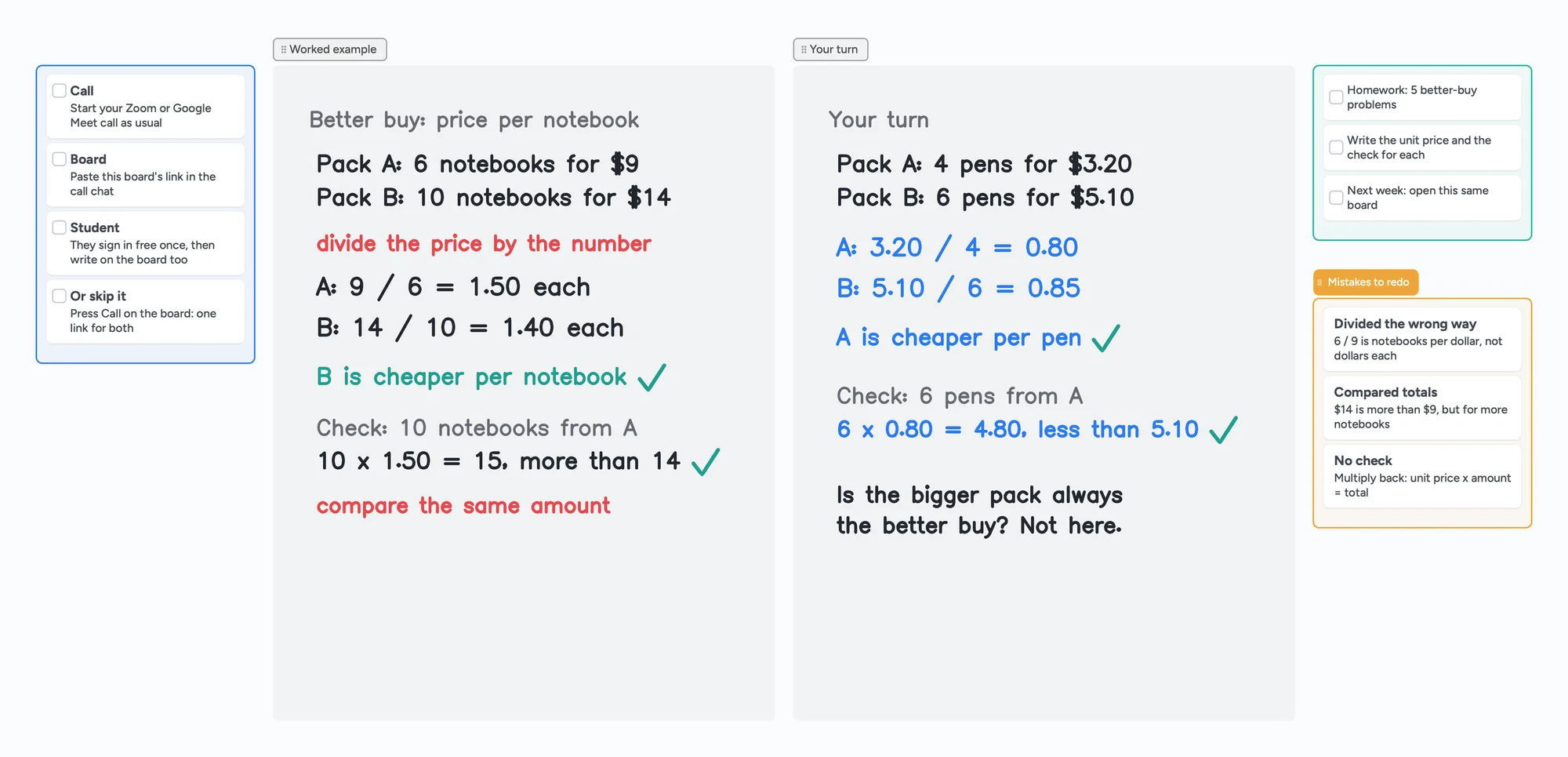
- Either call needs a board. Meet has no whiteboard built in now that Jamboard is gone, and annotation on a shared screen is not a worksheet you both keep. Put one board link in the call chat and write on it together.
Free Zoom and free Meet side by side (read November 5, 2026)
Each row comes from Zoom's or Google's own help page, read on November 5, 2026. The Instaboard column is our own plan. Check the linked pages for your account before you rely on a row.
| Zoom, free (Basic) licence | Google Meet, no subscription | Instaboard call (free) | |
|---|---|---|---|
| Call length with one student | 40 minutes: meetings hosted by a Basic licence end after 40 minutes with 1 host and 1 or more participants (KB0067966, updated October 29, 2025) | Up to 24 hours for one-on-one meetings on a computer. 3 or more people: up to 60 minutes, with a chime at 50 minutes (Meet Help, Requirements) | Up to 60 minutes per call, with a warning 10 minutes before the end. Pro has no limit |
| Recording | Computer recording is available to free and paid accounts, in the desktop app for Windows, macOS or Linux; not on iOS, iPad or Android (KB0063640, updated October 15, 2026) | Google lists paid Workspace editions, Google One with 2 TB or more, and Workspace Individual for recording; free personal accounts are not on its list. Computer or Android only (Meet Help, Record a video meeting) | No recording |
| Writing on the screen | Annotation tools for presenters and viewers while screen sharing; the host can turn participant annotation off (KB0067931, updated July 7, 2026) | No whiteboard built in now that Jamboard is gone | A pen on a shared board; your student signs in free to write |
Swipe the table sideways to see every column.
Zoom: support.zoom.com KB0067966, KB0063640 and KB0067931. Google: support.google.com/meet answers 7317473 and 9308681. Instaboard figures are our own plan. Plans and limits change.
How to tutor on Google Meet
- Before the lesson. Open the ready board below and swap in your own problems, then copy its link.
- Start the Meet call as usual and paste the board link in the Meet chat. Your student opens it in any browser.
- Teach on the board. Work the example with your pen while your student watches, then let them write the next one in their own colour. Your student signs in free once to write; anyone with the link can view.
- Keep the call and the board side by side, the call in one window and the board in another, or the board on an iPad while the call runs on your laptop.
- After the lesson, tick off the homework and note the mistakes. Your student keeps the link, so next week you open the same board.
For a full first lesson, see how to teach math online. For the click path of finding a whiteboard in Meet and why the add-on may be missing, see whiteboard for Google Meet.
What tutors say about the two
A February 2025 thread on r/TutorsHelpingTutors asked exactly this question, from a private math tutor who had mostly used Meet. The replies are individual tutors' opinions, not measurements:
- Several prefer Zoom for annotation on a shared screen and for recording sessions locally, and one says Zoom is worth $16 a month to avoid restarting after 40 minutes.
- Others prefer Meet because it is quicker for them and their students to start.
- One tutor reports using two document cameras on Zoom, one on the face and one on the paper they write on.
Prices and limits in a 2025 thread may have changed, so the table above is the source for today's limits.
Where Zoom or Meet is the better choice
- Meet for long free one-on-one calls. Up to 24 hours on Google's page, against our 60 minutes per call. If your lessons run 90 minutes, keep Meet for the video and use the board beside it.
- Zoom for writing on the student's screen. Annotation on shared content is built in. A board is for worked problems you both keep, not for marking up whatever is on their screen.
- Zoom for recording on a free account (desktop app). We don't record, and Google lists paid editions for Meet recording.
On the Zoom side, the Zoom 40-minute limit for tutors lists the ways to get a full hour, and an iPad as a whiteboard on Zoom covers the iPad setups.
What the board doesn't do
- Your student needs a free sign-in to write.
- Free calls on the board run up to 60 minutes per call and need a free sign-in. There is no recording.
- The board sits next to your call; it is not a Zoom or Meet add-on and doesn't mark up your student's screen.
- The eraser removes whole strokes; undo is the quickest way to fix the last thing you wrote.
- No handwriting recognition, no plotter or algebra engine, no scheduling or class mode.
- Free covers 5 boards in your list, and 150 items across your account (pen strokes don't count). Pro is $5 a month billed yearly ($59.99 a year).
Start from the ready board
It opens in your browser in a few seconds, with nothing to install. Sign in for free when you want to save it and share it.
Questions
Is Zoom or Google Meet better for online tutoring?
It depends on the lesson. For a free call that runs a full hour or longer, Meet: Google's page says one-on-one meetings can run up to 24 hours on a computer without a subscription, while a free Zoom meeting with a student ends after 40 minutes. For annotation on a shared screen and recording on a free account, Zoom.
Can I tutor for a full hour free on Google Meet?
Per Google's Requirements page (read November 5, 2026), without a Meet subscription, on a computer, you can host one-on-one meetings for up to 24 hours. Meetings with 3 or more participants are limited to 60 minutes, with a chime at 50.
Can I record a tutoring lesson on Google Meet?
Google's recording page lists paid Workspace editions, Google One with 2 TB or more, and Workspace Individual. A free personal account is not on that list. The host must be allowed to record, and recording works on a computer or Android device.
Can I use Instaboard with Zoom or Google Meet?
Yes. Keep your call where it is, paste the board link in the call chat, and you both write on the board while you talk. The board sits next to the call; it does not run inside Zoom or Meet.
How do I tutor on Google Meet?
Start a Meet call, share a board link in the chat, and write on the board together: you work the example, your student does the next one. The numbered steps above cover the lesson from start to finish.
Sources
- Google Meet Help: Learn what requirements you need to use Google Meet (read November 5, 2026)
- Google Meet Help: Record a video meeting (read November 5, 2026)
- Zoom: Understanding time limits for Zoom Meetings (KB0067966, updated 2025-10-29)
- Zoom: Enabling or disabling computer recording (KB0063640, updated 2026-10-15)
- Zoom: Using annotation tools for collaboration (KB0067931, updated 2026-07-07)
- r/TutorsHelpingTutors: Google Meet v/s Zoom v/s Others (February 2025)
Related
Does Google Meet have a whiteboard? Not since Jamboard ended
Google Meet has no built-in whiteboard since Jamboard ended. How to open an add-on, what to check if it's missing, and a board your student can write on.
The Zoom 40-minute limit: what it means for a one-hour lesson
Free Zoom meetings with others end at 40 minutes. What the rule says, and what a tutor can do for a one-hour lesson: Zoom Pro, Google Meet, Teams Free, or a call on the board.
Use your iPad as a whiteboard on Zoom (and let your student write too)
Use an iPad as a Zoom whiteboard: mirror it, use Zoom Whiteboard, share a board your student writes on, or skip Zoom. Echo, lag and AirPlay fixes.
An online whiteboard for tutoring that works the way you teach
A free whiteboard for online tutoring: paste the worksheet, write with a pen, and your student answers on the same board. Call on it or beside Zoom.
How to teach math online: your first lesson, step by step
How to tutor math online as a beginner: what you need, how to run a first lesson on a board your student writes on too, with Zoom, Google Meet or no video app at all, and what to do without a whiteboard.
Online tutoring setup: what you need before your first lesson
What you need to start tutoring online: sound, light, camera, internet, a way to write, and a board your student writes on too. A plain checklist with a five-minute test call and a ready board to open.
A Zoom Whiteboard alternative where your student writes too
Zoom's free whiteboard gives you 3 editable boards, sharing is built around Zoom accounts, and free calls stop at 40 minutes. What tutors use instead, where Zoom is still better, and a ready lesson board.