For college students and graduates studying for the LSAT®, and the study partner who reads their journal
A wrong answer journal board for LSAT® study, shared with a study partner
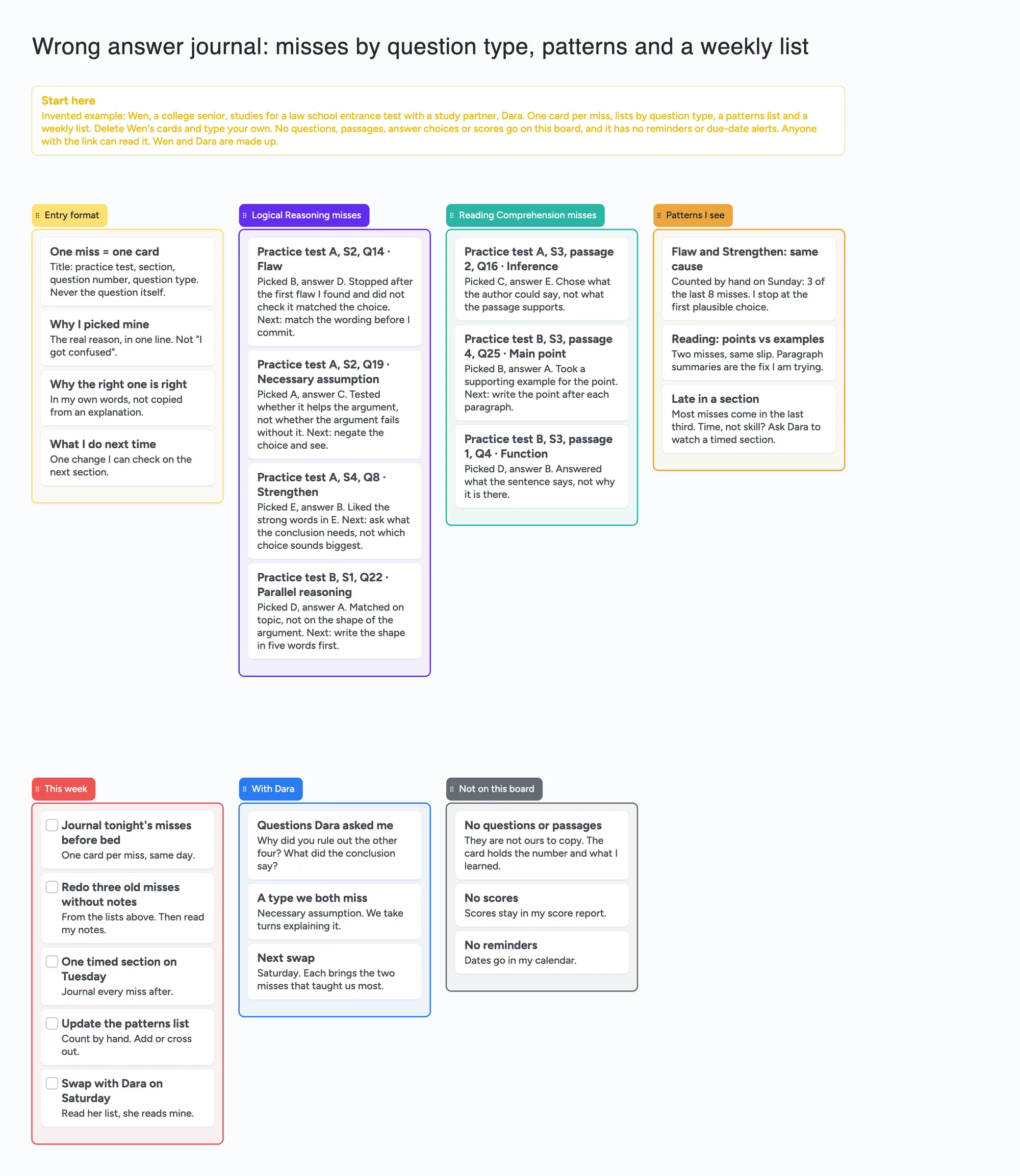
We make Instaboard, an online board. This page gives you a wrong answer journal laid out on it and filled in for an invented college senior, Wen, who studies for the LSAT® with a study partner, Dara. One card holds one miss: the test, section, question number and question type in the title, and why she picked her answer, why the right one is right and what she will do next in the body. Lists group the misses by question type, a patterns list holds what she counted by hand, a weekly list holds the plan, and one list says what is not on the board. The board holds no questions, passages, answer choices or scores, it does not count your misses for you, and it has no reminders or due-date alerts. Wen and Dara are made up.
Opens in your browser. Anyone can view; a free sign-in lets you edit.
Updated
Read this first: what the board does and doesn't do
- It does not count for you. The patterns list in the example was counted by hand. If you will log more than a few dozen misses and want counts and filters across tests, use a spreadsheet and keep this board for the notes and the weekly plan.
- No questions, passages, answer choices or scores go on it. A card holds the test, section and question number, the question type and your own words. LSAC®'s website terms say you may not copy, publish or reproduce its contents in ways inconsistent with its rights without written consent, so the board never needs them.
- It has no reminders or due-date alerts. The weekly list has tick boxes only. Put dates in your calendar yourself.
- What it is: a journal for the reasons you miss questions, kept where a study partner can read it. The example uses 34 of your 150 free items.
- Nothing private goes on it. Anyone with the link can read the board, so keep personal details off it. New boards start with "Anyone who joins can view".
- Free plan: 5 boards, 150 items, 3 pictures per board. Copying the board takes 1 of your 5 boards. Writing on it needs a free sign-in.
What a wrong answer journal entry holds
Two pages we read on November 24, 2026 describe an entry in detail. Both are written by people who sell or run study help, so read them as their view.
- ScoreGap ("Wrong Answer Journal Template for the LSAT®"; page data: published March 5, 2026, modified June 2, 2026) lists twelve fields: test name and date, section, question number, question type, difficulty, your answer, the correct answer, time spent, why you picked your answer, why the correct answer is right, what you will do differently, and a flag for review. It says the first eight are data already in your score report, fields 9 to 11 are the reflection fields, and the twelfth is a flag for review. ScoreGap sells a tool that fills in the first eight fields; its page says it is free to start.
- Test Ninjas ("LSAT® Question Type Error Log: Template & System"; page data: published and modified May 10, 2026) says a log that does not sort by question type is "a diary, not a diagnostic tool", lists ten columns to copy into Google Sheets or Excel, and says spreadsheets win for most students because they sort and filter by question type. It lists 17 Logical Reasoning question types and about six Reading Comprehension categories.
Wen's board keeps the part a board is good at: the reason in your own words. The first card on the "Entry format" list says a card's title is the test, section, question number and question type, and the body holds why she picked hers, why the right one is right and one change she can check on the next section. Difficulty, time and the answer letters stay in her score report.
Wen's board, list by list
Wen, Dara, the test names and every miss on the board are invented, and no card holds a question. Read the top row left to right, then the bottom row.
- Entry format. Four cards: one miss is one card, why I picked mine, why the right one is right, what I do next time.
- Logical Reasoning misses. Four example cards, each titled with a made-up test, section, question number and type (flaw, necessary assumption, strengthen, parallel reasoning), with the pick, the right letter, the reason and the next step.
- Reading Comprehension misses. Three example cards (inference, main point, function) in the same shape.
- Patterns I see. Three cards Wen wrote after counting by hand on a Sunday: the same slip in two question types, a slip in reading, and a note that most misses come late in a section.
- This week. Five tick-box cards: journal the misses the same night, redo three old misses without notes, one timed section, update the patterns list, swap with Dara.
- With Dara. The questions Dara asked, a type they both miss and the next swap.
- Not on this board. Three cards: no questions or passages, no scores, no reminders.
Why the board holds numbers, not questions
LSAC®'s Terms and Conditions of Use (last updated April 4, 2025) cover the Contents of its website, including text, data and compilations. They say users may download copyrighted material for their own personal or law school use, and may not copy, publish or reproduce the Contents in any manner inconsistent with LSAC®'s rights, or for any commercial purpose, without its prior written consent. This page is not legal advice, and we read only the part about the website's contents. It is one reason the board keeps no question text. The other is that some people in r/LSAT work this way. Replies are single accounts, not research, and these are the comments we read; all were read on November 24, 2026.
- In r/LSAT ("How did y'all keep a wrong answer journal when you can not copy & paste the questions, etc?", OP u/glomsu, June 30, 2024), u/linobby says not to write out the whole question and answers, only the test, section and question number. u/a_prototype_ says a handwritten journal helped because reviewing each question took so long, that once they stopped rushing their score started going up, and that they write the prep test, section and question number plus two bullet points per question: why the wrong answer is wrong and why they chose it, and why the right answer is right and why they eliminated it. u/SassyClassyGinger makes a review document for each section, pasting in the question as an image from the review window, with whether it was flagged, its difficulty, its type and how far over the target time they were, then why the right answer is right and why the wrong one was chosen, and says it is for their own use only. Not everyone leaves the question out, and this board does.
- In r/LSAT ("Guide to Wrong Answer Journaling (with a Google Sheets template in the comments!)", OP u/EricB7Sage, March 18, 2025), u/Skfrodo asks how, when going over the journal again, you remember what the stimulus was: do you go back to the tests each time, or write general reasons that show patterns in your behavior? The OP answered it: it depends on your learning style, and in their view you get the most from abstracting the flawed principle you applied rather than how you missed that exact question, since the broader mistake will come again. They also suggested adding a column that links a photo or a hyperlink to the question if that helps in review. Our reading: a journal with no questions in it leans on your own test material for the question itself, or on a link.
When people start a journal, and what else they do
- In r/LSAT ("How to Wrong Answer Journal?", OP u/legallylama, June 23, 2023), u/commiecween says that if you are early in studying they do not think a journal is beneficial yet: drill and review the questions you got wrong first. They say journaling helps once you can clearly state your mistakes, and that its main purpose is to understand trends and address them. u/skelecan posts an excerpt of their own journal, with the date, the test, section and question, their pick and the right answer, a note on whether they corrected it in blind review, and what they need to do to improve.
- In r/LSAT ("How do I properly \"blind review?\"", OP u/MBAMarketingMom, May 8, 2025), the replies disagree. u/Melodic_Cut4732 says the only value in blind review is going back to sections you had to rush, and that they never did it. u/westcoastneighbor goes over every question they flagged during a test, to say why they chose their answer and why the others were not as good.
Our reading: the journal and the re-review are two habits, and people mix them differently. The example board has a list for misses, not for re-review. If you re-review flagged questions, add a list for them and write the reasons the same way.
Your section labels may change in August 2027
LSAC®'s "Types of LSAT® Questions" page (no date found; read November 24, 2026) says the multiple-choice part is four 35-minute sections: three scored and one unscored, and the unscored one can be Reading Comprehension or Logical Reasoning and can come at any point. Its page "The LSAT® Will Look a Little Different Starting August 2027" (no date found; read November 24, 2026) says that beginning with the August 2027 test the unscored questions will be embedded in each of the three scored sections, every test taker will start with Reading Comprehension followed by two Logical Reasoning sections, and practice tests in the new format will be available from February 2027.
For a journal that means the section number on a card will mean something different for tests taken in the new format. The lists by question type do not change, which is why the board groups misses by type first and keeps the section in the card title.
How much of the 150 it uses
Our arithmetic: the example is 7 lists, 26 cards and a title, 34 items. Seven of the cards are example misses, so 27 items stay fixed. At 10 misses a test, 123 miss cards reach 150, which is the 13th test (12 tests make 147). At 20 misses a test, 6 tests make 147 and the 7th goes over. ScoreGap's page says people around the 155 to 165 score range miss roughly 10 to 28 questions a test; that is its figure, not ours. Someone who writes on your board adds the cards they type to their own 150. A copy takes 1 of your 5 free boards. Pro removes the item limit.
What a board can't do
- No counting. The board does not total your misses by question type; you count them by hand. A spreadsheet totals and filters them across many tests.
- No scores, questions or answer choices. The board holds your own words about them.
- No reminders or due-date alerts. The tick boxes do not remind you of anything. Use your calendar.
- No import from a score report. Every card is typed by hand, which is the transcription cost ScoreGap's page describes.
- Ticks don't say who or when. Anyone with edit access can untick a box, and a copy keeps its ticks, so untick the weekly list before you reuse the board.
- A copy takes 1 of your 5 free boards, and the example uses none of the 3 pictures allowed per board.
Where other tools do this better
Read on November 24, 2026; pages change, so check them. A date is printed only where a page shows one.
| Tool | What we read | Better for |
|---|---|---|
| Google Sheets template | The r/LSAT guide post by u/EricB7Sage (March 18, 2025) links a Google Sheets template and says it suits filtering later by question type or passage style or topic. We did not open the sheet | Totalling and filtering misses by type across many tests |
| Sheets template on the 7Sage forum | A forum member posted a Sheets journal with examples and notes on getting question images in (page prints Wednesday, Jun 4, 2025). We did not open the sheet | A ready layout with examples, if you keep question images |
| Notion template | A "Wrong Answer Journal" template by muvanji; page data lists a price of 0, a rating of 4.9 from 53 ratings (JSON-LD 4.89) and reviews dated January 2025 to January 2026. The listing's own last-updated line is broken; page data says it was created May 9, 2024 and last updated November 22, 2024 | A database you can sort, with the fields set up |
| ScoreGap | Its page says a Chrome extension fills in the first eight fields from your score report and that it is free to start. We did not try it | Skipping the transcription of test, question and answer data |
| Instaboard board | Free plan: 5 boards, 150 items, 3 pictures per board. Lists and cards you type, shared by link. No counting, import, reminders or due-date alerts | Your reasons and weekly plan on one screen that a study partner can read and write on |
Swipe the table sideways to see every column.
From each page or comment named, read November 24, 2026: scoregap.com, test-ninjas.com, the Notion listing, the 7Sage forum post, and the four r/LSAT threads in the sources. Our wording, not theirs.
Where these win
Use a spreadsheet or a tool that fills in your score data when you want to total and filter misses, and your calendar for dates. Use this board when you want the reasons behind your misses, a weekly plan and a study partner's questions in one place.
How to use it, in about fifteen minutes
- Open the board and sign in free when it asks you to write. Delete Wen's cards and keep the lists.
- After each practice section, add one card per miss. Title: test, section, question number, type. Body: why you picked yours, why the right one is right, what you do next time.
- Put each card in its type's list. Add a list if you miss a type that has none yet.
- Once a week, count by hand and update the patterns list. Cross out a pattern when it stops showing up.
- Fill the weekly list and put the dates in your calendar. Untick it before the next week.
- To share it, set Share to "Anyone who joins can edit" if your study partner should write. Each person who writes signs in for free. Keep questions, passages, scores and personal details off it.
LSAT® is a trademark registered by LSAC, which is not affiliated with, and does not endorse, this page.
Start from the ready board
It opens in your browser in a few seconds, with nothing to install. Sign in for free when you want to save it and share it.
Questions
What should an LSAT® wrong answer journal entry include?
ScoreGap's page lists twelve fields, from test and section to why you picked your answer and what you will do differently. On this board a card's title holds the test, section, question number and type, and the body holds your reasons and your next step.
Can I put the questions or answer choices on the board?
It is not meant for them. LSAC®'s website terms say you may not copy, publish or reproduce its contents in ways inconsistent with its rights without written consent, and some people in r/LSAT keep only the test, section and question number. Anyone with the link can read the board.
Does the board count my misses by question type?
No. It has one list per type, you move cards by hand and you count them yourself. A spreadsheet can total and filter them, and Test Ninjas says spreadsheets win for most people for that reason.
When should I start a wrong answer journal?
Views differ. One commenter in r/LSAT says to drill and review first and start a journal once you can state your mistakes clearly; another posts an excerpt from theirs. Start when you can write the reason in a sentence.
Can my study partner write on it?
Yes. New boards start with "Anyone who joins can view", so anyone with the link can read it. Set it to "Anyone who joins can edit" if they should write; each person who writes signs in for free.
Is Instaboard free?
Yes. The free plan includes 5 boards, 150 cards and items across your account (pen strokes, arrows and sections don't count), 3 images and 1 file per board, unlimited collaborators and video calls up to an hour. Pro is $5 a month billed yearly ($59.99 a year), or $7.99 monthly, and the people you invite join free.
Sources
- LSAC®: Guidelines for Informational Use of LSAC Trademarks by Third Parties (no date found; read November 24, 2026)
- LSAC®: Terms & Conditions of Use (last updated April 4, 2025; read November 24, 2026)
- LSAC®: Types of LSAT® Questions (no date found; read November 24, 2026)
- LSAC®: The LSAT® Will Look a Little Different Starting August 2027 (no date found; read November 24, 2026)
- ScoreGap: Wrong Answer Journal Template for the LSAT® (page data: published March 5, 2026, modified June 2, 2026; a vendor's page; read November 24, 2026)
- Test Ninjas: LSAT® Question Type Error Log: Template & System (page data: published and modified May 10, 2026; read November 24, 2026)
- Notion Marketplace: Wrong Answer Journal by muvanji (page data: created May 9, 2024, last updated November 22, 2024; the listing's own last-updated line is broken; reviews January 2025 to January 2026; read November 24, 2026)
- 7Sage forum: Wrong Answer Journal Template (page prints Wednesday, Jun 4, 2025; read November 24, 2026)
- r/LSAT: How to Wrong Answer Journal? (OP u/legallylama, June 23, 2023; replies are single accounts; read November 24, 2026)
- r/LSAT: How did y'all keep a wrong answer journal when you can not copy & paste the questions, etc? (OP u/glomsu, June 30, 2024; replies are single accounts; read November 24, 2026)
- r/LSAT: Guide to Wrong Answer Journaling (with a Google Sheets template in the comments!) (OP u/EricB7Sage, March 18, 2025; replies are single accounts; read November 24, 2026)
- r/LSAT: How do I properly "blind review?" (OP u/MBAMarketingMom, May 8, 2025; replies are single accounts; read November 24, 2026)
Related
A math mistake log template: one card per mistake, redone in ink, filled in so you can see how it reads
A math mistake log (error log) for a tutor and student: one card per mistake, the cause named first, redone in ink and moved from to-redo to secure. Filled example board, and when a spreadsheet is the better log.
Cornell notes, digital: cue cards that stay linked to your notes
How to take Cornell notes on a screen: a filled example (glycolysis) with cue cards joined to note cards by arrows, a self-quiz checklist and a summary. What a board does that a printable can't, and where a printable is better.