For college and graduate students planning a team capstone
A capstone project plan your whole team can read and edit on one board
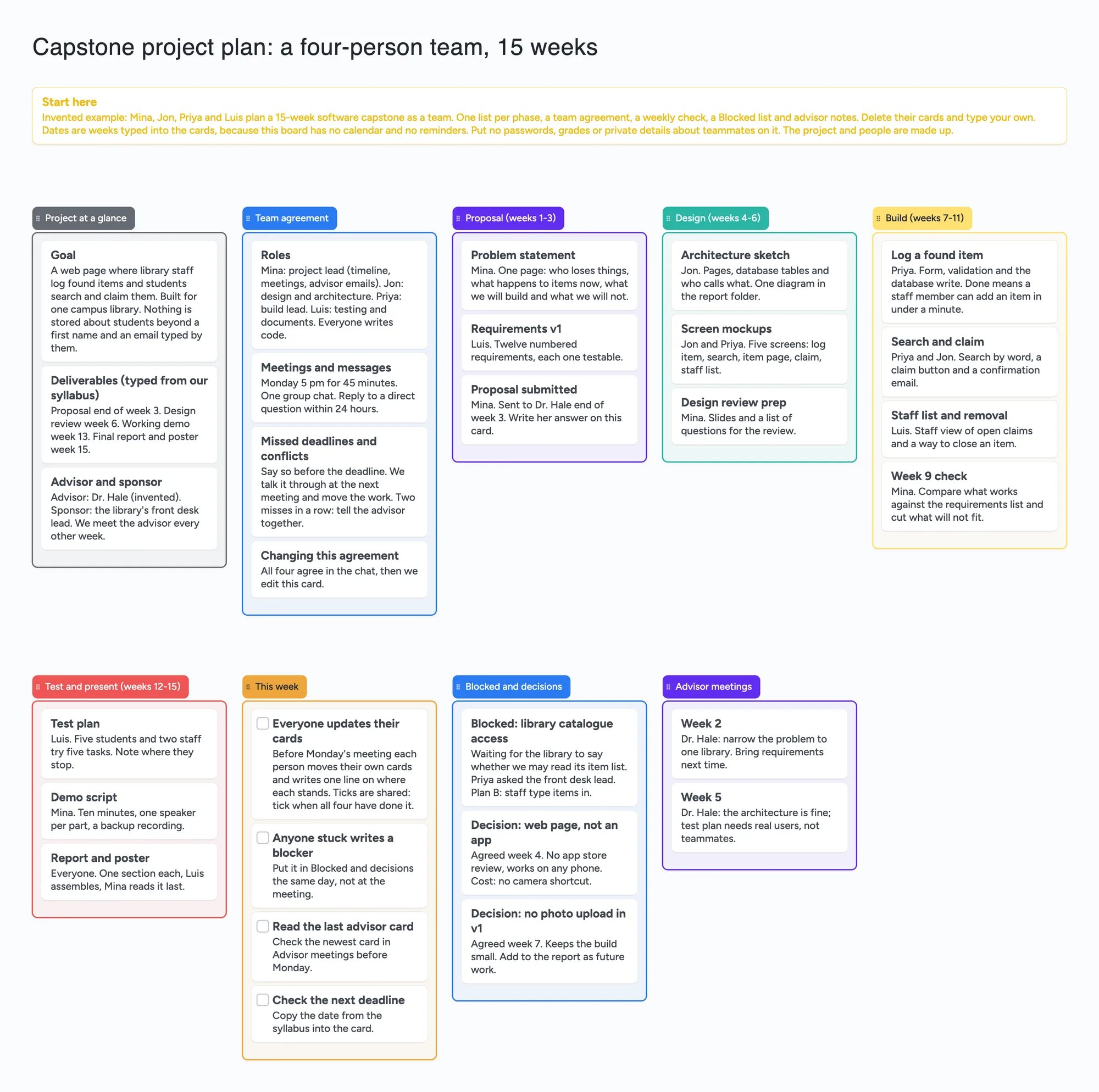
We make Instaboard, an online board. This page gives you a capstone plan already laid out on it and filled in for four invented students, Mina, Jon, Priya and Luis, who plan a 15-week software capstone for a campus library. It has a team agreement, one list per phase, a weekly check with tick boxes, a Blocked and decisions list and a list for advisor meetings. Open it, delete their cards, type your own and share the link with your team and your advisor. It does not draw a Gantt chart, send reminders, track hours or show who finished what, and it holds no real student data. The project and the people on it are made up.
Opens in your browser. Anyone can view; a free sign-in lets you edit.
Updated
Read this first: what the board does and doesn't do
- What it is: one screen for a team capstone: who we are and what we owe (the agreement and the deliverables), the work by phase, what is blocked, what we decided and what the advisor said. Everyone with the link sees the same plan. The example uses 40 of your 150 free items.
- What it isn't: no Gantt chart, no reminders or due-date alerts, no hours, no file attachments and no record of who moved or ticked a card. Weeks and dates are text you type. The four tick boxes in "This week" are shared: anyone with edit access can tick or untick them.
- If your capstone is mostly code, the board next to your code (GitHub Projects) is usually easier to keep up, and the page says why. This board suits teams whose work is not all code, or who want the agreement and the advisor notes beside the tasks.
- Keep private things off it: a free board is shared by link. Put no passwords, grades or details about a teammate on it. If you are under 18, check with a parent or your school before using any online tool for coursework.
- Free plan: 5 boards, 150 items, 3 pictures per board. Copying the board takes 1 of your 5 boards. Writing on it needs a free sign-in. New boards start with "Anyone who joins can view".
When your code's board or Trello is the better choice
A student on r/agile (OP u/dhd_jpg, October 27, 2026) is a senior computer science major in a three-person capstone group. The professors told them to pick a board and justify the pick, with Jira, GitHub Projects and Trello as examples. Replies are single accounts; we read the comments we read.
- u/One-Light-8453 calls Jira overkill for three people and says the right board is the one you will still update in week 6, usually the one next to your code.
- u/mshadmanrahman suggests a simple next, doing, blocked and done board, GitHub Projects if that is where you already work, and agreeing what "done" means and reviewing the board together once a week.
- u/azangru says not to do scrum for a team like that, and that you can even open a whiteboard in Excalidraw or tldraw and draw some rectangles.
GitHub's own documentation describes Projects as an adaptable table, board and roadmap that can be linked to issues and pull requests, with custom fields (page shows no date, read November 24, 2026). If your capstone is a code repository and nothing else, that is the better fit. Use this board when the work is not all code, such as a design, a study, a business plan or a report, or when you want the team agreement, the blocked list and the advisor notes on the same screen as the tasks.
The team agreement card by card
A capstone team contract page from Cal Poly Humboldt's mechanical engineering capstone course on Engineering LibreTexts (Chapter 3; last modified October 16, 2025) says a team contract sets expectations, defines roles and builds accountability. Its list of sections includes team information, goals, roles and responsibilities, a meeting schedule and communication plan, workload and deadlines (with consequences for missed deadlines such as redistributing tasks or a team discussion), a conflict resolution plan that escalates to the faculty advisor if needed, attendance, a code of conduct, accountability, amendments if all members agree, and signatures. It advises writing the contract as a team and keeping a copy somewhere everyone can reach it.
The board's Team agreement list borrows four of those: roles, meetings and messages, missed deadlines and conflicts, and how to change the agreement. Mina's team typed theirs into four cards. There are no signatures on a board. If your course wants a signed contract, keep that as a file and link or copy its text onto the cards.
Mina, Jon, Priya and Luis, list by list
The example team plans a web page where library staff log found items and students search and claim them. Every name, date and note on the board is invented, including their advisor, Dr. Hale. Read it left to right, top row then bottom row.
- Project at a glance. Three cards: the goal in a few sentences, the deliverables copied from the syllabus (proposal week 3, design review week 6, working demo week 13, report and poster week 15) and the advisor and sponsor.
- Team agreement. Roles, a Monday 5 pm meeting and one group chat, what happens if someone will miss a deadline, and how the agreement changes.
- Proposal, Design, Build and Test and present. One list per phase, with the weeks in the list name. Each card has one named owner at the front of its text and says what "done" means, for example a staff member can add an item in under a minute.
- This week. Four tick-box cards for the Monday meeting: everyone updates their own cards, anyone stuck writes a blocker, read the last advisor card and check the next deadline.
- Blocked and decisions. One blocker (waiting on library access, with a plan B) and two decisions with the week they were agreed and what they cost, such as a web page instead of an app.
- Advisor meetings. One card per meeting with what Dr. Hale said, so the next meeting starts from it.
Putting decisions on cards is the part that helps most when a team argues later. A card that says what was decided, in which week and what it cost is easy to point to.
What students say about group work and boards
Two older threads are about the team side. They are single accounts, not research, and we read the comments we read.
- r/EngineeringStudents "My senior design project group = nightmare." (OP u/BonerForScience, March 7, 2014): the OP describes a team that can rarely meet. u/SciCtrGuy suggests keeping a record of what is discussed and agreed and setting firm deadlines for each task, with flex time. u/garoodah says to go back to your project charter and reassess the group with the professor present. u/twerps says to make sure there is documentation of who did what so you can get a fair grade. That is 12 years old.
- r/mit "Do you guys use any software for project tracking or task management?" (OP u/JohnKoshbin, September 15, 2025): u/bmmoore2021 asks whether the group will buy in to a system at all. u/TheOriginalTerra says it is as hard to get slackers to buy in to Asana as to get them to do their work. u/ArghBH uses a shareable Google Sheet with clickable check boxes. u/immimmigrant uses a GitHub project tracker plus a recurring Google Calendar invite and a meeting notes template.
The pattern in those replies is buy-in and a shared record. A board does not make anyone work. What it can do is put the agreement, the tasks and the decisions in one place that the whole team and the advisor can open.
How big does a capstone board get in 150 items?
Each card and each list is 1 of your 150 free items, across all your boards. The title text box counts too. Arrows, sections and pen strokes don't. Our arithmetic from the example, counted as if one account made everything:
- As built: 9 lists + 30 cards + 1 title = 40 items.
- A full term: if the team adds one Blocked and decisions card a week for 15 weeks (12 more than the 3 already there) and an Advisor meetings card every other week (5 more than the 2 already there), the board reaches 40 + 12 + 5 = 57.
- A second term on a copy: a capstone that continues into a second semester can copy the board and start over: 40 more, so 80 in all. A third copy makes 120 and a fourth 160, which is over 150, and every copy takes 1 of your 5 boards.
- Past 150: Pro removes the item limit.
What a board can't do
- No Gantt chart or timeline. Weeks are text in a list name. Nothing shows that the demo depends on the build.
- No reminders or due-date alerts. The board does not know your deadline; you copy it from the syllabus into a card.
- No record of who did what. A card says "Priya" only because someone typed it. Ticks don't say who or when, anyone with edit access can untick a box, and a copy keeps its ticks. If your professor wants individual contribution evidence, keep it somewhere that records it, such as your code history or your course tool.
- No hours and no file attachments. Link to a document by pasting its address into a card.
- No signatures, and nothing that makes a teammate join or update. The board needs everyone to sign in for free to write.
- Not private by default. New boards start with "Anyone who joins can view". Anyone you give the link to can read it.
- A copy takes 1 of your 5 free boards, and the example uses none of the 3 pictures allowed per board.
Where GitHub Projects, Trello or a sheet does this better
Read on November 24, 2026; pages change, so check them. A date is printed only where the page shows one.
| Tool | What the page says | Better for |
|---|---|---|
| GitHub Projects (GitHub Docs, no date) | Describes Projects as a table, board and roadmap view that stay up to date with your issues and pull requests, with custom fields | A capstone that lives in a code repository, with tasks linked to the code |
| Trello (pricing page, no date) | Free plan: unlimited cards, up to 10 boards per Workspace and 10 collaborators. Standard $5 per user a month billed annually ($6 monthly). Premium $10 per user a month billed annually ($12.50 monthly) adds Timeline, Calendar, Table and Dashboard views | A kanban board with its own app, plus timeline or calendar views on a paid plan |
| A shared Google Sheet | Not read for this page. One r/mit commenter, u/ArghBH, uses a shareable sheet with clickable check boxes | A task list with owners and due dates in columns that your course already uses |
| Instaboard board | Free: 5 boards, 150 items, 3 pictures per board. Lists per phase, cards with owners typed in, shared by link. No timeline, reminders or record of who did what | The agreement, the tasks, the blocked list and the advisor notes on one screen, for a team whose work is not all code |
Swipe the table sideways to see every column.
From each page, read November 24, 2026: docs.github.com (About Projects), trello.com/pricing. Our wording, not theirs. The Sheet row is a Reddit commenter's view.
Where these win
If your team ships code, keep the tasks beside the repository. If your professor wants a Gantt chart or hours, use a tool that makes them. Use this board when the plan, the agreement and the advisor's notes should sit on one screen that every teammate and your advisor can open by link.
How to use it, in about twenty minutes
- Open the board and sign in free when it asks you to write. Delete the example team's cards and keep the lists.
- Fill in Project at a glance together: the goal, the deliverables copied from your syllabus and your advisor's name.
- Write the Team agreement as a team, one card per rule, and agree in your chat before anyone edits it.
- Rename the phase lists to your own phases and weeks, and give each card an owner's name and a line that says what done means.
- At each meeting, go down the four tick-box cards, then untick them for next week.
- Put blockers and decisions on cards the day they happen, with the week and what the choice costs.
- After each advisor meeting, add one card with what was said. Share the link with your advisor, set to "Anyone who joins can view", or "can edit" if you want them to write.
Start from the ready board
It opens in your browser in a few seconds, with nothing to install. Sign in for free when you want to save it and share it.
Questions
What should a capstone project plan include?
Course materials differ, so follow your syllabus first. One course's team contract page lists team information, goals, roles, a meeting plan, workload and deadlines, conflict handling, attendance, a code of conduct, accountability and amendments. This board covers the plan side of that: goal, deliverables, agreement, phases, blockers, decisions and advisor notes.
Is this better than GitHub Projects or Trello for a capstone?
For a team that mostly writes code, probably not: some r/agile commenters favour GitHub Projects because the tasks link to the code. This board suits work that is not all code, or a team that wants the agreement, the blocked list and the advisor notes beside the tasks.
Does it show who did what on a team project?
No. A card names an owner only because someone typed the name. Ticks don't record who or when, and anyone with edit access can untick a box. Keep individual contribution evidence in a tool that records it.
Can my advisor see it and comment on it?
Yes. Anyone you send the link to can open it, and new boards start with "Anyone who joins can view". Set it to "Anyone who joins can edit" if your advisor should write too. Each person who writes signs in for free. Keep passwords, grades and details about teammates off it.
How much of the free plan does a capstone use?
The example is 40 of your 150 free items. Adding a blocked or decision card each week and an advisor card every other week for 15 weeks comes to 57. Copying it for a second term makes 80, and a fourth copy goes past 150 (our arithmetic).
Is Instaboard free?
Yes. The free plan includes 5 boards, 150 cards and items across your account (pen strokes, arrows and sections don't count), 3 images and 1 file per board, unlimited collaborators and video calls up to an hour. Pro is $5 a month billed yearly ($59.99 a year), or $7.99 monthly, and the people you invite join free.
Sources
- Engineering LibreTexts, Cal Poly Humboldt Mechanical Engineering Capstone: Chapter 3, Team Contract Agreement (last modified October 16, 2025; read in full November 24, 2026)
- GitHub Docs: About Projects (page shows no date; read November 24, 2026)
- Trello: Pricing (page shows no date; read November 24, 2026)
- r/agile: which project board / tracker do you guys use for a small team? (OP u/dhd_jpg, October 27, 2026; replies are single accounts, comments we read, read November 24, 2026)
- r/EngineeringStudents: My senior design project group = nightmare. (OP u/BonerForScience, March 7, 2014; replies are single accounts, comments we read, read November 24, 2026)
- r/mit: Do you guys use any software for project tracking or task management? (OP u/JohnKoshbin, September 15, 2025; replies are single accounts, comments we read, read November 24, 2026)
Related
Plan a thesis on one board you can share with your advisor
An editable thesis planning board: a list per chapter, literature clusters, advisor feedback and the core argument on one shared board you send to your advisor.
A personal kanban board you can copy: five lists, a limit of two in Doing
A personal kanban board you can copy: Backlog, This week, Doing with a limit of 2, Waiting and Done, filled in for one freelancer. The limit is a rule, not enforced.