For filmmakers outlining a documentary with a partner
A documentary outline board: the story you hope to tell, and what you still need to get
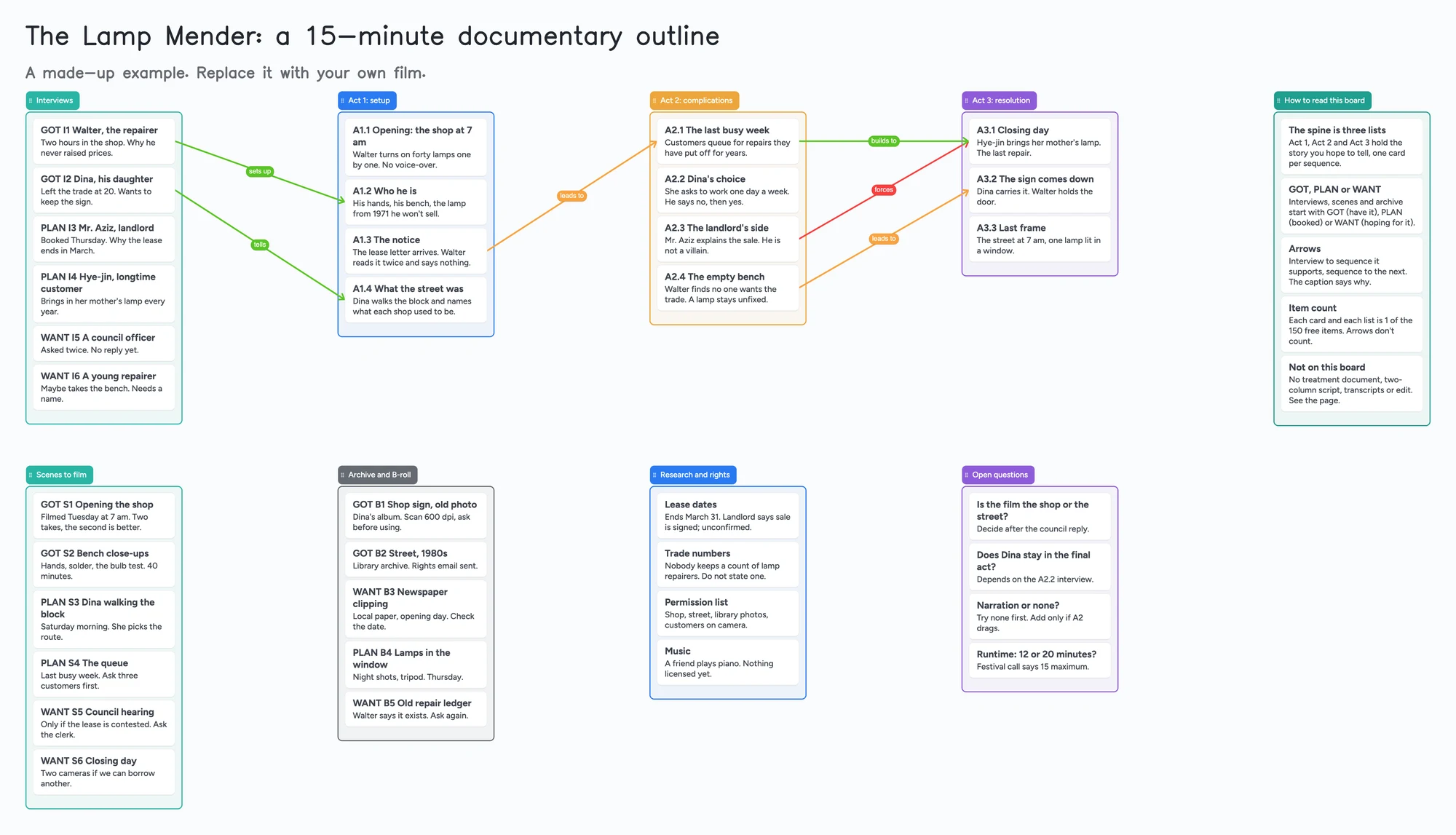
This is a way to outline a documentary before and during the shoot: three lists for the acts, a list of interviews, a list of scenes to film, one for archive and B-roll, and a list of open questions, with an arrow from each interview to the sequence it supports. It is an outline, not a treatment document and not a script. It has no two-column audio and video layout, no transcripts and no edit. Celtx, StudioBinder, Boords and Storyflow cover those, and the next section says how. Use the board for the part where you and a co-director or producer keep arguing about the shape of the film, and need one place that shows what you have, what is booked and what you are only hoping for.
Updated
The short answer
- What it is: one board with three act lists (the spine of the story you hope to tell), a list of interviews, a list of scenes to film, a list of archive and B-roll, and a list of open questions. Interview, scene and archive cards start with GOT (you have it), PLAN (it is booked) or WANT (you are hoping for it).
- What it isn't: not a treatment, not a two-column script, no transcripts or notes search, and no edit. Documentary outlines are meant to change, and the board changes with them, but it won't tell you the story is not working. Celtx, StudioBinder and Boords are the tools for scripts and storyboards.
- Arrows: an arrow can join a card in one list to a card in another, takes a caption and its own colour, and stays attached when a card is reordered or a list moves. The example draws an arrow from each interview to the sequence it sets up, and from sequence to sequence.
- Free plan: the example is 50 of your 150 free items (41 cards and 9 lists, our count). Arrows, sections and pen strokes don't count. Use link cards for archive stills; a feature-length film with its interviews, scenes and archive passes 150 (Pro is $5/mo billed yearly).
What this board doesn't do, and where Celtx, StudioBinder, Boords and Storyflow are better
Read on November 11, 2026 from each tool's own pages. Celtx's pricing page lists a multi-column AV script editor next to its screenplay editor, along with a beat sheet, storyboard, shot lists and production planning tools; its plans differ on which of those are included, and prices were not read. StudioBinder's pricing page says its Free plan is "free forever", and lists script outlines, storyboards, shot lists, call sheets and a production calendar among its features on paid plans.
Boords' pricing page lists a Free plan with 5 active storyboards and 3 active scripts, and says unlimited clients can review and comment without an account on every plan. Storyflow has a page for documentary storyboards, which describes boarding the narrative spine, planning interviews and b-roll, and keeping research and transcripts on the same canvas with an AI that lays out a spine from a treatment. Its pricing page, read the same day, says Storyflow is "paid-only during early access" and its Free plan "launches before the end of 2026", and that anyone invited to a board by a paid member signs up at no cost.
Where these tools win
If you need a two-column audio and video script, a storyboard with sign-off from clients, call sheets, or an assistant that reads your transcripts, use Celtx, Boords, StudioBinder or Storyflow. Use this board when the problem is the shape of the film and who has what, and you want it in a place a co-director opens from a link.
How to outline a documentary on the board
A 2023 thread in r/documentaryfilmmaking asks for a pre-production documentary outline template. A documentary editor answers that the outline starts from the dramatic beats that will drive the story, that you should plan the film as if you could tell it any way you want, and then stay flexible, because documentary changes at every stage. Another reply keeps a spreadsheet listing each scene, its purpose, an estimated time and the elements needed, and treats it as a guide, not a template for the film. These are two people's methods, not rules. NYFA's guide to writing a documentary script describes the same step as a sequence outline that follows the story's acts.
- Start with the three act lists. One card per sequence, in order, in your own words. This is the story you hope to tell, so write it as if you could have anything.
- List interviews separately, then join them. One card per person with the one thing you need them to say. Draw an arrow from each interview to the sequence it supports and caption it ("sets up", "tells", "forces").
- Plan scenes to film, not only interviews. The editor's advice in the thread is to build story beats from things happening on camera, with interviews supporting them. Give those their own list.
- Mark what you have. Start the title of every interview, scene and archive card with GOT, PLAN or WANT, and change the word when it changes. Nothing sorts by it; you scan for it by eye.
- Keep archive and rights in plain sight. A list for stills, clips and clippings, and a list for what needs permission, with who is asking.
- Put what you don't know in Open questions. Is it about the shop or the street? Does the daughter stay in the final act? Move a question into an act the day you answer it.
- Share it. In the share menu set Share to "Anyone with the link can edit" (new boards start view-only). A co-director or producer signs in free and writes live, and you each see the other's changes within seconds. The 4-digit join code expires after 2 hours of inactivity.
When the film changes after the interviews
A board is easy to rearrange, which suits an outline that will change. Drag a card to another act. Move a whole list. An arrow stays attached to its two cards. If a planned interview doesn't happen, change PLAN to a note and move the card to Open questions; the arrow stays on the sequence it was meant to support, so you can see what is now missing.
Our reading: that is also the limit. A board shows what you meant to make. It can't reorder your footage or count minutes. When you have the material, the edit is where the outline gets tested. If you are writing a scripted film instead, see outlining with index cards or planning a short film's pre-production.
This board vs Celtx vs StudioBinder vs Boords vs Storyflow
| Tool | What we read (Nov 11, 2026) | Good at | Not what you get |
|---|---|---|---|
| Instaboard board | Free: 5 boards, 150 items. Pro $5/mo billed yearly | The shape of the film on one screen; arrows from interviews to sequences; a co-director on the same link after a free sign-in | Two-column script, transcripts, storyboards with sign-off, an edit |
| Celtx | Pricing page lists a multi-column AV script editor, beat sheet, storyboard, shot lists; plans differ; prices not read | Writing the script and the production paperwork in one place | A loose board you open without a plan |
| StudioBinder | Free plan "free forever"; paid plans list script outlines, storyboards, shot lists, call sheets. Prices not quoted | Production documents and a calendar | A free-form map |
| Boords | Free: 5 active storyboards, 3 active scripts; unlimited clients review without an account | Storyboards and scripts with review and sign-off | An outline you rearrange freely |
| Storyflow | "Paid-only during early access"; Free plan before end of 2026; invitees of a paid member join free | Research, stills and transcripts on a canvas, with an AI that lays out a spine | Free for the person who starts the board, today |
Swipe the table sideways to see every column.
From each tool's own pages, read November 11, 2026. No prices are quoted where a page didn't show one.
Limits of the free plan for a documentary
- Items. Each card and each list is 1 of your 150 free items, across all your boards. The example is 41 cards and 9 lists, 50 in all. Arrows, sections and pen strokes don't count.
- A feature passes 150. Our arithmetic: the 15-minute example is 50, so a feature with its interviews, scenes and archive can reach 150 on cards alone. Pro is $5 a month billed yearly.
- Boards. The free plan includes 5 boards. A card that opens its own board uses one of them, so the example keeps everything on one board.
- Photos. 3 images per board. The example has none. Use link cards for archive stills; on the web a link card's preview picture no longer counts toward the 3, but the iPhone, iPad and Android apps still count it until their next update.
- No reminders or sorting. The board doesn't tell anyone that a rights email is unanswered. Card colour is the border and text only.
- No transcripts and no search inside your footage. Put a one-line summary on the card and link the file or the transcript elsewhere.
- Writing needs a free sign-in. A partner who joins by link or code can add cards and arrows, and the board counts as one of their 5.
Start from the ready board
It opens in your browser in a few seconds, with nothing to install. Sign in for free when you want to save it and share it.
Questions
Is there a free documentary outline template?
Yes. Open the board, replace the example film with yours and turn on "Anyone with the link can edit" if a co-director needs to write on it. It is a board of cards, lists and arrows, not a treatment or script template; Celtx and StudioBinder cover those.
Is it a documentary treatment or a two-column script?
No. It is an outline you can rearrange, with no audio and video columns. Celtx lists a multi-column AV script editor on its pricing page.
Can my co-director or producer work on it with me?
A person who opens the link and signs in free can write on it live; you each see the other's changes within seconds. The board counts as one of their 5 free boards, and the cards they add count toward their own 150 items.
How many cards fit on the free plan?
Each card and each list is one item of the 150 across all your boards. The example is 50. That is our arithmetic. Arrows are free.
Can I put archive photos on the board?
Up to 3 pictures per board on the free plan. For more, use link cards that point at the files or the archive's page.
Sources
- r/documentaryfilmmaking: pre-production documentary outline template (February 2023, replies are single accounts)
- NYFA: How to Write a Documentary Script (read November 11, 2026)
- Celtx: pricing (read November 11, 2026)
- StudioBinder: pricing (read November 11, 2026)
- Boords: pricing (read November 11, 2026)
- Storyflow: documentary storyboard (read November 11, 2026)
- Storyflow: pricing (read November 11, 2026)
Related
A short film pre-production board: who owns what, on one screen
Plan a short film with a director and a producer on one shared board: cast, crew, gear, permits, locations and shoot days. Free ready board, and where StudioBinder does more.
Outline a novel or screenplay with index cards, on a board you can share
Outline a novel or screenplay on digital index cards: one list per act, 40 short cards, subplot arrows, a co-writer on the same board. Free to start; TV pilot too.
Outline a story with a co-writer, on one board you both edit
Outline a story with a co-writer on one shared board: ideas lists for each of you, an agreed outline, a decide-by list. A filled example to copy. Not a drafting tool.