For people who plan in Notion and want something visual beside it
A whiteboard for Notion: embed a true one, or think on a shared board beside it
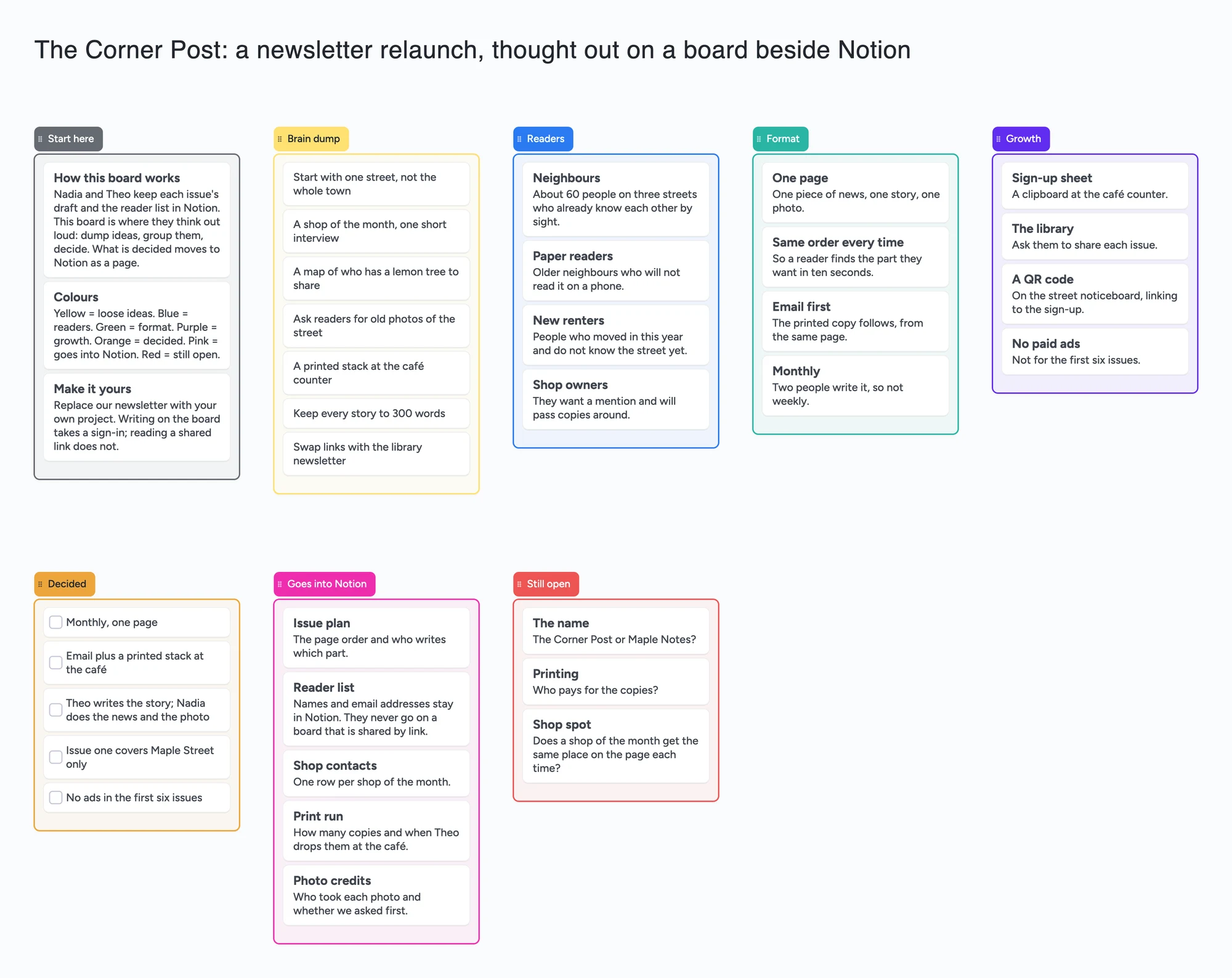
For a true whiteboard beside Notion, Miro or Excalidraw win, and Notion's help page lists both as things you can embed. We make Instaboard, a different kind of tool: a shared board of cards, lists and pen where two or more people think a plan out, with its link pasted into a Notion page. It is filled in below for two invented neighbours, Nadia and Theo, restarting a street newsletter while the drafts and the reader list stay in Notion.
Opens in your browser. Anyone can view; a free sign-in lets you edit.
Updated
Read this first: what to use for what
- A true whiteboard: use Miro or Excalidraw. Notion's help page (read November 25, 2026) lists both among the apps you can embed, and each tool's own page says what its embed can and can't do.
- What Instaboard is: lists and cards you drag around, with a pen, arrows and a call on the board. It has no Notion connection. You paste its link into a Notion page, which per Notion's help shows the link as a bookmark block. We have not tested embedding it, so this page does not claim it works.
- What stays in Notion: the drafts, the databases and anything with names or email addresses. The board is for thinking, before something becomes a page.
- Notion's own whiteboard: the pricing page and the embed help page we read list none, and one of the three r/Notion threads we read asks whether Notion will build one. We have not read every Notion release note.
- Plan limits: 5 boards, 150 items and 3 pictures per board. Anyone with the link can read a shared board; writing takes a free sign-in. Copying this board takes 1 of your 5.
What people mean by a whiteboard for Notion
We read three r/Notion threads. Each summary is ours, from the comments we read, and each commenter is one person's view.
| Thread | What the asker wanted | What the comments we read suggested |
|---|---|---|
| "Will Notion ever build a whiteboard?" (posted 2024-11-02; 25 comments read in an archived copy) | A whiteboard inside Notion; the asker wrote that they know about "Affine, Code and ClickUp" but moving the whole system would take huge effort. | u/Mygdala embeds a Miro board and does the heavy whiteboarding in Miro. u/Kun42 embeds a tldraw sketch (Share, Copy editor link, then /embed). Several commenters hope Notion builds one. |
| "Any tool that provides a more visual / whiteboarding experience to Notion" (posted 2024-04-28; 12 comments read in an archived copy) | Shapes created for each Notion database entry, a link back to the Notion page, live updates between the two. | mindmap.so, Affine and scrintal were suggested; u/kentdshaw exports a database to CSV and uploads it to kumu or graphcommons, and calls it a lot of work. The asker notes embeds from Figma, Witeboard and Lucidchart don't link to a database. |
| "Whiteboarding while in Notion" (posted 2020-04-29; 15 comments read in an archived copy) | The author shares a way to draw inside a Notion page and asks what other whiteboard apps people have found. Commenters bring up the iPad app and an iPad Pencil. | The author embeds a whiteboardfox.com link set so any participant can edit; they say it autosaves for them and that anyone with the 15-digit URL can view and edit. One commenter replied that everything gets deleted, and one wrote in 2023 that if the site fails the content shows as errors. |
Swipe the table sideways to see every column.
Reddit pages read November 25, 2026; the threads are dated 2020 to 2024, so tools and plans may have changed since.
Two different wants sit in those threads: a drawing surface inside a page, and a visual layer on top of a Notion database. A board of cards does neither. It does a third job, thinking a plan through with other people before it is written up, and that is what the rest of this page covers.
If you want a true whiteboard in Notion: what to embed
Notion's help page on embeds (read November 25, 2026) says you type /embed and paste the URL, and Notion's Miro connection page says you can type /miro and paste a Miro link. It says Notion can embed content from over 1,900 domains, that some websites prohibit being embedded and show a Failed to Load error, and that embeds which need a login to an outside site will not work in Notion's desktop or mobile apps.
| Tool | What its own pages say (read November 25, 2026) | Wins when | Trade-off |
|---|---|---|---|
| Miro | Listed on Notion's help page with its own /miro block. Miro's help says embeds follow the board's Share settings and are view-only on mobile. Miro's marketplace page for the Notion embed says boards cannot be edited from Notion; Miro's help says you can set view, comment or edit rights for an embed. The two pages read differently, so test it on your own board. Free is 3 editable boards; Starter is $8 per member a month billed yearly. | You want a bigger canvas and more tools than a board of cards (our view). | Only 3 boards stay editable on Free. |
| Excalidraw | Listed on Notion's help page. Its pricing page lists Free as 1 scene with unlimited collaborators and "Notion, Obsidian and other integrations"; Plus is $6 per user a month with a 14-day trial and unlimited scenes. | You want quick shared sketches and diagrams. | Its pricing page lists 1 infinite scene on Free. |
| Witeboard | A widget page on freenotionwidgets.com (page copyright 2023) gives three steps: copy the URL, type /embed in Notion, paste it. We read no limits or prices for it. | You want what its page calls a "Simple online whiteboard". | We could not read its plan limits, so we say nothing about them. |
Swipe the table sideways to see every column.
Pages read November 25, 2026: Notion's embeds help page and Miro connection page, miro.com pricing, Miro's embed help and marketplace pages, plus.excalidraw.com/pricing and freenotionwidgets.com. None of Miro's or Excalidraw's pages shows a date.
Nadia and Theo's newsletter board, list by list
The plan is invented, including every name. Nadia and Theo want to restart a one-page newsletter for three streets. The drafts and the reader list live in Notion; this board is where they think it out. Read it from the top left, across, then the second row.
- Start here. Three grey cards: how the board works, what the colours mean, and a reminder to swap in your own project.
- Brain dump. Seven yellow cards of loose ideas, in no order: one street first, a shop of the month, a lemon-tree map, old street photos, a printed stack at the café.
- Readers, Format, Growth. Three lists that sort the dump. Readers names four groups (neighbours, paper readers, new renters, shop owners), Format says one page, monthly, same order every time, and Growth holds the sign-up sheet, the library and a QR code on the noticeboard.
- Decided. A tick-box list of five choices: monthly and one page, email plus a printed stack at the café, who writes what, Maple Street only for issue one, no ads in the first six issues. A tick is a card marked done; it does not remind anyone of anything.
- Goes into Notion. Five pink cards listing what moves to Notion by hand: the issue plan, the reader list, shop contacts, the print run and photo credits. Names and email addresses stay in Notion on purpose.
- Still open. Three red cards of questions neither of them can answer yet: the name, who pays for printing, and where the shop of the month sits on the page.
Nothing on the board is connected to Notion. The list called Goes into Notion is a to-do list for copying, done by hand.
What goes in Notion and what goes on the board
This split is our view, not a rule from either tool.
| Job | Where we would put it | Why |
|---|---|---|
| Drafts and long text | Notion | A board is lists of short cards, not a document. |
| Reader list, names, email addresses | Notion | Anyone who has a board's link can open it, so personal details stay off it. |
| Loose ideas from two or more people | The board | Each person drags cards into groups at the same time and everyone sees it move. |
| Choosing between options | The board | Cards move from Still open to Decided, and the question and the answer sit side by side. |
| The final plan others will read | Notion | Once it is decided, write it up where your other pages live. |
Swipe the table sideways to see every column.
Where the other tools are the better choice
- Miro, in our view, when you want a bigger canvas and workshop-style tools, and an embed that shows the live board inside a Notion page.
- Excalidraw when you want to sketch a diagram quickly with people you invite by link (its pricing page lists unlimited collaborators on Free), and the 1 scene its Free plan lists is enough.
- Notion when the work is long text or a database. Its pricing page (read November 25, 2026) lists databases with subtasks, dependencies and custom properties, which a board of cards doesn't have.
- Your own Notion page when you are working alone: a bulleted list in one page is quicker than a board.
Set it up beside a Notion page in six steps
- Open the board and make your copy. "Make a copy" takes 1 of your 5 free boards; replace Nadia, Theo and the newsletter with your own people and project.
- Empty the Brain dump and have everyone add one card per idea before anyone groups them.
- Sort the cards into your own lists, rename the lists, and tick or move cards to Decided as you agree.
- Share the link. To let others write, tick "Anyone who joins can edit" in Share; each person signs in free to add or move cards.
- Paste the link into a Notion page. Notion's help says a pasted URL gives a menu with Paste as bookmark; a bookmark is a block that shows the link. We have not tested whether the board embeds.
- Move what is decided into Notion by hand, using the Goes into Notion list as your checklist.
How much of the 150 free items it uses
Each card and each list is 1 of your 150 items across all your boards, and the title text box counts too. Arrows, sections and pen strokes don't. Our arithmetic from the example:
- As built: 8 lists + 35 cards + 1 title = 44.
- Two projects on two boards: 2 x 44 = 88, and 2 of your 5 free boards.
- Three projects: 3 x 44 = 132. A fourth, 4 x 44 = 176, goes over 150.
- Copying this board takes 1 of your 5 boards, and the copy's items count against the same 150.
What the board doesn't do
- No Notion connection: nothing syncs with a Notion page or database, and a Notion database can't create cards on it.
- No auto-layout and no database views. You drag cards and lists by hand, draw with a pen and join cards with arrows.
- No voting on cards, no reminders and no due-date alerts.
- 3 pictures per board. The example has none.
- A shared board is open to anyone with the link, so keep names, addresses and money out of it.
Start from the ready board
It opens in your browser in a few seconds, with nothing to install. Sign in for free when you want to save it and share it.
Questions
Does Notion have a whiteboard?
The pricing page and the embed help page we read on November 25, 2026 list none. The help page lists other tools you can embed instead, including Miro and Excalidraw. We have not read every Notion release note, so check Notion's current feature list.
How do I add a whiteboard to a Notion page?
Per Notion's help page, hover over a new line, click the + and choose Embed (or type /embed), then paste the whiteboard's URL. Notion's Miro connection page says you can type /miro for a Miro board. Some sites block embedding and show Failed to Load.
Can I draw inside the embedded whiteboard from Notion?
It depends on the tool and its Share settings. Miro's marketplace page for the Notion embed says boards cannot be edited from Notion, while Miro's help says you can set view, comment or edit rights, so test it. Notion's help says embeds that need a login to an outside site will not work in its desktop or mobile apps.
Can I embed an Instaboard board in Notion?
We have not tested it, so we don't say it works. You can paste the board's link into a Notion page, where Notion's help says it can show as a bookmark block you can click. We make Instaboard, and it has no Notion connection.
Is a shared board a replacement for Miro?
No. In our view Miro suits a larger canvas and workshop-style work better. A board of lists and cards suits two or more people thinking a plan through before it goes into Notion.
Is Instaboard free?
There is a free plan: 5 boards, 150 cards and items across your account (pen strokes, arrows and sections don't count), and 3 pictures and 1 file per board. Anyone with the link can read a board; writing on it takes a free sign-in. Pro removes the item limit and adds invite-only boards: $5 a month billed yearly ($59.99 a year), or $7.99 monthly.
Sources
- Notion Help: Embeds, bookmarks and link mentions (read November 25, 2026)
- Notion: pricing (no whiteboard listed among plan features; read November 25, 2026)
- Notion: Miro connection page (read November 25, 2026)
- Miro: pricing (read November 25, 2026)
- Miro Help: Embed a Miro board (read November 25, 2026)
- Miro Marketplace: Notion (Miro Embed) (read November 25, 2026)
- Excalidraw+: pricing (read November 25, 2026)
- Free Notion Widgets: Witeboard widget (page copyright 2023; read November 25, 2026)
- r/Notion: "Will Notion ever build a whiteboard?" (posted 2024-11-02; 25 comments read in an archived copy, November 25, 2026)
- r/Notion: "Any tool that provides a more visual / whiteboarding experience to Notion" (posted 2024-04-28; 12 comments read in an archived copy, November 25, 2026)
- r/Notion: "Whiteboarding while in Notion" (posted 2020-04-29; 15 comments read in an archived copy, November 25, 2026)