For two adults who share one classroom and close it for the summer
A shared classroom end-of-year checklist for two teachers, on one board
We make Instaboard, an online board for planning with other people. Most end-of-year checklists assume one teacher packing up one room. This page gives you a plan for the other case, a room two adults use, already laid out on a board and filled in for two invented colleagues, Priya and Dan, who share Room 14: Priya teaches there in the mornings, Dan in the afternoons. Nine lists: who owns what in the room, what each of them packs, what they do together, the school's sign-offs, notes for September, open questions and a late-August check. Open it, swap our room for yours and send the link to the other teacher. It is a place to write the split down and tick things off together. It sends no reminders, a date on a card is text you typed, and nobody's name or grades belong on it. If you have the room to yourself, a printed checklist is enough; the first section says so.
Opens in your browser. Anyone can view; a free sign-in lets you edit.
Updated
Read this first: what the board does and doesn't do
- What it is: one shared room on one screen. Each list answers a question two people sharing a room have to settle before summer: whose is each thing, what each of you packs, what you do together, what the school needs signed, and what the next person should know in September. Both of you can edit it, and the example uses 50 of your 150 free items.
- What it isn't: it isn't a school checkout form, and it doesn't replace one. The sign-offs list is your copy of what the school asks for; the school still decides what counts. There are no reminders or due-date alerts, nothing counts down to the last day, and a date inside a card such as Before June 14 is text you typed.
- Ticks: the packing, Together and sign-off lists have tick boxes. Anyone who can edit can tick or untick a card, and the board doesn't record who did or when. Agree who ticks what.
- No student data: a board is shared by link. The example has no student names, grades or notes about a child. Put none on yours.
- Free plan: 5 boards, 150 items, 3 pictures per board. Copying the board takes 1 of your 5 boards. Writing on it needs a free sign-in. New boards start with Anyone who joins can view.
If the room is yours alone, print a checklist
A board earns its place only when two people have to agree on the same room. If you teach in it alone, a one-page printed checklist is quicker: you pack, tick, hand in the form and go. One printable PDF and one pack-up post are in the table further down. The rest of this page is for rooms with a second adult in them.
- One teacher, one room: print a list and tick it.
- Two teachers who each pack their own half and never overlap: a short text message may do.
- Two teachers who share cupboards, supplies, a key and one school form: this board. The shared part is where things go missing or get done twice.
- More than two adults, or a room used by a club or a daycare: one board per room can still work, but check the item count in the section on the 150 limit.
Whose is it? Start with ownership, not packing
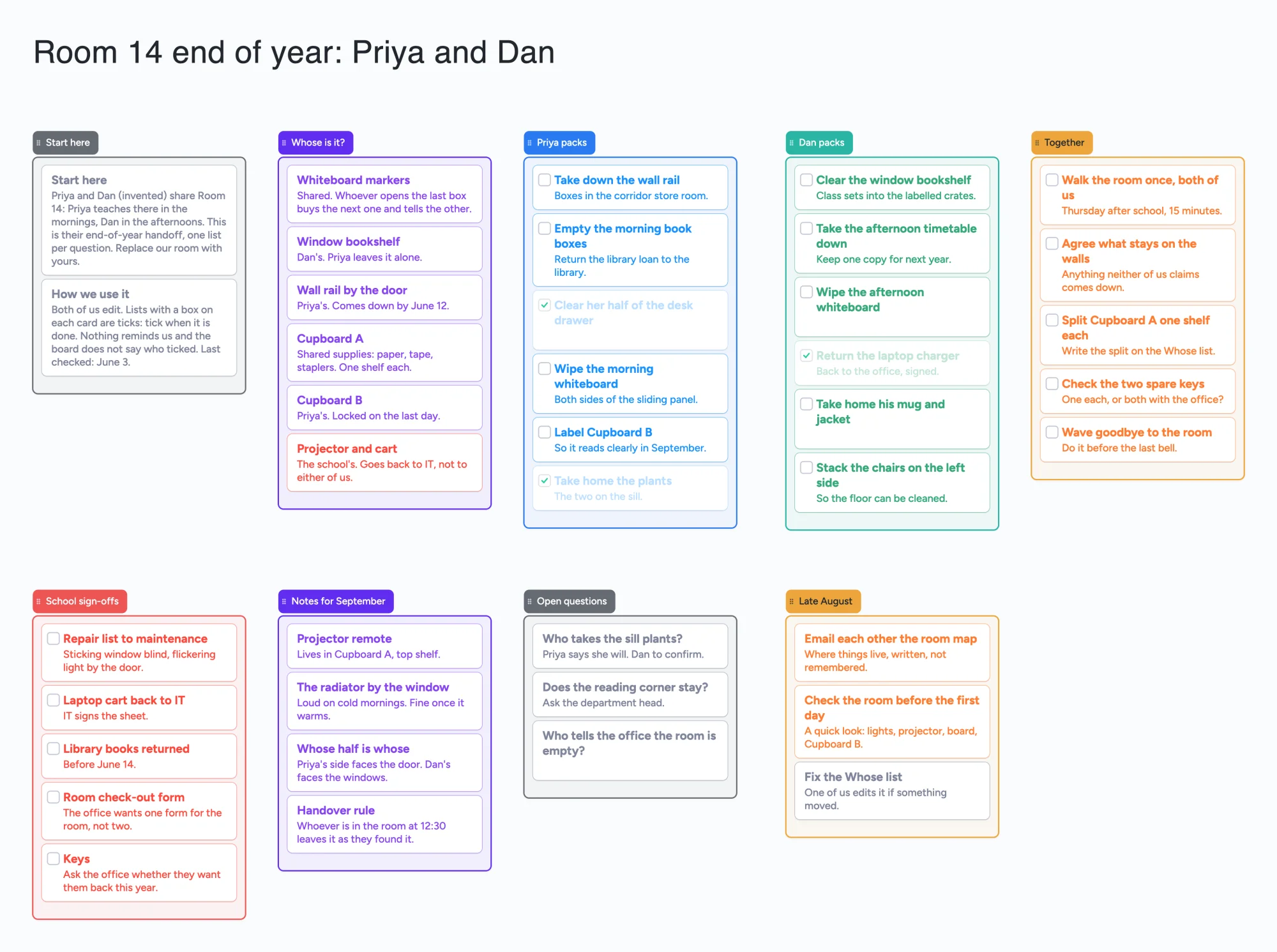
Priya and Dan start with a list called Whose is it?, before either of them touches a box. It has six cards: the whiteboard markers (shared, and whoever opens the last box buys the next and says so), the window bookshelf (Dan's), the wall rail by the door (Priya's, down by June 12), Cupboard A (shared supplies, one shelf each), Cupboard B (Priya's, locked on the last day) and the projector and cart (the school's, so they go back to IT, not to either of them). The red card is the one that would otherwise end up in someone's car.
Why start there: among the four accounts quoted, much of the friction is about things in the room. In a r/Teachers thread, Do you share a classroom? (OP u/SavingsMonk158, December 2024; we read 30 comments in an archived copy, 1 removed), each reply is one person's account. u/RecalledBurger, sharing for three years, said they dislike it and that the other adult does not pick up after themselves, and was thinking of asking for a second teacher desk. u/Kirkwilhelm234, who used to teach music from a cart, left a cup of tea in one teacher's room and was told it had grown mould there. u/ladyonecstacy shares with a before-and-after-school daycare and said things were used, missing or broken in the first year, and that they pack or lock up almost everything during breaks. u/amusiafuschia described a calmer case: one other teacher, mornings and afternoons, the same courses and the same curriculum, which they said makes sharing easy. Our view: a written ownership list does not make people tidy, but it makes the argument shorter.
Your half, my half, and the middle
The example is invented. Read the board from the top left, across, then the second row.
- Start here. Two grey cards: what the board is for, and how the two of them use it, ending with a last-checked date typed by hand.
- Whose is it? The six ownership cards above.
- Priya packs. Six tick cards: take down the wall rail, empty the morning book boxes, clear her half of the desk drawer, wipe the morning whiteboard, label Cupboard B, take home the plants. Two are ticked so you can see what a ticked card looks like.
- Dan packs. Six tick cards: the window bookshelf, the afternoon timetable, the afternoon whiteboard, the laptop charger (ticked), his mug and jacket, and stacking the chairs on the left so the floor can be cleaned.
- Together. Five tick cards for what neither can do alone: walk the room once with both of them there, agree what stays on the walls, split Cupboard A, check the two spare keys, and say goodbye to the room.
- School sign-offs. Five tick cards: a repair list to maintenance, the laptop cart back to IT, library books returned, the room check-out form (the office wants one for the room, not two) and the keys.
- Notes for September. Four cards for whoever opens the room first: where the projector remote lives, the loud radiator, which side faces the door and a handover rule.
- Open questions. Three grey cards nobody has answered yet: who takes the sill plants, whether the reading corner stays, who tells the office the room is empty.
- Late August. Three cards: email each other the room map, check the room before the first day, fix the Whose list if something moved.
Nothing on the board is timed. Thursday after school is text on a card, and moving a card does not change anyone's plan.
The school's list is separate from yours
Priya and Dan keep the school's requirements in their own list because the school's form is often one form for one teacher, and a shared room needs it answered once. What teachers say about those forms varies. In a r/Teachers thread, End of year checkout lists (OP u/KitchenConsequence41, May 2026; we read 55 comments in an archived copy), the poster describes chasing people for signatures who sign without checking the task. u/captured3 wrote that they put the same broken clock on the repair form every year, that next year will be eleven in the same room with it, and that they don't think the school looks at the form. u/Neither_Arm_3955 said theirs is a Google form of check boxes that basically says the teacher swears the tasks are done. u/Shelby71 said the faculty suggested that the admin team set up tables at the front of the school for a set period on the last day, with everyone who signs off there, and that they have had no issues getting it done since. u/ChocolateBananas7 wrote that for most teachers there none of the cabinets lock, and they still have to tick the box.
In another thread, End of year checkoff nonsense (OP u/DIGGYRULES, May 2025; we read 121 comments in an archived copy, 11 removed), u/Dazzling_Outcome_436 said their school linked the list to Google forms so tasks checked off automatically, and assigned an admin to each area of the school for classroom inspections, so you didn't have to chase an admin down, just maybe walk a hallway or two over. These are single accounts from different schools, not a rule. Use the board for the part that is yours and shared: who is carrying the laptop cart to IT, who writes the repair list, who asks the office about keys.
A one-line example from nd.gov's end-of-year checklist (read November 25, 2026; see the table): make a list of items that need repair for the maintenance department. On this board that is one card in School sign-offs, so it is on the list once, not twice.
When to start: a timeline from one teacher's post
The board does not hold a timeline. If you want one, The Simply Organized Teacher's pack-up post (the page shows May 5, 2020; read November 25, 2026) orders the work by weeks before the last day: technology three to four weeks out, cabinets two to three weeks out, the walls one to two weeks out and the boxes the final week. It is written for one teacher with one room, so the shared pieces are yours to add. One idea from it fits a shared room well: keep one cabinet for items that belong to the grade level or the school, so they are in one place if anyone moves. A commenter on that page who signs as the head custodian wrote that custodians empty and clean every room over the summer, so pack things you could lift safely and put things in appropriately sized boxes. That is one person's comment on one page.
If you want those weeks on the board, type them into the card titles, for example Cupboards, three weeks out. They are still text: Instaboard has due dates on cards, and this board does not use them. It sends no reminders or due-date alerts either, so one of you has to open the board.
Getting the other teacher in: a twenty-minute start
- Open the board and sign in free when it asks you to write. Replace our room with yours and delete any list you don't need.
- Fill Whose is it? first, together, one card per thing that could be argued about. Mark the school's things in red.
- Fill each person's packing list and the Together list, with the tasks that need both of you.
- Copy your school's sign-offs onto School sign-offs and ask the office whether they want one form for the room or two.
- Add Notes for September for whoever opens the room first, and put what you haven't settled under Open questions.
- Send the link. Set Share to Anyone who joins can edit if the other teacher should write on it, or leave it on view if they should only read. Each person who writes signs in free.
- Tick as you go, and agree who unticks if something has to be redone.
What the one-teacher lists give you, and what they leave out
Read on November 25, 2026; pages change, so check the page. A source date is printed only where a page shows one.
| Tool | What the page says | Better for |
|---|---|---|
| nd.gov end-of-year checklist (PDF) | One PDF with tick boxes in groups: final activities, enlisting student help (elementary), discard, inventory, permanent records, clean and organize, electronics, cover, take home, goodbye, then reflection questions | One teacher packing one room. It mixes in tasks for students and elementary classes that a shared-room board leaves out |
| The Simply Organized Teacher pack-up post | A step-by-step pack-up in five stages with timing in weeks before the last day; a checklist download is offered through a sign-up form we did not use | One teacher who wants an order for the work. It is written for a single room |
| Your school's own check-out form or Google form | Not read for this page; teachers in the threads above describe paper lists, Google forms and signatures | The thing the school actually checks. Keep it as the record and copy only its tasks onto the board |
| Google Docs, Sheets or a text message | Not read for this page | Two people who just need a short shared list |
| Instaboard board | 5 boards, 150 items, 3 pictures per board on the free plan | Two adults who share a room, a key and a form and want one plan both of them can move |
Swipe the table sideways to see every column.
Pages read November 25, 2026: nd.gov/espb EndOfYearChecklist PDF and thesimplyorganizedteacher.com/year-end-classroom-packing-list. Our wording, not theirs.
Where these win
If you have the room to yourself, use a printed list and the school's form. Use this board when two teachers share a room and want to see, on one screen, whose each thing is and who has packed what, with a link in place of a text thread.
Next June, and how many rooms fit in 150 items
Each card and each list is 1 of your 150 free items, across all your boards. The title text box counts too. Arrows, sections and pen strokes don't. Our arithmetic from the example:
- As built: 9 lists + 40 cards + 1 title = 50.
- Three rooms on one board: 3 x 49 + the one title = 148. A fourth passes 150.
- One room per board: 2 boards x 50 = 100 and 2 of your 5 free boards; a third is 150, which is the limit, and uses 3 of 5 boards.
- Next June: copy the board and edit it. The copy takes 1 of your 5 boards, and its items count against the same 150. A copy keeps its ticks, so untick them first.
- With Pro, the 150-item limit is removed.
What the board leaves to the two of you
- It isn't the school's form. The sign-offs list copies what your school asks for. If the form wants a signature, the board's tick isn't one.
- No reminders or due-date alerts. Nothing tells Priya the wall rail comes down by June 12. A date on a card is typed text.
- Ticks don't say who or when. Anyone who can edit can tick or untick a card.
- No inventory counts. A card that says class sets into the labelled crates doesn't count the sets. Keep the real inventory in your usual place and link or name it on a card.
- No students on it. The board is shared by link. Leave out student names, grades and notes about children.
- It is not private by default. New boards start with Anyone who joins can view. Anyone with the link can read it; sign-in is only needed to write. Set it to Anyone who joins can edit only if the other teacher should write on it.
- A copy takes 1 of your 5 free boards, and writing needs a free sign-in.
Start from the ready board
It opens in your browser in a few seconds, with nothing to install. Sign in for free when you want to save it and share it.
Questions
What goes in an end-of-year checklist for a shared classroom?
Start with who owns what, then each person's packing, the tasks you do together and the school's own sign-offs. The one-teacher checklists we read cover cupboards, electronics, repairs, keys and taking things home; a shared room adds a list of whose each thing is and a note for whoever opens the room in September.
Can two teachers use the same board?
Yes. New boards start with Anyone who joins can view, so anyone with the link can read it. Set it to Anyone who joins can edit if the other teacher should write too; each person who writes signs in free. Put no student names or grades on it.
Does the board replace my school's check-out form?
No. Schools differ, and the form is the record your school keeps. Use the board for the shared tasks and your own copy of what the form asks for.
Will the board remind us of a deadline?
No. It sends no reminders or due-date alerts. A date on a card is text you typed, so one of you has to open the board.
How many classrooms fit on the free plan?
The example is one room and 50 of your 150 free items. Three rooms on one board is about 148 and a fourth is over the limit; one room per board is 50 each and 1 of your 5 boards (our arithmetic). A copy next June takes 1 of your 5 boards.
Is Instaboard free?
There is a free plan: 5 boards, 150 cards and items across your account (pen strokes, arrows and sections don't count), and 3 pictures and 1 file per board. Anyone with the link can read a board; writing on it takes a free sign-in. Pro removes the item limit and adds invite-only boards: $5 a month billed yearly ($59.99 a year), or $7.99 monthly.
Sources
- nd.gov (ESPB): End of Year Checklist, PDF (read November 25, 2026)
- The Simply Organized Teacher: Easy End Of Year Classroom Pack Up Checklist (page shows May 5, 2020; read November 25, 2026)
- r/Teachers: Do you share a classroom? (OP u/SavingsMonk158, December 2024; replies are single accounts, 30 comments read in an archived copy, 1 removed, November 25, 2026)
- r/Teachers: End of year checkout lists (OP u/KitchenConsequence41, May 2026; replies are single accounts, 55 comments read in an archived copy November 25, 2026)
- r/Teachers: End of year checkoff nonsense (OP u/DIGGYRULES, May 2025; replies are single accounts, 121 comments read in an archived copy, 11 removed, November 25, 2026)