For a small team that keeps repeating the same mistakes from job to job
A lessons learned log template on one shared board: lessons by kind, what worked, a review before the next job
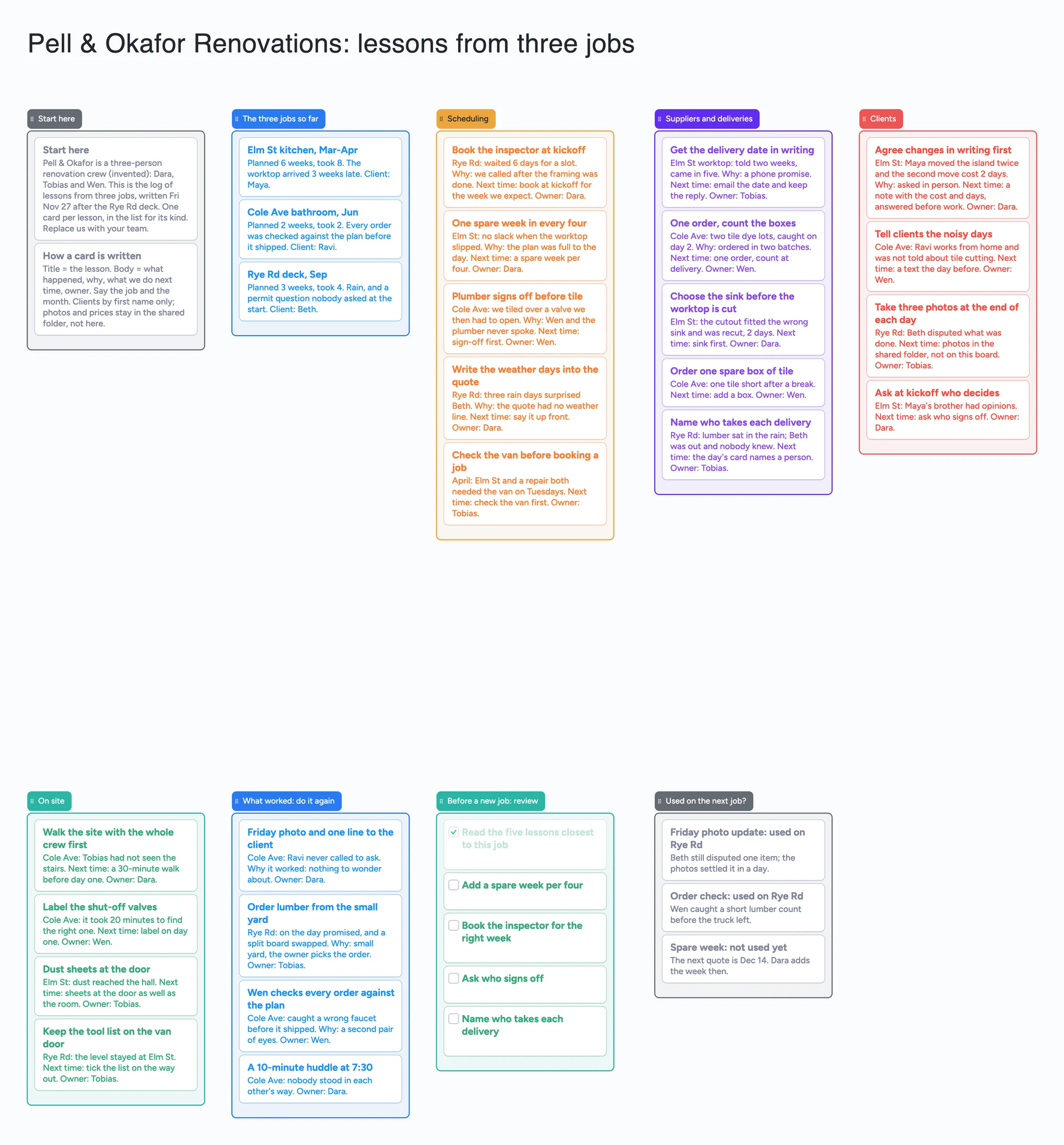
We make Instaboard, an online board. This page gives you a lessons learned log already laid out on it, filled in for an invented three-person renovation crew: Pell & Okafor Renovations has finished three jobs, a kitchen, a bathroom and a deck, and on Friday, November 27 Dara, Tobias and Wen write down what they learned. Nine lists: the three jobs, four lists of lessons grouped by kind (scheduling, suppliers and deliveries, clients, on site), a list of what worked, a tick-box review to run before the next job and a list that says whether a lesson was used. Open it, swap the crew for your team and send the link to the people who did the work. It is a log you read and add to by eye, not a tracker: no reminders or due-date alerts, no search, and Sort / Filter works one list at a time. Below we say what that costs and when a register or a task tool is the better choice.
Opens in your browser. Anyone can view; a free sign-in lets you edit.
Updated
Read this first: what the board does and doesn't do
- What it is: a running log the whole crew can read in ten minutes. One card per lesson, grouped by kind, each with what happened, why, what to do next time and who owns the change. The Pell & Okafor board holds 22 lessons and uses 45 of your 150 free items.
- What it is not: no reminders or due-date alerts, no status field, no search and no filter across lists, and no record of who added or ticked what. The owner on a card is typed text.
- Why a board: the lessons from three jobs sit side by side, so the same cause appearing in two lists is visible without a report. Anyone who joins can view it; to add a card they sign in free.
- Keep off it: photos, prices, client addresses and anything private. A link board is not private. The example uses first names and keeps photos in a shared folder.
- When to use something else: a register you can filter, actions with dates that remind someone, or anonymous input. A section below lists them.
When a register or a task tool is the better choice
Start with what the guides we read ask for that a shared board does not do.
- You want to filter or search the log. Vaiz's lessons learned template page describes tagging each entry by project or source and by category, so a board holding lessons from a dozen sprints or launches stays searchable and recurring root causes show up (page undated, read November 24, 2026). Rework says to tag entries by project type, methodology and phase so someone starting a similar project can find the five most relevant lessons within five minutes. A board has no tags and no filter across lists; we make no claim that it does.
- You want actions with dates that someone is reminded of. MeisterTask's guide (July 14, 2026) says every lesson should end with a concrete next step, a named owner and a due date, and suggests a 15-minute monthly review of open items; it turns each recommendation into a task. On a board the owner and the date are text on a card, and nothing reminds anyone.
- You want input that isn't attributed. Rework says anonymous pre-session inputs can help if the team has sensitive dynamics. Cards here are written by named people on a link board.
- You want a status on each lesson. MeisterTask's template has an open, in progress or completed status. The board's "Used on the next job?" list is a typed note, not a status field.
- Someone else's private details would go in it. Client names, addresses and prices don't belong on a link board.
If the team is small, the log is short enough to read, and you want one place where lessons from several jobs sit next to each other, a board does that part well.
What one entry holds: four sources, four field lists
The pages we read (all November 24, 2026) don't agree on the fields of a lessons learned entry, which is why the board folds them into one card. Here is what each page lists:
| Page | Fields it lists for one entry | What "owner" means there |
|---|---|---|
| MeisterTask (July 14, 2026) | What happened, root cause, impact, recommendation, owner with a due date, status | Who is responsible for making the change happen |
| Rework (updated June 4, 2026) | ID, category, what happened, impact, root cause, recommendation, owner, date | Who documented the entry |
| Vaiz (no page date) | Project or source, what went well, what didn't, impact, root cause, action item, owner, deadline; four columns: Captured, Root cause reviewed, Action assigned, Applied next cycle | The person with the action item |
| Pell & Okafor's card | Title is the lesson; body says the job and month, what happened, why, what to do next time, owner | Who makes the change |
Swipe the table sideways to see every column.
Read November 24, 2026. The first three are vendor or vendor-adjacent pages and describe their own templates. Pell & Okafor's wording is our own choice, not a field list from any source.
Rework's "owner" is the person who wrote the entry down, MeisterTask's and Vaiz's is the person who acts on it. The board uses the second meaning, and the Start here card says so: it is who makes the change, not who made the mistake.
Pell & Okafor's board, list by list
The example is invented. Dara, Tobias and Wen run a small renovation crew. They have finished three jobs this year: the Elm St kitchen (planned six weeks, took eight), the Cole Ave bathroom (planned two weeks, took two) and the Rye Rd deck (planned three weeks, took four). Each list answers one question.
| List | The question it answers | In Pell & Okafor's board |
|---|---|---|
| The three jobs so far (blue) | What jobs do these lessons come from? | "Elm St kitchen, Mar-Apr" planned 6 weeks, took 8; "Cole Ave bathroom, Jun" planned 2, took 2 |
| Scheduling (orange) | What went wrong or right with dates? | "Book the inspector at kickoff", "One spare week in every four" |
| Suppliers and deliveries (purple) | What did we learn about orders? | "Get the delivery date in writing", "One order, count the boxes" |
| Clients (red) | What did we learn about people? | "Agree changes in writing first", "Tell clients the noisy days" |
| On site (green) | What did we learn at the job? | "Label the shut-off valves", "Keep the tool list on the van door" |
| What worked: do it again (blue) | What should we repeat on purpose? | "Friday photo and one line to the client" |
| Before a new job: review (tick boxes) | What do we check before the next quote? | "Read the five lessons closest to this job" |
| Used on the next job? (grey) | Did any lesson actually change anything? | "Order check: used on Rye Rd", "Spare week: not used yet" |
Swipe the table sideways to see every column.
The board's own wording. Dates and owners are text typed into a card; owners and dates are typed text, and the board sends no alerts. The tick boxes can be ticked and unticked by anyone with edit access, and the board doesn't show who ticked or when.
The ninth list, Start here, has two cards: what the log is, and how a card is written.
Group by kind, not by job
A lessons log can be laid out by job, one list each, or by kind, one list for each type of cause. Pell & Okafor chose kind. The reason is the one Vaiz gives for its category tags: group entries by category such as process, communication, tooling and planning to see whether the same root cause keeps showing up across projects. Rework's example categories are schedule, scope, cost, risk, communication, team and vendor. Pell & Okafor's four are their own, taken from what a renovation job runs into.
On their board it shows. Three of the five Scheduling cards come from different jobs, and "Name who takes each delivery" in Suppliers is the same gap as "Ask at kickoff who decides" in Clients: nobody was named. Neither list is wrong; you can only see the overlap because the cards are next to each other. Putting the job in each card's body (Elm St, Cole Ave, Rye Rd) keeps the source Vaiz says an entry needs.
The cost is the other way round: a list by kind can't show everything that went wrong on one job in one place. That is what the three job cards at the top are for, with the plan against the real time, and it is a weaker view than a list by job.
From a symptom to a lesson: one entry traced
MeisterTask says surface observations like "communication was poor" don't lead to change, and suggests asking why until you reach a cause you can act on; if the answer ends with "because someone forgot", it says to keep digging. Here is one Pell & Okafor entry traced that way. The steps are ours, applied to an invented case:
- The symptom: the Elm St worktop arrived three weeks late.
- Why late? The date Tobias had was two weeks and it came in five.
- Why was the date wrong? It was a phone promise; nothing was written down.
- The lesson on the card: "Get the delivery date in writing."
- The action: email the date and keep the reply; owner Tobias.
The card keeps only the last three steps, and the reason is one line. Not every card needs a full chain: Vaiz suggests skipping the root-cause pass for small issues ("not every miss deserves a root-cause pass") and uses an impact rating to decide. The board has no impact field; the weak cards in the example, like "Dust sheets at the door", simply have no why.
Don't log only what went wrong
Rework lists "only capturing negatives" as a common mistake and says to document anything that worked unusually well so the next team can repeat it deliberately. MeisterTask starts its three questions with what worked and why, and says the "and why" matters most because it lets you copy the practice into a different context. Vaiz's template has a what-went-well field next to what-didn't. Pell & Okafor's "What worked: do it again" list has four cards, each with the reason it worked, such as the Friday photo and one line to the client: Ravi never called to ask, because there was nothing to wonder about.
Four good cards against eighteen problems is lopsided. That is also how most logs look, and it is a reminder to add a good card whenever you notice one.
The step that matters: review before the next job
Rework's whole argument is that a lessons log has to be read when the next project starts. It calls a document stored where no one visits "a guilt receipt", says to review existing lessons at initiation rather than closure, and suggests pulling the three to five most relevant into the new plan. MeisterTask says to refer to the register at the next kickoff and confirm the changes are in place. Pell & Okafor's last two lists are that review:
- Read the five lessons closest to this job. Ticked for the next quote, to show how it looks.
- Add a spare week per four. From Elm St.
- Book the inspector for the right week. From Rye Rd.
- Ask who signs off. From Elm St.
- Name who takes each delivery. From Rye Rd.
The grey list beside it records what happened to three of them: the Friday photo update and the order check were used on Rye Rd, and the spare week is not used yet because the next quote is Dec 14. MeisterTask suggests tracking whether recommendations are completed and whether the same problems recur; this list is a typed version of that, three cards long, with no totals.
How many jobs fit in 150 items?
Each card and each list is 1 of your 150 free items, across all your boards. The title text box counts too. Arrows, sections and pen strokes don't. Our arithmetic from Pell & Okafor's lists:
- As built: 9 lists + 35 cards + the title = 45. Of those cards, 22 are lessons and what-worked entries.
- Room left: 150 - 45 = 105 items.
- A job's worth: the example has 22 entries across 3 jobs, about 7 a job. Add 1 card for the job itself and that is 8 new cards a job, so 105 / 8 = 13 more jobs, 16 in all.
- Rework's range: Rework says a typical project yields 10 to 25 entries. At 10 entries and a job card, 11 a job, that is 9 more jobs; at 25 and a job card, 26 a job, that is 4 more.
- Boards: a copy takes 1 of your 5 free boards.
Rework also says that more than 30 entries from a full project suggests you're capturing noise along with signal, so a log that outgrows 150 items may be a log that needs pruning. Pro removes the item limit: $5 a month billed yearly ($59.99 a year), or $7.99 monthly. Three jobs a year doesn't need it.
What a board can't do for a lessons log
- Search or filter. No tags, no filter across lists. Label filters work within a single list only.
- Remind anyone. No reminders, due dates or alerts. "Dec 14" is text.
- Track status or completion. No status field and no totals; the "used" list is typed.
- Show who wrote, ticked or changed a card, or when. Anyone with edit access can edit or untick.
- Keep an entry private or anonymous. Anyone who has the link can view the board.
- Offline. Changes made offline are kept and sync when you're back online.
Where other tools do this better
Read November 24, 2026. Not listed means not on the page we read; it doesn't mean the tool lacks it. No ranking: they suit different teams.
| Option | What its page says | Better than a board at | Where a board fits |
|---|---|---|---|
| Asana lessons learned template page | Describes owners and deadlines on action items, forms to collect input and custom fields to tag takeaways inside a work tool; the title says 2026 and the page shows no date. Pricing is not listed on that page (as of November 24, 2026) | Assigned follow-ups, forms and a searchable set of reports inside a work tool | A crew that doesn't have a work tool and wants the lessons on one screen |
| MeisterTask guide | Five-step method with Notes for the log and tasks for the actions, owner and due date on every lesson; the guide is by MeisterTask (July 14, 2026). Pricing is not listed on that page (as of November 24, 2026) | Turning each lesson into a tracked task | Reading the log together without a task tool |
| Vaiz lessons learned template | A board template with four columns, four task types and eight custom fields; the page's Use template button links to a sign-up address on app.vaiz.com (read from the link, not clicked). No page date | Filtering by category and linking an action to a task | A plain board with no custom fields |
| Rework template and examples | A register table with an ID column, category, root cause and recommendation, and three examples; says to store it as a shared spreadsheet, a page in your project wiki, or a dedicated section in your project management platform (updated June 4, 2026) | A sortable sheet with an ID per entry | Seeing the lessons next to each other without a sheet |
Swipe the table sideways to see every column.
From each page as read November 24, 2026; the closing list of other templates on the Asana page was not read. Vendor and vendor-adjacent pages. Instaboard isn't affiliated with any of these.
Set up your own, in order
- Open the board and delete the crew's cards as you replace them, so it is never half Pell & Okafor.
- List your jobs first. One card each with the plan against what happened.
- Write lessons soon after the job, in the list for their kind. Rework says a running log takes about five minutes an entry and gives richer output than a session months later.
- Say who acts, not who erred. MeisterTask says to write who was involved as roles rather than names, and that blameless means understanding what went wrong in the system or process, not who to blame.
- Add what worked while you're at it.
- Write the review list for your next job from the five most relevant lessons, and tick it as you go.
- Share it. Set the share setting so anyone who joins can edit ("Anyone who joins can edit"); new boards start view-only, and each person signs in free to write.
Limits of the free plan for this board
- Items. Each card and each list is 1 of 150 free items across your account; the example is 45. Arrows, sections and pen strokes don't count.
- Boards. 5 on the free plan. "Make a copy" takes 1 of them.
- Pictures. 3 per board. The example has none; photos belong in a shared folder.
- Writing needs a free sign-in. Anyone who joins can view the board; to change it they sign in, and the board then counts as 1 of their 5.
- Private lessons. A link board is not the place for client details or anything private; invite-only boards are a Pro feature.
Start from the ready board
It opens in your browser in a few seconds, with nothing to install. Sign in for free when you want to save it and share it.
Questions
What is a lessons learned log?
A running record of what a team learned on its projects: what happened, why, what to do differently and who owns the change. Rework describes lessons learned as structured records of knowledge gained, covering practices that worked and problems that should be prevented. This board holds one for a three-person example crew.
What should each entry include?
The three pages we read list slightly different fields. MeisterTask lists what happened, root cause, impact, recommendation, owner with a due date, and status; Rework adds a category and a date; Vaiz adds the project or source and a what-went-well field. The Pell & Okafor cards fold these into a title and a short body: the job, what happened, why, what to do next time and the owner.
How is a lessons learned log different from a retrospective?
Rework says a sprint retrospective is a short, sprint-specific ceremony, while lessons learned span the whole project and often feed into knowledge that teams who weren't on the project can use. Vaiz's FAQ puts it as the retrospective being the meeting and the template being the record that stays behind. This board is the record.
When should we add to the log?
MeisterTask suggests running sessions at major milestones, when something unexpected happens, at close and before people leave, within one to two weeks of the milestone. Rework suggests a running log updated throughout the project, at about five minutes an entry, as well as a closing session. The example crew writes after each job.
How do we make sure the lessons are used?
Both Rework and MeisterTask say to read the log at the start of the next project. The example has a tick-box review list for that, and a list that records which lessons were used. The board doesn't remind anyone to run the review; put it in your own calendar.
How much of the free plan does it use?
The example is 9 lists, 35 cards and the title, 45 of your 150 free items, and a copy takes 1 of your 5 free boards. At about 8 new cards a job there is room for 13 more jobs. That is our arithmetic, and your other boards share the 150. Pro removes the item limit.
Sources
- MeisterTask: Lessons learned: method, questions and how to follow through (July 14, 2026; read in full November 24, 2026; vendor content)
- Rework: Lessons Learned in Project Management: Template and Process (by Tara Minh, updated June 4, 2026; read in full November 24, 2026; vendor-adjacent)
- Vaiz: Free lessons learned template (no page date; read in full November 24, 2026; vendor content)
- Asana: Lessons Learned Template for Better Project Reviews (title says 2026; no page date; read November 24, 2026, closing list of other templates not read; vendor content)
Related
A decision log template on one shared board: open, decided, revisit, reversed
A decision log template on one shared board for two to five people: open questions, decided with the why, revisit on a date, reversed. When a spreadsheet or Notion is the better home.
A shift handoff template for a small shop: one shared board instead of a group chat
A shift handoff template for a small cafe, shop or bar: done today, still to do, low stock, notes and tomorrow on one shared board, with a first name on every card. Free to copy. Not a clinical record.
A personal annual review template on one board
A personal annual review template on one shared board: wins, hard parts, lessons, stop, keep, next steps. No reminders; Todoist and free booklets do more.