For a novelist with a finished draft, beta readers and an editor
A novel revision board: your reader and editor notes, sorted into a plan
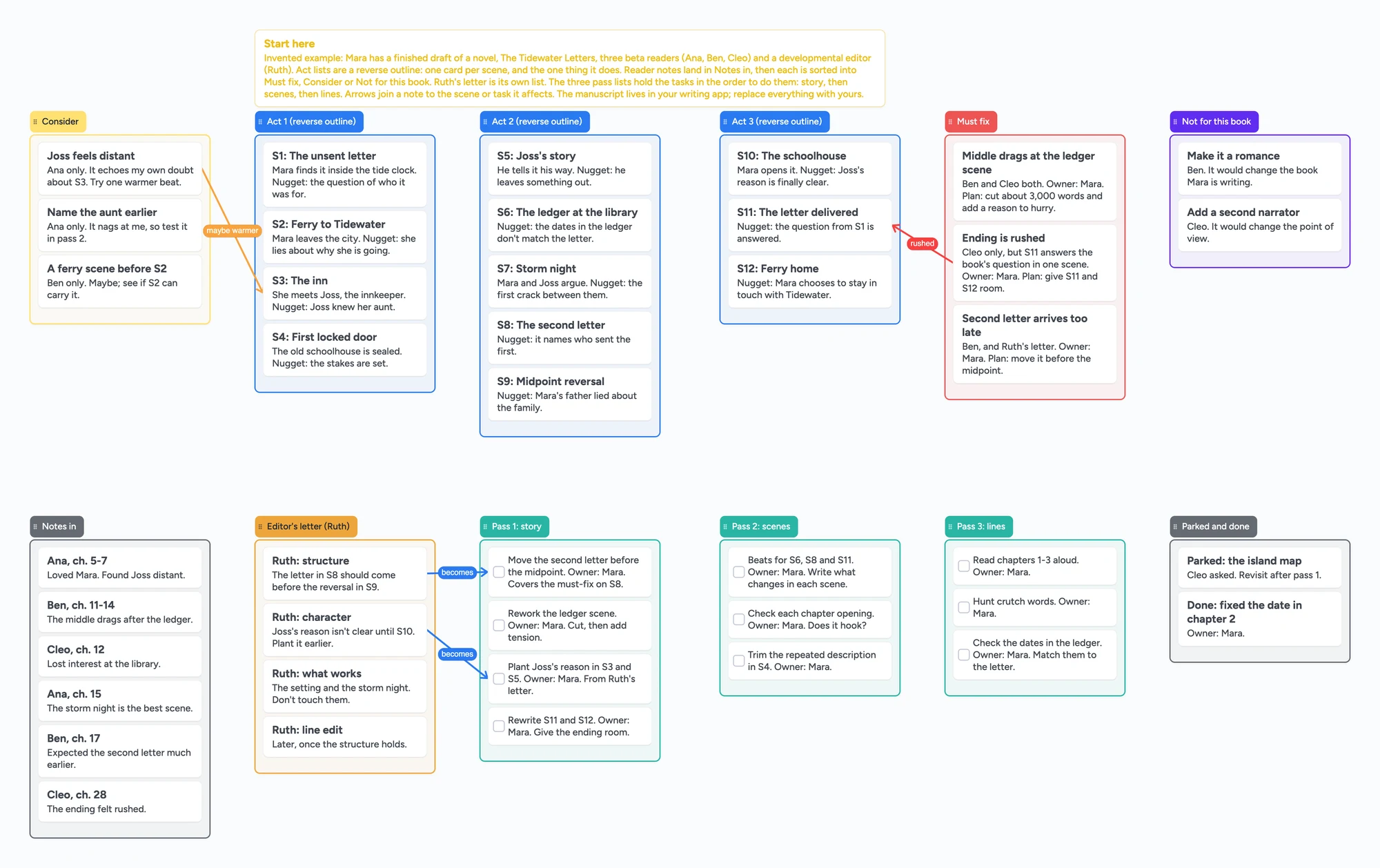
This is for a novelist who has a finished draft and a pile of notes: three beta readers who disagree, maybe an editor's letter, and no clear order to fix things in. The ready board gives you a scene-by-scene reverse outline across three act lists, a list where every reader note lands, lists that sort the notes into must fix, consider and not for this book, the editor's letter, and three pass lists (story, scenes, lines) holding the tasks in the order to do them. It is the plan, not the manuscript: there is no manuscript, no tracked changes, no word count and no reminders, and your readers will most likely keep commenting in their own files. Word and Google Docs comments, Reedsy Studio, Scrivener, Plottr and a spreadsheet are better at parts of this job; the sections below say which.
Opens in your browser. Anyone can view; a free sign-in lets you edit.
Updated
The short answer
- What it is: a board for the stage after the draft. The act lists are a reverse outline, one card per scene with the one thing it does. Reader notes go in one list, then each is sorted into Must fix, Consider or Not for this book. The editor's letter has its own list, and Pass 1 story, Pass 2 scenes and Pass 3 lines hold the tasks.
- What it isn't: no manuscript, no tracked changes or comment import, no word count, no reminders and no sorting or counts. Notes are typed in as cards, so a reader who comments in Word or Docs stays there.
- Arrows: an arrow joins a card in one list to a card in another, takes a caption and its own colour, and stays attached when a card moves. The example joins a reader note to the scene it is about, and the editor's notes to the tasks they become.
- Sharing: anyone with the link can read the board with no account. Writing takes a free sign-in, and new boards start view-only, so set Share to "Anyone with the link can edit" for an editor or co-author who should add cards.
- Free plan: the example is 55 of your 150 free items (43 cards and 12 lists, our count). Arrows, sections and pen strokes don't count.
Two jobs: a checklist of what to look for, and a plan from the notes you got
Most pages that rank for revising a novel are checklists. Nathan Bransford's revision checklist (June 2022, read in full) is a list of questions grouped as storytelling essentials, structure, characters, craft and brass tacks. A checklist tells you what to look for. It doesn't say which of three contradictory reader notes to act on, or in what order to fix things. That second job is the one this board is for, and it is what newer posts like Indie Author Magazine's "How Your Beta Reader Feedback Becomes a Revision Plan" (June 5, 2026) are about.
Keep your checklist wherever you like and use the board for the notes. It gives the checklist a place to land: a failed check becomes a card in a pass list.
How to run a revision on the board
These steps follow what the authors and editors we read describe, each as one person's method. Tiffany Hawk (a published author who teaches writing at Stanford Continuing Studies) says to triage instead of revising from page one, so that the biggest things come first. Susan Odev in Indie Author Magazine sorts reader notes into "must fix," "consider fixing" and "not for this book," and starts the plan with structural issues, then chapter-level ones, then small ones. In r/writing, u/alanna_the_lioness says the value of beta readers is big-picture feedback that may mean taking the book apart, and that she breaks out the main takeaways and starts a new outline from them.
- Reverse outline first. One card per scene in the act lists, with the one thing that scene does. Between the Lines Editorial (April 20, 2022) breaks a reverse outline by scene rather than chapter and looks for each scene's "core nugget"; a scene with none is a flag. Scene and act labels (S1, S2) let a note point at them.
- Wait for all your readers, then put every note in one list. Debbie Emmitt (April 29, 2022) says to wait until all feedback is in before reading any of it. Each note is a card with the reader's first name and chapter.
- Look for patterns before individual opinions. Odev says that when several readers name the same problem it is a signal, and that outliers often reveal taste. Emmitt gives a rule of thumb: if most readers (3 out of 5 or more) say something negative, seriously consider changing it. Those are their rules, not ours.
- Sort each note. Move it to Must fix, Consider or Not for this book, and add an owner and a plan on the card. Say why a note is in Not for this book, so that you don't reopen it at 2 a.m.
- Join notes to scenes. Draw an arrow from the card to the scene it is about and caption it ("drags here", "arrives late"). The arrows stay attached when you move the cards.
- Put the editor's letter in its own list. One card per point, and an arrow from each to the pass task it becomes. Hawk says a developmental editor's letter can run 3 to 15 single-spaced pages; the board holds your summary of it, not the letter.
- Work the passes in order. Pass 1 story (structure, plot, character, new scenes), then Pass 2 scenes, then Pass 3 lines. Tick each task off. Park anything you aren't ready to decide in Parked and done.
Hawk also says to revise from a new draft and never delete anything, so you keep a boneyard. That lives in your writing app, not here.
Where Word, Google Docs, Reedsy Studio, Scrivener, Plottr, Notion and a spreadsheet are better
Read on November 14, 2026, each from its own page. Microsoft's Track Changes page says that deletions are marked with a strikethrough and additions with an underline, with a different colour for each author. Google's comments page lets you comment on highlighted text, reply, resolve a comment and, when you add someone with @, they get an email. If your readers or editor mark up the manuscript itself, that is the right tool, and this board starts after their notes come back.
Reedsy Studio's home page says Studio lets you invite your co-author, editor or proofreader to view edits, respond to comments and revise live, and share individual chapters with beta readers through an online e-reader. Its core writing is free; the home page lists the Outlining add-on at $7.99 a month. Its planning page says Boards can't yet be shared with a collaborator. If you want the draft, the editor's marks and the plan in one app, that is the better fit.
Scrivener's page describes a ring-binder, an integrated project outline and compile to Word, PDF or Final Draft, on macOS, Windows and iOS. One reply on the Literature & Latte forum in 2020 says Scrivener imports Word comments but not Track Changes markup; that is a single forum post from 2020, so check it against your version. Plottr's pricing page lists Plottr at $60 a year and Plottr Pro at $99 a year, with Pro adding a browser app and real-time collaboration, which it says suits writers who need to collaborate with a co-author, coach or editor.
For the sort-and-count job, a spreadsheet is better. Debbie Emmitt's free template (an .xlsx, April 2022) has drop-down lists, a Done column that turns the row green, and a separate sheet for positive comments, and her post says compiling into a spreadsheet lets you see whether most readers found a scene slow or just one. Notion lists a free "Beta Reader Feedback Tracker" template for authors; we did not read what is inside it. A spreadsheet sorts and counts. This board doesn't.
Where these win
For comments and tracked edits on the manuscript, use Word, Google Docs or Reedsy Studio. For drafting and compiling, use Scrivener. For a plotting tool you can share with an editor, look at Plottr Pro. For sorting and counting notes, use a spreadsheet. Use this board for the picture: the reverse outline, where each note lands, which ones you chose to act on, and the order of the passes.
Planning a book before you draft it is a different job; organizing a novel with index cards and a mystery outline board cover it, and a romance outline board does the same for two points of view. After the passes, a book launch plan board picks up the next stage.
This board vs Word and Docs vs Reedsy Studio vs Scrivener vs Plottr vs a spreadsheet
| Tool | What we read (Nov 14, 2026) | Good at | Not what you get |
|---|---|---|---|
| Instaboard board | Free: 5 boards, 150 items, 3 images per board. Pro $5/mo billed yearly | A reverse outline, sorted notes, the editor's points, the order of passes | A manuscript, tracked changes, counts, reminders |
| Word / Google Docs | Track Changes (Microsoft); comments, replies, resolve, @ email (Google) | Marking up the manuscript itself | A plan across notes from several readers |
| Reedsy Studio | Core free; Outlining add-on $7.99/mo (home page; pricing page shows no figure); editor can view edits and comment; Boards can't be shared yet | Draft, editor's marks and beta preview in one app | A shared planning board today |
| Scrivener | macOS, Windows, iOS; ring-binder and outline; compile to Word, PDF, Final Draft | Drafting and restructuring the manuscript | Live collaboration; no price read |
| Plottr | $60/yr; Pro $99/yr adds a browser app and real-time collaboration | A plotting tool to share with an editor | Free |
| Spreadsheet (Emmitt template) | Free .xlsx with drop-downs and a Done column | Sorting and counting readers' notes | A picture of the story |
Swipe the table sideways to see every column.
From each tool's own pages, read November 14, 2026. We name no tool as the best; they do different jobs.
Limits of the free plan for a revision board
- Items. Each card and each list is 1 of your 150 free items, across all your boards. The example is 43 cards and 12 lists, 55 in all (our count). A real novel is far bigger: 80 scene cards, the 12 lists and 60 reader notes already come to 152 (our arithmetic), so reverse-outline by act or by chapter, or keep notes shorter.
- Boards. The free plan includes 5 boards. Making your own copy of the example uses 1 of them; a card that opens its own board uses another, so the example keeps everything on one board.
- No manuscript, no tracked changes, no comment import. Reader notes are typed in as cards. Nothing links a card to a line of your draft, and nothing records which draft a note was about.
- No sorting or counts. You see a pattern by looking. Nothing tells you that three of five readers named the same scene.
- No reminders and no timeline axis. A deadline is text in a card.
- Readers need a free sign-in to write. A reader who joins by link or code can add cards, and the board counts as one of their 5. Most will keep sending notes the way they do now.
- Copy as image only. To send the plan to someone without the link, use Copy as image on the board.
Start from the ready board
It opens in your browser in a few seconds, with nothing to install. Sign in for free when you want to save it and share it.
Questions
Is there a free novel revision template I can share with my editor?
Yes. Open the board, replace the example novel, readers and scenes with yours, and set Share to "Anyone with the link can edit" if your editor needs to write on it. It is a board of cards, lists and arrows, not a document.
Can beta readers comment on the manuscript here?
No. There is no manuscript on the board. Readers comment in the file you send them, and you copy the notes that matter onto cards. Word, Google Docs or Reedsy Studio are better for that.
How do I decide which beta reader notes to act on?
The authors we read give rules of thumb: look for the same problem named by several readers, treat a single reader's taste as an outlier unless it points at something your genre needs, and sort every note as must fix, consider or not for this book. Those are their rules. The board gives you somewhere to put each one.
Does it track changes or count how many readers agree?
No. There are no tracked changes and no counts. If you want to count how many readers named a problem, a spreadsheet does that better.
How many scenes fit on the free plan?
Each card and each list is one item of the 150 across all your boards. The example is 55. That is our arithmetic. Arrows are free.
Sources
- Indie Author Magazine: How Your Beta Reader Feedback Becomes a Revision Plan (June 5, 2026, read November 14, 2026)
- Debbie Emmitt: Beta reader feedback, how to deal with it, with free template (April 29, 2022, read November 14, 2026)
- Tiffany Hawk: The Complete Guide to Self-Editing Your Book (read November 14, 2026; its tools section was not cited)
- Between the Lines Editorial: How to Reverse Outline Your Novel (April 20, 2022, read November 14, 2026)
- Nathan Bransford: Novel revision checklist (June 2022, read November 14, 2026)
- r/writing: How to organize multiple beta reader feedback (July 2, 2023; replies are single accounts)
- Microsoft Support: Track changes in Word (read November 14, 2026)
- Google Docs Editors Help: Use comments, action items, & emoji reactions (read November 14, 2026)
- Reedsy Studio: home page, plan-a-book (Boards) page and pricing page (read November 14, 2026)
- Scrivener overview, Literature & Latte (read November 14, 2026)
- Literature & Latte forum: Best Digital Format for Beta Readers to Comment? (2020; one forum reply)
- Plottr: Pricing (read November 14, 2026)
- Notion: Beta Reader Feedback Tracker template (listed free; contents not read)
Related
Outline a novel or screenplay with index cards, on a board you can share
Outline a novel or screenplay on digital index cards: one list per act, 40 short cards, subplot arrows, a co-writer on the same board. Free to start; TV pilot too.
A mystery novel outline board for suspects, clues and red herrings
Outline a mystery novel on one board: a list per suspect, clues, red herrings and reveal order. A free ready board, and where Plottr and Sheets do more.
A romance novel outline board: one list for each lead, one for the beats they share
Outline a dual-POV romance on one shared board: a chapter list for each lead and a middle list of shared beats, with arrows between them. Free ready board, and where PlotProse and Plottr do more.
A book launch plan board: who owns each task and which reader still owes a review
Plan one book launch on a shared board with your editor, publicist or co-author: a card per task and per ARC reader, an owner on each, arrows from a task to the one waiting on it. Free ready board.