For two teachers, tutors or trainers planning one workshop together
A workshop planning template on one board for two facilitators
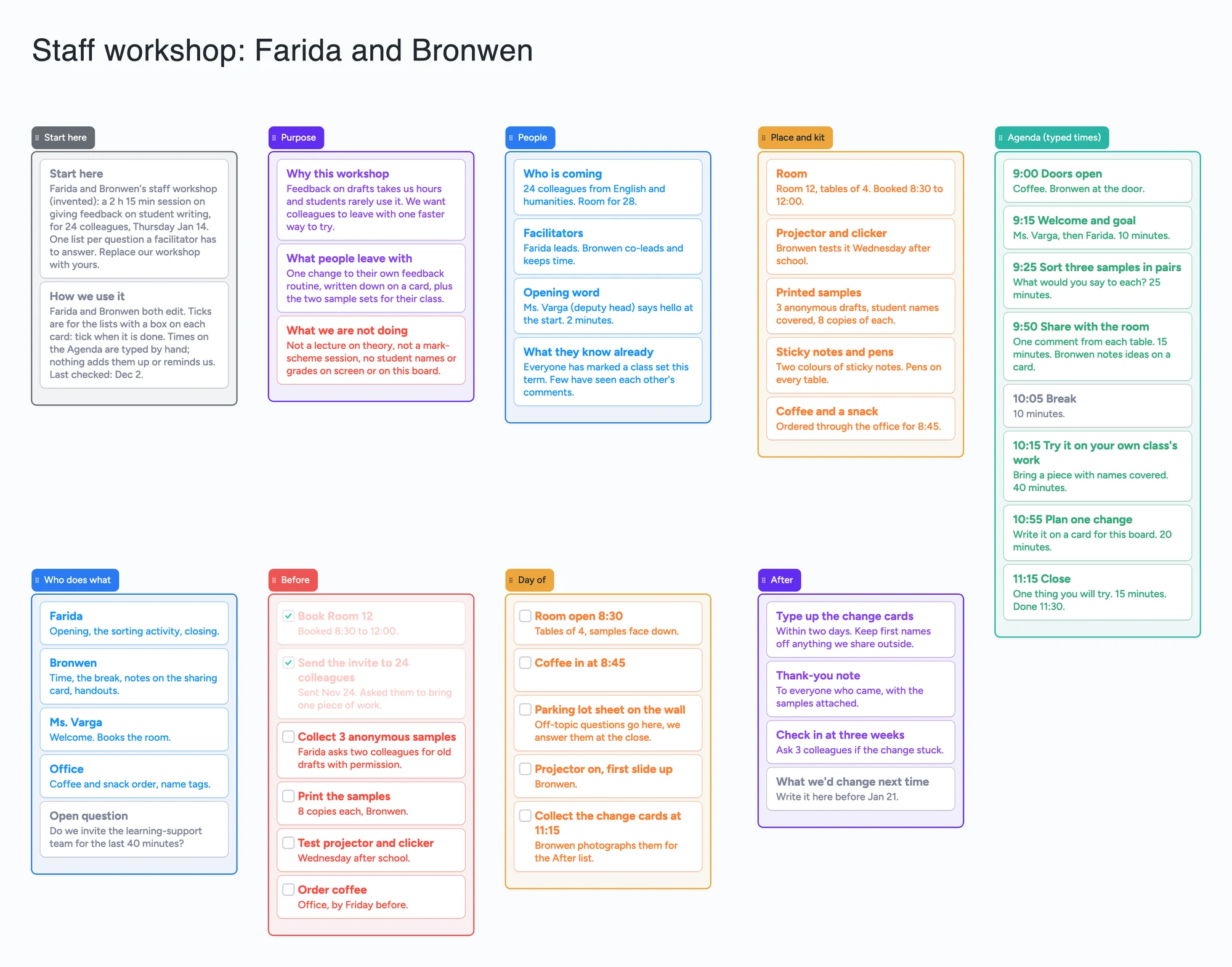
We make Instaboard, an online board for planning with other people. This page gives you a workshop plan already laid out on it, filled in for two invented colleagues, Farida and Bronwen, who run a 2 hour 15 minute staff session on giving feedback on student writing for 24 colleagues. Nine lists: why the workshop is happening, who is coming, the room and the kit, the agenda, who does what, then what to do before, on the day and after. Open it, swap our workshop for yours and send the link to your co-facilitator. It is a place to lay a plan out and read it together. The agenda times are text you type, nothing adds them up, nothing counts who has replied and nothing sends a reminder. If one person is running a one-hour session, a printed checklist is probably enough; the first section says when.
Opens in your browser. Anyone can view; a free sign-in lets you edit.
Updated
Read this first: what the board does and doesn't do
- What it is: one workshop on one screen. Each list answers one question a facilitator has to settle: why, who, where and with what, in what order, who does which job, and what happens before, on the day and after. Both of you can edit it, and the example uses 52 of your 150 free items.
- What it isn't: not a calendar or a booking tool, and it keeps no guest list of replies. The agenda times are typed text: nothing adds them up or warns you when a session runs over. "24 colleagues" is a number someone typed, not a count of replies. There are no reminders or due-date alerts and no budget sums, and your slides and handouts live elsewhere.
- Ticks: the Before and Day of lists have tick boxes. Anyone who can edit can tick or untick a card, and the board doesn't record who did or when.
- No student data: a board is shared by link. The example uses anonymous samples with names covered. Put no student names, grades or notes about a child on yours.
- Free plan: 5 boards, 150 items, 3 pictures per board. Copying the board takes 1 of your 5 boards. Writing on it needs a free sign-in. New boards start with "Anyone who joins can view". Pro adds invite-only boards and removes the item limit.
When a printed checklist is enough
Most workshop planning pages are checklists, and for one facilitator running a short session a checklist is the right tool: you print it, tick it and you are done. A shared board earns its place when two people plan the same session and each needs to see what the other has done, which is the case this page is built for. If you plan alone, or the workshop is small, skip the board.
- One facilitator: a printed or typed checklist does the job.
- A dated project with dependencies: a Gantt tool moves later tasks when an earlier one slips. The board doesn't.
- Replies and reminders: a form, an invitation tool or your calendar holds those; the board keeps only the number you type.
- Two facilitators who want one plan they both read and move: this board.
Farida and Bronwen's workshop, list by list
The workshop and every detail are invented. Farida and Bronwen teach at the same school, and the session is for 24 colleagues in English and humanities on Thursday, January 14. Read the board from the top left, across, then the second row.
- Start here. Two grey cards: what the workshop is, and how the two of them use the board, ending with a "last checked" date typed by hand.
- Purpose. Three cards: why it is happening (feedback on drafts takes hours and students rarely use it), what people leave with (one change to their own routine, written on a card), and what they are not doing (no lecture on theory, no mark scheme, no student names).
- People. Who is coming, who facilitates, who gives the opening word and what colleagues already know. The room holds 28, so 24 fits.
- Place and kit. The room and its booking, the projector, printed anonymous samples, sticky notes and the coffee order.
- Agenda. Eight cards, each with a typed start time: doors at 9:00, a 10-minute welcome, a 25-minute pair activity sorting three samples, 15 minutes sharing with the room, a 10-minute break, 40 minutes trying it on their own class's work, 20 minutes planning one change and a 15-minute close. They add up to 2 hours 15 minutes of workshop from 9:15 to 11:30; we added them by hand, the board did not.
- Who does what. One card for each of Farida, Bronwen, the deputy head and the school office, plus a grey Open question card that asks whether to invite the learning-support team for the last 40 minutes.
- Before, Day of and After. The three tick lists, covered below.
Nothing on the board is scheduled. "9:25" is part of a card's title, and moving a card does not change anyone's time.
Six questions a workshop plan answers
The layout borrows its questions from a workshop planning canvas published on Agile Alliance, written by Toby Sinclair (the page says it first appeared on Tasty Cupcakes and is licensed under Creative Commons Attribution 4.0; it shows no date of its own; read November 25, 2026). The page calls them the 6 P's of workshop preparation: Purpose, Practicalities, Participants, Products, Process and Principles, each with three questions. They ask why the workshop is happening and what follows if it doesn't; where and when it takes place, the room setup and the materials; who will be there, their role and their needs; the inputs to the session, what to prepare beforehand and what you will leave with; the agenda, the steps that meet the purpose and when the breaks are; and "We work best when…", how decisions are made and what the workshop values are. The summary is ours; the author has not seen our board.
| Canvas heading | Where it sits on Farida and Bronwen's board |
|---|---|
| Purpose | The Purpose list, three cards |
| Practicalities | Place and kit: room, projector, samples, sticky notes, coffee |
| Participants | People: who is coming, who facilitates, what they know already |
| Products | The "What people leave with" card in Purpose, the printed samples in Place and kit, and the change cards collected at 11:15 |
| Process | Agenda, with the break written in as its own card |
| Principles | No list of its own on the example; the "How we use it" card says who edits, and the Parking lot card in Day of is the nearest thing to a working norm. Add a card if your group wants "we work best when" and decision rules written down |
Page read November 25, 2026: agilealliance.org/agile-games/the-ultimate-workshop-planning-template. Our mapping, not theirs.
Before, day of, after: the three lists
- Before: six cards with tick boxes: book the room, send the invite, collect three anonymous samples, print them, test the projector, order coffee. The first two are ticked on the example, so you can see what a ticked card looks like.
- Day of: five tick cards in the order they happen: room open at 8:30, coffee at 8:45, a parking lot sheet on the wall, projector on, collect the change cards at 11:15.
- After: four cards with no tick boxes: type up the change cards within two days, send a thank-you note, check in at three weeks and a grey card for what Farida and Bronwen would change next time.
Dates inside cards ("Wednesday after school", "before Jan 21") are typed text. Instaboard has due dates and a calendar view for lists, and this board does not use either; it also sends no reminders or due-date alerts, so Bronwen has to remember to test the projector.
If one of you is away: a plan someone else can run
A thread in r/facilitation (OP u/DriverVegetable2215, May 27, 2025; we read 16 comments in an archived copy) is about designing workshops for other people to run. u/Kbs4kts, who has worked as a facilitator, a designer and both, wrote that, when they were the facilitator receiving a program to deliver, they would get text-heavy slides and no run sheet and have to spend hours structuring the session, and that what they build when designing for others is a facilitator outline: a run sheet for a one-day or few-day workshop, the resources to bring, detailed activity instructions and the learning outcomes. They also described a case where a subject expert died and someone else had to cover the sessions with no materials at all.
A shared board is a light version of that run sheet: the agenda, the kit and who does what are already written where the second person can read them. It is not a facilitator guide, since activity instructions for each exercise belong in a document, but it means the colleague who steps in can find the room, the time and the cards.
What facilitators say about planning a workshop
From r/UXDesign, "How do you learn to facilitate workshops and meetings?" (OP u/Particular_Neck2936, June 15, 2025; we read 27 comments in an archived copy; this is a thread about design workshops at companies, not about school staff sessions, and each reply is one person's view). u/Valuable-Comparison7, the top reply (28 points in an archived copy), suggested sharing an agenda ahead of time that states the purpose and why it matters, with a link to the shared space, preparing a canvas for each step, timeboxing every group activity, using dot voting instead of in-the-moment debate and writing down what people say as they say it. u/jklionheart added that they keep a "Parking Lot" space for conversations that derail things, so those people know the topic won't be forgotten.
Two lessons for this board: purpose and the agenda come first, in plain cards both facilitators can read, and the Parking lot sheet gets its own tick card in Day of so it does not get forgotten.
How many workshops fit in 150 items?
Each card and each list is 1 of your 150 free items, across all your boards. The title text box counts too. Arrows, sections and pen strokes don't. Our arithmetic from the example:
- As built: 9 lists + 42 cards + 1 title = 52.
- Two workshops on one board: 2 x 51 + the one title = 103. A third would make 154, over 150.
- One workshop per board: 2 boards x 52 = 104 and 2 of your 5 free boards; a third is 156, over 150.
- Next term: copy the board and edit it. The copy takes 1 of your 5 boards, and its items count against the same 150.
- With Pro, the 150-item limit is removed.
What a board can't do
- Agenda times are only text. The board doesn't add them up, doesn't warn you that a session runs long and doesn't move later cards when one changes.
- No RSVP counts. "24 colleagues" is a number you typed. Use a form or an invitation tool for replies, and update the card by hand; the Notion listing above has a participant list with RSVP status.
- No reminders or due-date alerts. Nothing tells Bronwen the samples need printing.
- No budget sums. A coffee order is a card with text on it.
- No slides or handouts. Keep them in your usual place and link or name them on a card. A board takes 3 pictures and 1 file.
- Ticks don't say who or when. Anyone who can edit can tick or untick a card, so agree who ticks what.
- It is not private by default. New boards start with "Anyone who joins can view". Anyone with the link can read it; sign-in is only needed to write. Set it to "Anyone who joins can edit" only if your co-facilitator should write on it.
- A copy takes 1 of your 5 free boards, and writing needs a free sign-in. A copy keeps its ticks, so untick the Before and Day of cards when you reuse it.
Where other tools do this better
Read on November 25, 2026; plans and pages change, so check the page. A source date is printed only where a page shows one.
| Tool | What the page says | Better for |
|---|---|---|
| GanttPRO workshop planning checklist template (page shows no date) | Offers the checklist as an Excel download, a Google Sheet, or to edit in GanttPRO; lists dependencies with auto-scheduling, progress tracked from values you set, and an event budget estimated from cost values | Dated tasks that move when another slips, and a budget. We did not read its pricing |
| Notion "Training Workshop Planning Checklist" (marketplace listing; shows "Last updated last month") | The button reads "Purchase template for $9.00". The listing describes a tasks database in five stages, a budget tracker, a participant list with RSVP status and documents, plus a suggested timeline counted back from the workshop. We read the listing, not the template | Dated tasks, a budget and an RSVP list in a Notion workspace |
| Agile Alliance workshop planning canvas (page shows no date of its own) | A canvas with six headings and their questions, with a download link from the author | Thinking through a workshop on one page before you plan the details |
| Google Docs, Sheets or a printed checklist | Not read for this page | One facilitator, a short session, or a facilitator guide with activity instructions |
| Instaboard board | 5 boards, 150 items, 3 pictures per board on the free plan | Two facilitators reading and moving one plan with one link |
Swipe the table sideways to see every column.
Pages read November 25, 2026: ganttpro.com/workshop-planning-checklist-template, notion.com/templates/training-workshop-planning-checklist, agilealliance.org/agile-games/the-ultimate-workshop-planning-template. Our wording, not theirs.
Where these win
If you need dates that move, a budget or reply counts, use a Gantt tool or a form. If you are on your own, a checklist is enough. Use this board when two facilitators want to plan one session together, see the same list of jobs and tick things off, with a link in place of an attachment.
How to use it, in about half an hour
- Open the board and sign in free when it asks you to write. Replace our workshop with yours and delete any list you don't need.
- Write Purpose first, before anything else: why it is happening, what people leave with and what you are not doing.
- Fill People and Place and kit, then lay out the Agenda with a typed start time on each card. Add the minutes up by hand.
- Split the jobs: one card per person in Who does what, and put your open questions on a grey card.
- Fill Before and Day of with the things that have to happen, in the order they happen, and tick them as you go.
- Send the link. Set Share to "Anyone who joins can edit" if your co-facilitator should write on it, or leave it on view if they should only read. Each person who writes signs in free.
- After the workshop, fill the After cards the same week and write what you would change on the last card.
Start from the ready board
It opens in your browser in a few seconds, with nothing to install. Sign in for free when you want to save it and share it.
Questions
What goes in a workshop planning checklist?
The sources we read agree on the same few things: the purpose, who is coming, the place and kit, the agenda with its breaks, who does which job, and what happens before, on the day and after. The board has one list for each.
Can two facilitators plan one workshop on the same board?
Yes. New boards start with "Anyone who joins can view", so anyone with the link can read it. Set it to "Anyone who joins can edit" if your co-facilitator should write too; each person who writes signs in free. Put no student names or grades on it.
Does the board keep the agenda to time?
No. The times are text you type, nothing adds them up and nothing warns you that a session is running long. Add the minutes by hand, as Farida and Bronwen did, or use a timer on your phone.
Can I use it to count who is coming?
Not on its own. The board has no RSVP tool, so the number of guests is something you type onto a card. Use a form or an invitation tool for the replies and update the card.
How many workshops fit on the free plan?
The example is one workshop and 52 of your 150 free items. Two on one board is about 103 and three is about 154, over the limit; two boards is about 104 and a third would be 156 (our arithmetic). Copying a workshop takes 1 of your 5 free boards.
Is Instaboard free?
There is a free plan: 5 boards, 150 cards and items across your account (pen strokes, arrows and sections don't count), and 3 pictures and 1 file per board. Anyone with the link can read a board; writing on it takes a free sign-in. Pro removes the item limit and adds invite-only boards: $5 a month billed yearly ($59.99 a year), or $7.99 monthly.
Sources
- Agile Alliance: The Ultimate Workshop Planning Template, by Toby Sinclair (page shows no date; CC BY 4.0 per the page; read November 25, 2026)
- GanttPRO: Workshop Planning Checklist Template (page shows no date; read November 25, 2026)
- Notion Marketplace: Training Workshop Planning Checklist (listing; shows "Last updated last month" and a $9.00 button; read in a browser November 25, 2026)
- r/facilitation: Designing workshops for others to run, have you done it? (OP u/DriverVegetable2215, May 27, 2025; replies are single accounts, 16 comments read in an archived copy November 25, 2026)
- r/UXDesign: How do you learn to facilitate workshops and meetings? (OP u/Particular_Neck2936, June 15, 2025; replies are single accounts, 27 comments read in an archived copy November 25, 2026)