For a free Trello Workspace that says it is full
Trello's free plan limit: who counts toward the 10 collaborators, and how to free a seat
A free Trello Workspace holds up to 10 collaborators, and the count is per Workspace, not per board. Members, guests and people you invited who never signed up all count. If you have 9 or 10 people, stay on Trello Free and clear the stale invites. If you really need more than 10 people editing, you pay or move. We make Instaboard, and this page gives you a board that counts your people.
Opens in your browser. Anyone can view; a free sign-in lets you edit.
Updated
The short answer
- The rule: a free Trello Workspace is limited to 10 collaborators. A collaborator is anyone invited to a board in the Workspace or to the Workspace itself (Trello Help, Collaborator limit for free Workspaces, read November 24, 2026).
- What counts: Workspace members, Workspace guests (single-board and multi-board) and pending board and Workspace invites. People only on closed boards and deactivated accounts don't count.
- Why it feels like 9: Trello's pages never mention 9. The one community answer reads it as the person who made the Workspace taking one of the ten, since every member counts.
- Over the limit: Trello says the Workspace's boards become view-only, no new collaborators can be added, and automations stop. Standard is $5 per user a month billed annually (Trello's pricing page, read November 24, 2026).
- Instaboard Free has no editor limit, but it has its own: 5 boards, 150 items across your account, 3 pictures per board. Pro removes the item limit and the picture limit.
Who counts, in Trello's own words
Trello's help page says "A collaborator is anyone who's been invited to a board in your Workspace or the Workspace itself" and lists Workspace members, Workspace guests ("board members who aren't members of your Workspace", single-board and multi-board) and pending board and Workspace invites. It does not count "anyone who's only a member of closed boards", deactivated accounts or deactivated Workspace members. A join request counts only once you approve it, unless that person is already on another board (Trello Help, read November 24, 2026; the page shows no date).
- Per Workspace. The help page says the limit applies to the Workspace "rather than the board itself", so a board with 6 people can still show the notice if another board in the same Workspace has more.
- Pending invites count. Trello's "What's a virtual user?" page says someone shown as Invited is a placeholder account that counts as a collaborator until they finish signing up.
- Invite links count, and they travel. The shareable-link page says "Anyone you invite to your Boards or Workspaces counts as a Collaborator" and that anyone with the link joins automatically, even if the link was forwarded.
- You can see the count, if you are an admin. The Workspace's Members page shows it in the sidebar. On a free Workspace every member is an admin; guests aren't.
Atlassian's community forum has the same question. In a November 2026 thread a student group's organiser could add only 9 people. One community answer (from an Atlassian Community Champion), a single person's reading and not Trello's, said the creator takes one of the ten and that stale pending invites can hold seats that the Members page doesn't show.
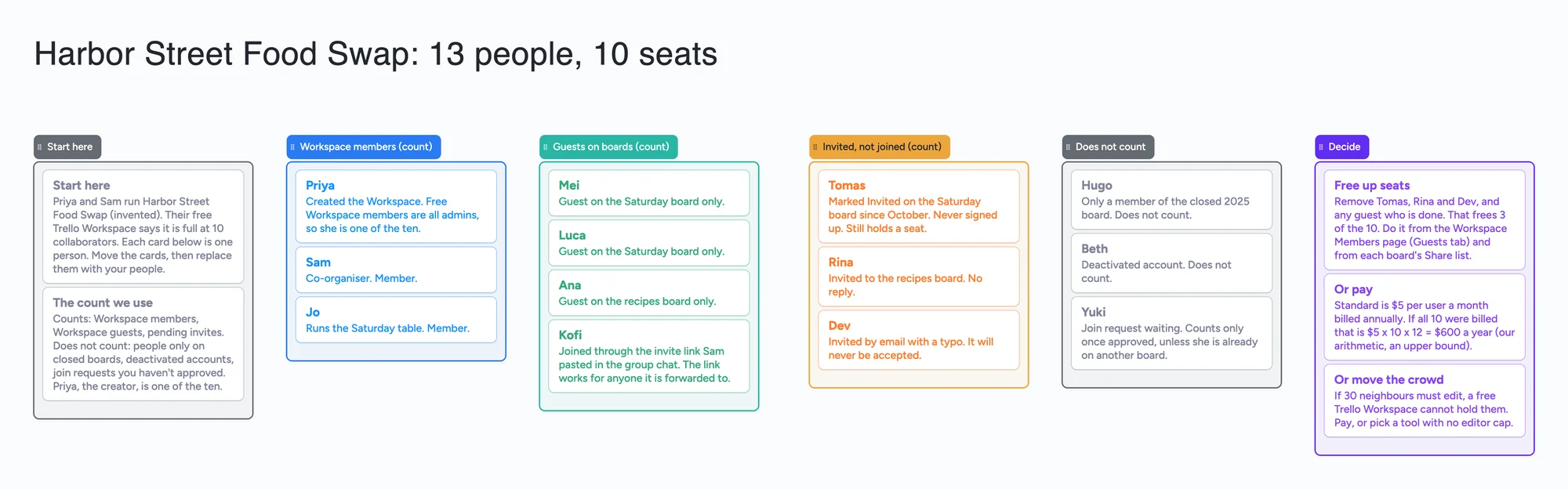
Harbor Street Food Swap: 13 people, 10 seats
The example is invented. Priya and Sam run a neighbourhood food swap on a free Workspace, and 13 names are tied to it. Each card on the board is one person, and each list is one rule.
| List | Who is in it | Counts toward 10? |
|---|---|---|
| Workspace members (blue) | Priya, Sam, Jo | Yes, 3 |
| Guests on boards (green) | Mei, Luca, Ana, and Kofi, who came in through a forwarded invite link | Yes, 4 |
| Invited, not joined (orange) | Tomas (never signed up), Rina (no reply), Dev (email with a typo) | Yes, 3 |
| Does not count (grey) | Hugo (closed 2025 board only), Beth (deactivated), Yuki (join request not yet approved) | No |
| Decide (purple) | Free up seats, or pay, or move the crowd | - |
Swipe the table sideways to see every column.
Names and counts are made up. A card is a note about a person; it doesn't connect to Trello. Our arithmetic: 3 + 4 + 3 = 10 counted, 3 not counted, 13 names.
The useful move is the order. Count the orange list first: the three invites that never turned into people hold 3 of the 10 seats and cost nothing to remove.
How to free a seat on Trello Free
From Trello's "Remove a collaborator from a free Workspace" page (read November 24, 2026):
- Members: the Workspace's Members page, find the person, Remove, then Remove from Workspace.
- Guests: the same page, Guests tab, Remove, then Remove from Workspace.
- Side effect: removing someone from the Workspace removes them from every board in it. If they were the only admin of a private board and no Workspace member is left on it, Trello closes that board instead; members of closed boards don't count, and closed boards don't count toward the 10-board limit either.
- Pending invites: Trello's virtual-user page says they show as Invited; per the community answer, they show on each board and not on the Workspace Members page. Remove them from each board's Share list.
- Invite links: a link you no longer want can be deleted from the board's Share menu; a link made by a member stops working when that member loses invitation permission.
At exactly 10, Trello's page says you can't add new collaborators, though you can add and remove existing ones. It says the boards turn view-only when the Workspace has "more than 10".
The other free limit: 10 open boards
Trello's "Why can't I create a board?" page says a free Workspace has "a limit of 10 boards open at a time", that closed boards are "essentially archived" and can be reopened if there is room, and that Standard and Premium allow unlimited boards. Trello's pricing page lists "Up to 10 boards per Workspace" on Free and unlimited cards. For one person that is more room than Instaboard Free's 5 boards and 150 items.
Pay, free seats, or move: the arithmetic
Standard is $5 per user a month billed annually ($6 billed monthly), and Premium is $10 ($12.50 monthly), per Trello's pricing page, read November 24, 2026. It lists unlimited Workspace collaborators on the paid plans. Trello's help says multi-board guests are billed like members on Standard and Premium, and points to a separate page for free single-board guests. Our arithmetic at the yearly Standard price:
- 3 billed users (the three Workspace members): $5 x 3 x 12 = $180 a year.
- 5 billed users: $5 x 5 x 12 = $300 a year.
- 10 billed users, upper bound if every collaborator were billed: $5 x 10 x 12 = $600 a year.
Clearing stale invites is the right call when the real group is 10 people or fewer. Paying is the right call when 11 or more people need to edit and you want Trello's cards, due dates and automations. Neither helps if you are a group of 30 that just wants everyone to tick things off.
When Trello is simply the better choice
- You are 10 people or fewer. Trello Free lists unlimited cards, 10 boards per Workspace, assignee and due dates, and an Inbox. Instaboard has no due dates or reminders.
- You want automation. Trello's pricing page lists 250 Workspace command runs a month on Free and unlimited Power-Ups per board. Instaboard has no automation or integrations.
- You run a repeatable workflow. A content pipeline, a sprint, a client tracker: kanban columns with the same stages every time.
- You want calendar, timeline or table views. Trello's pricing page lists them on Premium. Instaboard has none of the three as views.
- You need a desktop app or JSON export, which Trello has and Instaboard doesn't.
What Instaboard's free plan does instead, and where it also stops
| Trello Free | Instaboard Free | |
|---|---|---|
| Who can edit | Up to 10 collaborators per Workspace, counting guests and pending invites | No limit on collaborators; editing needs a free sign-in |
| Boards | Up to 10 open boards per Workspace | 5 in your own list; a board you open from someone's link counts as 1 of your 5 |
| Content | Unlimited cards | 150 items across your account (cards, lists, text boxes and pictures count; pen strokes, arrows and sections don't); 3 pictures and 1 file per board |
| Due dates and assignees | Listed on Free | Assign people with @ on a card; no due dates, no reminders |
| Paid price | Standard $5 per user a month billed annually | Pro $5 a month billed yearly ($59.99 a year), or $7.99 monthly; invited people join free |
Swipe the table sideways to see every column.
Trello facts from trello.com/pricing and Atlassian's Trello help center, read November 24, 2026. Instaboard facts are ours.
A free Instaboard account stops too: at 5 boards you can't create a sixth, though a shared link still opens. Pro removes the item limit and the picture limit. For the full side-by-side, see Trello alternatives for families, classes and groups over 10.
Does your list of people fit in 150 items?
A seat-counting board is small. Our arithmetic from Harbor Street's board:
- As built: 6 lists + 18 cards + the title text box = 25.
- A group of 60 names: 60 person cards + 2 start cards + 6 lists + the title = 69.
- Room left: 150 minus the 9 fixed items (2 start cards, 6 lists, the title) leaves 141 person cards on one board, if it is your only board.
If you use Instaboard for real work boards as well, they share the same 150.
What this board can't do
- Connect to Trello. It doesn't read your Workspace or tell you who counts. You type the names.
- Move a Trello board over. There is no Trello import. Trello exports JSON, which Instaboard can't read, so you'd retype your lists.
- Remind you. No reminders, due dates or alerts.
- Add up the count. No totals; you count the cards by eye, or by the list titles.
- Keep it private. A board shared by link isn't private; don't put full names or emails you wouldn't share.
Set up your own, in order
- Open the board and replace Priya and Sam's names. Delete their cards as you go.
- Open the Workspace's Members page in Trello (you must be an admin) and read the collaborator number in the sidebar.
- Add one card per person, using the Members page and each board's Share list. Put Invited people in the orange list.
- Check the total against the sidebar. If the two differ, a pending invite or a link joiner is the usual reason.
- Free seats first: remove stale invites, then guests who are done.
- Fill the Decide list with your headcount and the price from Trello's page, then pick.
Start from the ready board
It opens in your browser in a few seconds, with nothing to install. Sign in for free when you want to save it and share it.
Questions
How many people can use a free Trello Workspace?
Up to 10 collaborators per Workspace, according to Trello's pricing page and its collaborator-limit help page (read November 24, 2026). Members, guests and pending invites all count.
Why can I only add 9 people to a free Trello board?
The Workspace's creator takes one of the ten, because every member of a free Workspace counts. Pending invites and people who joined by an invite link count too, and the limit is for the whole Workspace, not one board. One community answer gave the same reading; Trello's page doesn't spell out the 9.
Do pending invites count toward Trello's 10-collaborator limit?
Yes. Trello's help lists pending board and Workspace invites as collaborators, and its virtual-user page says a person shown as Invited counts until they sign up.
What happens when a free Trello Workspace goes over 10 collaborators?
Per Trello's help, the Workspace's boards become view-only, you can't add new collaborators, and automations stop running until you remove people or upgrade.
Do people on closed boards count toward the Trello limit?
No. Trello's help says anyone who is only a member of closed boards doesn't count, and neither do deactivated accounts.
What does Instaboard's free plan give me instead?
No cap on how many people edit, with a free sign-in to write and no account needed to view. It has 5 boards, 150 items across your account and 3 pictures per board. Pro removes the item limit and the picture limit. Instaboard has no due dates, reminders or integrations.
Sources
- Trello Help: Collaborator limit for free Workspaces (who counts, who doesn't, what happens over the limit; read November 24, 2026; page shows no date)
- Trello Help: Remove a collaborator from a free Workspace (read November 24, 2026)
- Trello Help: What's a virtual user? (Invited people count as collaborators; read November 24, 2026)
- Trello Help: Invite people with a shareable link (read November 24, 2026)
- Trello Help: Why can't I create a board? (10 open boards on a free Workspace; read November 24, 2026)
- Trello Help: Multi-board guests (billing on Standard and Premium; read November 24, 2026)
- Trello: pricing (Free up to 10 collaborators and 10 boards per Workspace; Standard $5 per user a month billed annually; read November 24, 2026)
- Atlassian Community: Allegedly 10 Free Members on Trello Board, Only Allowed to Add 9 (November 2026; one volunteer's reading; read November 24, 2026)