For a small shop that rents out gear and checks it back in at a desk
Equipment rental return checklist: one shared board for the return desk
When a rented item comes back across the counter, someone has to decide whether it is ready for the next booking. This is a board for that moment, filled in for an invented shop, Thornbury Gear Rental, where Maeve runs the return desk and Reuben, Dorothea and Fionn help. It has eleven lists: Start here, At the counter, Test it, Parts and accessories, Look it over, If something is wrong, Clean and reset, Back on the shelf, Notes from today, Keep off this board and Set it up for your shop. We make Instaboard, an online board. The board keeps no record of who checked what: a tick shows no name and no time, anyone with edit access can un-tick it, and nothing alerts anyone that an item is due back. It holds no deposits, no charges, no customer details and no damage photos. Where a form, an app or a phone video does more, we say so below.
Opens in your browser. Anyone can view; a free sign-in lets you edit.
Updated
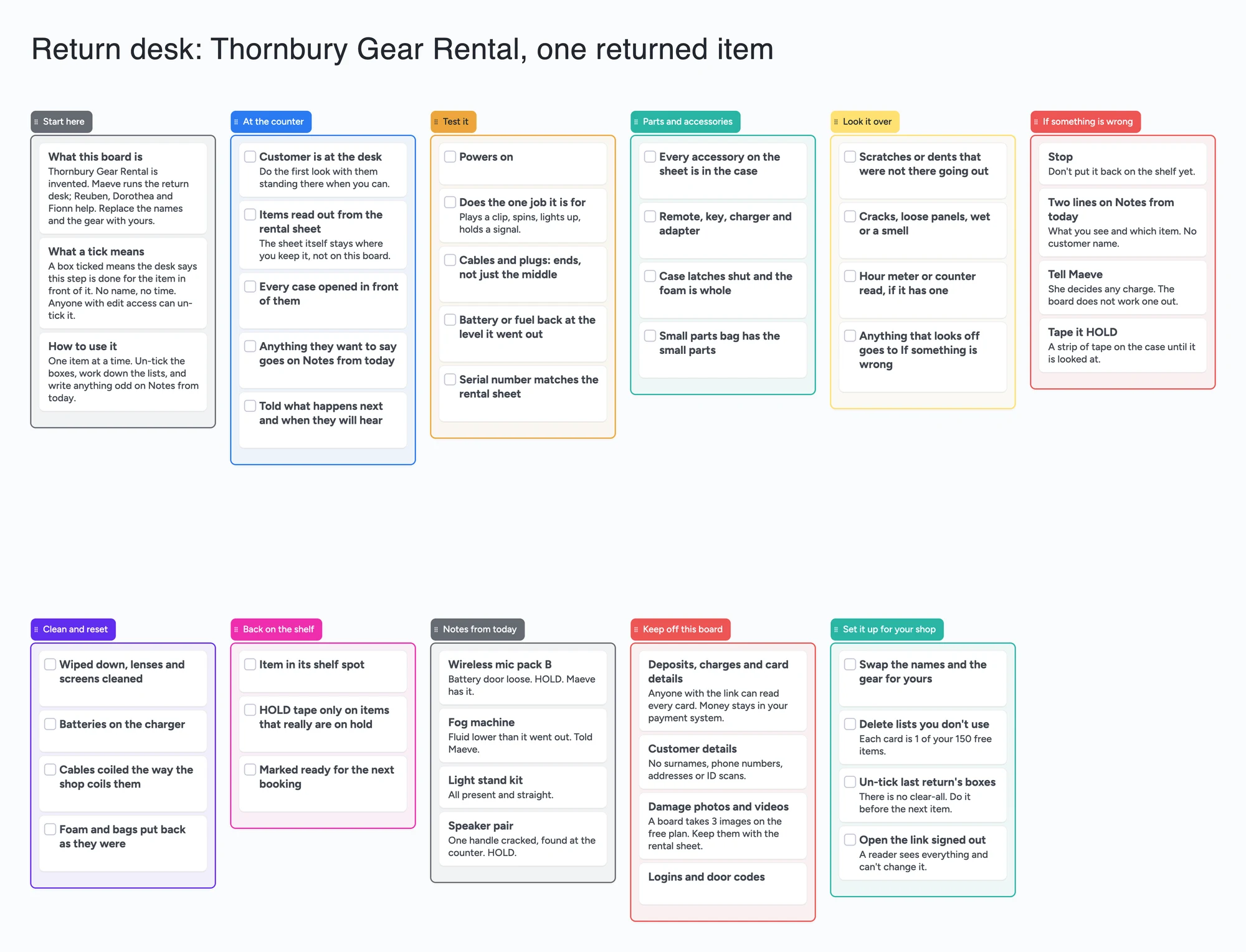
Where this board stops: one returned item at a time, and no money, names or photos
- What it covers: the return desk for one item at a time, in the order the desk works: the counter, a test, parts and accessories, a look over, what to do when something is wrong, cleaning and back on the shelf. The shop is invented and every name is a first name.
- What it leaves out: your inventory, your bookings, your rental agreement and your prices. It does not work out a charge, and nothing tells anyone that an item is due back.
- What a tick means: the desk's own note that a step is done for the item in front of it. No name, no time; anyone with edit access can un-tick it.
- Your plan: the example is 56 of your 150 free items (44 cards, 11 lists and 1 title text box, our count). Arrows and pen strokes don't count. A copy takes 1 of your 5 boards. Writing needs a free sign-in; a reader can open the link signed out and can't change anything.
What the desk checks, and in what order
Two sources describe a return check, and both are written for the people who rent out gear. Miratag, a checklist-software vendor, has an Equipment Rental Return Inspection Checklist of "30 items" and "10–15 min" (no date printed on the page; its instruction line says "Complete with the customer present whenever possible. Photograph any damage before the customer leaves. Attach photos to this form."). Anaïs's Equipment Return & Inspection Checklist, a template in Notion's gallery (its page links the creator's own store; it shows "Last updated 2 months ago"), says each returned item gets "its own quick inspection: power test, function test, cables, case, accessories, and serial number, plus overall condition and any damage found."
The board takes the same order and puts it in lists you work down from left to right:
- At the counter (5 cards). The customer is at the desk, the items are read out from the rental sheet, every case is opened in front of them, anything they want to say goes on Notes from today, and they are told what happens next.
- Test it (5 cards). It powers on, it does the one job it is for, the cables are checked at the ends, battery or fuel is back at the level it went out with, and the serial number matches the sheet.
- Parts and accessories (4 cards). Every accessory on the sheet is in the case, the remote, key, charger and adapter are there, the case latches and the foam is whole, and the small parts bag has the small parts.
- Look it over (4 cards). Scratches or dents that were not there going out, cracks or loose panels, a wet or smelly case, and the hour meter or counter, if it has one.
- Clean and reset (4 cards), then Back on the shelf (3 cards). Wiped down, batteries on the charger, cables coiled the way your shop coils them, the item in its spot and marked ready for the next booking.
A booking with several items goes through the same lists once per item. Un-tick the boxes between items, or write one line per item on Notes from today.
With the customer standing there, or without
Miratag's line, with the customer present and photos taken, is close to what people who answer rental owners on Reddit say. In r/smallbusiness, a thread titled "Equipment rental owners: how do you handle deposits and damage disputes?" (posted 2026-11-16 UTC by someone who runs a small rental business in Jamaica; Reddit shows 25 comments; the archived copy we read has 15, including AutoModerator's reminder and a reply by the poster, none removed) draws these replies, each one account's view:
- u/gradyandersen: "a quick phone video walkaround with the customer standing there at pickup and again at return beats any checklist, because there's nothing left to argue about."
- u/DogmaticParadigm87: "Go through the checklist and take photos together with the customer at pickup, then have them sign it."
- u/techChanger suggests "agreeing on what damage costs before anything goes out" and "A one-page sheet per item type with set charges" that the customer signs with the rental form.
Three accounts (u/gradyandersen, u/brandhacker and u/Fiko_Zouhaer55) put a video walkaround ahead of a checklist, and others say to use photos and a checklist together. The board takes no side. It is the checklist half: the first card in At the counter says to do the first look with the customer standing there when you can, and every case is opened in front of them. It stores no video, no photo and no signature, and it has no price sheet. Those stay with your rental sheet.
What a photo won't show: the meter, the fuel and the charge
u/dbl0207, in the same thread, writes "Record the hour meter or fuel level for powered gear at both ends, since photos won't show that." and "Write down a small wear allowance, so tiny scuffs are absorbed and never argued over." PDQ Equipment, a construction-equipment rental company, makes the same point from the customer's side in a guide to returning a rented machine (no date printed in the text we read; the guide says it is "still an ad"): "Photograph the hour meter when the machine arrives and again when you call it off rent." It also says to return a machine "at the fuel level it came with". That guide is about mini excavators and scissor lifts returned by contractors, not a small desk checking in cameras or speakers, and we take only the meter and the fuel idea from it.
Two of the board's cards are those: Hour meter or counter read, if it has one (in Look it over) and Battery or fuel back at the level it went out (in Test it). The board has no field for the number. A reading you want to keep goes on Notes from today or on the rental sheet. The wear allowance is yours to write down, and it isn't on the board.
When something is wrong, the desk stops and hands it up
The If something is wrong list has four cards without tick boxes: stop and don't put it back on the shelf yet; write two lines on Notes from today (what you see and which item, with no customer name); tell Maeve, who decides any charge; and tape it HOLD until it is looked at. The Notes from today list in the example has four lines in it: a wireless mic pack with a loose battery door, a fog machine low on fluid, a light stand kit that is all present, and a speaker pair with one cracked handle.
The board doesn't work out a charge, store a repair estimate or say who pays. The Notion template does have somewhere for that: its page says "If something's damaged, note it down with an estimated repair cost and customer charge." If you want that in one place per item, a database does it; this board does not.
Which tool does which job
Each row is that page's own description, read November 26, 2026. We are not affiliated with any of them, and plans and prices can change.
| Option | What its own page says | Better than this board for | Where this board differs |
|---|---|---|---|
| Miratag Equipment Rental Return Inspection Checklist (a vendor) | "30 items", "10–15 min"; "Photograph any damage before the customer leaves. Attach photos to this form."; Download PDF or Use in App | A form with the photos attached and a printed copy | Here: no photos on the board and no form to print |
| Equipment Return & Inspection Checklist by Anaïs (a Notion template) | Views named All Returns, Needs Attention, Damage Found and Ready to Rent; "an estimated repair cost and customer charge" for damage | A record of every returned item, with views and a cost field | Here: no database, no views and no cost field; one item at a time |
| A phone video walkaround (what u/gradyandersen describes) | "at pickup and again at return", with "the customer standing there" | Proof of how the item looked | Here: the board records nothing |
Swipe the table sideways to see every column.
From each page and thread, read November 26, 2026. Miratag sells checklist software; the Notion template is a listing in Notion's own gallery.
Where these win
If you need a record of each item's condition and its photos, use a form with photos or a database. If you want proof against a dispute, take the video. Use this board when the people at the desk want one shared list of what to check and what to do next, which anyone with edit access can fix.
What never goes on a board that anyone with the link can read
New boards start as "Anyone who joins can view", and invite-only boards are a Pro feature. The Keep off this board list holds four things on purpose:
- Deposits, charges and card details. In r/sweatystartup (posted 2024-07-06 UTC), u/Philthy91, who says they run an event rental company, writes "I always have a card on file, even if they want to pay in cash." Where you keep the card is up to you; it is not on a card here.
- Customer details. No surnames, phone numbers, addresses or ID scans. The notes say which item, not whose.
- Damage photos and videos. A board holds 3 images on the free plan, and the example has none. Keep them with the rental sheet.
- Logins and door codes. Put them in a password manager.
Items, boards and un-ticking: fitting returns on the free plan
- Items. Each card, list and text box is 1 of your 150 free items, across all your boards. The example is 56. Arrows and pen strokes don't count. Pro removes the item limit ($5 a month billed yearly, $59.99 a year, or $7.99 monthly).
- More than one desk or shop. Our arithmetic: two copies are 112 items and three are 168, which passes 150 if nothing else is on your account. Each copy is also 1 of your 5 boards. Keep one board and work each item down it instead.
- Un-ticking. There is no clear-all button, and a copy keeps its ticks. The example has 29 tick boxes; un-tick them before the next item.
- No reminders or due-date alerts. Nothing tells the desk an item is due back.
- Not private by default. Anyone with the link can read every card.
- Writing needs a free sign-in. A reader can open the link signed out and can't change anything.
- Open the board and swap the names. Replace Thornbury Gear Rental's crew and its gear with yours.
- Edit the test and parts cards to match your gear. A lighting rental and a camera rental check different things.
- Delete the lists you don't use. A shop with no HOLD tape can lose that card.
- Read it as a stranger would, then open the link signed out. No names, no money, no codes.
Start from the ready board
It opens in your browser in a few seconds, with nothing to install. Sign in for free when you want to save it and share it.
Questions
Is there an equipment rental return checklist the whole desk can share?
Yes. Open the board, replace Thornbury Gear Rental's names and gear with yours and share the link. It holds the order of a return: the counter, a test, parts and accessories, a look over, what to do when something is wrong, cleaning and back on the shelf.
Can I put deposits, charges or customer details on the board?
No. Anyone with the link can read every card. Keep deposits, card details and customer names in your payment system and on the rental sheet, and put only the steps of the return on the board.
Can the board store damage photos or a signature?
No. The example has no images, a board holds 3 on the free plan, and nothing on it records a signature. Keep photos, videos and signed forms with your rental sheet.
Does it work out a charge for damage?
No. The If something is wrong list says to stop, write two lines, tell the person who decides and tape the item HOLD. The board adds nothing up and stores no repair estimate.
Does a tick show who checked an item?
No. A tick shows no name and no time, and anyone with edit access can un-tick it. It is the desk's own note that a step is done, not a record.
How many returns fit on the free plan?
Keep one board and work each item down it. The example is 56 items, so two copies are 112 and a third passes the 150 free items (our arithmetic), and each copy takes 1 of your 5 boards.
Sources
- Miratag: Equipment Rental Return Inspection Checklist (read November 26, 2026; no date printed on the page; a checklist-software vendor)
- Notion Marketplace: Equipment Return & Inspection Checklist by Anaïs (read November 26, 2026; page shows "Last updated 2 months ago")
- PDQ Equipment: Returning Rental Equipment Without Extra Charges (read November 26, 2026; no date printed in the text we read; a rental company's own guide)
- r/smallbusiness: Equipment rental owners: how do you handle deposits and damage disputes? (2026-11-16 UTC; read November 26, 2026; Reddit shows 25, the archived copy has 15 including AutoModerator and the poster's own reply, none removed; replies are single accounts)
- r/sweatystartup: How do rental companies process not returned-damaged products? (2024-07-06 UTC; read November 26, 2026; the archived copy has 7 comments, none removed; replies are single accounts)