For a student and a parent comparing schools they visit, not an application tracker
A college visit notes template: compare schools on one board
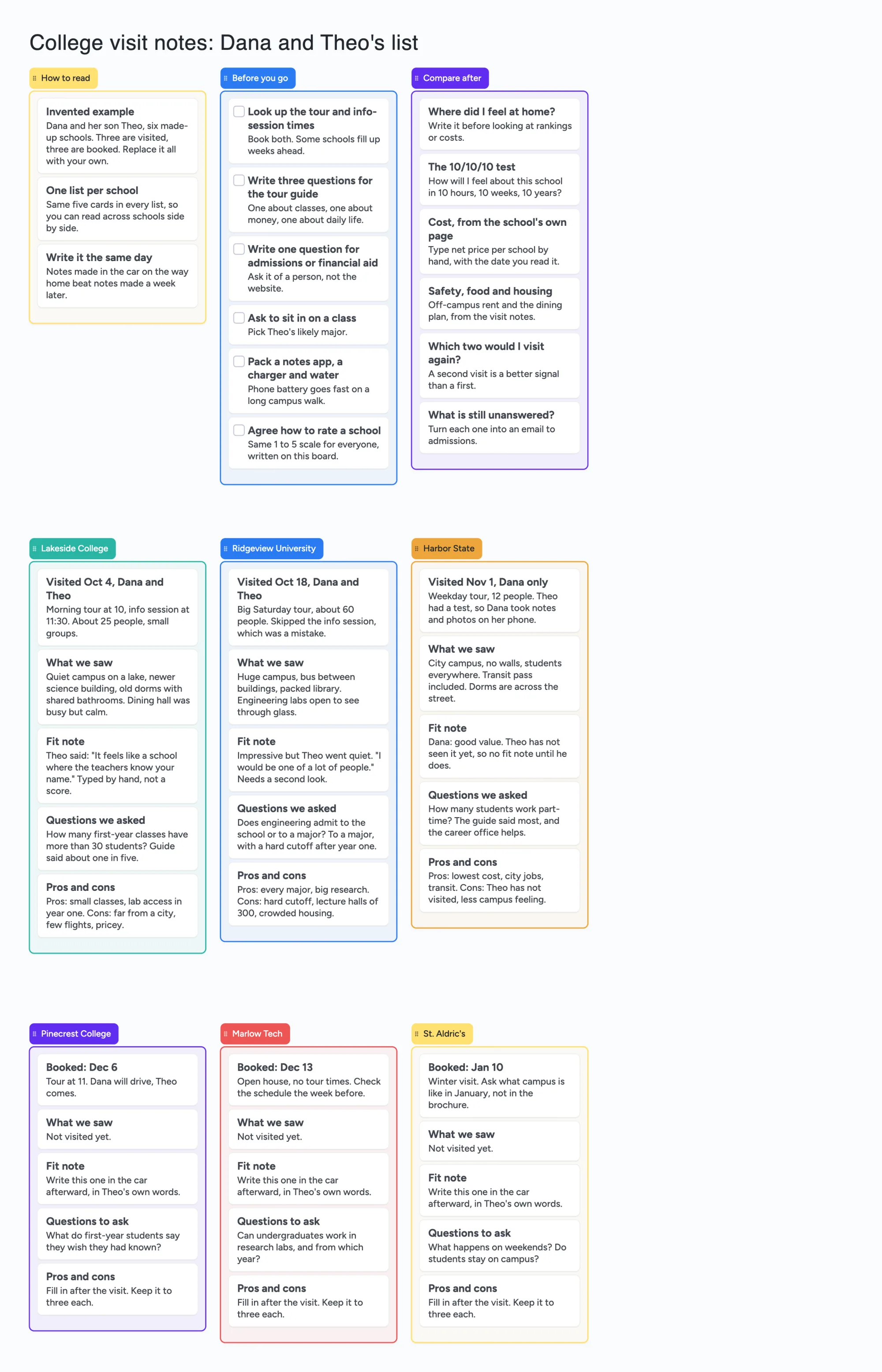
We make Instaboard, a free online board. This page gives you college visit notes already laid out on it, filled in for one invented pair, Dana and her son Theo, and six made-up schools: three visited, three booked. Each school gets its own list with the same five cards (the visit, what we saw, a fit note, questions, pros and cons), so you can read across schools side by side. A Before you go list and a Compare after list sit above them. Open it, write your own visits over theirs, and send the link to the other parent or to your student. It is a place to put notes, not a scorer: it adds nothing up, sets no deadlines and tracks no applications. If you are under 18, check with a parent or your school before you put your plans on a shared board.
Opens in your browser. Anyone can view; a free sign-in lets you edit.
Updated
Read this first: what the board does and doesn't do
- What it is: your notes from each campus visit on one screen, one list per school, the same five cards in each. The example uses 55 of your 150 free items.
- What it isn't: no score, no cost lookup, no map or route, no deadlines, no application tracker. Every figure on it is typed by hand, and the example says to write the date you read it.
- Where the questions come from: the board is a layout. For checklists and questions to ask, use the College Board and College Raptor pages below; this page says what each one covers. We are not affiliated with either.
- Free plan: 5 boards, 150 items, 3 pictures per board. Copying the board takes 1 of your 5 boards. Writing on it needs a free sign-in.
- Private? Not by default. New boards start with "Anyone who joins can view", so keep test scores, passwords, student ID numbers and anything you don't want shared off it. Pro adds invite-only boards: $5 a month billed yearly ($59.99 a year), or $7.99 monthly.
Dana and Theo's visits, worked through
The example is invented, including every school. Dana is a parent, Theo is her son and a senior. Here is what the three visited lists hold.
- Lakeside College, visited together. A small morning tour plus an info session. The fit note is Theo's own sentence, typed by hand: it feels like a school where the teachers know your name. The question they asked, how many first-year classes are over 30 students, has an answer written next to it (about one in five, from the guide).
- Ridgeview University, visited together. A big Saturday tour with about 60 people. They skipped the info session, and the card says that was a mistake. The fit note records that Theo went quiet, which is why it says needs a second look, not a verdict.
- Harbor State, Dana only. Theo had a test, so Dana took the notes. The fit note says there isn't one yet; Theo hasn't seen it. A card that says "not yet" is more honest than a guess.
- The three booked schools have a date and a question to ask. Their What we saw and Fit note cards say to write them in the car afterward, in Theo's own words, so the empty lists show what is still to do.
Nothing on the board is dated except what Dana writes in a card's words. The board has no calendar, so "Dec 6" is text she reads, not a reminder.
What to write down while you walk
Five cards per school is our layout. The ideas in them come from the guides and threads named on this page, in our own words.
- The visit: who came, which tour, how many people. A 12-person weekday tour and a 60-person Saturday tour are different experiences, and you won't remember which was which in March.
- What we saw: places, not adjectives. The dining hall, a dorm, the library, the neighbourhood outside the gate. The College Board checklist lists these (tour, residence halls, dining hall, library, career center, walking around the surrounding community).
- Fit note: one sentence in the student's words. The most useful version of this idea in the Reddit thread below is a "how I felt visiting" line next to a "vibe" line, not a number.
- Questions: what you asked, and the answer you got, with who gave it. Ask one of admissions or financial aid, not the tour guide only.
- Pros and cons: three each at most. If you can't stop at three, you probably haven't decided what matters yet.
Write the same day. The first card on the board says notes made in the car beat notes made a week later; that line is our advice, not a rule from any of the sources.
Comparing schools after the visits
The Compare after list has six one-line cards, each a question to answer by reading across the school lists:
- Where did I feel at home? Answer it before looking at rankings or costs.
- The 10/10/10 test: how will I feel about this school in 10 hours, 10 weeks, 10 years? In the Reddit post below the poster believes it came from another user.
- Cost, from the school's own page, typed by hand with the date you read it. The board does no sums.
- Safety, food and housing, from your visit notes. A commenter on the same post suggested adding these.
- Which two would I visit again? A second visit tells you more than a first.
- What is still unanswered? Turn each one into an email to admissions.
College Raptor's worksheet page also suggests scoring schools on a scale of 1 to 10. You can do that in a card's text; the board won't total it for you.
How many schools fit in 150 items?
Each card and each list is 1 of your 150 free items, across all your boards. The title text box counts too. Arrows, sections and pen strokes don't. Our arithmetic from the example's lists:
- As built: 9 lists + 45 cards + 1 title = 55 (the three front lists hold 15 cards, each of the six schools is 1 list and 5 cards).
- Ten schools: the front lists and title stay at 19 items, and 10 schools x 6 = 60, so 79.
- Twenty schools: 19 + 120 = 139. Twenty-one is 145; a twenty-second would go over 150 (our arithmetic).
- Two students, one board each: 2 x 55 = 110, and 2 of your 5 free boards.
- Pictures: the example has none. Free boards take 3 pictures each, so a photo of every dorm won't fit; write what you saw.
What a board can't do
- No scoring or totals. Fit notes, costs and ratings are text you type. Nothing is added, ranked or compared for you.
- No reminders and no due alerts. The board will not tell you a tour is on Saturday. Put the date in the calendar app you already use.
- No application tracker. Deadlines, essays and portals live elsewhere. This board is for the visit and the comparing, before you apply.
- No map, route or travel time. Use a maps app for the drive.
- No college data. It does not look up net price, acceptance rate or test ranges; type them from the school's own page, with the date.
- A copy takes 1 of your 5 free boards, and writing needs a free sign-in. A copy keeps its ticks, so untick the Before you go cards when you reuse it.
- It is not private by default. New boards start with "Anyone who joins can view". Anyone you give the link to can read; sign-in is only needed to write. Set it to "Anyone who joins can edit" only if the other parent or your student should write on it.
- 3 pictures per board.
Where other tools do this better
Read on November 22, 2026; plans and pages change, so check the page. None of these pages shows a date except where noted.
| Tool | What the page says | Better for |
|---|---|---|
| College Board blog: Campus Visit Checklist (post dated April 14, 2026) and BigFuture's campus tours guide (no date) | A checklist that covers gathering information (info session, interview, financial aid, sitting in a class, meeting a professor), exploring the campus (tour, students, residence halls, dining hall, library, career center, the surrounding community), and questions for guides, professors and the financial aid office. BigFuture says a college list of three or more colleges earns scholarship drawing entries | The questions to ask and the places to see, plus its college list and search |
| College Raptor's visit worksheet (page body shows no date) | A free Excel (.xlsx) comparison worksheet you can edit, plus a guide to formats (spreadsheet, one page per school, chart, a mix), comparison points (distance, size, facilities, major program, statistics, acceptance rate, extracurriculars) and scoring 1-10 | Columns you can sort and total, and a prefilled set of comparison points |
| Toured (App Store listing, no date shown) | Free with in-app purchases. Says it captures live tours with a timer and captioned photos, gives a Fit Score, compares up to 4 colleges, covers 6,000+ colleges, and lets parents follow up to 5 students; Premium unlocks unlimited visits and comparisons | Photos on the tour, a built-in score and cost compare in one phone app |
| Niche (niche.com/colleges) | College profiles with rankings, net price, acceptance rate and SAT range, with Compare and Add to List | Looking up the numbers on a school before you visit |
| Instaboard board | Free: 5 boards, 150 items, 3 pictures per board. Pro $5 a month billed yearly ($59.99 a year), or $7.99 monthly | A filled-in layout to copy and one link a parent and a student can both write on |
Swipe the table sideways to see every column.
From each page, read November 22, 2026: blog.collegeboard.org/campus-visit-checklist, bigfuture.collegeboard.org campus-visits-and-tours, collegeraptor.com create-college-visit-worksheet, apps.apple.com Toured id6759206267, niche.com/colleges. Our wording, not theirs.
Where these win
If you want a spreadsheet that totals and sorts, use College Raptor's worksheet or your own sheet. If you want photos and a score taken on the tour, try a tour app such as Toured. If you want the numbers on a school, look them up on its own page or on Niche. Use this board when a parent and a student want to read each other's notes side by side, in words, with one link.
What people say about keeping visit notes
From r/ApplyingToCollege, a thread asking for a thorough spreadsheet to finalize a college list (OP u/smileycat__, May 21, 2021; replies are one person's view each). u/knock_knock_hu_here shared their own Google Sheet with a link to make a copy. An unnamed deleted account wrote that you should make your own, because scores, cost and population are standard but some columns are personal. u/Professional-Double, u/jstruble69 and u/Plane_Bird4665 recommended Notion. u/sushint described pro and con lists, deadlines and demonstrated interest in their own sheet.
From a second r/ApplyingToCollege post, a visit-notes template (OP u/budgetant5, April 27, 2021; the OP says it was written in Google Docs). Each school gets Location, General Info, a "Bench test" of how they felt visiting, Vibe, the 10/10/10 test (asked where it came from, the OP wrote "I believe u/admissionsmom came up with it"), Major, Extra-Curriculars, Pros and Cons. u/AstroAnonymous suggested adding safety, off-campus food and housing costs; the OP replied "Added".
Two lessons for this board: the useful part is the same questions in the same order for every school, and several people in the first thread already use a sheet or Notion, so a board has to be better at reading notes side by side, not at adding numbers.
How to use it, in about half an hour
- Open the board and sign in free when it asks you to write. Replace the example school lists with yours; delete the ones you don't need.
- Fill Before you go for the first visit, and tick the cards as you do them. Change the questions to ones your family cares about.
- Agree the rating the board mentions, a 1 to 5 scale or just words, and write it on the card so both of you use the same one.
- Write each school's list the same day. The student writes the fit note in their own words; the parent takes the rest.
- Add a school by copying one list and renaming it, or by adding five cards in a new list.
- To share it, set Share to "Anyone who joins can edit" if one other person should write on it, or leave it on view if they should only read. Each person who writes signs in free.
- After the visits, answer Compare after one card at a time, reading across the schools.
Start from the ready board
It opens in your browser in a few seconds, with nothing to install. Sign in for free when you want to save it and share it.
Questions
What should I write down on a college visit?
The visit itself (who came, which tour, how big), what you saw, a one-sentence fit note in the student's words, the questions you asked and the answers, and a short pros and cons list. The College Board's campus visit checklist covers what to see and ask: tour, residence halls, dining hall, library, career center and the surrounding community, with sample questions for tour guides, professors and the financial aid office.
Is there a free college visit notes template I can use online?
Yes. Open the board, replace the example schools with yours and write on it after a free sign-in. It is a layout to copy, not a scorer: it adds nothing up. College Raptor also offers a free Excel worksheet if you want columns you can sort.
Can my parent and I both write on the same board?
Yes. New boards start with "Anyone who joins can view", so anyone with the link can read it. Set it to "Anyone who joins can edit" if the other person should write too; each person who writes signs in free. If you are under 18, check with a parent or your school before you put your plans on a shared board.
Does it remind me about tours or deadlines?
No. The board has no reminders, due alerts or calendar link. Put tour dates in the calendar app you already use. This board is for notes and comparing, not for applications.
How many schools fit on the free plan?
The example is six schools and 55 of your 150 free items, ten schools is 79, and twenty-one schools is 145 (our arithmetic). Arrows are free. Copying a fresh board takes 1 of your 5 free boards.
Is Instaboard free?
Yes. The free plan includes 5 boards, 150 cards and items across your account (pen strokes, arrows and sections don't count), 3 images and 1 file per board, unlimited collaborators and video calls up to an hour. Pro is $5 a month billed yearly ($59.99 a year), or $7.99 monthly, and the people you invite join free.
Sources
- College Board blog: Campus Visit Checklist (post dated April 14, 2026; read November 22, 2026)
- BigFuture: Complete Guide to Campus Tours (page shows no date; read November 22, 2026)
- College Raptor: How to make a college visit worksheet (page body shows no date; read November 22, 2026)
- Toured: College Visit Tracker, App Store listing (shows no date; read November 22, 2026)
- Niche: Colleges (page shows no date; read November 22, 2026)
- r/ApplyingToCollege: a thorough spreadsheet to finalize a college list (OP u/smileycat__, May 21, 2021; replies are single accounts, 25 of 82 comments loaded, read November 22, 2026)
- r/ApplyingToCollege: a college visit template (OP u/budgetant5, April 27, 2021; replies are single accounts, read November 22, 2026)
Related
A college application board: schools, essays, recommenders and deadlines in one place
Plan college applications on one shared board: reach, match and safe schools, essays, recommenders, deadlines and aid forms, with a parent or counselor able to read it. Free ready board.
How to study from lecture slides: your notes beside each slide
Put your lecture slides beside your own-words notes and a 'can't explain yet' card, then study with a group on one board. Free plan: 3 images per board.