For a small animation team tracking shots
An animation production tracker the director and every animator can see
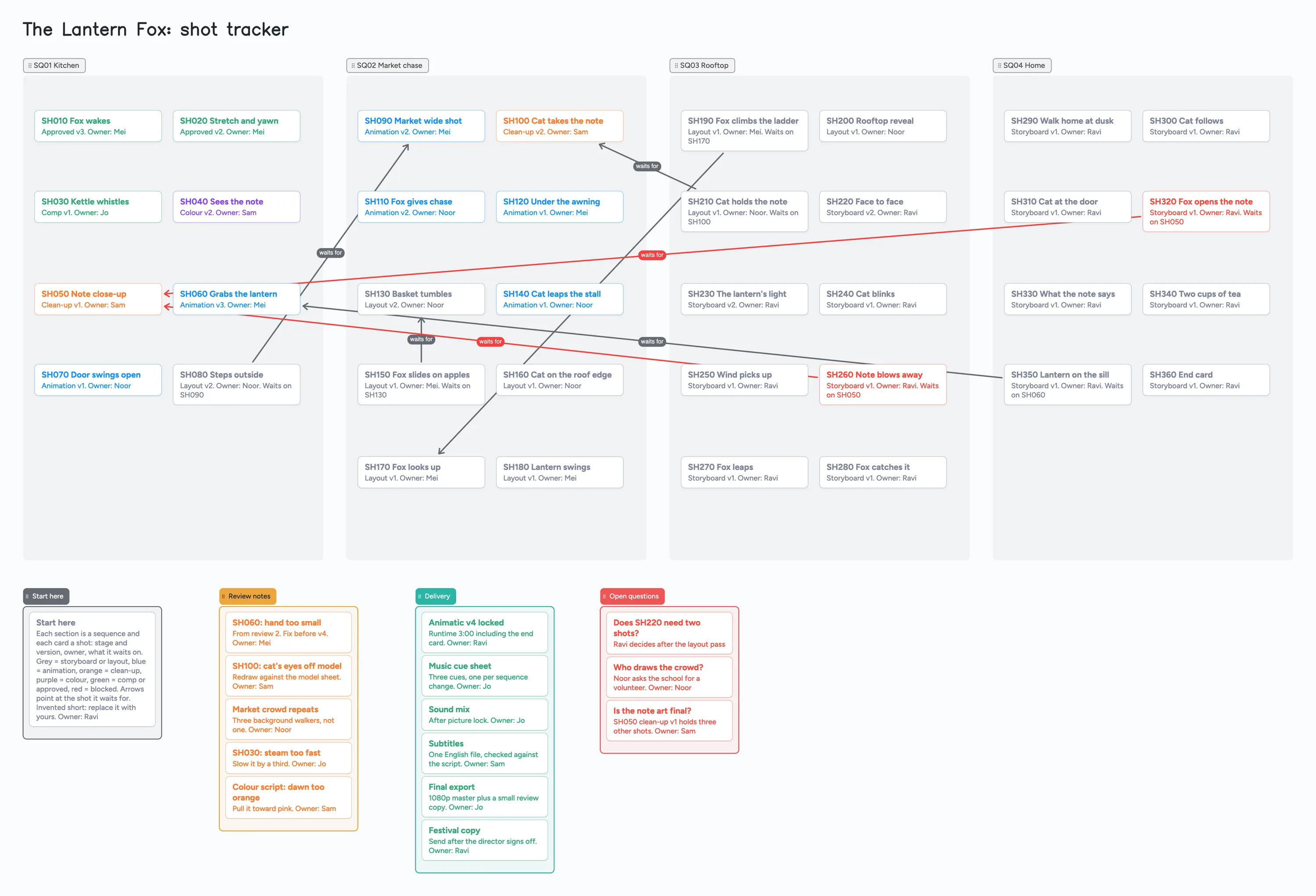
A small animation team (a director, a few animators, someone on colour and sound) keeps asking the same things: which shots are in layout, which are in animation or clean-up, who has each one, and which shot is waiting for another. This page shows that on one shared board: a section for each sequence, one card for every shot (stage, version, owner), arrows from a shot to the shot it waits for, and lists for review notes, delivery and open questions. The short in the example, "The Lantern Fox", is invented, so swap in your own. It is a tracker for the shot list and who owns what, not a review tool or a pipeline: it stores no frames or video and has no render, timeline or reminders. The tools in the table below do those jobs better.
Updated
The short answer
- What it is: a section per sequence, a card per shot (stage and version, owner, what it waits on), arrows from a blocked shot to the shot it waits for, and lists for review notes, delivery and open questions. Card colour shows the stage: grey for storyboard or layout, blue for animation, orange for clean-up, purple for colour, green for comp or approved, red for blocked.
- What it isn't: no frames or video, no player, no render tracking, no timeline axis, no reminders, no per-shot version history. The version is a word on the card, for example "Animation v2". Nobody is told when a card changes.
- The example uses 55 of your 150 free items: 36 shot cards, 15 other cards and 4 lists (our arithmetic). Each card and each list counts; sections, arrows and pen strokes don't. A longer short of 120 shots would use about 139 on its own, so it fills the free plan.
- Every card names an owner. Set the link to edit (new boards start view-only) and have each person sign in free to write.
What this board can't do for an animation team
- No frames or video. A free board holds 3 images and 1 file, so a shot card is text. Put a link to your review copy or shared folder in a card and name the version there. The example has no images.
- No version history. "Animation v2" is typed on the card. The board doesn't keep v1 for you or compare versions.
- No timeline axis and no reminders. A card says what a shot waits for, not when. Nothing flags a shot that has sat in layout for a week, and nobody is told when a card changes. Dates, if you want them, are words on a card.
- No per-stage sorting or counts. Colour is the card's border and text, set by hand. The board doesn't total how many shots are in clean-up.
- An arrow is only a line. An arrow joins a card in one section to a card in another, takes a caption and its own colour, and stays attached when a card is reordered or a section moves. It doesn't know whether the shot it points at is finished.
- 150 items on the free plan, across your account. The example is 55. The arithmetic for a longer short is below. Pro is $5 a month billed yearly ($59.99 a year) and removes the item limit.
- 5 boards and 3 images per board on the free plan. An animator who opens your link uses 1 of their own 5 boards, and cards they add count toward their own 150.
How to track shots on one board
This is how the example board is used. The names, versions and runtime belong to the example.
- Make a section for each sequence. The example has Kitchen (8 shots), Market chase (10), Rooftop (10) and Home (8). A section is free and holds its cards, so you can rename it or move it with its shots.
- Add one card per shot. Bold title with the shot code ("SH060 Grabs the lantern"), then one line: stage and version, "Owner:" and a first name. The example writes "Animation v3. Owner: Mei".
- Colour the card by stage and change it when the shot moves on. Grey for storyboard or layout, blue for animation, orange for clean-up, purple for colour, green for comp or approved. Edit the stage line at the same time.
- Mark a blocked shot red and say what it waits for. Add "Waits on SH050" to the card and draw an arrow from the blocked shot to the shot it waits for, captioned "waits for". The example has seven such arrows, two of them red because those two shots are blocked by the same shot, SH050.
- Keep review notes in their own list. One card per note, with the shot code in the title and an owner on the card, for example "SH100: cat's eyes off model".
- Keep a delivery list and an open questions list. Delivery holds the animatic lock, music cue sheet, sound mix, subtitles and exports, each with an owner. Open questions hold anything nobody can answer yet, with who will decide.
On the working method, one commenter in r/animation (November 21, 2021), u/spacecad3ts, described an Excel sheet with every step for every shot printed on the wall. The board does the same job on screen, with the sheet's step column turned into card colour and a version word. That is one person's setup, not a standard.
How many shots fit on the free plan
- The example: 3 minutes, 36 shots in 4 sequences, plus 15 cards (1 Start here, 5 review notes, 6 delivery, 3 open questions) and 4 lists, which is 36 + 15 + 4 = 55 items (our arithmetic).
- A longer short: 120 shots with the same 15 cards and 4 lists is 139 items, leaving 11 of your 150 for every other board you have. Our arithmetic. Two boards like the example come to 110.
- Ways to stay under: put only shots that are still moving on the board and delete finished ones, or keep one card per sequence with the shot list in its body, or split one board per act. Sequence sections cost nothing, so you can group shots without spending items.
- Beyond that, a shot tracker built for a studio is a better fit, or Pro, which removes the item limit.
Shot tracking tools, side by side
Each row is from the tool's own pages, read on November 11, 2026. Features and prices change, so check the page before you choose.
| Tool | What its pages say | Where it is better | Where a shared board fits |
|---|---|---|---|
| Instaboard board | Free: 5 boards, 150 items. Pro $5 a month billed yearly | Nothing in this table: no frames, versions, review or schedule | A free, filled example of shots, stages and owners that the whole team edits by one link |
| Picoprod | Free for students, freelancers and small projects; Pro $49 one-time. The free version lists unlimited projects, shots, assets and tasks, Gantt, Kanban and list views, per-shot version tracking, a video URL with a play button and a production journal. It saves on your own computer, with no cloud and no sign-up; changes don't sync in real time, so the team swaps a backup file after each important update | Per-shot version tracking, Gantt, a play button on a video link, PDF reports | One shared page everyone opens by one link, with changes showing for the others within seconds and no backup file to pass around |
| Kitsu (CGWire) | Open source and free to self-host. Hosted plans: Agency €20 per user a month billed annually (1 to 20 users, 100GB), Production €30, Studio €35, with a two-week trial. Lists task tracking, a review engine with playlists and preview versions, a breakdown list, a schedule and an API | Review with versions and playlists, a breakdown list, a schedule, an API | A quick shot plan with no server to host and no per-user plan to buy |
| ShotGrid (Autodesk Flow Production Tracking) | Overview page: "Track projects, shots, and assets across the pipeline", with media playback and review tools and a 30-day free trial. We didn't find a price on the pages we read | Pipeline-wide tracking of shots and assets with playback and review, built for studios | A small team that needs a shot list and owners, not a pipeline |
| Spreadsheet | Not a vendor page; our own point | Filters, sorting, sums and a column per stage | Seeing which shot waits on which as a picture, with arrows |
Swipe the table sideways to see every column.
From each tool's own pages, read November 11, 2026. We name no tool as the best; they do different jobs.
When another tool is the better choice
- You need review on the frames. Kitsu's review engine and ShotGrid's playback are built for comments on a version. A board has no player and no timecodes.
- You need versions kept for you. Picoprod lists per-shot version tracking on its free version. A board keeps whatever version word you type.
- You need a schedule or a Gantt. Picoprod lists Gantt and Kitsu lists a schedule. A board has no timeline axis.
- You track dozens of artists across hundreds of shots. ShotGrid is built for that. A board passes 150 items at about 130 shots.
- You need reminders. The board has none. Use your calendar or chat.
- You only need sorting and sums. A spreadsheet. On r/vfx (January 4, 2024) a student team asked for an open-source alternative, and replies there named Kitsu (open source, but you host it), Airtable, and Google Sheets if you only need tracking.
On bigger tools, one commenter on r/vfx (December 4, 2024), u/lennyfoulds, called ShotGrid the best off the shelf if you don't have a pipeline person, and another, u/ParadoxClock, suggested self-hosting Kitsu. Those are two accounts, not a survey.
Start from the ready board
It opens in your browser in a few seconds, with nothing to install. Sign in for free when you want to save it and share it.
Questions
Is there a free animation production tracker?
Yes. Open the board, replace the example short with yours and set Share to "Anyone with the link can edit" so the team can write. It is a board of cards, sections and arrows, not a review tool. Picoprod also has a free version (see the table).
Can the animators put their shots on it?
No frames. A free board holds 3 images and 1 file, so a shot is a text card with a stage, a version word and an owner. Link to the review copy in a card.
How many shots fit on the free plan?
Each shot card and each list is 1 of the 150 items across your account. The example is 55 for 36 shots. A 120-shot short with the same extra cards is 139 (our arithmetic). Sections, arrows and pen strokes don't count.
Will it tell me when a shot changes stage?
No. There are no notifications or reminders. Changes show on the board within seconds for anyone who has it open.
Does it work for a 3D or live-action short?
The sections and cards work for any short with stages. Rename the stages and colours: the example is 2D.
Sources
- Picoprod: home page (free for students and small projects; Pro $49 one-time; local save; read November 11, 2026)
- Picoprod: features (free-version list; read November 11, 2026)
- CGWire: pricing (Kitsu cloud plans and trial; read November 11, 2026)
- CGWire: Kitsu (review engine, breakdown, schedule; read November 11, 2026)
- Kitsu on GitHub (open source; read November 11, 2026)
- Autodesk: Flow Production Tracking overview (read November 11, 2026)
- r/vfx: a student team asks for an open-source alternative (January 4, 2024; replies are single accounts)
- r/vfx: thread read for the ShotGrid and Kitsu replies (December 4, 2024; replies are single accounts)
- r/animation: thread read for u/spacecad3ts's reply (November 21, 2021; one commenter's setup)
Related
A post-production tracker board: which cut is done and who owns each note
Track a short film's post-production on one shared board for a director and an editor: a card per cut and per note, an owner on each, arrows from a note to the cut that takes it. Free ready board.
A short film pre-production board: who owns what, on one screen
Plan a short film with a director and a producer on one shared board: cast, crew, gear, permits, locations and shoot days. Free ready board, and where StudioBinder does more.
Sketch a rough storyboard by hand, with a co-writer or director on the same board
Sketch a rough storyboard by hand on one shared board: a frame is a section, the pen sketch sits inside it, a caption card goes under it. A filled example to copy.