For people whose Evernote account is full
Hit Evernote's 50-note limit? Run one project on a shared board
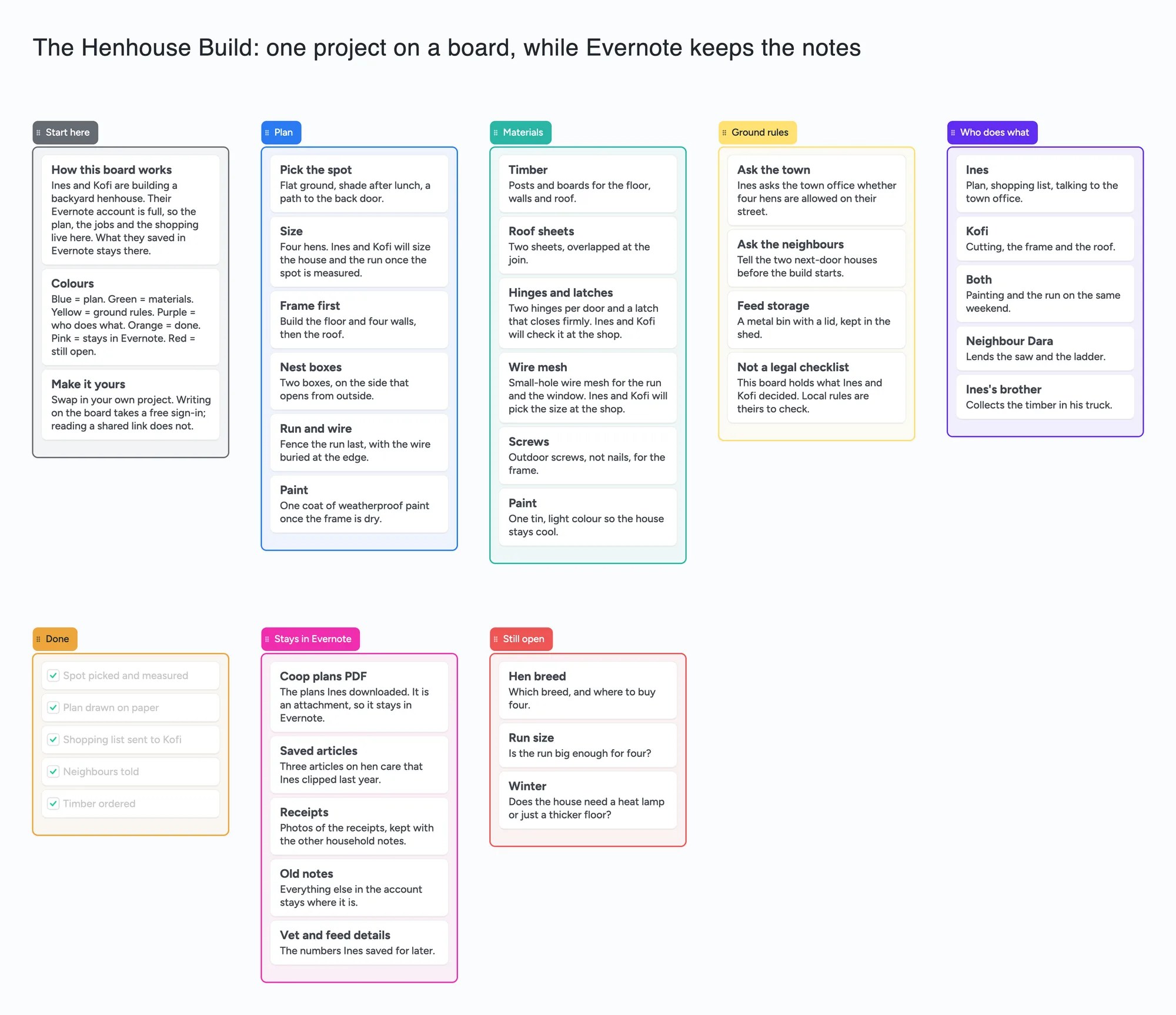
Evernote's help page says its lowest plan allows up to 50 notes and 1 notebook, and that you cannot create new ones once you pass it. Evernote is the better place for a pile of notes, clippings and attachments. We make Instaboard, a shared board of lists and cards, and it suits a single project that two or more people work on. The board below is filled in for two invented neighbours, Ines and Kofi, building a backyard henhouse while their old notes stay in Evernote.
Opens in your browser. Anyone can view; a free sign-in lets you edit.
Updated
Read this first: stay, split or move
- Stay in Evernote if what you have is notes: clippings, scans, receipts, anything you search for later. Evernote's plans page (read November 25, 2026) lists advanced search, offline notes, tasks and a calendar as features, and a board of cards is not built for a pile of notes.
- Split if one project is what filled the account and other people need to work on it. Put that project on a shared board and leave everything else where it is. This page shows how, with a filled example.
- What the cap does: past 50 notes or 1 notebook you can still view, edit, share and export what you have, but you cannot create new notes or notebooks. Notes in the trash still count. Evernote's help page says so; the numbers are Evernote's, not ours.
- What we don't do: we don't import Evernote notes. Import here is PDF only, as a flat picture that takes 1 of your 5 boards. You copy the cards over by hand.
- Plan limits on our side: 5 boards, 150 items and 3 pictures per board. Anyone with the link can read a shared board; writing takes a free sign-in.
What Evernote does when you reach the cap
We opened two Evernote pages in a browser on November 25, 2026: the help article "Understanding Evernote Free and Starter plans limits" (it shows "Updated 10 months ago") and the plans page, which shows no date. The table is from those pages.
| Free | Starter | |
|---|---|---|
| Notes | 50 | 1,000 |
| Notebooks | 1 | 20 |
| Devices that sync | 1 | 3 |
| Storage | 1 GB | 5 GB |
| Attachments | 200 | 1,000 |
| Tags | 20 | 100 |
Swipe the table sideways to see every column.
Evernote's plans page, read November 25, 2026. The help article gives the note and notebook numbers only. Evernote lists Advanced as unlimited notes and notebooks. The plans page also prints prices; this page quotes none. The page text does not show which plan includes each listed feature.
- Over the cap, you can still view, edit, share and export your notes, says the help article. You cannot create new notes or notebooks until you are back within the plan's numbers.
- The trash counts. The article says notes in the trash still count toward the note limit, so emptying it can free room.
- Shared notes still arrive. At the limit you can receive shared notes; they sit in Shared with Me and cannot be moved into your own notebooks until you are within the limit or upgrade.
- One notebook means one pile. The article suggests consolidating by deleting extra notebooks and moving notes into the one you keep.
When Evernote is the better choice
- A lot of small notes you search later. Evernote's plans page lists advanced search with Boolean, geographic and filtered searches. A board has lists you can sort and filter one at a time, not a search across a pile of notes.
- Attachments and clippings. Evernote's comparison table lists 200 attachments and 1 GB of storage on Free. We allow 3 pictures and 1 file per board, 10 MB.
- Reminders. Evernote's plans page lists tasks with dates, reminders and assigning others. A card here can carry a due date, but nothing alerts anyone.
- Offline notes, listed on Evernote's plans page. On a board, changes are kept and sync when you're back online.
- Staying put. If Evernote's numbers fit you, there is nothing to move. Everything on the Free plan still opens, edits and exports.
What people did at the cap
Two r/Evernote threads, read in an archived copy on November 25, 2026. Each name is one person's view.
| Thread | What the poster hit | What the comments we read said |
|---|---|---|
| "Limit reached?" (posted June 2024; Reddit shows 23 comments, we read 18 in an archived copy) | A free account that said the limit was reached, though the poster had not created a note for ages. | u/NoLateArrivals asked whether there were more than 50 notes including the trash and more than one notebook. u/jtid wrote that the trash counts against the limit. The poster replied that they had read the plans page as 50 notes a month, and wrote that they had started moving notes to Google Drive. |
| "Is free tier now limited to 50 notes?" (posted October 2023; Reddit shows 110 comments, we read 25 in an archived copy) | A message on creating a note saying the plan limits them to 1 notebook and 50 notes; the poster wrote that the plan comparison page did not mention it. | u/MD004 wrote that they could still open existing notes but make no new ones, and used Notion's import from Evernote. u/khapidhwaja wrote that they switched to Obsidian. u/sleepwalkcapsules wrote that they had already exported all their data. u/TheJessicator replied that the limit was 100,000 notes and linked Evernote's system-limits page, which now shows a not-found page in a browser (November 25, 2026); later commenters wrote that they were hit by the same message. |
Swipe the table sideways to see every column.
The comments are from 2023 and 2024; Evernote's current help article is the one to trust on numbers.
None of the comments we read asked for a shared project board. They moved the notes. The split on this page is for the narrower case where one shared project, not the whole archive, is what filled the account.
Ines and Kofi's henhouse board, list by list
The people and the plan are invented. Ines and Kofi are building a backyard henhouse; Ines's Evernote account is full of old notes. The plan, the jobs and the shopping live on the board. Read it from the top left, across, then the second row.
- Start here. Three grey cards: how the board works, what the colours mean, and a reminder to swap in your own project.
- Plan. Six blue cards in build order: the spot, the size, the frame, nest boxes, the run and wire, paint.
- Materials. Six green cards: timber, roof sheets, hinges and latches, wire mesh, screws, paint.
- Ground rules. Four yellow cards: ask the town office, tell the neighbours, keep the feed in a metal bin, and a card saying the board holds what they decided and local rules are theirs to check.
- Who does what. Five purple cards: Ines, Kofi, both, neighbour Dara who lends the saw and ladder, and Ines's brother with the truck.
- Done. A tick-box list of five jobs, all ticked in the example. A tick marks a card done; it does not remind anyone of anything.
- Stays in Evernote. Five pink cards pointing at what Ines leaves where it is: the coop plans PDF, three saved articles, receipt photos, old notes, and the vet and feed numbers.
- Still open. Three red cards of questions neither can answer yet: the breed, the run size and winter.
What goes where, and how far the board stretches
| Kind of thing | Keep it in Evernote | Put it on the board |
|---|---|---|
| A PDF, receipt photo or clipped article | Yes, as an attachment | Only a card that says where it is |
| Who does which job this weekend | No | Yes, in a list or on a card |
| Decisions the two of you agreed | Optional, as a note | Yes, in a tick-box list |
| A shopping list you both edit | Either; we did not test Evernote's sharing | Yes, one card per item |
| Old notes you search for years | Yes | No |
Swipe the table sideways to see every column.
Our own suggestion, not Evernote's advice. We did not test sharing a note on any Evernote plan.
- Our arithmetic: the henhouse board is 46 items out of the 150 a free account can hold across all boards, so three copies use 138 and a fourth passes 150. Evernote counts notes; we count cards, lists and text boxes, so the two numbers are not the same unit.
- Board count: a copy takes 1 of your 5 boards, and a board you open from someone's link counts too.
- Names and private details: a free board is shared by link. Keep addresses, account numbers and anything sensitive in Evernote.
- Open the board and make your copy. Replace Ines, Kofi and the henhouse with your own people and project.
- Move the live part of your project over by hand, one card per job, and leave the notes, PDFs and clippings in Evernote.
- Fill in the Stays in Evernote list so everyone knows where the attachments are.
- Share the link. To let others write, tick "Anyone who joins can edit" in Share; each person signs in free to add or move cards.
Start from the ready board
It opens in your browser in a few seconds, with nothing to install. Sign in for free when you want to save it and share it.
Questions
How many notes can you have on Evernote's Free plan?
Evernote's help article, read November 25, 2026, says up to 50 notes and 1 notebook. Its comparison table lists Free with 1 device and 1 GB of storage. Starter is listed at up to 1,000 notes and 20 notebooks. Check Evernote's pages for today's numbers.
What happens to my notes when I pass the limit?
Evernote's help article says you can still view, edit, share and export your existing notes, but you cannot create new notes or notebooks until you are back within the limit. Notes in the trash still count toward it.
Does emptying the trash help?
Per Evernote's help article, notes in the trash still count toward the note limit, so deleting them for good can free room. Do that only after you have exported anything you want to keep.
Can I import my Evernote notes into Instaboard?
No. We import PDF only, as a flat picture you write on, and it takes 1 of your 5 boards. Cards are copied over by hand, so this suits a project, not a whole archive.
Is a shared board a replacement for Evernote?
No. Evernote is better for many notes you search later, attachments and clippings. A board of cards suits one project that two or more people work on, with the old notes left in Evernote.
Is Instaboard free?
There is a free plan: 5 boards, 150 cards and items across your account (pen strokes, arrows and sections don't count), and 3 pictures and 1 file per board. Anyone with the link can read a board; writing on it takes a free sign-in. Pro removes the item limit and adds invite-only boards: $5 a month billed yearly ($59.99 a year), or $7.99 monthly.
Sources
- Evernote Help: Understanding Evernote Free and Starter plans limits (page shows "Updated 10 months ago"; read November 25, 2026)
- Evernote: Compare plans (page shows no date; read November 25, 2026)
- r/Evernote: "Limit reached?" (posted June 2024; Reddit shows 23 comments, we read 18 in an archived copy, November 25, 2026)
- r/Evernote: "Is free tier now limited to 50 notes?" (posted October 2023; Reddit shows 110 comments, we read 25 in an archived copy, November 25, 2026)