For small teams and tutors who hit Lucidspark's 3-board limit
A free Lucidspark alternative with 5 editable boards, and where Lucidspark is better
Lucid's pricing page says the Free plan includes "3 editable Lucidspark boards" (lucid.app/pricing/lucidspark, read November 16, 2026), and Lucid's community team has said a free user can edit only the 3 most recently created ones. Instaboard Free keeps 5 boards editable and has video calls on the board, but caps items at 150 across your account, where Lucidspark Free has unlimited shapes per board. If you work on one huge board, stay on Lucidspark. If you juggle several small ones, here is how the two compare.
Opens in your browser. Anyone can view; a free sign-in lets you edit.
Updated
The short answer
- Lucidspark Free: 3 editable boards, unlimited shapes per board, freehand drawing, emoji reactions, presentation mode (Lucid pricing page, read November 16, 2026). Individual is $9 a month billed annually; Team is $10 per user a month billed annually.
- Instaboard Free: 5 boards and 150 items across your account. Each card and each list is 1 of the 150; pen strokes, sections and arrows don't count. The example board is 35 of the 150 (our arithmetic). Pro is $5 a month billed yearly ($59.99 a year), or $7.99 monthly.
- Writing without a Lucid account is a Team and Enterprise feature (Guest Collaborators). On Instaboard anyone with the link can read; to write, they sign in free with Google, Apple or email.
- Lucidspark is better at facilitation (voting, timer, breakout boards on higher plans), at big boards with no shape cap, and if your company already uses Lucid. Lucidchart is a separate diagramming product: Instaboard has no flowchart shapes.
When Lucidspark is the better choice
- You have one big board. Lucidspark Free lists "Unlimited shapes per Lucidspark board". Instaboard Free stops at 150 items across all your boards, so a 200-sticky brainstorm won't fit.
- You run workshops. Lucid's Guest Collaborators table lists dot voting for Free users and Full Voting Mode for premium users. Its pricing page lists voting, a timer, facilitator tools and a laser pointer on the Team plan. Enterprise adds breakout boards. Instaboard has a countdown timer and a laser pointer, but no voting and no facilitator controls.
- You already use Lucid. Lucidspark sits beside Lucidchart in the Lucid suite, and its Enterprise plan includes both. Lucidchart's Free plan lists 3 editable documents and 75 shapes per document.
- You are a teacher or student with a school email. Lucid's help article "Sign up for a free Educational account" offers a free educational account to individual teachers and students in K-12 and higher education. It prints no board limit, but a 2023 post by Lucid's support team said free EDU accounts still keep only the 3 most recent documents editable, so check before you rely on it.
If that is how your team works, stay with Lucidspark.
What Lucid's own pages say about the Free plan
- Pricing page (lucid.app/pricing/lucidspark, read November 16, 2026): Free is $0 with "3 editable Lucidspark boards", "Unlimited shapes per Lucidspark board", freehand drawing, emoji reactions, basic Visual Activities and presentation mode. Individual "Unlimited editable boards" at $9 per month billed annually. Team $10 per user per month billed annually.
- The same page says a free trial lasts seven days, and that you add payment information when you sign up for it.
- Lucid's community team, October 10, 2025 (community.lucid.co 11974): "it is expected behaviour that you can only edit up to 3 most recently created boards in Lucidspark" without an Individual Lucidspark subscription. It is a community reply, not the plan page.
- Lucid's help article "Guest collaborators in Lucid" (read November 16, 2026): "Plan availability: Team and Enterprise." Guest Collaborators are people with no Lucid account who edit through a shared link. On Free, the people you share with sign in.
- Lucid's pages don't say whether a board someone else shares with you counts toward your own 3 editable boards, so this page makes no claim about it.
Six people on Lucidspark Team, billed annually, is $720 a year (our arithmetic: 6 x $10 x 12). Pro on Instaboard is $59.99 a year, and the people you invite join free.
Lucidspark Free and Instaboard Free side by side
Lucidspark rows are from Lucid's own pages, read on November 16, 2026. Plans change, so check the page before you commit.
| Lucidspark Free | Instaboard Free | |
|---|---|---|
| Editable boards | 3 editable boards | 5 boards |
| Items per board | Unlimited shapes per board | 150 items across your account (cards and lists count; pen strokes, arrows and sections don't); 3 images and 1 file per board |
| Someone with no account wants to write | Guest Collaborators are Team and Enterprise only | They sign in free (Google, Apple or email) and write on the board you shared |
| Someone opens the link with no account | Not read on Lucid's pages | Can read everything; can't change anything |
| Voting, timer, facilitation | Dot voting on Free; full voting, timer and facilitator tools on Team; breakout boards on Enterprise | A countdown timer and a laser pointer; no voting, no facilitator controls |
| Video call on the board | Not read on Lucid's pages | Free calls up to 60 minutes with a warning 10 minutes before the end; calls need a free sign-in; no recording |
| Paid, as listed | Individual $9 a month billed annually; Team $10 per user a month billed annually | Pro $5 a month billed yearly ($59.99 a year), or $7.99 monthly; the people you invite join free |
| Import | Miro imports Lucidspark boards by PDF (Miro help) | No Lucidspark import; PDF import opens a PDF as pages you can write on |
Swipe the table sideways to see every column.
Lucid sources: lucid.app/pricing/lucidspark, help.lucid.co Guest collaborators and Lucid Plans, community.lucid.co 11974, all read November 16, 2026.
When Instaboard fits better
- You use several small boards. One board per lesson, per client or per sprint: 5 stay editable on Free, against Lucidspark's 3.
- You need people to write without a paid seat. They open your link, sign in free and add cards. On Lucidspark, no-account editing needs Team or Enterprise.
- You want to talk while you work. Start a call on the board; everyone signs in free to join.
- You don't want to pay per person. Pro is one price, and the people you invite join free.
- You write with a pen. The pen is pressure-sensitive, and pen strokes don't count toward the 150 items.
One tutor on r/miro (u/NaniFarRoad, April 7, 2025) wrote that Lucid "put up their prices" and that, together with a few other annoyances, was why they tried Miro. A teacher on r/gsuite (u/Jackvolfe, October 22, 2023) found Lucidspark "pretty hard to work on while I'm teaching" next to Jamboard. Each is one person's view.
Lucidspark alternatives in 2026: which one for which need
We make Instaboard, so it is in this table. There's no ranking: each row says what it is for and where it beats us. Free-plan facts were read on each tool's own pages on November 16, 2026.
| Tool | Free plan and price | Where it is better than Instaboard | Where Instaboard fits better |
|---|---|---|---|
| Miro | Free: unlimited boards, the three most recent stay editable. Starter $8 per member a month billed yearly, which adds visitor editing with no sign-in | Integrations with Microsoft, Slack, Google and Adobe; a Lucidspark import by PDF | 5 editable boards on the free plan, and a video call on the board |
| FigJam | Figma's plan table lists Starter as a single team with one folder and 3 files; paid plans on its pricing page | A whiteboard inside the Figma workspace, with templates for retros and kickoffs | 5 editable boards on the free plan, and a video call on the board |
| Lucidchart | Free: 3 editable documents, 75 shapes per document. Individual $9 a month billed annually | Diagramming is its job: Individual adds unlimited objects per document, premium shape libraries and Visio import and export | Cards, lists and a call; we have no flowchart shape library |
| Instaboard (us) | Free: 5 boards, 150 items across your account, 3 images and 1 file per board. Pro $5 a month billed yearly | - | Opens in any browser and in the iPhone, iPad and Android apps; anyone can view by link, writing takes a free sign-in; free calls up to 60 minutes |
Swipe the table sideways to see every column.
From lucid.app/pricing (Lucidspark and Lucidchart), miro.com/pricing and help.figma.com Figma plans and features, read November 16, 2026. For Mural see [Mural alternatives](/compare/mural-alternatives).
What this brainstorm board can't do
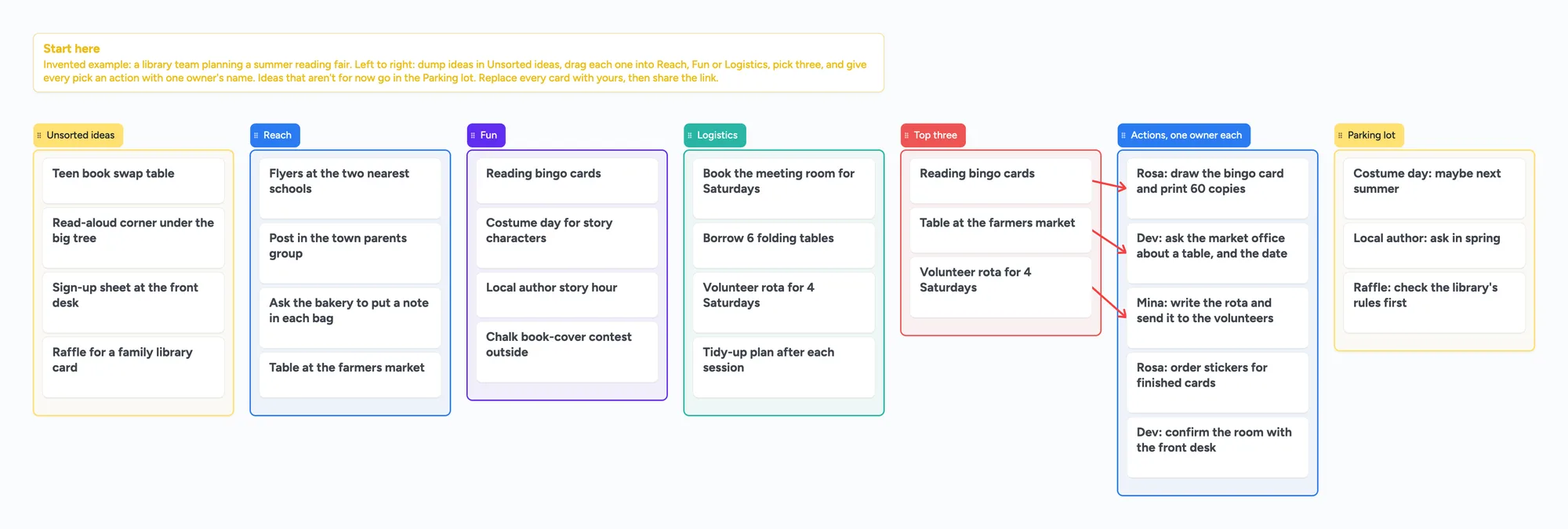
- 150 items on the free plan, across your account. The example board is 7 lists and 28 cards (the Start here card included), 35 items. Four boards like it are 140, and a fifth passes 150 (our arithmetic). Pro removes the limit.
- No voting, no facilitator controls, no breakout boards. The "owner" on an action card is text in the card's title.
- No Lucidspark import. To bring ideas over, retype the cards you want, or export your Lucidspark board as a PDF and use Import PDF here: it opens as pages you can write on, and the notes stay part of the picture.
- 5 boards and 3 images per board. The example board has no images.
- Writing needs a free sign-in. Someone who isn't signed in can read the board but can't change it. If you are under 18, check with a parent or your school before you sign up to any tool.
How to run the brainstorm on the board
- Open the ready board and read the Start here card.
- Share it. In the share menu, set "Anyone with the link can edit"; new boards start as "Anyone with the link can view". Send the link, or the 4-digit join code.
- Everyone signs in free (Google, Apple or email) and adds cards to Unsorted ideas. What they add shows up on your board within a few seconds.
- Drag each idea into a theme list, then move your three picks to Top three.
- Draw an arrow from each pick to an action, and start each action with one owner's name, like "Rosa: draw the bingo card". Arrows don't count toward the 150.
- Keep the board as the notes. The board counts as 1 of each person's 5 free boards, and the cards they add count toward their own 150.
Selected cards or lists can be copied as an image with "Copy as image" and pasted into a doc or chat.
Start from the ready board
It opens in your browser in a few seconds, with nothing to install. Sign in for free when you want to save it and share it.
Questions
Is Lucidspark free?
Yes, with limits. Lucid's pricing page lists the Free plan as $0 with 3 editable Lucidspark boards, unlimited shapes per board and freehand drawing. Individual is $9 a month billed annually and Team is $10 per user a month billed annually (read November 16, 2026).
How many boards can I edit on Lucidspark Free?
Three. Lucid's pricing page says "3 editable Lucidspark boards", and Lucid's community team said on October 10, 2025 that free users can edit only the 3 most recently created boards.
Is there a free alternative to Lucidspark?
Yes. Instaboard Free keeps 5 boards editable, with 150 items across your account. Miro Free keeps its 3 most recent boards editable and Figma's Starter plan lists 3 files. Lucidspark Free has no shape cap per board, so for one very large board it can be the better free choice.
Is Lucidspark free for students and teachers?
Lucid offers a free educational account to individual teachers and students in K-12 and higher education who sign up with a school email (Lucid help, read November 16, 2026). A 2023 post by Lucid's support team said free EDU accounts keep only the 3 most recent documents editable, so check the current terms.
Lucidspark vs Miro: which is better on the free plan?
Both keep 3 boards editable on Free. Miro's pricing page says "Create and share unlimited boards. Three most recent ones will remain editable", and Lucid's says "3 editable Lucidspark boards". Instaboard keeps 5 editable but caps items at 150 across your account.
Is there an alternative to Lucidchart?
Lucidchart is a diagramming tool, with 75 shapes per document on its Free plan. Instaboard isn't a diagram maker: it has no flowchart shape library. For cards, lists and a shared planning board it is an alternative.
Can someone edit an Instaboard board without an account?
No. Anyone with the link can read it, but writing needs a free sign-in with Google, Apple or email. There is no workspace to join, and the board counts as 1 of their 5 free boards.
Can I import a Lucidspark board into Instaboard?
Not as editable items. Export the board from Lucidspark as a PDF and use Import PDF in Instaboard: it opens as pages you can write and draw on, but the stickies and shapes stay part of the picture. Miro, by contrast, has an import from Lucidspark.
Is Instaboard free?
Yes. The free plan includes 5 boards, 150 cards and items across your account (pen strokes, arrows and sections don't count), 3 images and 1 file per board, unlimited collaborators and video calls up to an hour. Pro is $5 a month billed yearly ($59.99 a year), or $7.99 monthly, and the people you invite join free.
Sources
- Lucid: Lucidspark pricing (Free 3 editable boards, unlimited shapes per board, Individual $9 and Team $10 billed annually, 7-day trial; read Nov 16, 2026)
- Lucid: Lucidchart pricing (Free 3 editable documents, 75 shapes per document, Individual $9; read Nov 16, 2026)
- Lucid Help: Guest collaborators in Lucid (Team and Enterprise; read Nov 16, 2026)
- Lucid Help: Lucid Plans (Free, Individual, Team, Enterprise; read Nov 16, 2026)
- Lucid Help: Sign up for a free Educational account (read Nov 16, 2026)
- Lucid community: 3 Lucidspark board limit on Individual plan (Lucid community team reply, Oct 10, 2025; read Nov 16, 2026)
- Lucid community: EDU Free vs. Free Lucid Account (Lucid support team, Jul 7, 2023; read Nov 16, 2026)
- Miro pricing (Free 3 editable boards, Starter $8 per member billed yearly with visitor editing; read Nov 16, 2026)
- Miro Help: Import Lucidspark boards to Miro (read Nov 16, 2026)
- Figma Help: Figma plans and features (Starter: one team, one folder, 3 files; read Nov 16, 2026)
- r/miro: New to Miro (coming from Lucidspark), u/NaniFarRoad, Apr 7, 2025 (one tutor's account)
- r/gsuite: End of jamboard. What is the best alternative?, u/Jackvolfe, Oct 22, 2023 (one teacher's account)
Related
A free Miro alternative for personal use, tutors and families
Miro Free keeps only 3 boards editable. Instaboard has 5 editable boards, video calls, Apple Pencil and sync when you're back online. Where Miro still wins.
A FigJam alternative for tutors who teach on an iPad
The FigJam iPad app retired on January 8, 2026 into the Figma app. Open sessions need a paid plan. What tutors get free, where FigJam is better, and a ready iPad lesson board.
A free Mural alternative where the people you invite can write, and where Mural is better
On Mural Free, visitors are view-only and 3 murals stay editable. A shared retro board anyone can write on after a free sign-in, and where Mural is better.
A free Milanote alternative for student projects, and where Milanote is better
Milanote's free plan stops at 100 notes, images or links. What Instaboard's free plan gives a student project, where Milanote is better, and a ready project board.