For master's and PhD students
Plan a thesis on one board you can share with your advisor
A thesis plan usually lives in four places: a chapter outline, a pile of papers, an advisor's comments in an email thread and a to-do list. This board puts the first three side by side and keeps the fourth short. Each chapter is a list with one card per section, a core argument list holds the claim and its points, a literature clusters list groups the papers you have read, an advisor feedback list keeps the comments with a checkbox each, and arrows show which card answers, fills or supports which. The example is an invented master's thesis, with invented findings, so every card is yours to overwrite. It has no date axis, no citations and no word count, and it does not replace your reference manager or your word processor.
Updated
The short answer
- One list per chapter, one card per section. Core argument, introduction, literature review, methods, results and discussion each get a list of six cards. Rename the lists to match your own table of contents.
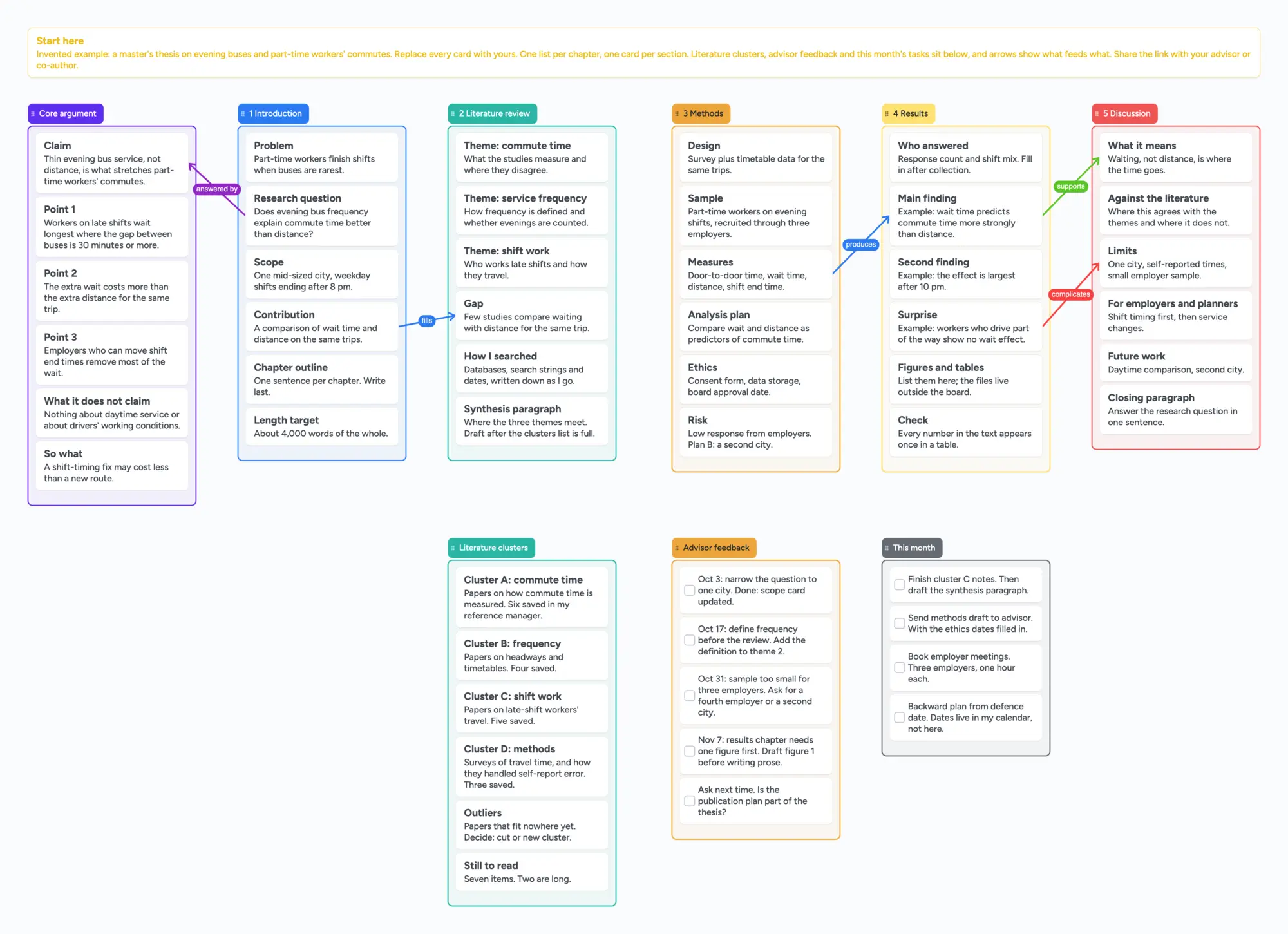
- The argument sits beside the chapters. The core argument list holds the claim, three points, what the thesis does not claim and the so-what. An arrow runs from the research question to the claim ("answered by"), and others tie the contribution to the gap, the measures to the main finding and the finding to the discussion.
- Three working lists sit below. Literature clusters group the papers you have read by theme and keep an outliers card and a still-to-read card. Advisor feedback is a checkbox card per comment, newest last, with an ask-next-time card. This month holds four short tasks.
- It is a plan, not a writing tool. The board has no citations, no timeline axis and no word count. Write in your word processor or LaTeX editor, keep papers in a reference manager and keep dates in your calendar.
- The free plan covers it. The ready board is 61 of your 150 free items (our count: 9 lists and 52 cards; arrows and pen strokes don't count) and uses no images. Making your own copy takes 1 of your 5 free boards.
How the board is laid out
Everything on the board is an editable card or list, and nothing on it is a photo.
- A start-here card says the thesis is invented and how the board is meant to be used.
- Six lists across the top: core argument, then chapters 1 to 5. Each chapter list has six cards, for example problem, research question, scope and contribution under the introduction, or design, sample, measures, analysis plan, ethics and risk under methods.
- Five captioned arrows join neighbouring lists: answered by, fills, produces, supports and complicates. They stay attached when you move a card or a list.
- Literature clusters (six cards) group papers by theme and say how many are saved in the reference manager. The papers themselves live in the manager, not on the board.
- Advisor feedback (five checkbox cards) keeps each comment with its date and what you will do about it. This month (four checkbox cards) is the short list.
On the board, the results chapter holds a figures and tables card that lists the figures. The image files stay outside the board, because a free board takes 3 images and 1 file.
Using it with an advisor or co-author
Set Share to "Anyone with the link can edit" (new boards start view-only), send the link and ask your advisor to sign in free to write. Anyone who only wants to read can open the link without an account. The board counts as 1 of their 5 free boards, and cards they add count toward their own 150 items.
- Give the advisor their own list. The advisor feedback list is the place for their comments. Two people typing in the same card merge keystroke by keystroke with no lock, so separate cards keep each person's words apart.
- Turn each comment into a card with a checkbox and a line on what you will change. Tick it when the chapter list has changed.
- Move the card, don't retype it. When a comment leads to a new section, drag the card into the chapter list.
- Keep a "core argument" list that never gets longer than one screen. If a chapter card doesn't connect to the claim or one of its points, it is a candidate to cut.
What others say about mapping a thesis
All of these were read in full on November 11, 2026, and each is one author's or one commenter's view.
- A Happy PhD (January 16, 2021) proposes a diagram of key obstacles, milestones and the everyday fuel that gets you past them, with Google Drawings and Jamboard templates, and suggests using it sparingly, for example at the start of the PhD or once a semester.
- The University of Melbourne's graduate research page "Planning your thesis including publications" points to a thesis map template and a publication map template, in Word format, and says a publication is usually one chapter. If your university has its own thesis map, start from that.
- Raul Pacheco-Vega (October 6, 2018) plans a thesis with a Gantt chart and by working backwards from the defence date. That is a calendar job, which this board doesn't do.
- r/GradSchool (November 16, 2018, 7 comments) is a student whose advisor asked for a concept map of a dissertation. One commenter found concept maps unwieldy on their own and used a critical-reading framework from a book instead; another writes a one-page review of each key paper and maps on large A1 sheets. Treat each as one person's way of working.
When something else is the better choice
These lines come from each tool's own page, read on November 11, 2026.
- You need a timeline or a Gantt chart. Notion's thesis template category listed 57 templates when read. Use one, or a calendar, for dates. Our board has no date axis.
- You need to collect and cite sources. Zotero is a free reference manager. Its groups let you share a library with a class or colleagues, and it says there is no limit on how many members may join. Our cards can say "six saved in my manager" and nothing more.
- You write in LaTeX and share the draft. Overleaf's Free plan allows 1 collaborator per project, Standard ($16.75 a month billed yearly, $199 a year) 10, and Pro ($33.25 a month billed yearly, $399 a year) unlimited. Share links have Viewer, Reviewer and Editor levels. Our board has no manuscript.
- You write a long draft in a writing app. Scrivener runs on macOS, Windows and iOS and is built for long documents. Your word processor is the right place for the thesis itself.
- You keep your notes as linked files. Obsidian is free without limits and needs no sign-up. Its Sync add-on costs $4 a month billed annually and is what shares a vault. Our board shows the structure on one screen and doesn't link notes.
- Your program gives you a template. Use the thesis map from your university or department, and treat ours as a practice shape.
What this board doesn't do
- No date axis, Gantt chart or reminders. The "backward plan from defence date" card only says to put the dates in your calendar.
- No citations, bibliography or reference manager. Papers are named in cards.
- No word count and no manuscript. The cards are plans, not text.
- The free plan: 5 boards and 150 items per account (cards, lists, images and text boxes count; pen strokes and arrows don't), 3 images and 1 file per board. The ready board leaves 89 items free. A card per paragraph or per paper will pass 150 on a long thesis, so keep cards to sections and clusters.
- Pro ($5 a month billed yearly, $59.99, or $7.99 monthly) has no image limit.
- Writing needs a free sign-in. Anyone with the link can view.
- Written for adult learners. Instaboard's terms say users are not minors.
Start from the ready board
It opens in your browser in a few seconds, with nothing to install. Sign in for free when you want to save it and share it.
Questions
Is there a thesis planning template I can edit?
This board is one: a list per chapter, a core argument list, literature clusters, advisor feedback and a short tasks list, with the example thesis invented. Making your own copy takes 1 of your 5 free boards.
Does it work for a dissertation or a PhD?
Yes. Rename the chapter lists and add lists for more chapters or papers. Each card and list is 1 of your 150 free items, so a long thesis is easier to keep on the board as sections than as paragraphs.
Can my advisor edit it?
Yes. Set Share to "Anyone with the link can edit"; new boards start view-only. Your advisor signs in free to write, and anyone who only reads can open the link without an account.
Does it keep my citations?
No. It has no citation or bibliography features. Keep papers in a reference manager such as Zotero and let the board's cards say what each cluster of papers is for.
Does it have a timeline?
No. It has no date axis. Keep dates in your calendar or a Gantt chart, and use the board for the structure of the argument.
Is Instaboard free?
Yes. The free plan includes 5 boards, 150 cards and items across your account (pen strokes, arrows and sections don't count), 3 images and 1 file per board, unlimited collaborators and video calls up to an hour. Pro is $5 a month billed yearly ($59.99 a year), or $7.99 monthly, and the people you invite join free.
Sources
- A Happy PhD: PhD tool, map out your PhD (Jan 16, 2021; read in full, Nov 11, 2026)
- University of Melbourne: Planning your thesis including publications (read in full, Nov 11, 2026)
- Raul Pacheco-Vega: Planning the timeline and progress of your doctoral dissertation (Oct 6, 2018; read in full, Nov 11, 2026)
- Reddit r/GradSchool: concept mapping for dissertation? (2018-11-16, 7 comments; read in full, Nov 11, 2026)
- Notion Marketplace: thesis templates (read Nov 11, 2026)
- Zotero: groups (read in full, Nov 11, 2026)
- Overleaf: plans and pricing (read Nov 11, 2026)
- Overleaf docs: sharing a project (read Nov 11, 2026)
- Scrivener overview, Literature & Latte (read Nov 11, 2026)
- Obsidian: home and pricing (read Nov 11, 2026)
Related
How to study from lecture slides: your notes beside each slide
Put your lecture slides beside your own-words notes and a 'can't explain yet' card, then study with a group on one board. Free plan: 3 images per board.
How to organize photos of handwritten notes on one study board
Lay out photos of your handwritten notes beside your own-words cards on one board. The free plan holds 3 photos per board and 5 boards: at most 15 photos.
Outline a novel or screenplay with index cards, on a board you can share
Outline a novel or screenplay on digital index cards: one list per act, 40 short cards, subplot arrows, a co-writer on the same board. Free to start; TV pilot too.
A free infinite canvas app for your notes, on Windows, Android, Chromebook and iPad
OmniCanvas alternative? Compare the free plans of OmniCanvas, Goodnotes, Concepts and Obsidian Canvas, and open a free shared infinite canvas board.