For adult organizers of a talent or variety night
Talent show organizer board: the jobs, the format and the running order, shared
If you need to sell tickets, take entries or score acts, use a ticketing tool, a sign-up form or a judging sheet. We make Instaboard, and this page gives you something those don't try to be: one board where the small team running the night sees the jobs, the format decisions, the running order and what is still undecided. It is for adult organizers of a show with adult performers; it gives no advice on shows with children. The club is invented. Open it, replace the acts with yours, and send one link to your team.
Opens in your browser. Anyone can view; a free sign-in lets you edit.
Updated
The short answer
- What it is: a list for each part of the show (team, format and rules, running order, sound and lights, backstage, front of house), with a card for each job or act and a colour for who has it. It answers "who has what, and what is still undecided", not "who bought a ticket".
- What it isn't: a ticketing, sign-up or scoring tool. TicketSource's guide describes early-bird and concession tickets and a scanning app; Jotform's sign-up sheet template page describes entries that arrive in a table by themselves; Map D's judging page describes a printable score sheet. This board has none of those.
- Why a team needs one place: TicketSource's guide says a running order should be "your single source of truth for everyone involved: acts, volunteers, your MC, backstage staff". The board keeps that order next to the jobs that depend on it.
- Adults only: the example show has adult performers and no children's names. The page doesn't cover school shows or shows with children.
- Free plan: 5 boards, 150 items across your account, 3 pictures per board. Anyone who joins can view; editing needs a free sign-in.
- Not on it: sign-up forms, ticket sales, scores, a clock, phone numbers or addresses. A board shared by link can be opened by anyone who has the link.
What this board doesn't do, before you build
- No entries and no tickets. Acts don't sign up on the board and nobody buys anything on it. Use a form or a ticketing tool, and put the acts that said yes on a card.
- No scores or tallies. There are no judging sheets and nothing adds up scores. Keep them on paper or in a spreadsheet.
- No cues and no reminders. Nothing sends a reminder or tells an act or a volunteer it is their turn. Instaboard has a countdown timer you can put on a board, but it does not read your running order.
- No audience vote. If the show has one, run it in a polling tool; the board only holds the decision to have one.
- No pictures to speak of. The free plan holds 3 pictures per board, so posters and photos belong elsewhere.
- Not private by default. Anyone who has the link can see every card, so keep phone numbers, addresses and anything about children off it. This page is for adult performers.
When another tool is the better choice
- You are selling tickets. TicketSource's guide says its tool lets you offer "early bird pricing that expires automatically, concession tickets, and family bundles", and that its scanning app lets your team check tickets on their own smartphones. It is TicketSource's own guide, so read it as that company's description of its product.
- You want entries to arrive by themselves. Jotform's sign-up sheet template page says a submission to your online application form "will automatically appear" in a table you can view as a spreadsheet, a calendar or cards, and share with judges and staff. A board needs someone to type each act in.
- You want a judging sheet. Map D, a vendor of event floor plans, publishes a printable 100-point rubric with five criteria (talent and skill, stage presence, creativity, audience engagement, presentation), a tally sheet, and says to use one sheet per act per judge. This board scores nothing.
- You want a live audience poll. TicketSource's guide names Mentimeter as a tool for running live polls at the event; the board has no voting.
- You run it alone, from a paper list. One person with one running order and a clipboard gets nothing extra from a board.
The board is for the other half: three or four organizers who each own a part of the night and need to see the whole of it at once, so the MC isn't also the person who knows who is on next.
What the guides say to decide first
These are the sources the board's lists come from. Each is one publisher's method, not a rule.
- Decide the format before you find acts. TicketSource's guide (byline date 31st of August) says "Auditions and open mic are completely different events to plan" and that the format decides venue size, running order and judging. The board's Format and rules list holds these decisions as cards.
- Give each night job its own person. The same guide says to assign one person to backstage and one to the performers, and that the performers' role "should not be carried by your MC or your front-of-house lead". The board's team list has one card per person.
- Write the running order for everyone. It says to include timings, act order, transition notes and what happens if something overruns, and to vary the lineup so similar acts aren't back to back. The board has the order as a list of numbered cards you can drag.
- Choose how acts are ranked before sign-up opens. Map D's judging page lists four formats, a judged rubric, an audience vote, a showcase with no ranking, and a judged round followed by an audience vote, and says to choose the format before sign-ups open. The board's first open question is that choice.
What people who have run an open mic say
This is one thread about a music open mic, not a variety show, so take it as one setting. Each comment is one person's view, read November 24, 2026.
- In-person order or online? In r/musicians (September 2023) u/m8bear wrote "Don't do anything online, make a list in person with the people that attend the day of the event in the order they sign up", and u/myleftone wrote "don't bother with online, just put out the book and start on time." TicketSource's guide, by contrast, lists online booking among ways to take audition applications, so the sources differ. The board's open questions are where your team writes which it chose.
- Mix loud and quiet. u/GruverMax wrote "I recommend mixing up the loud and quiet acts rather than sticking them together," which matches TicketSource's advice to vary the order.
- Talk to every performer. u/eissirk wrote "Make sure to get some face time with every single performer," and described asking each one whether they wanted to sit or stand before bringing them up.
- Monitors. u/Natural-Letterhead-5 wrote "you'd be surprised how many open mic setups don't have them and it's awful." A card on the Sound and lights list is where a monitor question goes.
Harbor Club's night, list by list
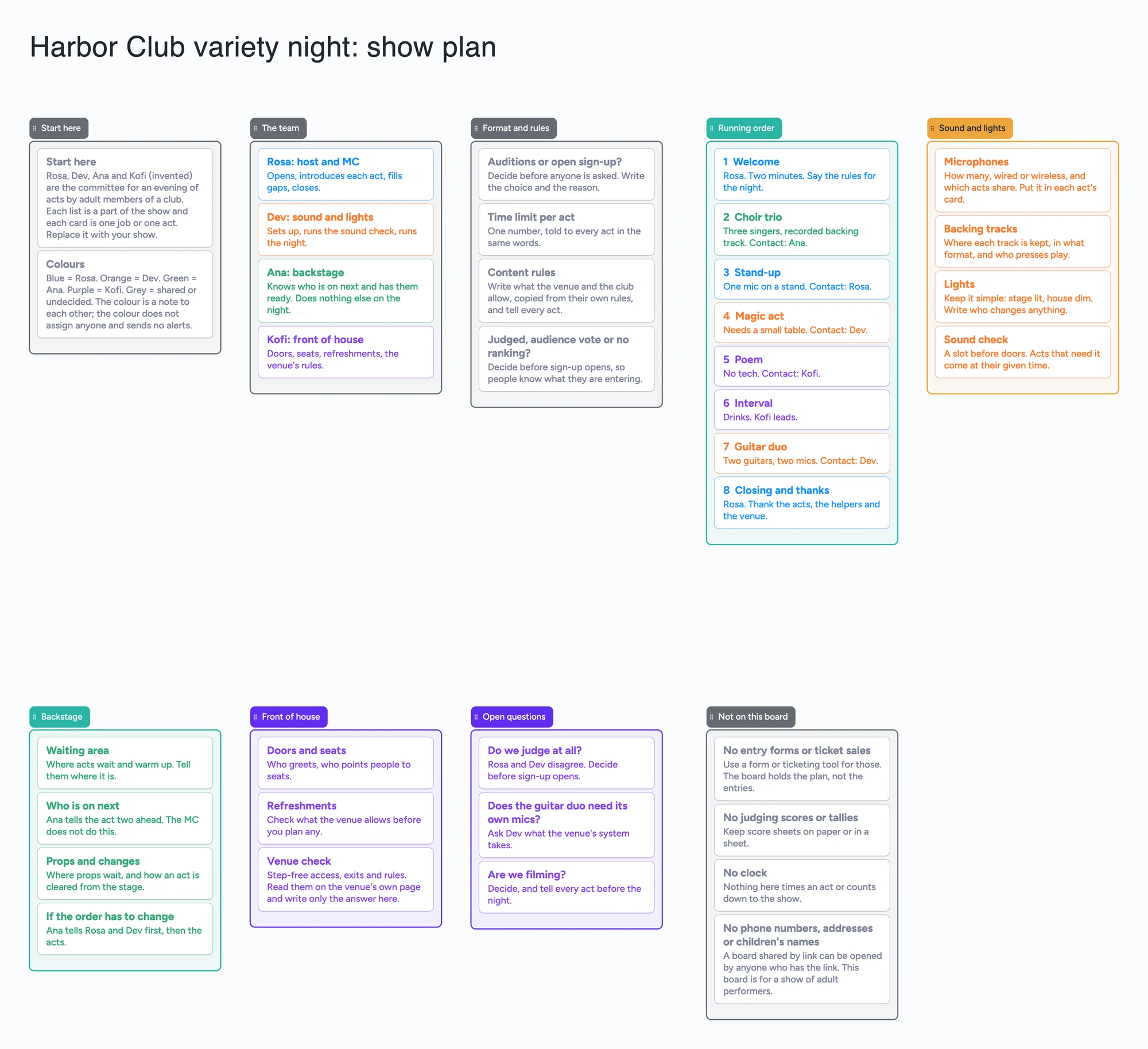
The example is invented. Rosa, Dev, Ana and Kofi are the committee for an evening of acts by adult club members. Each list is a part of the show.
| List | What goes in it | In the example board |
|---|---|---|
| Start here (grey) | The team and the colour rule | Blue is Rosa, orange Dev, green Ana, purple Kofi, grey shared or undecided |
| The team (grey) | One card per organizer and what they own on the night | Host and MC, sound and lights, backstage, front of house |
| Format and rules (grey) | Decisions to make before anyone is asked | Auditions or open sign-up, time limit per act, content rules, judged or not |
| Running order (green) | One numbered card per act, with its tech need and a contact | Welcome, choir trio, stand-up, magic act, poem, interval, guitar duo, closing |
| Sound and lights (orange) | What the night needs from the venue's system | Microphones, backing tracks, lights, sound check |
| Backstage (green) | Where acts wait and who tells them they are next | Waiting area, who is on next, props and changes, if the order has to change |
| Front of house (purple) | Doors, seats, refreshments and the venue's own rules | Doors and seats, refreshments, venue check |
| Open questions (purple) | What the team hasn't decided | Whether to judge, whether the guitar duo needs its own mics, whether to film |
| Not on this board (grey) | What stays off a link board | No entry forms or ticket sales, no scores, no clock, no phone numbers or children's names |
Swipe the table sideways to see every column.
The board's own wording. Names, the club and the acts are made up. Content, venue and licensing rules are not on the board: read them on your venue's own pages and write only the answer on the card.
The useful move is the Backstage list. The card "Who is on next" gives that job to one person who isn't the MC, which is the split TicketSource's guide recommends.
Does your show fit in 150 items?
The free plan allows 150 items across all your boards. Each card, list and text box is one item; sections, arrows and pen strokes aren't. The ready board has 38 items that don't change with the number of acts (9 lists, 28 cards outside the running order, and the title) and 8 running-order cards. Our arithmetic:
| Show | Running-order cards | Items | Of the free 150 |
|---|---|---|---|
| 8 running-order cards (5 acts plus welcome, interval, closing), as built | 8 | 46 | 104 left |
| 15 acts, 1 card each | 15 | 53 | 97 left |
| 30 acts, 1 card each | 30 | 68 | 82 left |
| 30 acts, 3 cards each (act, tech, props) | 90 | 128 | 22 left |
| 112 running-order cards, 1 card each | 112 | 150 | 0 left |
| 113 running-order cards, 1 card each | 113 | 151 | Over 150 |
Swipe the table sideways to see every column.
Our arithmetic: 38 items that stay the same on the ready board, plus one card per act or per act-part. Items are counted across all your boards, so a second board uses the same 150.
If you reach the limit, put the tech notes in the act's own card instead of separate cards, or upgrade. Pro removes the item limit; it is $5 a month billed yearly ($59.99 a year), or $7.99 monthly.
Set it up for your own show, in order
- Open the board and sign in free to edit it. Delete the Harbor Club cards as you go.
- Name the organizers on the team cards, one night job each, and give each person a colour.
- Fill Format and rules first. Write the choices on the cards before anyone is asked to perform.
- Add acts to the running order as they are confirmed, one numbered card each, with the tech need and a contact on the card.
- Set the board's Share setting to "Anyone who joins can edit" so each organizer can move their own cards, and give each person their own cards rather than typing in the same one.
- Move what nobody has decided to Open questions and re-read the board together a week before.
Start from the ready board
It opens in your browser in a few seconds, with nothing to install. Sign in for free when you want to save it and share it.
Questions
Can a committee plan a talent show on one board?
Yes. Send the link; anyone can view it, and editing needs a free sign-in. Once you set Share to "Anyone who joins can edit", each organizer can add and move cards. Colour is a note to each other; it doesn't assign anyone or send a message.
Does it take entries or sell tickets?
No. Use a form or a ticketing tool for those and put the acts that said yes on a card in the running order.
Does it work for a school talent show?
This page is for adult organizers of a show with adult performers. It gives no advice for school shows or shows with children, and the example has no children's names.
Can it score the acts?
No. There are no judging sheets and nothing adds up scores. Map D describes a printable rubric and tally sheet; keep scores on paper or in a spreadsheet.
Should acts sign up online or in person?
The sources differ. TicketSource's guide lists online booking as one way to apply for auditions, while two commenters on one open mic thread said to take names in person. The board's Format and rules list is where your team writes its choice.
How many acts fit on the free plan?
With one card per act, 112 running-order cards is 150 items including the lists and the title (our arithmetic). The limit is 150 items across all your boards. Pro removes the item limit.
Sources
- TicketSource: How to Organise a Talent Show, the Complete Planning Guide (Rebecca Collis; byline date 31st of August; format, roles, running order, ticket tools, Mentimeter; read November 24, 2026)
- Jotform: Talent Show Sign Up Sheet table template (entries arrive in a table; spreadsheet, calendar and card views; read November 24, 2026)
- Map D: Talent Show Judging Sheet and Rubric (an event floor-plan vendor; 100-point rubric, formats, one sheet per act per judge; read November 24, 2026)
- Reddit r/musicians: Throwing an open mic at my local hall. Tips? (u/hurrdurrbadurr, September 11, 2023; u/m8bear, u/myleftone, u/GruverMax, u/eissirk, u/Natural-Letterhead-5)