For an illustrator or maker who takes commissions
Art commission queue template: one shared board for slots, waitlist and stages
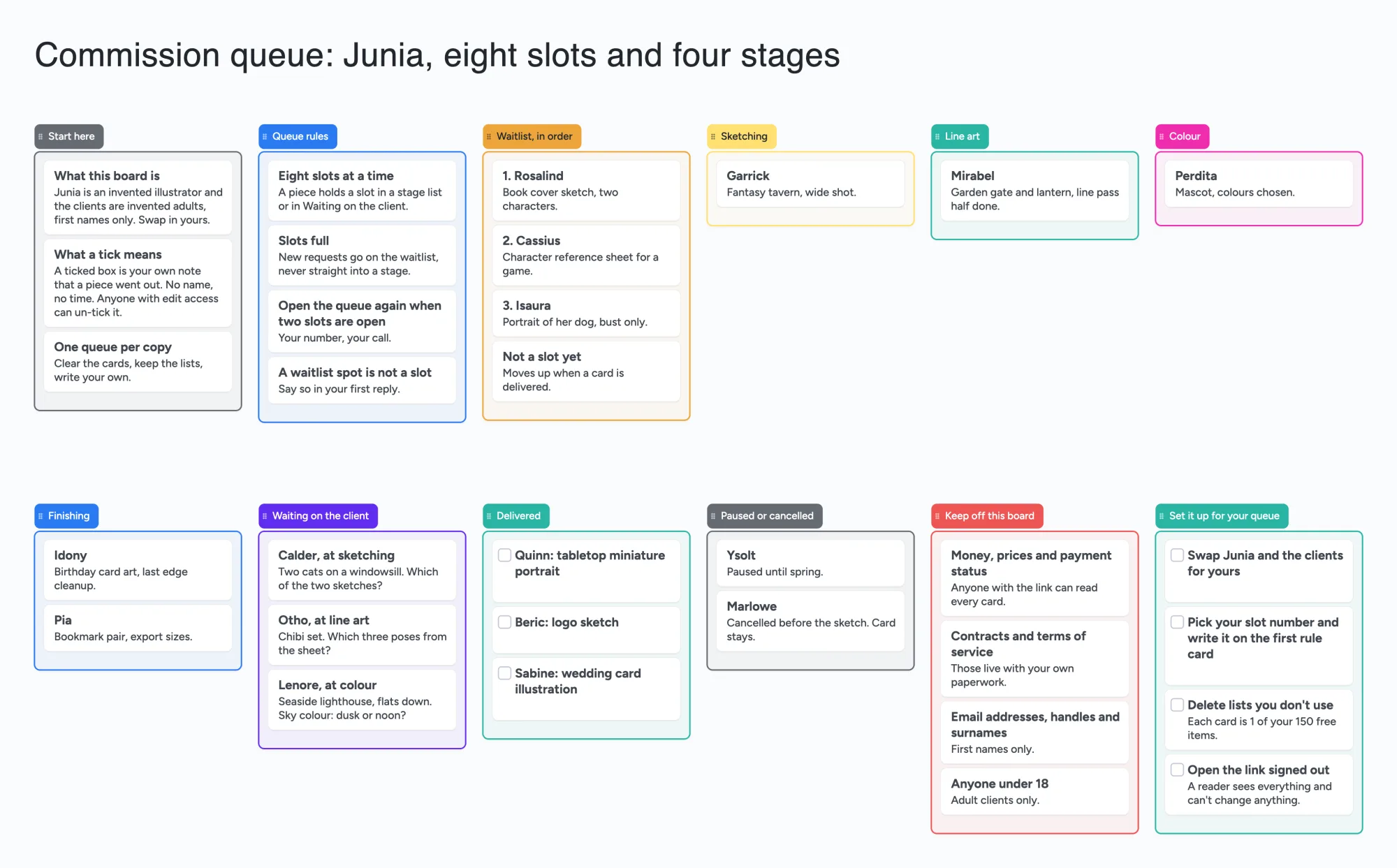
If you take commissions, the queue is the thing clients ask about: who has a slot, who is waiting, and where their piece is. This board is that queue filled in for an invented illustrator, Junia, with invented adult clients and first names only. It has twelve lists, one named Waitlist, in order: Start here, Queue rules, Waitlist, in order, Sketching, Line art, Colour, Finishing, Waiting on the client, Delivered, Paused or cancelled, Keep off this board and Set it up for your queue. It holds no prices, no payment status, no contract or terms of service and no client contact details. A tick shows no name and no time, anyone with edit access can un-tick it, and nothing on the board tells a client where their piece is: a client sees it only if you send the link, and then sees every other client's card too.
Opens in your browser. Anyone can view; a free sign-in lets you edit.
Updated
A queue you can read at a glance
- What it covers: the queue itself: how many slots you hold, who is on the waitlist and in what order, a list for each working stage, what is waiting on a client, what is delivered and what is paused. The artist and clients are invented, adults only, first names only.
- What it leaves out: prices, payment status, contracts and terms of service, email addresses and handles, and clients under 18. Nothing on it takes a payment or records one.
- Where another tool fits better: Trello's template gallery has a community template, Commission Queue for Artists (by DerpyOlives), and Notion's gallery lists several commission trackers. Those come with a structure already built; this board is a plain list layout you rearrange.
- Your plan: the example is 45 of your 150 free items (32 cards, 12 lists and 1 title text box, our count). Arrows and pen strokes don't count. A copy takes 1 of your 5 boards. Writing needs a free sign-in; a reader can open the link signed out and can't change anything.
Start with the Trello gallery template, or a Notion one, if you want a built structure
The Trello template gallery has a community template, "Commission Queue for Artists", by DerpyOlives, an artist (not made by Trello); the page showed 4.4K copies and 14.9K views when we read it on November 26, 2026. Its description says "Want to keep tabs on all your commissions? Want to let others know your progress so far?" The data of the template's public source board (trello.com/b/lhwwtQb6), read in a browser, shows lists named Intro / Commission List / T.O.S, Awaiting Payment, Paid, Sketched, Lined, Colored, Shaded, Final Touches and Completed!, and that board is set to public with comments and voting disabled. It has payment lists and a list named for terms of service; this board has neither on purpose. If you want your queue to carry payment status, the Trello template is built for that.
Notion's marketplace lists commission trackers too. "commission tracker" by Sue-Jan Noreiga says "Use this tracker to keep track of your commissions while providing transparency to commissioners about where you're at in your process"; the page shows 4.9 from 36 ratings and "Last updated last year". "Artist/ Commission Kit" by Teafiee describes itself as "A commission queue tracker/queue kit for commissioners to keep track of the artist queue!"; it shows 4.9 from 82 ratings and "Last updated last year". Both are ready-made Notion templates.
This board is what is left when you want none of that: lists you can rename, a handful of cards, and one link. In our view it fits better when you already know your own stages and only want the queue visible and easy to move around.
The queue as rules: slots, a waitlist, and stages
Three answers from one thread. In an r/ArtistLounge thread asking how artists keep track of a commission queue (posted 2025-06-04 UTC; the archived copy has 17 comments, including AutoModerator's, none removed), u/Tea_Eighteen writes "I only take three at a time. Finish them, then open up another three." and u/Avery-Hunter writes "A spreadsheet, but also I try to keep my queue as short as possible, preferably 5 projects or fewer." u/SekhWork writes "Excel is the main way, my other art friend prefers Trello." Each is one account's view.
In an r/artbusiness thread, "How Do I Set Up a Smooth Running Commission Queue?" (posted 2022-04-02 UTC; the archived copy has 17 comments, including AutoModerator's, none removed), in a reply the artist who posted describes an earlier muddle: "I had one person confused thinking they had a slot when they where on the waiting list". Another commenter, u/nyx_aurelia, says to make clear to clients that you are on a long waiting list and to hold off on project details, beyond a short note on the type of commission, until you can start. The board's rule cards separate the two: Slots full sends new requests to the waitlist, and A waitlist spot is not a slot says to say so in your first reply.
The example has eight slots and eight pieces holding them: one each in Sketching, Line art and Colour, two in Finishing and three in Waiting on the client. Three more people are on the waitlist and nothing moves them up by itself. Your number of slots is yours to write on the first rule card.
Who can see the queue, and what that means for other clients' cards
Who can see a queue is one poster's problem, and our board has a limit of its own: anyone with the link can read every card. In an r/artbusiness thread, "What do you think of using Trello as a commission queue?" (posted 2026-03-27 UTC; the archived copy has 7 comments, including AutoModerator's; one of them has since been removed and is not quoted), the artist who posted writes in a reply that they are "really just trying to make it so someone can't go into the board and move stuff around and write something offensive everywhere". In another reply, u/Local-Dependent-2421 (2026-03-28 UTC) suggests "making the board public (view only for clients)" or sending screenshots instead. Each is one account's view.
Trello's pricing page, read on November 26, 2026, says Free is "for up to 10 collaborators per Workspace" with "Up to 10 boards per Workspace", and lists Observers under Premium at $10 per user a month billed annually. Our board has the same limit, stated plainly: a new board starts as "Anyone who joins can view", a reader who opens the link signed out can't change anything, and writing needs a free sign-in. Every reader still sees every card, because there are no per-person permissions on the free plan. That is why the example has no prices and no contact details, and why clients appear by first name only.
Keeping prices, terms and client details off the queue
Four things stay off both the board and this page, and the Keep off this board list says so:
- Money, prices and payment status. The board takes no payment and records none. If you want payment as its own column, that is a reason to use the Trello gallery template.
- Contracts and terms of service. Keep them in your own paperwork. The board states no terms.
- Email addresses, handles and surnames. First names only, because every reader of the link sees every card.
- Anyone under 18. The example clients are adults. Keep minors off a board that anyone with the link can read.
Paused or cancelled keeps a card for a piece that stopped, so the queue shows what happened; it records no reason beyond a line of text.
Three ways to keep a queue, side by side
One row per source, all read on November 26, 2026. We make Instaboard and have no tie to any of them, and plans and pages change.
| Where | What it says | Choose it when | Here instead |
|---|---|---|---|
| Trello gallery template "Commission Queue for Artists" (community template by DerpyOlives; 4.4K copies shown) | A starter queue; lists include Awaiting Payment, Paid and one named Intro / Commission List / T.O.S; Trello Free is up to 10 collaborators per Workspace | You want payment status and your terms on the same board | No payment lists, no terms; stages and slots only |
| Notion "commission tracker" (Sue-Jan Noreiga) and "Artist/ Commission Kit" (Teafiee); ratings 4.9 each | Ready-made trackers; one "providing transparency to commissioners"; each page shows "Last updated last year" | You already work in Notion and want a database | Plain lists and cards, no database |
| r/ArtistLounge answers (2025) | Answers include Excel, a spreadsheet, Trello and keeping only a few open slots at a time | You like a sheet you can sort and export | No sums, no export file |
Swipe the table sideways to see every column.
From each page, read November 26, 2026. Trello and Notion are products with plans of their own; the Reddit row is single accounts.
If you need more than a queue
If you want payment status, a terms list, a database or a sheet you can export, use the Trello gallery template, a Notion tracker or a spreadsheet. Use this board when you only want the queue itself, a few slots and a waitlist you can rearrange, on one link.
Making the board your own
- Items. Each card, list and text box is 1 of your 150 free items, across all your boards. The example is 45. Arrows and pen strokes don't count. Pro removes the item limit ($5 a month billed yearly, $59.99 a year, or $7.99 monthly).
- More than one queue. Our arithmetic: two copies are 90 items, three are 135 and a fourth passes 150 if nothing else is on your account. Each copy is also 1 of your 5 boards. Keep one board and rewrite the cards.
- Ticks. Only the Delivered and Set it up lists have tick boxes. A tick shows no name and no time; anyone with edit access can un-tick it. There is no clear-all, and a copy keeps its ticks.
- No reminders or due-date alerts. Nothing on the board tells you or a client that a piece is late.
- Who can write. To let a collaborator move cards, tick "Anyone who joins can edit" in Share; writing needs a free sign-in.
- Open the board and swap the names. Replace Junia and every client with yours; adults, first names only.
- Write your number of slots on the first rule card and delete the stage lists you do not use.
- Move pieces by hand as they go from sketch to finish.
- Open the link signed out and read it as a client would: every card is visible.
Start from the ready board
It opens in your browser in a few seconds, with nothing to install. Sign in for free when you want to save it and share it.
Questions
Is there a commission queue template an artist can share?
Yes. Open the board, replace Junia and the invented clients with yours and share the link. It holds queue rules, a waitlist, four working stages, a list for pieces waiting on a client, a delivered list and a paused list.
Should I use the Commission Queue for Artists template in Trello's gallery instead?
If you want payment lists and a terms list on the board, yes: that community template has Awaiting Payment, Paid and a list named Intro / Commission List / T.O.S. This board has neither on purpose and is a plain layout you rearrange.
Can clients see only their own piece?
No. Anyone with the link sees every card, and the free plan has no per-person permissions. That is why the example uses first names only and holds no prices or contact details.
Does it take payments or track who has paid?
No. The board holds no prices and no payment status, and it does not take a payment.
Will it tell a client when their piece moves?
No. Nothing on the board sends a message, a reminder or a due-date alert. A client sees the move only by opening the link.
How many queues fit on the free plan?
Keep one board and reuse it. The example is 45 items, so three copies are 135 and a fourth passes the 150 free items (our arithmetic), and each copy takes 1 of your 5 boards.
Sources
- Trello template gallery: Commission Queue for Artists, by DerpyOlives (a community template, not made by Trello; read November 26, 2026; the page showed 4.4K copies and 14.9K views; list names and board settings read in a browser from the data of its public source board, trello.com/b/lhwwtQb6)
- Trello pricing (read November 26, 2026; a software company's page)
- Notion Marketplace: commission tracker, by Sue-Jan Noreiga (read November 26, 2026; 4.9 from 36 ratings; "Last updated last year")
- Notion Marketplace: Artist/ Commission Kit, by Teafiee (read November 26, 2026; 4.9 from 82 ratings; "Last updated last year")
- r/ArtistLounge: how artists keep track of a commission queue (2025-06-04 UTC; read November 26, 2026; the archived copy has 17 comments, including AutoModerator's, none removed; replies are single accounts)
- r/artbusiness: What do you think of using Trello as a commission queue? (2026-03-27 UTC; read November 26, 2026; the archived copy has 7 comments, including AutoModerator's; one has since been removed and is not quoted; replies are single accounts)
- r/artbusiness: How Do I Set Up a Smooth Running Commission Queue? (2022-04-02 UTC; read November 26, 2026; the archived copy has 17 comments, including AutoModerator's, none removed; replies are single accounts)