For a small team that hit a whiteboard tool's free limit and has to decide
Conceptboard's pricing page says 3 boards, its help page says no limit: what a small team does next
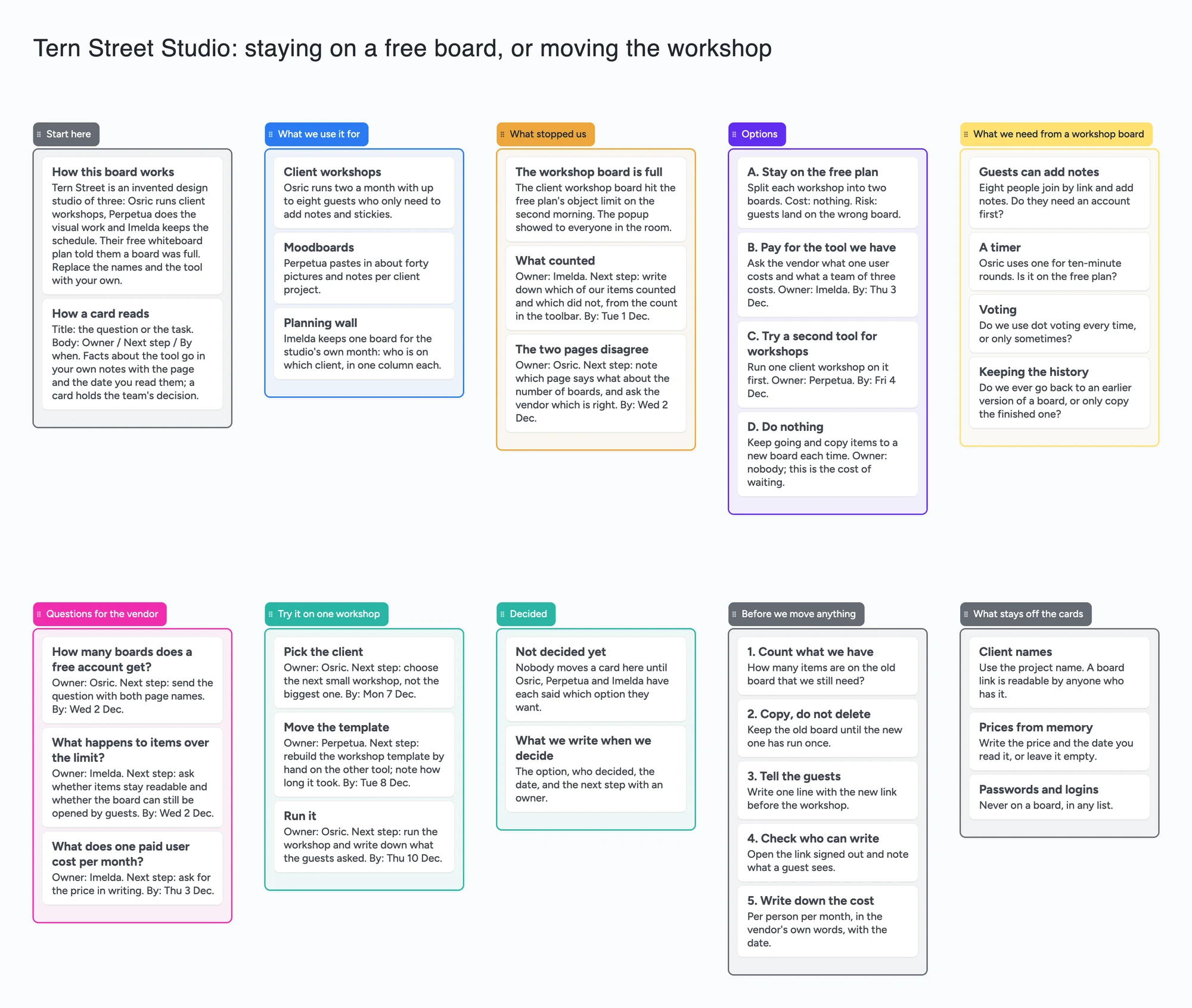
We read two Conceptboard pages on November 26, 2026 and they disagree. The pricing page's Free column lists 3 active boards and 100 objects per board; the help article on free account limitations says free users are "not limited in the number of boards they can create and share" and repeats the 100 objects. We saw no date on either page, and we claim neither number as the rule. Instaboard, which we make, is a shared board, so what we offer here is a decision board for the situation underneath: a small team on a free whiteboard plan that has run out of room and has to choose between staying, paying and trying another tool. It is filled in for an invented design studio, Tern Street Studio, so you can read it before you write your own.
Opens in your browser. Anyone can view; a free sign-in lets you edit.
Updated
The short version
- The two pages disagree. Conceptboard's pricing page (no date shown; read November 26, 2026) lists Active boards 3 on Free. Its help article "Free Account Limitations" (no date seen; read the same day) says free users are not limited in the number of boards. We print both and rule on neither.
- The part both pages agree on: 100 objects per board on Free and 10 MB per upload. Only the help article adds that scribbles, lines and handwriting are not counted and that a popup appears when a board is full.
- What the pricing page leaves out of Free: live moderation, timer and voting show a cross in the Free column and a tick from Starter up.
- Where we count differently: Free here is 150 items across your whole account, not per board. Arrows, sections and pen strokes don't count.
- When to stay on Conceptboard: if you run timed, voted workshops, use Teams or Webex, or need German data centres, its paid plans list those and we do not match them here (the table says where).
What the two Conceptboard pages say, side by side
Both pages were opened in a browser on November 26, 2026. We saw no date on either, so we can't say which is newer. The table prints what each says in its own words where it matters.
| Question | Pricing page | Help article "Free Account Limitations" |
|---|---|---|
| How many boards on Free? | Active boards: 3 (the page's tooltip says "Maximum number of boards that can be worked on in parallel") | "not limited in the number of boards they can create and share" |
| Objects per board | 100 | 100 objects per board: uploads, shapes and text items |
| Who can join a free board? | Guest contributors: a cross in the Free column; "temporary access for externals" from Starter | Unlimited Guests, as Reader or Reviewer only; to collaborate a guest needs a free account |
| Private board sharing | A tick in every column, Free included; the page's tooltip says "Limit board access to invited users only" | Free boards have one type of access: "Anyone with the link" |
| Upload size | 10 MB per upload on Free | 10 MB for free accounts |
Swipe the table sideways to see every column.
Both pages read November 26, 2026; we saw no date on either. The tooltip is the pricing page's own text. Where the two differ we have not picked one.
One possible reading of the boards number is that "active" means not archived: Conceptboard's help page on its main pages says archiving makes a board read-only and removes it from the Boards page, and that an archived board can be reactivated. We found no page that ties the 3 to archiving, so this is our guess, not a finding. If the number matters to you, the board has it as the first question for the vendor.
What counts toward the 100 objects, and what to do at the limit
The help article says a free board holds 100 objects: uploads, shapes and text items. Scribbles, lines and handwriting are not counted. An object counter in the toolbar shows how many you have used. When you reach the limit, a popup alerts all board participants. The article says owners and editors can then select items, copy them and paste them into a new board in Chrome or Firefox, or duplicate the board and delete content in other browsers.
Tern Street's board turns that into three plain steps: write down which of your items counted, check the number of boards with the vendor, and decide before the next workshop. The studio's first card in What stopped us is the popup showing to everyone in the room, because that is when a free limit becomes everyone's problem and not just the owner's.
Where Conceptboard is the better choice
| Feature | Conceptboard's pricing page (read November 26, 2026) | Instaboard |
|---|---|---|
| Timer, voting, live moderation | Cross on Free; tick on Starter, Advanced and Corporate & Government | A countdown timer widget; this page does not run votes or a moderated session |
| Board history and approvals | Cross on Free; the help article lists Board History and Versioning and Board Approvals as Pro features | We found no history panel on the board; no approval step |
| Teams and Webex | Cross on Free; listed in the Integrations group | We found no Teams or Webex integration; a board link is pasted into a call or chat |
| Template library | A tick in every column; the tooltip says over 150 templates in English and German | Boards are built from cards and lists; you start from a ready board like this one |
| Hosting and security | Starter lists data centres in Germany; its FAQ says GDPR-compliant and ISO 27001, 27017 and 27018 certified (the vendor's claim) | Not compared on this page |
| Paid price | Starter from €5 or $6 per user per month, Advanced from €10 or $12, Corporate & Government from €14 or $16.80, as the page prints them | See the last question below |
Swipe the table sideways to see every column.
The pricing page prints the "from" prices with no billing period and we saw no billing toggle, so we print them as shown. Vendor claims are the vendor's.
If your workshops need a timed round, a vote at the end or a Teams call with the board inside it, those are on Conceptboard's paid plans and you pay for them there. This board does none of them for you.
How we count instead: 150 items across your whole account
A free Instaboard account has 5 boards and 150 items across your whole account, not per board. Each list and each card is 1 of the 150, and so are text boxes, stickies and widgets. Arrows, sections and pen strokes don't count. A board also takes 3 pictures and 1 file on the free plan.
Neither count is simply bigger. A studio that keeps one huge workshop board runs into Conceptboard's 100 objects on that board. A studio with many small boards runs into the 150 here, because the items add up across all of them. Tern Street's decision board is 10 lists + 32 cards + 1 title text box = 43 items (our arithmetic), which leaves 107 for everything else.
Tern Street's board, list by list
Tern Street Studio and everyone in it are invented: Osric runs client workshops, Perpetua does the visual work and Imelda keeps the schedule. Cards in the working lists read Owner, Next step and By.
| List | What it holds | In Tern Street's board |
|---|---|---|
| What stopped us (orange) | What happened and what to find out | "The two pages disagree" Owner: Osric. Next step: note which page says what about the number of boards, and ask the vendor which is right. By: Wed 2 Dec |
| Options (purple) | Four options, A to D: A lists a cost and a risk, B and C an owner and a date, D the cost of waiting | "A. Stay on the free plan" Split each workshop into two boards. Cost: nothing. Risk: guests land on the wrong board |
| What we need from a workshop board (yellow) | The questions about guests, timer, voting and history | "A timer" Osric uses one for ten-minute rounds. Is it on the free plan? |
| Questions for the vendor (pink) | What to ask in writing | "How many boards does a free account get?" Owner: Osric. Next step: send the question with both page names. By: Wed 2 Dec |
| Try it on one workshop (green) | A small trial before moving anything | "Move the template" Owner: Perpetua. Next step: rebuild the workshop template by hand on the other tool; note how long it took. By: Tue 8 Dec |
Swipe the table sideways to see every column.
The board's own wording. On this board the owner and the date are typed in the card text.
The other five lists are Start here, What we use it for, Decided, a grey list of five checks to run before moving anything and a grey list of what stays off the cards: client names, prices from memory and passwords.
Take it to your own team
- Open the board and replace Tern Street's names and tool. Keep the list titles or rename them to your own steps.
- Write down what you use the tool for in the first working list, one card per use, before anyone talks about options.
- Copy the vendor questions into an email and send them from a person's own address. Put the answer and the date you got it on the card.
- Share it. Set Share to "Anyone who joins can edit" so each person can move cards (new boards start view-only); each person signs in free to write. A copy takes 1 of your 5 boards.
- Run one small workshop on whichever option you pick before you move anything else.
- Move a card to Decided only when everyone has said which option they want, and write the date and the next step on it.
What this board does not do
- No reminders or due-date alerts. The By dates are text; someone has to read the list.
- It does not move your Conceptboard boards. Import here is PDF only, a flat picture on a page you write on; it takes 1 of your 5 boards.
- It does not settle the 3-board question. Only Conceptboard can say which of its two pages is right.
- No record of who changed a card. We found no history panel on the board, so nothing shows who moved a card or when. The Owner and By lines are typed text.
Start from the ready board
It opens in your browser in a few seconds, with nothing to install. Sign in for free when you want to save it and share it.
Questions
How many boards does Conceptboard's free plan allow?
Its pages differ. The pricing page, read November 26, 2026, lists Active boards 3 in the Free column. The help article "Free Account Limitations", read the same day, says free users are not limited in the number of boards they can create and share. Neither page shows a date, so ask Conceptboard in writing which applies to you.
How many objects can a free Conceptboard board hold?
Both pages say 100 per board. The help article says uploads, shapes and text items count, scribbles, lines and handwriting do not, and a popup tells everyone on the board when it is full.
What does Conceptboard leave out of its free plan?
Its pricing page shows crosses in the Free column for live moderation, timer, voting, board history, board approval and the Teams and Webex integrations. Its help article also lists projects, video and audio chat with screen sharing, team templates and board tags as Pro features.
Can guests edit a free Conceptboard board?
The two pages word it differently. The pricing page shows a cross for guest contributors on Free. The help article says a free board can have unlimited guests as Reader or Reviewer, and that a guest needs a free Conceptboard account to collaborate.
Does this page move my Conceptboard boards to Instaboard?
No. Instaboard imports PDF only, as a flat picture on a page you write on, and that takes 1 of your 5 boards. The ready board here is a place for the team's decision, not a converter.
Is Instaboard free?
There is a free plan: 5 boards, 150 cards and items across your account (pen strokes, arrows and sections don't count), and 3 pictures and 1 file per board. Anyone with the link can read a board; writing on it takes a free sign-in. Pro removes the item limit and adds invite-only boards: $5 a month billed yearly ($59.99 a year), or $7.99 monthly.
Sources
- Conceptboard: pricing page (no page date shown; a vendor page; Free column, Starter, Advanced and Corporate & Government prices; read November 26, 2026)
- Conceptboard Help Center: "Free Account Limitations" (no page date seen; a vendor page; read November 26, 2026)
- Conceptboard Help Center: "Overview of the Main Pages" (archive wording; no page date seen; a vendor page; read November 26, 2026)